Short answer: Bolt.new wins when you want an app built and hosted from a browser tab, with nothing to install, Figma imports, a bundled backend and native mobile through Expo. Cursor wins when developers already have a codebase and want an AI editor with Plan Mode, parallel cloud agents, pull request review and a choice of models.
You have a design and a deadline. A designer on your team swears by Bolt.new; your lead developer lives in Cursor. Online debates frame it as no-code versus pro-code. That framing hides the real trade-offs: who owns the repo, which branch the work lands on, and who pays for which model. This page referees with each vendor's own docs.
In this comparison:
- Bolt.new and Cursor at a glance
- Feature comparison
- Cost model by team size
- Where Bolt.new wins and where Cursor wins
- Switching from one to the other
Pick your section, or read straight through.
Bolt.new and Cursor at a glance
Changes in 2026
- Cursor is now owned by SpaceX. The all-stock deal was confirmed on June 16, 2026, and Cursor's August 14 post says the acquisition has closed. Cursor plans now bundle Grok products, and the entry Plus tier is limited to Grok models.
- Bolt.new ran Bolt Forge as a research preview from September 14 to October 14, 2026, for individual Pro users, using open models (SD Times). Teams and Enterprise were excluded.
Bolt.new
Bolt.new, from StackBlitz, runs a whole development environment in the browser on WebContainers, "so you don't have to install anything." It is for "everyone": non-coders who change apps by chatting, developers who edit code, PMs, marketers and agencies. Start from a prompt, a Figma frame, Google Stitch designs, a GitHub repo or a Lovable project. Plan mode works through strategy without writing code. Bolt Cloud bundles hosting, databases, auth, file storage, server functions and Stripe payments. Native mobile apps come through Expo. Bolt lists SOC 2 Type II.
Cursor
Cursor is an AI code editor and coding agent. It runs as a desktop editor, a CLI (including headless and CI use), cloud agents, mobile and SDKs. Plan Mode asks clarifying questions, researches the codebase and drafts a plan you can edit before building. Cloud agents run in isolated cloud VMs, many in parallel, each on its own branch. Bugbot reviews pull requests for bugs, security issues and code quality. Cursor connects to Slack, Microsoft Teams, Jira, Linear, GitHub, GitLab, Azure DevOps, Bitbucket, JetBrains and Xcode.
Feature comparison
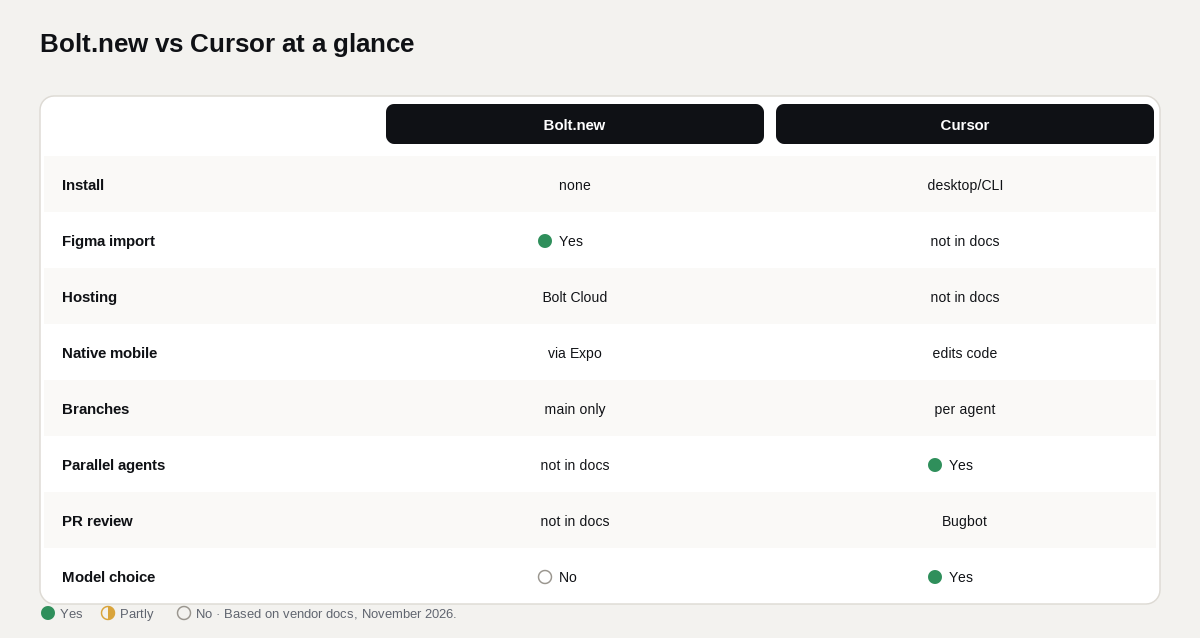
| Aspect | Bolt.new | Cursor | Source |
|---|---|---|---|
| Where it runs | Browser, on WebContainers; no install | Desktop editor, CLI, cloud agents, mobile, SDKs | Intro to Bolt; Cursor docs |
| Starting points | Prompt, Figma, Google Stitch, GitHub repo, Lovable project | Your existing repo | Intro to Bolt; Cursor docs |
| Planning / spec | Plan mode: strategy without code | Plan Mode: clarifying questions, codebase research, editable plan | Bolt glossary; Cursor Plan Mode |
| Agent autonomy | Standard and Max agents in one project | Parallel cloud agents in isolated VMs, one branch each | Bolt agents; Cursor cloud agents |
| Testing / review | Version history to restore saved states | Bugbot PR review; Autofix pushes fixes | Bolt glossary; Cursor Bugbot |
| Deploy / hosting | Bolt Cloud: bolt.host subdomain, custom domains on paid plans | Not covered in the Cursor docs we checked | Bolt Cloud |
| Code and Git | Stays on main; owner-only GitHub connection | GitHub, GitLab, Bitbucket, Azure DevOps; branch per agent | Bolt Git; Cursor cloud agents |
| Team / admin | Teams: central billing, access management; SSO and audit logs on Enterprise | SSO on Teams; SCIM, audit logs, model limits on Enterprise | Bolt pricing; Cursor Enterprise |
| Model choice | "Bolt handles model selection behind the scenes" | Many providers, chosen per task | Bolt agents; Cursor docs |
| Pricing model | Tokens; Teams per member | Usage pool; Teams per seat; models billed by usage | Bolt pricing; Cursor pricing |
Cost model by team size
| Team size | Bolt.new | Cursor |
|---|---|---|
| 1 person | Free: monthly token allowance with a daily limit; Pro: more tokens, no daily limit, rollover up to two months | Free tier with limited agent and chat requests; Plus limited to Grok models; higher tiers add a weekly usage pool |
| 5 people | Teams, per member; each member's tokens are their own and not shared | Teams, per seat, with SAML/OIDC SSO; cloud agents included |
| 25 people | Enterprise (custom): SSO, audit logs | Enterprise (custom): SCIM, audit logs, access controls, group spend limits |
Check Bolt's pricing page and Cursor's pricing page for amounts as of November 2026. On Bolt, if a plan's hosting usage runs out, the site "stops displaying publicly until your usage resets." On Cursor, cloud agents set a spend limit on first use, and Free and Plus don't include them. For reference, Devfab (Beta) logs cost after each run, per task and per project.
Where Bolt.new wins
- Nothing to install. A full dev environment runs in the browser tab.
- You start from a design. Import a Figma frame or Google Stitch designs.
- You need hosting and a backend. Bolt Cloud bundles databases, auth, storage, functions and Stripe.
- You need a mobile app built for you. Native apps through Expo.
Where Cursor wins
- You have an existing codebase. Cursor works in your repo on four Git hosts.
- Several tasks at once. Cloud agents run in parallel, each on its own branch.
- Pull request review. Bugbot flags bugs and security issues before merge.
- You choose the model. Many providers per task; Bolt picks for you.
Switching from one to the other
Bolt.new to Cursor. The project owner connects Bolt to GitHub and creates a private repo. Clone it and open it in Cursor. Bolt "stays on main" and pulls outside changes every 30 seconds, so commits you push to main come back into Bolt. Cursor's cloud agents push to their own branches; merge them to main before Bolt sees them. Disconnecting GitHub from Bolt is permanent, so decide before you cut the link.
Cursor to Bolt.new. Import the GitHub repo in Bolt. Bolt cannot switch branches, so merge what you need into main first.
Where Devfab fits
Bolt gets a first version live, and Cursor speeds up a developer. A client project needs the parts in between: domain research, a plan someone signs off, tested user journeys, and a deploy to the client's own server.
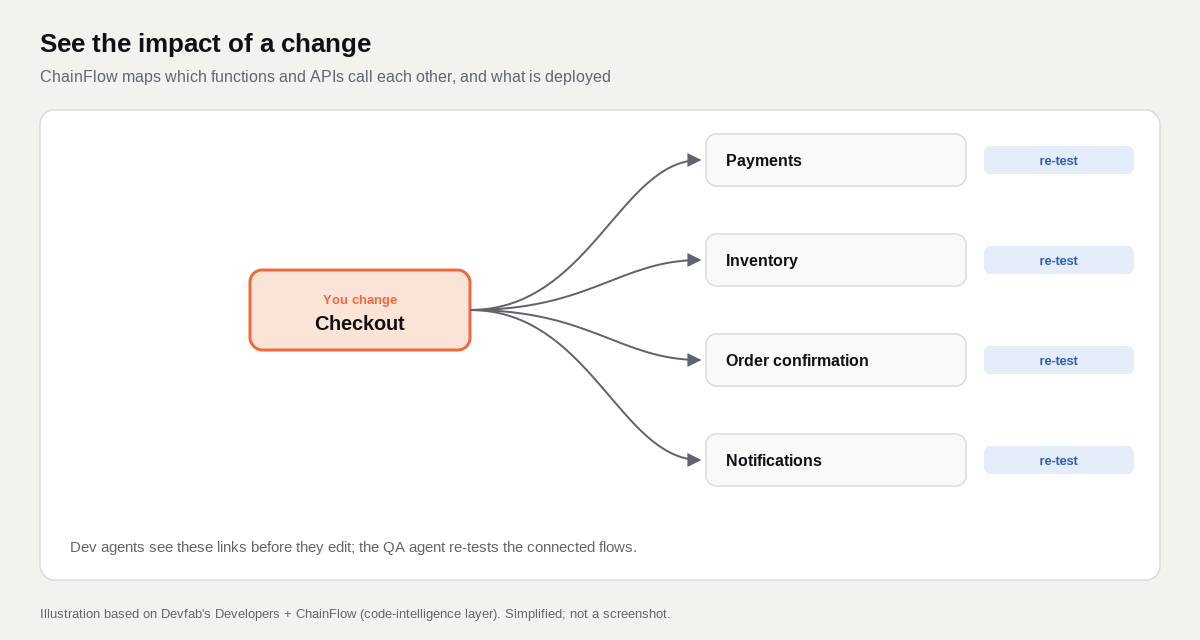
Coding agents automate the developer. Devfab automates the development lifecycle. Devfab's Researcher maps the domain before the Planner writes. A person approves the plan. Dev agents use ChainFlow, which maps which functions and APIs call each other, so a change to checkout does not break payments, inventory or notifications. The QA agent runs UI, flow and logic tests, and Deploy ships to your own server.
Devfab's honest limits: it is new and in Beta, with a smaller community and fewer integrations. It is not an editor for hands-on coding, and it needs a GitHub account. For a Figma import or an Expo mobile prototype, Bolt.new is the simpler pick. See Devfab vs Bolt.new and Devfab vs Cursor.
FAQ
Can I edit a Bolt.new project in Cursor?
Yes. Connect Bolt to GitHub (only the project owner can), clone the repo and open it in Cursor. Bolt keeps the project on main, auto-commits each non-breaking change and pulls outside changes every 30 seconds, so commits you push to main from Cursor show up in Bolt.
Which is better for a mobile app?
Bolt.new, if you want it built for you. Bolt builds native mobile apps through its Expo integration. Cursor can edit a mobile codebase, Xcode is among its listed integrations, but it does not generate and host the app for you.
Do Bolt.new and Cursor let me choose the AI model?
Cursor does: its model list includes Anthropic, Google, OpenAI, xAI and Cursor's own Composer, among others. Bolt says it handles model selection behind the scenes; you choose between its Standard and Max agents instead.
Who owns Cursor and Bolt.new?
Cursor's maker Anysphere is a wholly owned subsidiary of SpaceX; the deal was confirmed on June 16, 2026, and Cursor's August 14 post says it has closed. Bolt.new is built by StackBlitz.
Read next
- What is an AI software factory?
- Devfab vs Bolt.new
- Bolt.new alternatives
- Cursor alternatives
- AI app builder vs AI coding agent
Shipping client work, not just prototypes? Try Devfab Beta
Sources (checked November 13, 2026): Intro to Bolt; Bolt glossary; Bolt: choose an agent; Bolt Git integration; What is Bolt Cloud?; Bolt pricing; SD Times: Bolt.new launches Forge (Sep 17, 2026); Cursor docs; Cursor pricing; Cursor Plan Mode; Cursor cloud agents; Cursor Bugbot; Cursor Enterprise; Cursor: Joining SpaceX (Aug 14, 2026); The Next Web: SpaceX makes Cursor takeover official.
Frequently asked questions
Can I edit a Bolt.new project in Cursor?
Yes. Connect Bolt to GitHub (only the project owner can), clone the repo and open it in Cursor. Bolt keeps the project on main, auto-commits each non-breaking change and pulls outside changes every 30 seconds, so commits you push to main from Cursor show up in Bolt.
Which is better for a mobile app?
Bolt.new, if you want it built for you. Bolt builds native mobile apps through its Expo integration. Cursor can edit a mobile codebase, Xcode is among its listed integrations, but it does not generate and host the app for you.
Do Bolt.new and Cursor let me choose the AI model?
Cursor does: its model list includes Anthropic, Google, OpenAI, xAI and Cursor's own Composer, among others. Bolt says it handles model selection behind the scenes; you choose between its Standard and Max agents instead.
Who owns Cursor and Bolt.new?
Cursor's maker Anysphere is a wholly owned subsidiary of SpaceX; the deal was confirmed on June 16, 2026, and Cursor's August 14 post says it has closed. Bolt.new is built by StackBlitz.