Short answer: Bubble wins when you build an app for customers or the public, such as a marketplace or SaaS product, and want hosting, database and scaling on one bill. Power Apps wins when the users are your own staff, your company runs on Microsoft 365 and Dataverse, and IT needs apps inside existing policies.
Your city's permit desk runs on email and shared folders. Residents want to apply online, and staff want one queue to review. The IT team says Power Apps, because everyone already has Microsoft 365. A consultant says Bubble, because residents aren't in your tenant. Both arguments hold, but for different users. This page sorts out which one fits your case.
In this comparison:
- Bubble and Power Apps at a glance
- Feature comparison
- Cost model by team size
- Where Bubble wins
- Where Power Apps wins
Who uses the app matters more than any feature.
Bubble and Power Apps at a glance
Power Apps is Microsoft's low-code platform for business apps on Dataverse and Microsoft 365. Users can "describe what they need in natural language and generate rich, custom app experiences," and it supports "pro code, no code, low code, and generated apps" (Power Apps). The September 2026 update made the app-builder skill generally available, letting AI coding tools build whole model-driven apps; nothing is created until the user approves the build plan (Microsoft blog). Two licensing changes landed this month: from November 15, 2026, new unmanaged developer environments and new Dataverse for Teams environments can't be created, and included AI Builder credits on attended RPA licenses ended November 1, 2026 (Licensing FAQ).
Bubble is a hosted no-code platform where "every component is visual, including the backend," with hosting, database and auto-scaling included (Bubble). Its AI Agent (beta) builds a full app from a description, then you keep chatting or edit visually (Bubble AI). It builds web apps plus native iOS and Android apps (beta). Apps run only on Bubble (Bubble manual).
Feature comparison
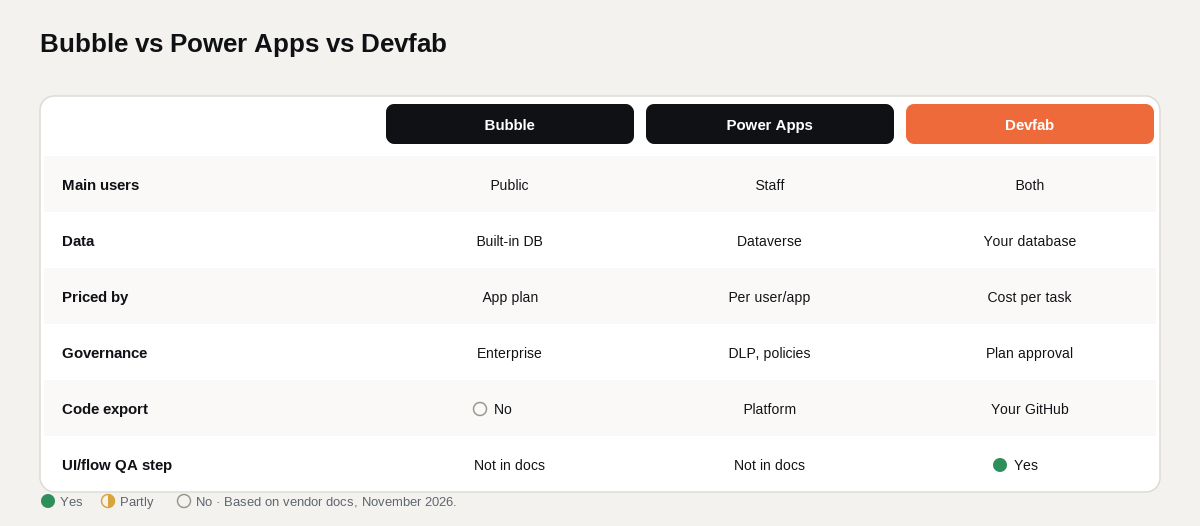
| Aspect | Bubble | Power Apps | Source |
|---|---|---|---|
| Typical users | Founders to Fortune 500s; marketplaces, SaaS, internal tools | Business users, developers and IT in one workspace | Bubble; Power Apps |
| AI building | AI Agent (beta) builds the full app | Natural-language generation; generative pages write React code | Bubble AI; The New Stack |
| Planning | Agent "plans your app with you" | "Plans" uses AI agents as requirements analyst, data modeler and solution architect | Bubble blog; The New Stack |
| Outside AI tools | Bubble MCP (beta) | App-builder skill for GitHub Copilot CLI, Claude Code and others; MCP for canvas apps | Bubble blog; Microsoft blog |
| Data | Built-in database | Microsoft Dataverse | Bubble; Power Apps |
| Mobile | Native iOS and Android (beta) | Not covered in the pages we checked | Bubble |
| Governance | Enterprise SSO, isolated instance, restricted contributor access | Central policies for environments, DLP, access and auditing | Bubble Enterprise; Power Apps |
| Code ownership | No code export | Runs on Power Platform; vibe-to-code-app guidance | Bubble manual; Microsoft blog |
| Pricing model | Plans by app, plus workload units and AI credits | Per user or per app licenses; pay-as-you-go; capacity add-ons | Bubble pricing; Licensing FAQ |
Cost model by team size
The two bill on different axes. Bubble charges per app plan, so price depends on app usage and editors, not on how many people use the app. Power Apps charges per user.
| Team size | Bubble | Power Apps | Devfab |
|---|---|---|---|
| 1 person | Free (no live app); Starter USD 32 per month | Developer Plan free (non-production); Premium USD 20 per user per month | Cost logged per task and per project (Beta) |
| 5 people | Growth USD 119 per month or Team USD 349 per month, by editors needed | Premium USD 20 per user per month, or per-app licenses | Cost logged per task and per project (Beta) |
| 25 people | Team or Enterprise (contact sales) | Premium per user, or pay-as-you-go via Azure (preview); USD 12 per user per month only at a 2,000-seat minimum | Cost logged per task and per project (Beta) |
Prices as of November 2026 from Bubble pricing (web plans, billed annually) and Power Apps pricing (paid yearly; may vary by country). Dataverse capacity costs USD 40 per GB per month as an add-on. Devfab is in Beta and offers predictable cost: cost is logged after each run, per task and per project.
Where Bubble wins
- Your users are outside the company. Bubble plans are priced per app, not per user, so residents, customers or sellers don't add seat costs.
- You want a native mobile app sharing data and workflows with the web app.
- You want one vendor for hosting, database and scaling, without Azure or Dataverse capacity to plan.
- You're building a product to sell, such as a SaaS or AI SaaS app.
Where Power Apps wins
- Your company runs on Microsoft 365 and Entra. Apps sit inside existing tenant governance and DLP.
- The data lives in SharePoint, Dynamics 365 or Dataverse. Microsoft connectors are the shortest path.
- Some staff already have seeded rights through Microsoft 365 licenses.
- Developers want to build with their own AI tools. The app-builder skill lets coding tools build model-driven apps after a plan is approved.
- IT must audit everything. Central policies for environments, DLP, access and auditing.
Power Apps caveats: several AI building pieces are still in preview, and the September 2026 post labels the app-builder skill both GA and preview. AI features draw on AI Builder or Copilot Credits capacity (Licensing FAQ).
Switching from one to the other
From Bubble to Power Apps. Export data as CSV or via the Bubble API and load it into Dataverse tables. Rebuild screens with natural-language generation or Plans, and set environment and DLP policies before you share the app.
From Power Apps to Bubble. Export the Dataverse tables, recreate them as Bubble data types, and describe the app to the Bubble AI Agent. Sign-in moves from Entra to Bubble's own user accounts unless you set up SSO on Enterprise.
Where Devfab fits
A permit system usually needs both sides: a public form for residents and a review queue for staff. Bubble covers the public side, Power Apps the staff side, and neither gives you a codebase you can host where your agency chooses.
App builders automate the first version. Devfab automates the development lifecycle. The Researcher maps permit types, fee rules and how other cities handle permits before the Planner writes a plan, and a person approves it. The QA agent runs UI and flow tests, such as a resident submitting an application and a reviewer approving it, plus logic tests. Code lives in your organization's GitHub and deploys to your own server. Devfab is in Beta, has fewer integrations than Microsoft's platform, and needs a GitHub account. See Devfab vs Power Apps.
FAQ
Is Power Apps included in Microsoft 365?
Partly. Some Microsoft 365 licenses include limited Power Apps use. Premium, on-premises and custom connectors, and now SQL, Azure and Dynamics 365 connectors, need a standalone license. As of November 2026, Power Apps Premium is USD 20 per user per month, paid yearly.
Can Bubble apps be used by customers outside my company?
Yes. Bubble is built for public-facing apps such as marketplaces and SaaS products, plus internal tools, and it hosts and scales them for you. Power Apps is licensed per user or per app, so check how outside users would be licensed before you choose it for them.
Can I build Power Apps with AI coding tools?
Yes. Microsoft's September 2026 update made the app-builder skill generally available, so tools such as GitHub Copilot CLI and Claude Code can build model-driven apps. Nothing is created until the user approves the build plan. Some related pieces are still in preview.
Which one lets me export code?
Bubble says apps can only run on Bubble and can't be exported as code. Power Apps generative pages produce native React code for custom screens, and Microsoft has guidance to convert a vibe app to a code app, but apps still run on Dataverse and the Power Platform.
Read next
Need the public side and the staff side in one codebase? Try Beta
Sources (checked November 2026): Bubble homepage; Bubble pricing: compare plans; Bubble AI app builder; Bubble for Enterprise; Bubble blog: What is Bubble AI (Aug 19, 2026); Bubble manual: Application and data ownership; Microsoft Power Apps; Power Apps pricing; Power Platform licensing FAQs; What's new in Power Platform: September 2026; The New Stack: Power Apps Plans (May 19, 2025).
Frequently asked questions
Is Power Apps included in Microsoft 365?
Partly. Some Microsoft 365 licenses include limited Power Apps use. Premium, on-premises and custom connectors, and now SQL, Azure and Dynamics 365 connectors, need a standalone license. As of November 2026, Power Apps Premium is USD 20 per user per month, paid yearly.
Can Bubble apps be used by customers outside my company?
Yes. Bubble is built for public-facing apps such as marketplaces and SaaS products, plus internal tools, and it hosts and scales them for you. Power Apps is licensed per user or per app, so check how outside users would be licensed before you choose it for them.
Can I build Power Apps with AI coding tools?
Yes. Microsoft's September 2026 update made the app-builder skill generally available, so tools such as GitHub Copilot CLI and Claude Code can build model-driven apps. Nothing is created until the user approves the build plan. Some related pieces are still in preview.
Which one lets me export code?
Bubble says apps can only run on Bubble and can't be exported as code. Power Apps generative pages produce native React code for custom screens, and Microsoft has guidance to convert a vibe app to a code app, but apps still run on Dataverse and the Power Platform.