Short answer: Glide wins when an operations team runs on Excel or Google Sheets and wants staff to turn those sheets into apps, workflows and AI answers without IT. Power Apps wins when the company is standardized on Microsoft 365, needs Dataverse, tenant-level data loss prevention and audit, and has IT ready to govern apps.
You run housekeeping for a group of hotels. Room status, linen counts and repair requests live in a dozen Excel files. The ops director likes Glide because her supervisors could build the app themselves. IT says the company already pays Microsoft, so use Power Apps.
Both camps have a point. The wrong pick means either an app IT cannot govern or an app ops staff cannot change. This page acts as referee, using vendor pages checked in November 2026.
In this comparison:
- Glide and Power Apps at a glance
- Feature comparison
- Cost model by team size
- Where Glide wins
- Where Power Apps wins
Each section settles one argument from that meeting.
Glide and Power Apps at a glance
Glide is now GlideOS. Glide announced "an entirely new version of our product, built from the ground up for the AI age" on March 5, 2026, went live in June and held a launch event on August 3, 2026 (Glide community; GlideOS launch recap). The old product continues as Glide Classic, with no stated end date (Glide Classic). GlideOS is a separate subscription, and there is no migration tool from Classic yet (Glide pricing).
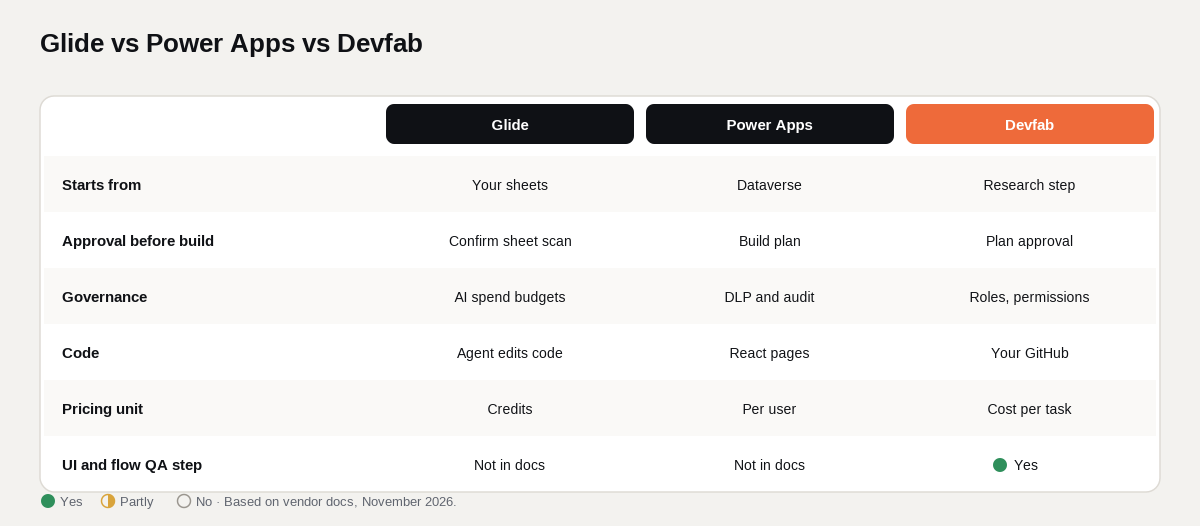
GlideOS turns the spreadsheets a business runs on into internal apps, workflows and AI agents. It targets operations teams in supply chain, manufacturing, retail, real estate, hospitality and professional services (Glide). Its SheetSense step scans uploaded sheets for formulas, macros, pivot tables and charts, then asks you to confirm before it builds.
Power Apps is Microsoft's low-code platform for business apps on Dataverse and Microsoft 365. It is built for business users, developers and IT working in one workspace, and it supports "pro code, no code, low code, and generated apps" (Power Apps). In September 2026, Microsoft made the app-builder skill generally available, so AI coding tools can build whole model-driven apps (September 2026 update).
Feature comparison
| Aspect | Glide | Power Apps | Source |
|---|---|---|---|
| Where it runs | Hosted; apps run on desktop and phone | Maker studio in the browser; also from AI coding tools such as GitHub Copilot CLI and Claude Code | Glide; Sept 2026 update |
| Planning or spec | SheetSense reads formulas, macros and pivots and asks you to confirm before building | Plans workspace uses AI agents as requirements analyst, data modeler and solution architect | GlideOS recap; The New Stack |
| Agent autonomy | Glide's agent builds apps, then can operate them, query data and run code | App-builder skill creates nothing until the user approves the build plan | GlideOS recap; Sept 2026 update |
| Testing | Not covered in the pages we checked | Not covered in the pages we checked | |
| Data | Excel, Google Sheets, Airtable, Notion, Snowflake and about 150 integrations | Dataverse; premium and custom connectors need a standalone license | Glide; Licensing FAQ |
| Code | GlideOS agents get direct access to full-stack app code | Generative pages produce native React code; "convert a vibe app to a code app" guidance | GlideOS recap; Sept 2026 update |
| Team and admin | AI spend budgets by team and model; apps private by default; SSO on Enterprise | Central policies for environments, data loss prevention, access and auditing | Glide pricing; Power Apps |
| Model choice | Approved models only; Enterprise can choose its LLM provider | AI features draw on AI Builder or Copilot Credits capacity | Glide; Licensing FAQ |
| Pricing model | Credits that meter LLM tokens, across Free to Enterprise | Per user, per user per app, or pay-as-you-go via Azure | Glide pricing; Licensing FAQ |
Cost model by team size
| Team size | Glide | Power Apps |
|---|---|---|
| 1 person | Free USD 0 (cannot publish apps) or Basic USD 25 per month | Developer Plan free for non-production; Premium USD 20 per user per month, paid yearly |
| 5 people | Pro USD 125 per month, team members starting at 5, 50 credits per member | Premium USD 20 per user per month, paid yearly, or limited rights seeded in some Microsoft 365 licenses |
| 25 people | Pro scales by seat count, or Enterprise custom | Premium USD 20 per user per month; USD 12 per user per month only at a 2,000-seat minimum |
Prices as of November 2026 from Glide pricing and Power Apps pricing. Microsoft says prices may vary by region, and Dataverse capacity is a paid add-on (USD 40 per GB per month, paid yearly). On Glide, extra credits are for paid plans only, and a June 2026 community thread reports that credit costs are hard to predict and agent mistakes still use credits (Glide community).
Where Glide wins
- The sheets are the system. SheetSense reads the formulas and macros your hotels already rely on, so the app starts from real logic, not a blank page.
- Ops staff build and run it. No repo, no pipeline and no IT ticket to change a room-status screen.
- Ask questions of live data. Ask Glide answers questions from business data and can take action (Glide).
- Ready-made systems. An App Store of multi-app templates is free to copy (GlideOS recap).
- Non-Microsoft stacks. Google Sheets, Notion, Airtable and Snowflake are first-class sources.
Where Power Apps wins
- Your tenant is Microsoft. Entra, SharePoint, Teams and Dynamics 365 are already in place, and apps sit under existing data loss prevention and audit.
- IT wants to plan before anything is built. The app-builder skill waits for approval of a build plan.
- Large internal audiences. Seeded Microsoft 365 rights cover some users, and very large rollouts get a lower seat price.
- Developers want code. Generative pages produce React code, and Microsoft documents converting a vibe app to a code app.
- Licensing stability matters. Glide's credit bill is still a live debate in its own community; Power Apps prices per user.
Switching from one to the other
There is no direct converter either way in the pages we checked. Glide to Power Apps: export the source sheets, load them into Dataverse, and use the Plans workspace or the app-builder skill to regenerate screens from a description. Power Apps to Glide: export the Dataverse tables to Excel and upload them, then let SheetSense read the structure before the agent builds. If you are still on Glide Classic, note that moving to GlideOS is itself a rebuild for now (Glide pricing).
Where Devfab fits
Both tools keep the app inside their platform. That suits internal tools. It fits less well when the hotel group wants a guest-facing app, its own codebase and its own servers.
Coding agents automate the developer. Devfab automates the development lifecycle. Its Researcher maps the domain first (room states, turnover rules, how other hospitality tools work) and suggests a prototype before the Planner writes a plan. A person approves the plan. The QA agent then runs UI and flow tests (screens, buttons and user journeys clicked end to end) plus logic tests, and code lives in your own GitHub account. Devfab is in Beta, with fewer integrations than either platform. See Devfab vs Glide and Devfab vs Power Apps.
FAQ
Is GlideOS the same product as the Glide I used before?
No. Glide launched GlideOS as a new platform in 2026 and the older product continues as Glide Classic. GlideOS is a separate subscription, and Glide's pricing page says there is no migration tool from Classic yet.
Do I already have Power Apps with Microsoft 365?
Some Microsoft 365 licenses include limited Power Apps rights. Premium, on-premises and custom connectors, and now SQL, Azure and Dynamics 365, need a standalone license such as Power Apps Premium, per Microsoft's licensing FAQ.
Which is cheaper for a hotel or retail team of 25?
As of November 2026, Power Apps Premium is USD 20 per user per month, paid yearly. Glide's Pro plan is USD 125 per month and includes team members starting at 5, scaling by seat count, with usage billed in credits. Credit use makes Glide's bill harder to predict.
Can I use outside AI coding tools with either one?
Power Apps can be built from AI coding tools such as GitHub Copilot CLI and Claude Code, and nothing is created until you approve the build plan. Glide supports outside agents over MCP, though at its August 2026 launch Build with MCP was still a roadmap item.
Read next
- What is an AI software factory?
- Glide alternatives
- Glide vs Airtable: spreadsheet-first apps vs a database-first app platform
Want the hotel app as code you own, tested end to end? Try Beta
Sources (checked November 2026): Glide homepage; Glide pricing; GlideOS launch recap (Aug 4, 2026); Glide Classic; Introducing a new Glide (Mar 5, 2026); Pricing issues with GlideOS (Glide community, Jun 2026); Microsoft Power Apps; Power Apps pricing; Power Platform licensing FAQ; What's new in Power Platform: September 2026; The New Stack: Power Apps Plans (May 19, 2025).
Frequently asked questions
Is GlideOS the same product as the Glide I used before?
No. Glide launched GlideOS as a new platform in 2026 and the older product continues as Glide Classic. GlideOS is a separate subscription, and Glide's pricing page says there is no migration tool from Classic yet.
Do I already have Power Apps with Microsoft 365?
Some Microsoft 365 licenses include limited Power Apps rights. Premium, on-premises and custom connectors, and now SQL, Azure and Dynamics 365, need a standalone license such as Power Apps Premium, per Microsoft's licensing FAQ.
Which is cheaper for a hotel or retail team of 25?
As of November 2026, Power Apps Premium is USD 20 per user per month, paid yearly. Glide's Pro plan is USD 125 per month and includes team members starting at 5, scaling by seat count, with usage billed in credits. Credit use makes Glide's bill harder to predict.
Can I use outside AI coding tools with either one?
Power Apps can be built from AI coding tools such as GitHub Copilot CLI and Claude Code, and nothing is created until you approve the build plan. Glide supports outside agents over MCP, though at its August 2026 launch Build with MCP was still a roadmap item.