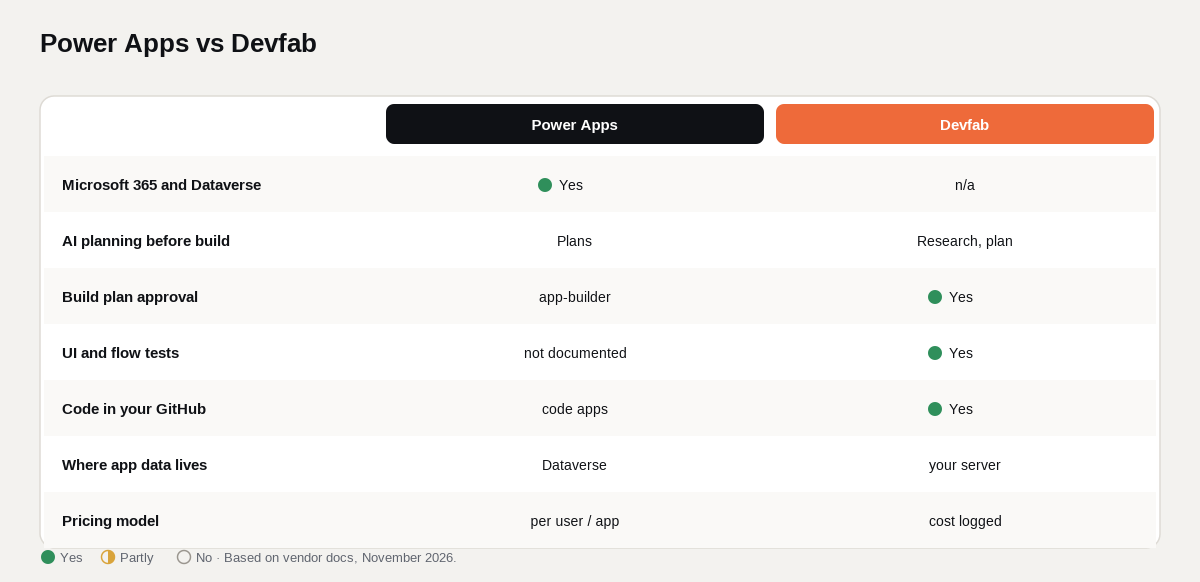
Short answer: Choose Power Apps when the client runs on Microsoft 365, Dataverse and Entra and wants apps inside existing tenant governance, data loss prevention and licences. Choose Devfab when the client wants custom software on their own stack: researched and approved plan, tested code in their GitHub, and deployment to their own server.
Your client is a Microsoft shop. Their IT team asks the first question before you finish the pitch: "Why not Power Apps?" Often that is the right answer. Sometimes it isn't: the app needs a custom backend, outside users, or a server the client controls. This page gives you a fair answer for both cases, with a source for every Power Apps fact.
In this comparison:
- What each tool is built for
- Switching triggers
- Cost model by team size
- Where Power Apps is the better choice
- Where Devfab is the better choice
Use it as your answer to that IT question.
What each tool is built for
Microsoft Power Apps
Power Apps is Microsoft's low-code platform for business apps on Microsoft Dataverse and Microsoft 365. Microsoft pitches it to business users, developers and IT working in one workspace, and supports "pro code, no code, low code, and generated apps".
Recent changes:
- September 2026: the app-builder skill lets AI coding tools, such as GitHub Copilot CLI, build whole model-driven apps, and it creates nothing until the user approves the build plan. Microsoft's post labels it both generally available and preview. A canvas authoring agent plugin is GA, with MCP support for canvas apps, and new guidance covers converting a "vibe app" to a code app.
- November 15, 2026: new unmanaged developer environments and new Dataverse for Teams environments can't be created.
- November 1, 2026: included AI Builder credits on attended RPA licenses were removed.
Other parts that matter:
- Natural-language building: users "describe what they need in natural language and generate rich, custom app experiences".
- Plans: a workspace where AI agents act as requirements analyst, data modeler and solution architect before generating assets. It became generally available in May 2025.
- Generative pages produce native React code for custom screens.
- Agents in apps: an agent feed lets users oversee AI agents, and Microsoft 365 Copilot can be embedded in custom apps.
- Governance: IT can "centralize policies for environments, data loss prevention, access, and auditing".
Power Apps' main user is an organization standardized on Microsoft 365, from citizen developers to IT.
Devfab
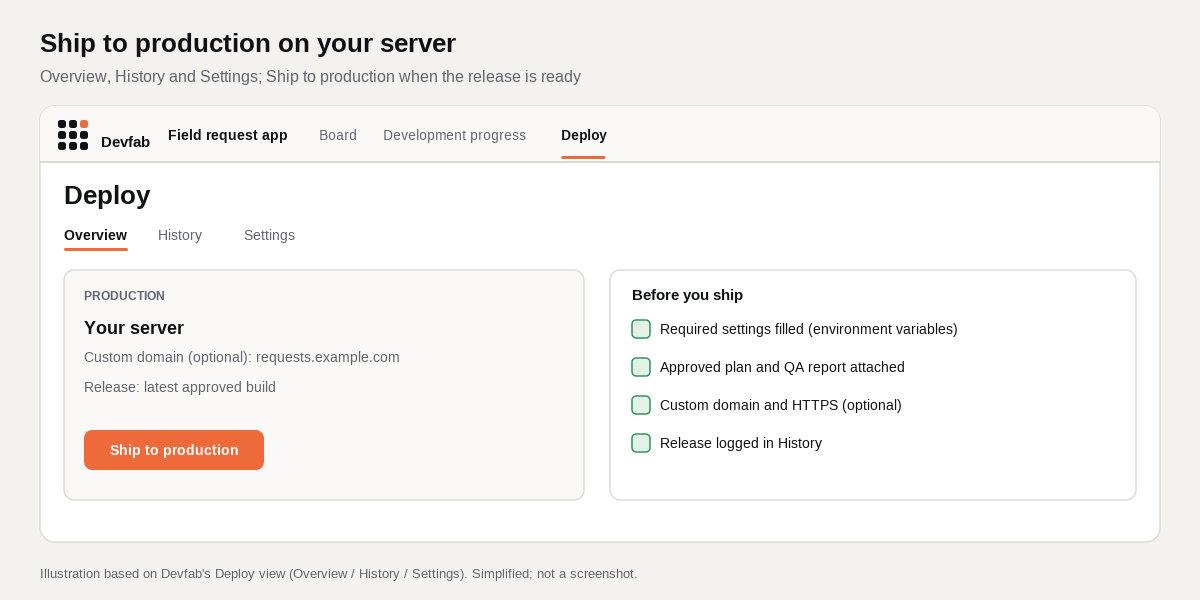
Devfab is an AI software factory with seven agents. The Researcher maps the domain first: key terms, best practices and competitors, then suggests a prototype. The Planner writes the plan and a person approves it before the Coordinator creates tickets. Developers work with ChainFlow, which maps which functions and APIs call each other so a change doesn't break connected features. Blueprint draws screens, the QA agent runs UI and flow tests plus logic tests, and Deploy ships to production on your own server, with a custom domain if you want one.
By default Devfab picks the stack that fits, such as Next.js and TypeScript for web apps or Node or Python for an API. Code lives in your own GitHub account (or your organization's).
Coding agents automate the developer. Devfab automates the development lifecycle.
Switching triggers
| Trigger | Power Apps | Devfab | Source |
|---|---|---|---|
| Connectors push up licence cost | Premium, on-premises and custom connectors, now including SQL, Azure and Dynamics 365, need a standalone licence | Integrations are written as code in your repo | Power Platform licensing FAQ |
| The app must run outside Microsoft's cloud | Apps store data in Dataverse | Deploy to your own server | Power Apps product page |
| AI features are still in preview | Generative page connectors and AI code-tool building are preview; Copilot chat in model-driven apps is opt-in preview | Agents are the product; Devfab as a whole is in Beta | Sept 2026 update; licensing FAQ |
| Developer environments change | New unmanaged developer environments can't be created from November 15, 2026 | Workspaces per project | Power Platform licensing FAQ |
| Code apps and source control | Code apps don't support Power Platform source code integration | Source code in your own GitHub account from the first ticket | Power Apps code apps ALM docs |
| You need a test report | App testing is not covered in the pages we checked | QA agent runs UI, flow and logic tests | Power Apps product page |
Cost model by team size
| Team size | Power Apps | Devfab |
|---|---|---|
| 1 person | Free Developer Plan for non-production; a per-user or per-app licence to run in production | Cost logged per task and per project (Beta) |
| 5 people | Per-user (Premium) or per-user-per-app licences; or pay-as-you-go through Azure for one app, billed by monthly active users (preview) | Cost logged per task and per project (Beta) |
| 25 people | A mix of per-user and per-app licences; some users may have limited rights through Microsoft 365; Dataverse capacity and API requests are paid add-ons | Cost logged per task and per project (Beta) |
AI features draw on AI Builder or Copilot Credits capacity. Check the Power Platform licensing FAQ for current terms.
Moving from Power Apps to Devfab
- Pick the app type. Code apps are projects you create with the Power Apps CLI and publish with
pa app push. Canvas and model-driven apps live in Dataverse solutions. - Get code into GitHub where it exists. Push a code app's project folder to a repo in your GitHub account. For canvas and model-driven apps, export the solution and use its tables and screens as the spec.
- Connect it to Devfab. For a repo, choose "Work on an existing project", pick it and leave the change box empty. ChainFlow maps the code first, so you can see which parts call Power Platform services, and suggests three small first tickets. Otherwise choose "Start a new project".
- Approve the plan. Human in the loop is the default, so you or the client approve before tickets exist.
- Let the QA agent test UI, user flows and logic.
- Deploy to the client's own server, with a custom domain if needed.
Where Power Apps is the better choice
- The client is standardized on Microsoft 365, Dataverse and Entra and wants apps inside tenant governance and DLP.
- The app mostly needs Microsoft connectors, such as SharePoint, Dynamics 365 and Teams, rather than a custom backend.
- Users already have rights. Some Microsoft 365 licences include limited Power Apps use.
- Citizen developers will maintain it, with IT setting policies centrally.
- You want Copilot inside the app, or AI agents overseen through an agent feed.
Where Devfab is the better choice
- The app must run on the client's own server, outside Dataverse, with code in their GitHub.
- The domain is new. The Researcher maps terms, best practices and competitors before planning.
- Scope needs sign-off on the whole project, not one app: a person approves the plan, then the Coordinator splits it into tickets.
- You need proof. The QA agent clicks through screens and user journeys and runs logic tests.
- You change existing code. ChainFlow shows what a change touches, such as checkout affecting payments, inventory and notifications.
- You need a delivery record: blueprints, user manuals, a Team Delivery Report and cost per task.
Devfab's honest limits: it is new and in Beta, with a smaller community and far fewer integrations than Power Apps and its Microsoft connectors. It is not an editor for hands-on coding. It needs a GitHub account. For an app that lives on SharePoint and Teams data, Power Apps is the natural home.
FAQ
Can Power Apps build an app from a description now?
Yes. Microsoft says users can describe what they need in natural language and generate apps. The Plans workspace uses AI agents as requirements analyst, data modeler and solution architect, and a September 2026 update lets AI coding tools build model-driven apps after the user approves a build plan.
What changes for Power Apps developers in November 2026?
Microsoft's licensing FAQ says that from November 15, 2026, new unmanaged developer environments and new Dataverse for Teams environments can't be created. Included AI Builder credits on attended RPA licenses were removed on November 1, 2026.
Which is better for an agency with Microsoft 365 clients?
If the client wants the app inside their tenant, on Dataverse, under their DLP policies and existing licences, Power Apps fits. If the client wants custom code in their GitHub, deployed to their own server, with a QA report and user manual, Devfab fits.
How do Power Apps and Devfab charge?
Power Apps is licensed per user or per user per app, with a pay-as-you-go option through Azure, a free non-production Developer Plan, and paid Dataverse capacity and AI credits. Devfab is in Beta with predictable cost: cost is logged after each run, per task and per project.
Read next
- What is an AI software factory?
- Microsoft Power Apps alternatives for teams that ship to production (2026)
- Power Apps vs Retool: which should your team use in 2026?
- How to deploy an AI-built app to your own server
See a client app deployed to the client's own server. Book a Devfab demo
Sources (checked November 13, 2026): Microsoft Power Apps product page; Power Platform licensing FAQ; What's new in Power Platform: September 2026 feature update; Power Apps code apps: ALM; The New Stack: Power Apps Plans (May 2025).
Frequently asked questions
Can Power Apps build an app from a description now?
Yes. Microsoft says users can describe what they need in natural language and generate apps. The Plans workspace uses AI agents as requirements analyst, data modeler and solution architect, and a September 2026 update lets AI coding tools build model-driven apps after the user approves a build plan.
What changes for Power Apps developers in November 2026?
Microsoft's licensing FAQ says that from November 15, 2026, new unmanaged developer environments and new Dataverse for Teams environments can't be created. Included AI Builder credits on attended RPA licenses were removed on November 1, 2026.
Which is better for an agency with Microsoft 365 clients?
If the client wants the app inside their tenant, on Dataverse, under their DLP policies and existing licences, Power Apps fits. If the client wants custom code in their GitHub, deployed to their own server, with a QA report and user manual, Devfab fits.
How do Power Apps and Devfab charge?
Power Apps is licensed per user or per user per app, with a pay-as-you-go option through Azure, a free non-production Developer Plan, and paid Dataverse capacity and AI credits. Devfab is in Beta with predictable cost: cost is logged after each run, per task and per project.