Short answer: For internal tools on your own databases, pick Retool (commercial) or Appsmith (open source). For approvals and forms that must be self-hosted, Budibase. For an enterprise platform swap, Mendix or OutSystems. If you want an app you own as code in GitHub, deployed to your own server, Devfab fits.
You built apps in Power Apps because they came with Microsoft 365. Then you needed a SQL connector, and found it needs a standalone license. Then Dataverse capacity, then AI credits. And in November 2026, Microsoft closed new developer and Dataverse for Teams environments. None of this makes Power Apps bad. It does make the real cost harder to see.
In this guide, you'll learn:
- Why teams leave Power Apps
- How six alternatives compare
- Each alternative in one block
- Where Power Apps is still the better choice
- How to choose
Use the sections below as your shortlist.
Why teams leave Power Apps
Status first. Power Apps is active and adding AI fast. The September 2026 update made the "app-builder skill" for building model-driven apps from AI coding tools generally available, and added MCP support for canvas apps.
The switching triggers we found in Microsoft's own docs:
- Licensing beyond Microsoft 365. Premium, on-premises and custom connectors, and now SQL, Azure and Dynamics 365 connectors, need a standalone Power Apps license beyond Microsoft 365 seeded rights.
- Extra meters. Dataverse capacity and API requests are paid add-ons, and AI features draw on AI Builder or Copilot Credits capacity.
- Environment changes. From November 15, 2026, new unmanaged developer environments and new Dataverse for Teams environments can't be created. Included AI Builder credits on attended RPA licenses were removed on November 1, 2026.
- AI pieces still in preview. Generative page connector support and "Build and edit model-driven apps with AI code generation tools" are labeled preview, and Copilot chat in model-driven apps is opt-in preview for standalone Power Apps.
- Limited Git story for code apps. Code apps can move between environments in Dataverse solutions, but Microsoft's ALM page says they "don't support source code integration."
Quick comparison
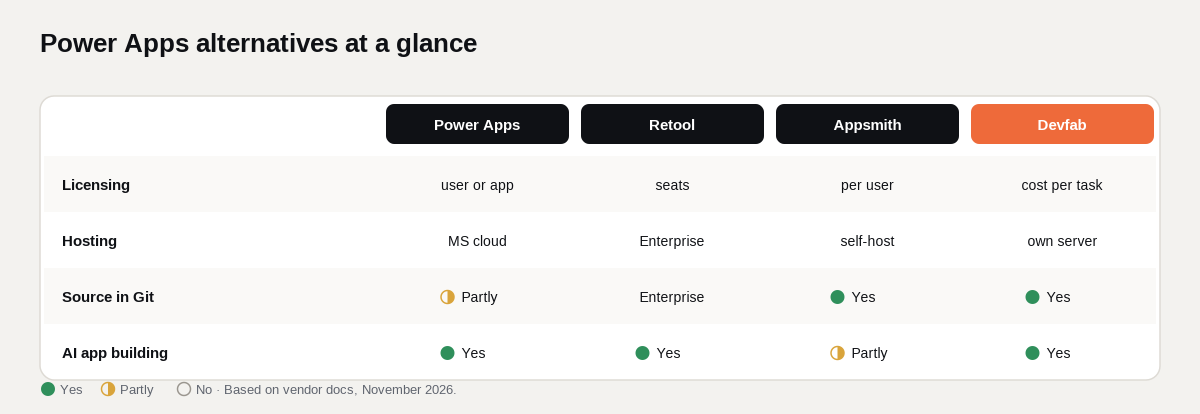
| Tool | Type | Hosting | Code and Git | AI building | Pricing model |
|---|---|---|---|---|---|
| Power Apps (baseline) | Low-code on Dataverse and Microsoft 365 | Microsoft cloud | Solutions and Pipelines; code apps lack source integration | Natural language, Plans, app-builder skill | Per user or per app, plus capacity and credits |
| Retool | Internal-tool and AI app builder | Cloud; VPC or on-prem on Enterprise | Editable React and TypeScript; Git on Enterprise | Prompt-first builder | Per builder and per user, plus AI credits |
| Appsmith | Open-source internal-tool builder | Self-host any edition, or cloud | Git sync with branches and PRs | Ask AI for JS and queries | Free self-hosted; cloud per user |
| Budibase | Open-source apps, automations, agents | Self-host incl. air-gapped, or cloud | Platform apps | Agents with approval policies | Free self-hosted; Cloud subscription |
| Mendix | Enterprise low-code | Mendix Cloud, Kubernetes, SAP BTP, own servers | Platform model | Maia, MCP for external agents | Per app and per user; compute separate |
| OutSystems | Enterprise low-code | ODC on AWS or self-hosted runtime | Platform model | Mentor App Generator | Custom quote |
| Devfab | AI software factory | Your own server | Normal codebase in your GitHub | Research, plan, build, QA, deploy | Cost logged per task and per project (Beta) |
The alternatives
1. Retool
Verdict: the strongest commercial pick for internal tools outside the Microsoft stack. Best for: engineering teams building admin panels and dashboards on Postgres, Snowflake and internal APIs. Trade-off: per-seat pricing, with Git and self-hosting on Enterprise. Pricing: free tier for up to 5 users; per-seat plans with separate builder and internal-user rates; pooled monthly AI credits; Enterprise custom. See Retool's pricing page.
- Its AI app builder (GA June 2026) writes React and TypeScript; you can inspect and edit code in a Code tab.
- Permissions attach to data sources and are enforced wherever an app was built.
- Retool can import apps from Lovable, Replit, Cursor or Claude Code and apply the same governance.
Compare them directly in Power Apps vs Retool.
2. Appsmith
Verdict: the open-source pick for teams that want to leave per-user licensing. Best for: CRUD screens and admin panels on your own databases, self-hosted. Trade-off: you run the infrastructure, and the AI layer is thin. Pricing: free open-source Community edition; cloud Free plan capped at 5 users; Business per user; Enterprise is a flat base fee for a block of users. No charge for developers.
- Apache-2.0 license; self-host via Docker, Kubernetes or an AWS AMI.
- Apps sync to Git for branches, commits, pull requests and merges.
- Appsmith Agents is labeled Legacy and closed to new sign-ups, and the Appsmith AI datasource was removed on September 30, 2026.
3. Budibase
Verdict: the best fit for forms, requests and approvals that must stay on your servers. Best for: public sector, finance and utilities IT teams. Trade-off: Cloud plans have hard monthly action limits; self-hosting means running servers. Pricing: free self-hosted Community plan (unlimited users and apps; bring your own AI key); Cloud subscription; custom Enterprise including air-gapped.
- Budibase 4.0 (November 10, 2026) added Approval Policies and approvals through Slack and Teams, so it can sit next to your Microsoft tools.
- It supports SSO and SCIM, and lists ISO 27001 and Iron Bank container images.
- Its core is GPL v3; paid features use a Business Source License.
4. Mendix
Verdict: a full enterprise platform with broader deployment choices than Power Apps. Best for: enterprises that need SAP BTP, Kubernetes, sovereign clouds or their own servers under one license. Trade-off: higher entry price. Pricing: as of November 2026, Standard from USD 1,090 per month for one app; Premium by quote; cloud compute billed separately; developers not charged.
- Maia Plan turns ideas and user stories into app plans; Maia generates domain models, pages and workflows.
- Mendix 11.12 (June 2026) is an LTS release with Agents Kit 2.0.
- External-agent policies "bring visibility, but no enforcement," per Mendix.
5. OutSystems
Verdict: the other enterprise platform, strong on compliance. Best for: regulated enterprises with large, interdependent app portfolios. Trade-off: no public prices. Pricing: free Personal Edition; paid platform by custom quote sized by application objects, users and add-ons.
- Mentor proposes a plan and applies changes after approval.
- It lists HIPAA, PCI DSS and FedRAMP requirements and 400+ pre-built connections.
- Developers can also use external tools such as Claude Code, Codex and Cursor.
6. Devfab
Verdict: the choice when a Power App has become a product-grade application you want to own outright. Best for: agencies and IT teams moving one app out of the tenant into a normal codebase. Trade-off: you leave Microsoft's built-in governance and connectors behind. Pricing: predictable cost: cost is logged after each run, per task and per project. Devfab is in Beta.
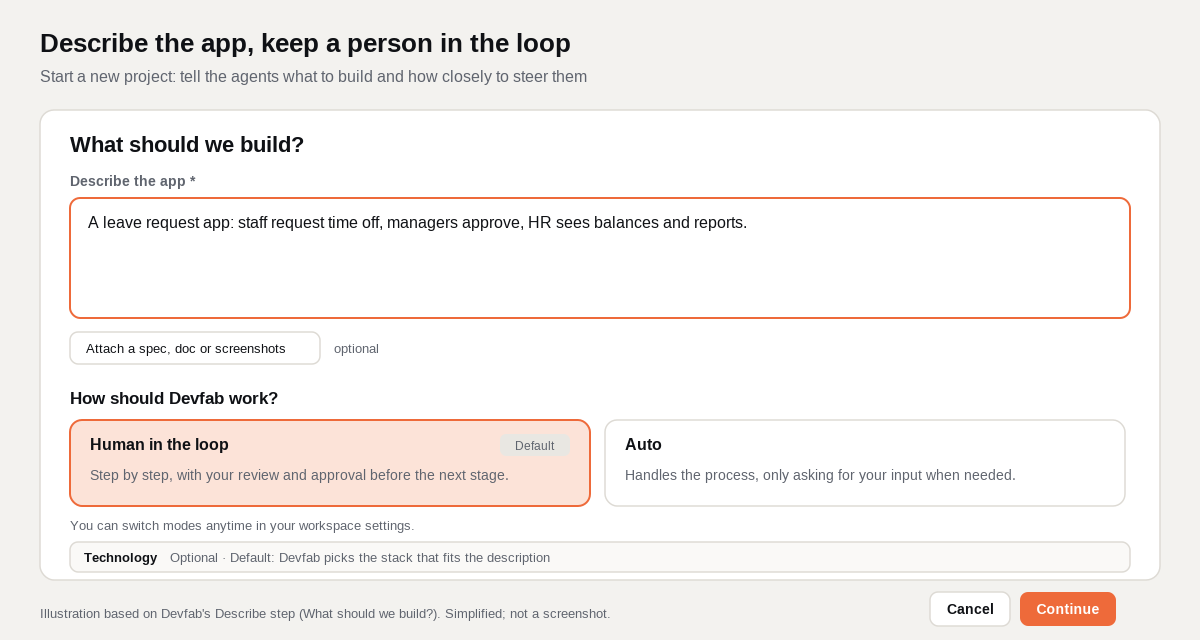
Devfab is an AI software factory with seven agents. Its research step runs before the Planner and maps the domain: key terms, best practices for that kind of app, and competitors, then suggests a prototype. A person approves the plan; the Coordinator turns it into tickets; developer agents build with ChainFlow, which maps which functions and APIs call each other so a change doesn't break connected features. The QA agent runs UI and flow tests (screens, buttons and user journeys clicked end to end) plus logic tests. The code lives in your own GitHub account (or your organization's), and Deploy ships it to your own server, with a custom domain if you want one. There is no per-user license on the app you ship.
Coding agents automate the developer. Devfab automates the development lifecycle.
Devfab's honest limits:
- It's new and in Beta, with a much smaller community than Power Apps.
- It has far fewer ready-made integrations than Power Apps' Microsoft connectors.
- It isn't a visual maker studio or an editor for hands-on coding.
- It needs a GitHub account, and you run the server.
Full comparison: Devfab vs Power Apps.
Where Power Apps is still the better choice
- You're standardized on Microsoft 365, Dataverse and Entra. Apps live inside existing tenant governance, data loss prevention and auditing.
- The app mostly needs Microsoft connectors. SharePoint, Dynamics 365 and Teams data are first-class.
- Many users already have seeded rights. Some Microsoft 365 licenses include limited Power Apps use.
- Business users and IT build together. Power Apps supports pro code, low code, no code and generated apps in one workspace.
- You want agents inside the app. An agent feed lets users oversee AI agents in apps, and Microsoft 365 Copilot can be embedded.
How to choose
- Staying in Microsoft 365 is a given? Stay with Power Apps and plan licenses carefully.
- Internal tools on non-Microsoft data, commercial support? Retool.
- Open source, self-hosted, no per-user fee? Appsmith or Budibase.
- Swapping one enterprise platform for another? Mendix or OutSystems.
- One important app you want to own as code, tested and on your server? Devfab. See What is an AI software factory?
FAQ
Why is Power Apps licensing confusing?
Because several meters stack up. Apps are licensed per user or per app (or pay-as-you-go via Azure in preview), premium and custom connectors need a standalone license, Dataverse capacity and API requests are paid add-ons, and AI features draw on AI Builder or Copilot Credits.
What changed in Power Apps in November 2026?
Microsoft's licensing FAQ says that from November 15, 2026 new unmanaged developer environments and new Dataverse for Teams environments can't be created. Included AI Builder credits on attended RPA licenses were removed on November 1, 2026.
What is the best open-source alternative to Power Apps?
Appsmith (Apache-2.0) for internal tools on your own databases, or Budibase (GPL v3 core) for forms, approvals and agents. Both can be self-hosted for free.
Can I keep Power Apps code in Git?
Partly. Code apps can be added to Dataverse solutions and deployed with Power Platform Pipelines, but Microsoft's ALM page says code apps don't support source code integration. Devfab keeps a normal codebase in your own GitHub.
Read next
- What is an AI software factory?
- Devfab vs Power Apps
- Power Apps vs Retool
- Internal tool builder vs custom app
- Build: HR leave request system
Ready to own the app instead of licensing it? Try the Devfab Beta
Sources (checked November 13, 2026): Microsoft Power Apps; Power Platform licensing FAQ (updated Oct 2026); What's new in Power Platform: September 2026; Power Apps code apps: ALM; The New Stack: Power Apps Plans (May 2025); Retool pricing; Retool launches a React AI app builder (Jun 2026); Retool extends governance to vibe-coded apps; appsmithorg/appsmith on GitHub; Appsmith pricing; Appsmith Agents (Legacy); Appsmith 2.3; AI datasource EOL (Aug 2026); Appsmith Review 2026 (Superblocks, a competitor, Sep 2026); Budibase homepage; Budibase pricing; Introducing Budibase 4.0 (Nov 2026); Budibase on GitHub; Mendix pricing; Mendix 11.12 release (Jun 2026); Mendix 11.10 release (Apr 2026); OutSystems pricing and editions; Next-gen Mentor in ODC; OutSystems Developer Cloud; OutSystems Agentic Systems Engineering (Mar 2026).
Frequently asked questions
Why is Power Apps licensing confusing?
Because several meters stack up. Apps are licensed per user or per app (or pay-as-you-go via Azure in preview), premium and custom connectors need a standalone license, Dataverse capacity and API requests are paid add-ons, and AI features draw on AI Builder or Copilot Credits.
What changed in Power Apps in November 2026?
Microsoft's licensing FAQ says that from November 15, 2026 new unmanaged developer environments and new Dataverse for Teams environments can't be created. Included AI Builder credits on attended RPA licenses were removed on November 1, 2026.
What is the best open-source alternative to Power Apps?
Appsmith (Apache-2.0) for internal tools on your own databases, or Budibase (GPL v3 core) for forms, approvals and agents. Both can be self-hosted for free.
Can I keep Power Apps code in Git?
Partly. Code apps can be added to Dataverse solutions and deployed with Power Platform Pipelines, but Microsoft's ALM page says code apps don't support source code integration. Devfab keeps a normal codebase in your own GitHub.