Short answer: GitHub Copilot wins when your code, issues and reviews already live on GitHub and you want completions, PR review and a cloud agent under one admin console. Cline wins when developers want an open-source agent that asks before every edit, runs on any repo and any model, and bills inference at cost.
Your team already pays for GitHub. Copilot is one checkbox away. Then a developer asks for Cline instead, because it is open source and works with any model.
One side says stay inside the platform you trust. The other says don't tie your AI to one vendor's credits. We sit in the middle and check both against their own docs, as of November 2026.
In this comparison:
- Cline and GitHub Copilot at a glance
- Feature comparison
- Cost model by team size
- Where Cline wins
- Where GitHub Copilot wins
The answer usually turns on one thing: where your code lives.
Cline and GitHub Copilot at a glance
GitHub Copilot is GitHub's AI assistant. It runs on GitHub.com, GitHub Mobile, IDEs (chat, inline and next-edit suggestions, agent mode), Copilot CLI, Windows Terminal and a desktop app for parallel agent sessions (GitHub Docs: features). Its cloud agent runs in a GitHub Actions-based environment or a cloud sandbox and can research a repository and create an implementation plan before changes (GitHub Docs: cloud agent; features). Two 2026 changes matter: plans are now described in GitHub AI Credits, with a new Max tier, and a new "Copilot in the cloud" experience reached paid plans from October 28, 2026 (Plans; cloud agent).
Cline is an open-source coding agent for VS Code, JetBrains, the terminal and desktop. It reads and writes files, runs commands and uses a browser, and every action requires your approval (Cline docs). It is active, with blog posts through November 19, 2026 (Cline blog archive). Cline says over 11 million developers have installed its VS Code extension (vendor claim) (Cline blog, Sep 2026).
Feature comparison
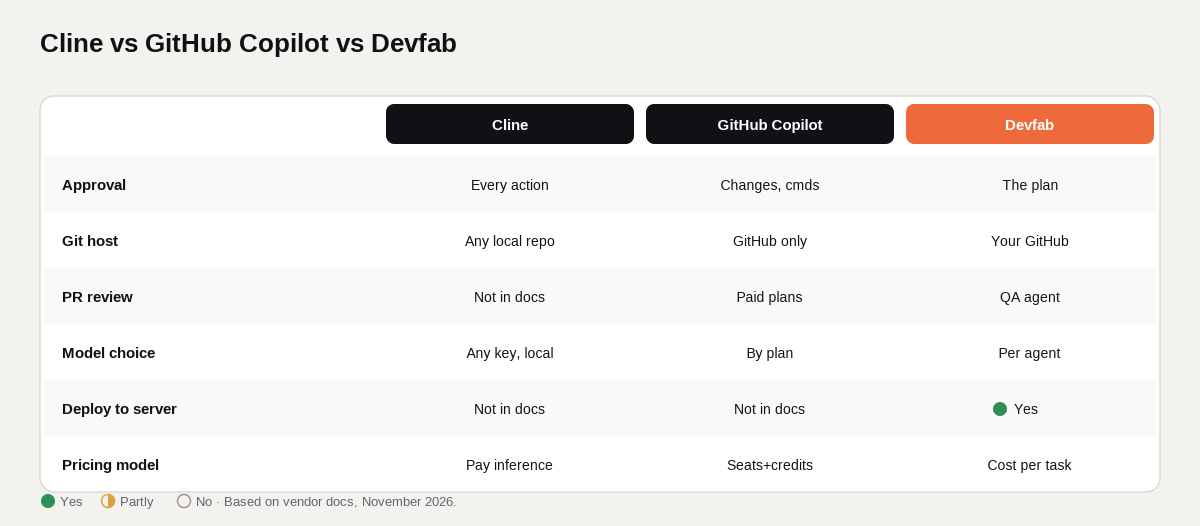
| Aspect | Cline | GitHub Copilot | Source |
|---|---|---|---|
| Where it runs | VS Code, JetBrains, CLI, desktop app, SDK, Kanban; more editors via ACP | GitHub.com, Mobile, IDEs, CLI, Windows Terminal, desktop app | Cline docs; Copilot features |
| Planning | Plan mode (no edits), Act mode, /deep-planning | Cloud agent can create an implementation plan first | Plan & Act; Copilot features |
| Agent autonomy | Approves every action; local | IDE agent asks to approve changes and commands; cloud agent works in Actions or a sandbox and opens a PR | Cline docs; Copilot cloud agent |
| Review | Not covered in the docs we checked | PR code review on paid plans | Copilot plans |
| Git host | Any local repo | Cloud agent works only with repos hosted on GitHub | Copilot cloud agent |
| Deploy and hosting | Not covered in the docs we checked | Not covered in the docs we checked | — |
| Team and admin | Enterprise: SSO, RBAC, central billing, auth logs, provider limits | Business/Enterprise: policies, usage data, file exclusions, audit logs, AI Controls | Cline pricing; Copilot features |
| Model choice | Cline billing, ClinePass, or any key incl. local runtimes | OpenAI, Anthropic, Google, Microsoft, Moonshot AI, xAI, by plan | Cline docs; Copilot models |
| Pricing model | Free; pay inference; Enterprise custom | Seats plus AI Credits; overage at USD 0.01 per credit | Cline pricing; Copilot plans |
Cost model by team size
| Team size | Cline | GitHub Copilot |
|---|---|---|
| 1 person | Free extension; pay inference (Cline billing, ClinePass or your own key) | Free USD 0; Pro USD 10, Pro+ USD 39 or Max USD 100 per user per month |
| 5 people | Same per developer; no seat fee in the docs we checked | Business USD 19 per granted seat per month, pooled credits |
| 25 people | Enterprise, custom pricing | Business, or Enterprise at USD 39 per granted seat per month |
Copilot prices as of November 2026 from GitHub Copilot plans and GitHub Docs. Chat and agent work use AI Credits; completions do not. Cline shows no plan prices on its pricing page as of November 2026.
Where Cline wins
- You want to see and approve every step. Each file edit and command waits for you (Cline docs).
- Your repos are not all on GitHub. Cline works on any local repo; Copilot's cloud agent needs GitHub (GitHub Docs).
- You want any model, including local ones, without a credit meter in between.
- You need open source you can read and fork: extension, CLI and desktop app (Cline Desktop post).
- You want to control where inference runs. Cline's pricing FAQ mentions VPC deployments and self-hosting (Cline pricing).
Where GitHub Copilot wins
- Your workflow already lives on GitHub. Assign an issue to the cloud agent and get a pull request back.
- You want inline completions. Completions and next-edit suggestions don't use AI Credits (Copilot plans).
- You want AI code review on every PR, included in paid plans.
- You govern many developers. AI Controls and the agent control plane went GA on February 26, 2026, with audit-log fields for agent actions (GitHub Changelog).
- You want a predictable seat price for a large team.
Copilot's limits are worth knowing. An Actions-based cloud agent session changes one repository, works on one branch, opens one PR per task, and has a maximum session length set in GitHub's docs. Branch protection can block it unless you grant a bypass (GitHub Docs).
Switching from one to the other
From Copilot to Cline. Code stays in your repo. Install Cline in VS Code or JetBrains and choose a model route (Cline docs). You lose PR review and the GitHub-hosted cloud agent, so decide what replaces them.
From Cline to Copilot. Make sure the repo is on GitHub, enable Copilot for your organization, and set policies and file exclusions on Business or Enterprise (Copilot features). Free plans do not include the coding agent or PR review (Copilot plans).
Where Devfab fits
Cline and Copilot speed up the developer. Neither, in the docs we checked, researches the domain before planning, runs a separate QA agent on user flows, or ships the app to a server.
Coding agents automate the developer. Devfab automates the development lifecycle. Take a permit tracker for a city office. Devfab's Researcher first maps permit terms, best practices and similar products, then suggests a prototype. A person approves the plan. Dev agents work with ChainFlow, so a change to the fee step shows its links to payments and notices. The QA agent runs UI, flow and logic tests, and Deploy ships to your own server.
Devfab is in Beta, needs a GitHub account, has fewer integrations than Copilot, and is not an editor. See Devfab vs GitHub Copilot and Devfab vs Cline.
FAQ
Is Cline free compared with GitHub Copilot?
Cline's extension is free and open source; you pay only for inference, through Cline's billing, ClinePass or your own key. GitHub Copilot has a Free plan and paid plans, for example Pro at USD 10 per user per month and Business at USD 19 per granted seat per month, as of November 2026.
Can I use Cline and GitHub Copilot together?
Yes. A common pattern is side by side: Copilot for inline completions and pull request review on GitHub, Cline for step-by-step agent work in the editor. Check your company's policy on running two AI tools.
Does GitHub Copilot's cloud agent work outside GitHub?
No. GitHub's docs say the cloud agent only works with repositories hosted on GitHub. Cline works on any local repository, whatever the Git host.
Which is better for a regulated enterprise?
Copilot Business and Enterprise give policy management, audit logs and agent controls that went generally available in February 2026. Cline's Enterprise tier offers SSO, RBAC, provider restrictions, and its FAQ mentions VPC and self-hosting. Pick by whether you need GitHub-wide governance or control over where inference runs.
Read next
- What is an AI software factory?
- GitHub Copilot alternatives for teams that ship to production (2026)
- Cline alternatives for teams that ship to production (2026)
Need more than faster code? See the whole lifecycle in one workspace. Try Beta
Sources (checked November 2026): Cline docs overview; Cline Plan & Act; Cline pricing; Cline blog archive; How We Migrated 11 Million Users (Cline blog, Sep 2, 2026); Cline Desktop announcement; GitHub Copilot plans; GitHub Docs: Plans for GitHub Copilot; GitHub Docs: Copilot features; GitHub Docs: About Copilot cloud agent; GitHub Docs: Supported AI models; GitHub Changelog: Enterprise AI Controls GA (Feb 26, 2026).
Frequently asked questions
Is Cline free compared with GitHub Copilot?
Cline's extension is free and open source; you pay only for inference, through Cline's billing, ClinePass or your own key. GitHub Copilot has a Free plan and paid plans, for example Pro at USD 10 per user per month and Business at USD 19 per granted seat per month, as of November 2026.
Can I use Cline and GitHub Copilot together?
Yes. A common pattern is side by side: Copilot for inline completions and pull request review on GitHub, Cline for step-by-step agent work in the editor. Check your company's policy on running two AI tools.
Does GitHub Copilot's cloud agent work outside GitHub?
No. GitHub's docs say the cloud agent only works with repositories hosted on GitHub. Cline works on any local repository, whatever the Git host.
Which is better for a regulated enterprise?
Copilot Business and Enterprise give policy management, audit logs and agent controls that went generally available in February 2026. Cline's Enterprise tier offers SSO, RBAC, provider restrictions, and its FAQ mentions VPC and self-hosting. Pick by whether you need GitHub-wide governance or control over where inference runs.