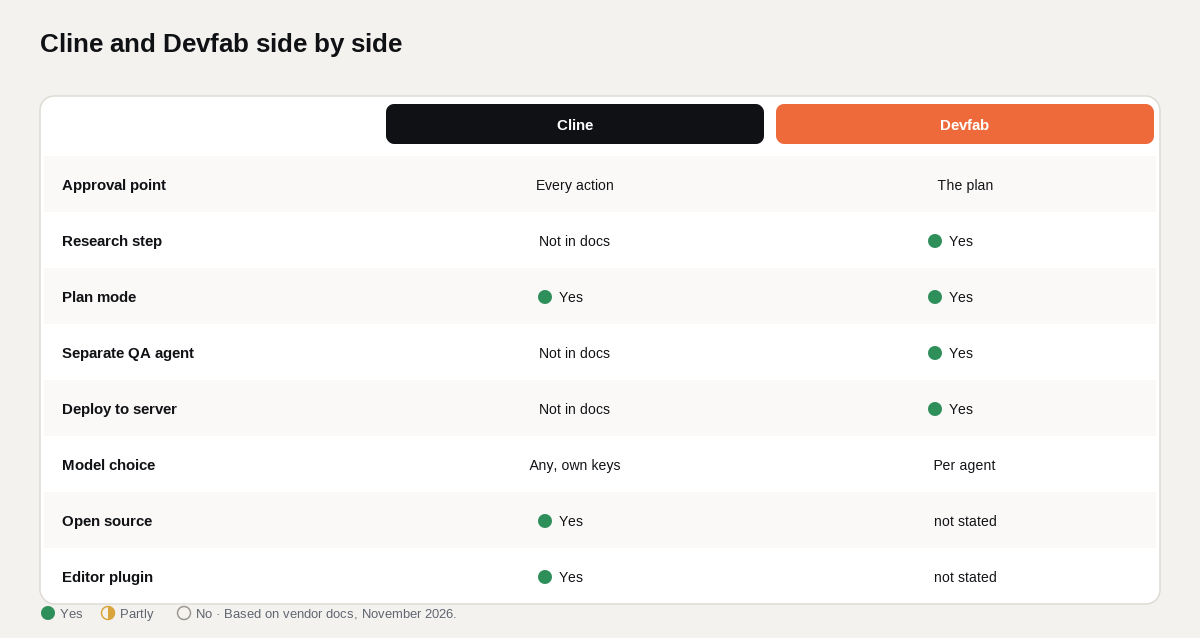
Short answer: Cline wins when a developer wants an open-source agent inside their own editor, approving every file edit and command with any model they choose. Devfab wins when a team ships client projects and needs research, an approved plan, tickets, a separate QA agent, deployment to its own server and cost logged per task.
You gave your developers Cline, and the code got better. The client project around it still runs on spreadsheets and goodwill. Clients want an approved plan, a test report and an app on their server. Someone has to run those steps, every time.
One camp says a good agent in the editor is all a team needs. The other says agencies need the whole delivery line. This page acts as the referee, using vendor docs checked in November 2026.
In this comparison:
- What each tool is built for
- Switching triggers
- Cost model by team size
- Where Cline is the better choice
- Where Devfab is the better choice
The sections run in that order.
What each tool is built for
Cline
Cline is an open-source AI coding agent. It reads and writes files, runs commands and uses a browser, and every action requires your approval (Cline docs). Status as of November 2026: active, with blog posts through October 2026. In January 2026, OpenAI hired at least seven Cline employees; OpenAI said it was not an acquisition (TEXXR, Jan 29, 2026).
What matters for a team comparison:
- Where it runs: a VS Code extension, a JetBrains plugin, a CLI (interactive or headless for CI/CD), a desktop app, an SDK, and Kanban, a web task board that runs many agents in parallel. It also works in Cursor, Windsurf, Zed and Neovim through ACP (Cline docs).
- Plan and Act: Plan mode reads and discusses without editing; Act mode carries out the plan. You can set a different model per mode, run
/deep-planningfor a longer session, and roll back with Checkpoints (Plan & Act docs). - Model freedom: pay through Cline's usage billing, use ClinePass (a subscription for open-weight models), or bring your own key for cloud providers and local runtimes (Cline docs).
- Open source: the extension, CLI and desktop app are described as fully open source (Cline Desktop announcement).
- Scale: Cline says over 11 million developers have installed the VS Code extension (vendor claim) (Cline blog, Sep 2026).
- 2026 changes: CLI 2.0 in February, Kanban in March, an SDK rebuild in May, ClinePass in June, a new harness for all users in August and a Desktop beta in September (Cline blog archive).
Cline's main user is a developer who drives each change and wants full control over the agent.
Devfab
Devfab is an AI software factory. Its unit of work is a client project, and seven agents run it: Researcher, Planner, Coordinator, Developers, Blueprint, QA agent and Deploy.
- The Researcher maps the domain before any plan: key terms, best practices for that kind of app, and competitors. Then it suggests a prototype.
- The Planner publishes the plan, and a person approves it. The Coordinator splits it into tickets and assigns dev agents.
- Developers work with ChainFlow, Devfab's code-intelligence layer. It maps which functions and APIs call each other and what is deployed, so a change to checkout doesn't quietly break payments or notifications.
- The QA agent runs UI and flow tests (screens, buttons and user journeys clicked end to end) plus logic tests. Deploy ships to your own server.
Coding agents automate the developer. Devfab automates the development lifecycle.
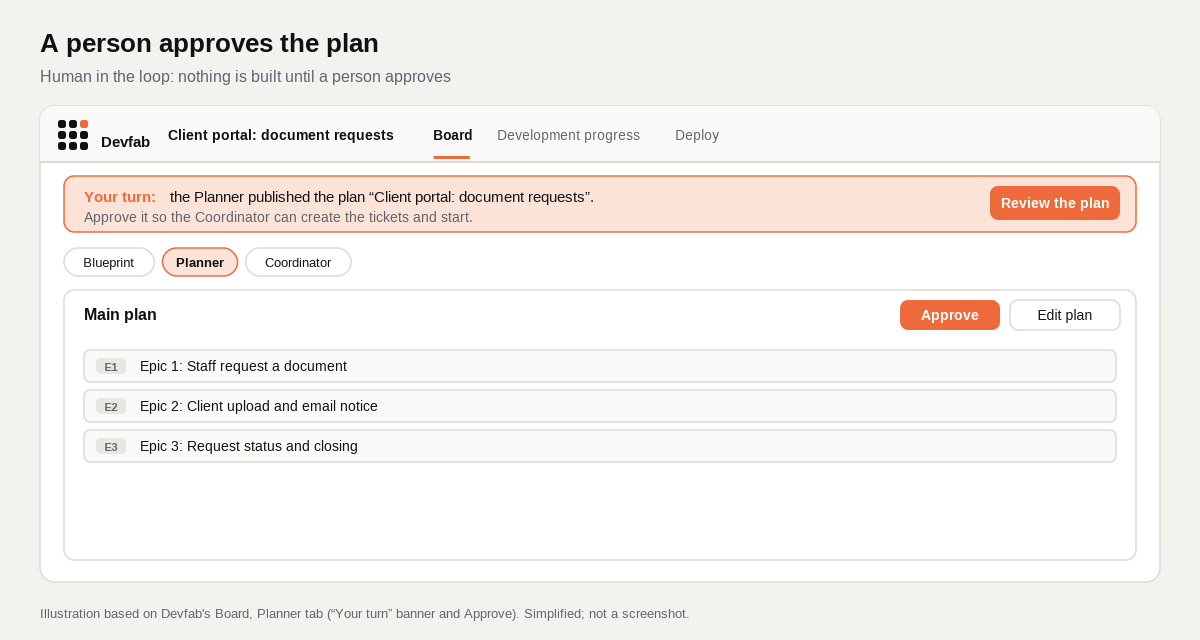
The approval point is the real difference. Cline asks for approval per action. Devfab's default mode, Human in the loop, asks for approval per stage, starting with the plan.
Switching triggers
| Trigger | Cline | Devfab | Source |
|---|---|---|---|
| Approving every action slows multi-ticket work | Every action requires your approval | Approve the plan; Human in the loop or Auto mode, switchable anytime | Cline docs |
| Team needs SSO, roles and central billing | SSO, RBAC, centralized billing and team dashboard are Enterprise features | Roles, workspace permissions, Team Delivery Report | Cline pricing |
| Client needs a QA report, not just passing code | Uses a browser while working; the test suite is yours to build | Separate QA agent runs UI, flow and logic tests | Cline docs |
| Deployment and user manuals are manual work | Not covered in the docs we checked | Ship to production on your own server; user manuals and blueprints | Cline docs |
| Team continuity questions | 7+ staff hired by OpenAI in Jan 2026, reported as a continuity challenge | Devfab is new and in Beta, with a small team | TEXXR |
| Features changed after the 2026 harness upgrade | Some less-used features were deprecated | Not applicable | Cline blog |
Cost model by team size
| Team size | Cline | Devfab |
|---|---|---|
| 1 person | Free open-source extension; you pay only for inference (Cline usage billing or your own key); ClinePass is a flat subscription for open-weight models | Cost logged per task and per project (Beta) |
| 5 people | Same model per developer; no seat fees for the open-source version | Cost logged per task and per project (Beta) |
| 25 people | Enterprise on custom pricing adds SSO, SLA, centralized billing, RBAC and provider restrictions | Cost logged per task and per project (Beta) |
Cline's pricing model as of November 2026, from Cline's pricing page and docs. Check the pricing page for current amounts. Devfab: predictable cost; cost is logged after each run, per task and per project; Devfab is in Beta.
Moving from Cline to Devfab
Cline already works in your repository, so there is no code to export.
- Confirm the code is in GitHub. Devfab works with a repository in your own GitHub account or your organization's.
- Open Devfab and choose "Work on an existing project". Connect GitHub and pick the repo.
- Leave the change box empty. ChainFlow maps the code first: which functions and APIs call each other and what is deployed. Then it suggests three small first tickets.
- Approve the plan. The Planner publishes it, and the Coordinator creates tickets only after a person approves.
- Turn on "QA agent · review before Done". The QA agent runs UI, flow and logic tests on each ticket before it closes.
- Keep Cline for hands-on work. Developers can keep Cline in their editor on the same repository for fixes outside the plan.
Where Cline is the better choice
- Your developers want to approve each file edit and command in their own editor, step by step.
- Open source and model freedom are requirements: bring your own key, local runtimes or open-weight models, with inference at cost.
- The work is single-repo coding where a person drives and the agent assists: refactors, bug fixes, small features.
- You need the agent in many places: VS Code, JetBrains, the terminal, CI pipelines and other editors through ACP.
- You already run delivery well and only need the coding stage to move faster.
Where Devfab is the better choice
- You want research before the plan. The Researcher maps the client's domain, best practices and competitors before anyone writes a ticket.
- A person should approve plans, not keystrokes. The plan is the checkpoint a client or project manager can read.
- Changes to existing apps must not break connected features. ChainFlow shows the impact across functions, APIs and deployed code.
- Clients expect proof of testing. The QA agent clicks through screens and user journeys and runs logic tests.
- The app must run on the client's server, with code in your GitHub account or theirs, plus docs such as blueprints and user manuals.
- You need cost per project. Cost is logged after each run, per task and per project.
Devfab's honest limits: it is new and in Beta, with a smaller community and fewer integrations than Cline. It is not an editor for hands-on coding. It needs a GitHub account. And for a one-line fix, a full project with a plan is more process than the job needs.
FAQ
Is Devfab a replacement for Cline?
Not for a developer who wants an agent inside the editor. Cline asks you to approve each file edit and command as it works. Devfab runs the project around the code: research, a plan a person approves, tickets, a separate QA agent, deployment and docs. Both can work on the same GitHub repository.
Cline has Plan and Act modes. How is Devfab's planning different?
Cline's Plan mode reads and discusses without editing, then Act mode carries out the plan, and you can roll back with Checkpoints. That plan covers one task. Devfab's Researcher maps the domain first, the Planner writes a project plan, a person approves it, and the Coordinator turns it into tickets for several dev agents.
Can I use my own model keys in Devfab, like I do in Cline?
Cline supports bring-your-own-key for cloud providers and local runtimes. In Devfab you can choose the model for each agent or keep Devfab's default. Devfab logs cost after each run, per task and per project.
Which is better for an agency that ships client work?
If your developers drive every change and you already have a tracker, CI, QA and release routine, Cline is a strong, low-cost choice. If you need client-approved plans, QA reports, deployment to client servers and cost per project in one place, Devfab is built for that.
Read next
- What is an AI software factory?
- Cline alternatives for teams that ship to production (2026)
- Cline vs Cursor: which should your team use in 2026?
- AI software factory vs AI coding tools: what's the difference?
See Devfab run one of your client projects. Book a Devfab demo
Sources (checked November 13, 2026): Cline docs overview; Cline Plan & Act; Cline pricing; Cline blog archive; How We Migrated 11 Million Users to Cline's Biggest Harness Upgrade (Sep 2, 2026); Cline Desktop announcement (Sep 14, 2026); OpenAI hires seven employees from Cline (TEXXR, Jan 29, 2026).
Frequently asked questions
Is Devfab a replacement for Cline?
Not for a developer who wants an agent inside the editor. Cline asks you to approve each file edit and command as it works. Devfab runs the project around the code: research, a plan a person approves, tickets, a separate QA agent, deployment and docs. Both can work on the same GitHub repository.
Cline has Plan and Act modes. How is Devfab's planning different?
Cline's Plan mode reads and discusses without editing, then Act mode carries out the plan, and you can roll back with Checkpoints. That plan covers one task. Devfab's Researcher maps the domain first, the Planner writes a project plan, a person approves it, and the Coordinator turns it into tickets for several dev agents.
Can I use my own model keys in Devfab, like I do in Cline?
Cline supports bring-your-own-key for cloud providers and local runtimes. In Devfab you can choose the model for each agent or keep Devfab's default. Devfab logs cost after each run, per task and per project.
Which is better for an agency that ships client work?
If your developers drive every change and you already have a tracker, CI, QA and release routine, Cline is a strong, low-cost choice. If you need client-approved plans, QA reports, deployment to client servers and cost per project in one place, Devfab is built for that.