Short answer: Cursor wins when developers want an AI-first editor with Plan Mode, cloud agents that work with GitHub, GitLab, Bitbucket or Azure DevOps, and a wide model menu. GitHub Copilot wins when your code, issues and reviews already live on GitHub and you want AI in many tools at a lower seat price, with GitHub-native agent governance.
One camp says Cursor is simply the better editor. The other says Copilot is already where the code lives, so why add a tool? Both camps are partly right. Both tools also changed in 2026: Cursor now belongs to SpaceX, and Copilot moved its plans to AI credits. This page acts as the referee, with sourced facts, verified prices and a winner per situation.
In this comparison:
- Cursor and GitHub Copilot at a glance
- Feature comparison
- Cost model by team size
- Where Cursor wins
- Where GitHub Copilot wins
Here's how each one compares.
Cursor and GitHub Copilot at a glance
Cursor: now part of SpaceX. SpaceX agreed to buy Anysphere, Cursor's maker, in an all-stock deal confirmed in an 8-K on June 16, 2026; Cursor survives as a wholly owned subsidiary (The Next Web). Cursor's August 14 post says it "has officially been acquired by SpaceX" (Cursor blog). Its plans now bundle Grok products, and the entry Plus tier is limited to Grok models (Cursor pricing).
Cursor is an AI code editor plus a coding agent that also runs in a CLI, as cloud agents, on mobile and through SDKs (Cursor docs). It describes itself as "a coding agent for building ambitious software". Its main user is a developer who wants AI inside the editor.
GitHub Copilot: new cloud experience and credit billing. A new "Copilot in the cloud" experience reached paid plans on October 28, 2026 (GitHub Docs). Plans are now described in GitHub AI Credits, with a new Max tier above Pro+, and request-based billing is listed as legacy (GitHub Docs).
Copilot is AI built into GitHub.com, IDEs, the terminal and a desktop app, with a cloud agent that takes assigned work and opens pull requests (GitHub Docs). It serves individuals and organizations on Business and Enterprise plans.
Feature comparison
| Aspect | Cursor | GitHub Copilot | Source |
|---|---|---|---|
| Where it runs | Desktop editor based on VS Code, CLI, cloud agents, mobile, SDKs | GitHub.com, GitHub Mobile, IDEs, Copilot CLI, Windows Terminal, desktop app, GitHub Desktop | Cursor docs; Copilot features |
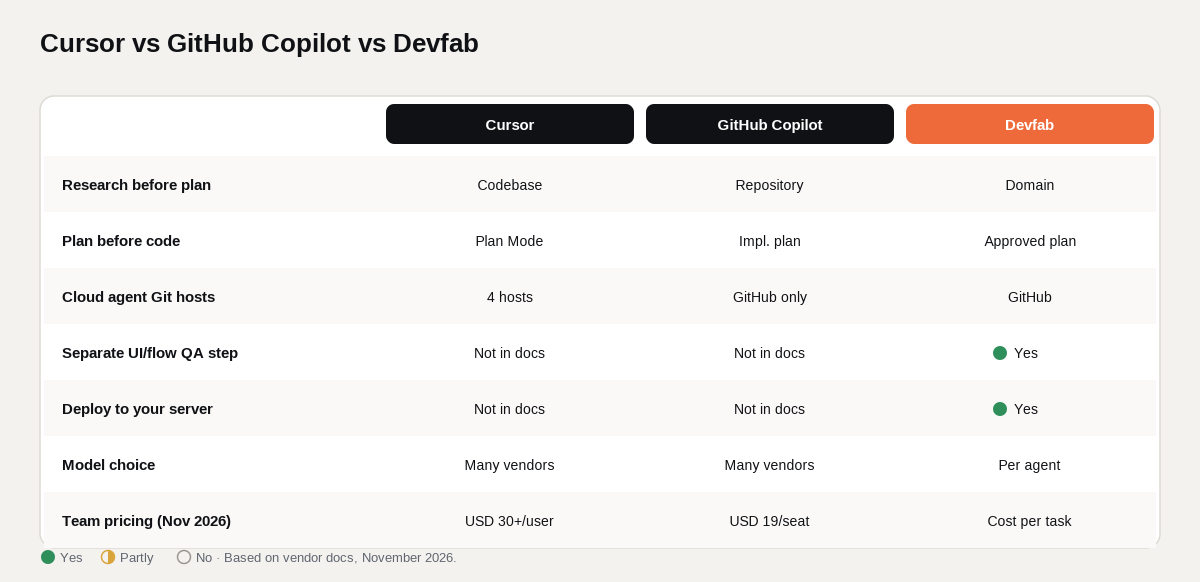
| Planning | Plan Mode asks questions, researches the codebase and drafts an editable plan | Cloud agent can research a repository and create an implementation plan | Plan Mode; Copilot features |
| Agent autonomy | Cloud agents run in isolated VMs, many in parallel, each on its own branch | Cloud agent runs in GitHub Actions or a cloud sandbox; Actions sessions change one repo, open one PR, 59-minute max | Cloud agents; Copilot cloud agent |
| Git hosts for cloud agents | GitHub, GitLab, Bitbucket Cloud, Azure DevOps | GitHub only | Same as above |
| Review and testing | Bugbot reviews PRs; Autofix can spawn a cloud agent to push fixes | PR code review on paid plans; GitHub warns output can contain vulnerabilities | Bugbot; Copilot plans |
| Deploy and hosting | Not covered in the docs we checked | Not covered in the docs we checked | — |
| Code ownership | Works in your repo; cloud-agent tools can run on self-hosted machines | Works in your GitHub repo | Cloud agents |
| Team and admin | SSO on Teams and Enterprise; SCIM, audit logs, model restrictions on Enterprise | Policies, usage data, file exclusions; audit logs on Enterprise; AI Controls GA Feb 26, 2026 | Cursor Enterprise; GitHub changelog |
| Model choice | Claude, Gemini, GPT, Grok, Cursor Composer and others | OpenAI, Anthropic, Google, Microsoft, Moonshot AI, xAI; Claude and Codex agents on Pro+ and Max | Cursor docs; Copilot models |
| Pricing model | Subscription with a weekly usage pool shared with Grok; third-party models at API list price | AI credits; per-seat Business and Enterprise with pooled credits | Cursor pricing; Copilot plans |
Cost model by team size
| Team size | Cursor | GitHub Copilot | Devfab |
|---|---|---|---|
| 1 person | Free; Plus USD 8/month (Grok models only, no cloud agents); Premium USD 30/month adds cloud agents, code reviews and third-party models | Free (2,000 completions/month); Pro USD 10; Pro+ USD 39; Max USD 100 per month | Cost logged per task and per project (Beta) |
| 5 people | Teams from USD 30 per user/month | Business USD 19 per seat/month, 1,900 AI credits per user, pooled | Cost logged per task and per project (Beta) |
| 25 people | Teams, or Enterprise (custom) for SCIM, audit logs and group spend limits | Business, or Enterprise USD 39 per seat/month with 3,900 credits per user; usage beyond the pool at USD 0.01 per credit | Cost logged per task and per project (Beta) |
Prices as of November 2026 from Cursor pricing, GitHub Copilot plans and GitHub Docs: Plans. Cursor bills third-party model usage separately. Devfab is in Beta and offers predictable cost: cost is logged after each run, per task and per project.
Where Cursor wins
- Your code isn't only on GitHub. Cursor's cloud agents support GitLab, Bitbucket Cloud and Azure DevOps as well as GitHub.
- Your developers want an editor built around AI, with Plan Mode drafting an editable plan before any code.
- You want long parallel agent runs in full VMs, with the option to run agent tools on hardware you manage.
- You want reviews that fix things. Bugbot Autofix can spawn a cloud agent to push fixes to a branch.
- Your team works in Slack, Microsoft Teams, Jira, Linear or Notion and wants to start agents from there.
Where GitHub Copilot wins
- Everything already lives on GitHub. Start cloud agent tasks from issues, pull requests, the Agents tab or code scanning alerts.
- Developers use many editors and terminals. Copilot runs in IDEs, Copilot CLI, Windows Terminal and GitHub Desktop.
- Seat price matters. Business is USD 19 per seat per month, and completions and next edit suggestions don't consume credits.
- You govern agents across a large enterprise. AI Controls and the agent control plane add an AI administrator role and agent activity in audit logs.
- You want several agents under one bill. Pro+ and Max list Claude and Codex as third-party agents.
Switching from one to the other
From Copilot to Cursor. Cursor is based on the VS Code codebase. In Cursor Settings, go to General > Account and click Import under "VS Code Import" to bring over extensions, themes, settings and keybindings (Cursor docs). Put shared agent instructions in an AGENTS.md file: Cursor reads it in the project root and subdirectories (Cursor rules), and Copilot Chat in VS Code reads it too (GitHub Docs). Cloud agents need Premium or a higher plan, Teams or Enterprise.
From Cursor to Copilot. Cursor project rules live in .cursor/rules. Move what matters into AGENTS.md or .github/copilot-instructions.md, which every Copilot surface reads. Check branch protection rules: they can block Copilot's cloud agent from opening pull requests unless it has a bypass.
Where Devfab fits
Both tools make developers faster inside a repository. Neither, in the docs we checked, researches the domain before planning, asks a person to approve a project plan, runs UI and flow tests as a separate step, or deploys the app.
Coding agents automate the developer. Devfab automates the development lifecycle. Its Researcher maps terms, best practices and competitors first; a person approves the plan; the QA agent runs UI, flow and logic tests; and the app deploys to your own server, with cost logged per task and per project. Devfab is in Beta, has fewer integrations and is not an editor, so many teams keep Cursor or Copilot for hands-on work. See Devfab vs Cursor and Devfab vs GitHub Copilot.
FAQ
Is Cursor still independent after the SpaceX deal?
No. SpaceX agreed to buy Anysphere, Cursor's maker, in a deal confirmed on June 16, 2026, and Cursor's August 14 post says the acquisition has officially closed. Cursor runs as a wholly owned subsidiary, and its plans now bundle Grok products.
Which is cheaper for a team of ten developers?
On list price, GitHub Copilot Business is USD 19 per seat per month and Cursor Teams starts at USD 30 per user per month, as of November 2026. Both bill extra usage beyond what the plan includes, so compare your real agent usage, not only the seat price.
Can I use Claude models in both?
Yes. Cursor's model table includes Anthropic Claude models, and GitHub Copilot supports models from Anthropic and other providers. Copilot Pro+ and Max also list Claude and Codex as third-party agents.
Does either tool test the finished app end to end?
Both review code: Cursor with Bugbot, Copilot with pull request code review. A separate QA step that clicks through user journeys is not covered in the docs we checked. Devfab's QA agent runs UI and flow tests plus logic tests before work is marked Done.
Read next
- What is an AI software factory?
- Cursor alternatives
- GitHub Copilot alternatives
- AI software factory vs AI coding tools
Want the plan, the QA report and the deploy around the code? Try Beta
Sources (checked November 13, 2026): Cursor docs; Cursor pricing; Cursor Plan Mode; Cursor cloud agents; Cursor Bugbot; Cursor Enterprise; Cursor VS Code migration; Cursor rules; Cursor blog: Joining SpaceX; The Next Web: SpaceX makes its Cursor takeover official; GitHub Copilot plans; GitHub Docs: Plans for GitHub Copilot; GitHub Docs: Copilot features; GitHub Docs: About Copilot cloud agent; GitHub Docs: Supported AI models; GitHub Docs: Custom instructions support; GitHub Changelog: Enterprise AI Controls GA (Feb 26, 2026).
Frequently asked questions
Is Cursor still independent after the SpaceX deal?
No. SpaceX agreed to buy Anysphere, Cursor's maker, in a deal confirmed on June 16, 2026, and Cursor's August 14 post says the acquisition has officially closed. Cursor runs as a wholly owned subsidiary, and its plans now bundle Grok products.
Which is cheaper for a team of ten developers?
On list price, GitHub Copilot Business is USD 19 per seat per month and Cursor Teams starts at USD 30 per user per month, as of November 2026. Both bill extra usage beyond what the plan includes, so compare your real agent usage, not only the seat price.
Can I use Claude models in both?
Yes. Cursor's model table includes Anthropic Claude models, and GitHub Copilot supports models from Anthropic and other providers. Copilot Pro+ and Max also list Claude and Codex as third-party agents.
Does either tool test the finished app end to end?
Both review code: Cursor with Bugbot, Copilot with pull request code review. A separate QA step that clicks through user journeys is not covered in the docs we checked. Devfab's QA agent runs UI and flow tests plus logic tests before work is marked Done.