Short answer: For the closest open-source swap, choose Kilo Code. For a polished agent that needs fewer approvals, choose Claude Code. For a free, MIT-licensed terminal agent with any model, choose OpenCode. If you want to approve a project plan instead of every action, with UI tests and deploy built in, try Devfab.
Cline asks before it acts. Every file edit. Every command. That's why many teams trust it, and why some teams outgrow it. Clicking approve all day is safe, but it doesn't scale to a backlog. Before you switch, know which family of tools you're moving to. Two of Cline's best-known cousins, Roo Code and Continue, no longer exist as products.
In this guide, you'll learn:
- Why teams leave Cline, from documented changes
- The quick comparison, sorted by approval style
- Where Cline is still the better choice
- How to choose where you want to approve
The rest of this page covers it in order.
Why teams leave Cline
What Cline is. An open-source coding agent for VS Code, JetBrains, a CLI (interactive or headless for CI/CD), a desktop app, an SDK and Kanban, a web board that runs many agents in parallel. It also reaches Cursor, Windsurf, Zed and Neovim through ACP (Cline docs). Plan mode reads and discusses without editing; Act mode carries out the plan; /deep-planning runs a longer planning session; Checkpoints allow rollback (Cline docs). You pay for inference through Cline, ClinePass (a subscription for open-weight models, launched June 29, 2026) or your own keys. Cline says the VS Code extension is installed by over 11 million developers, a vendor claim (Cline blog).
The switching triggers:
- Approval on every action. The docs say every action requires your approval. Good for control, slow for volume.
- Changes under your feet. The new harness rolled out to all users on August 23, 2026, and deprecated "some less-used features."
- A supply-chain scare. An unauthorized npm publish of the Cline CLI on February 17, 2026 got a public post-mortem (Cline blog archive).
- Continuity questions. In January 2026 OpenAI hired at least seven Cline employees; OpenAI said it was not an acquisition (TEXXR).
- Team features cost extra. JetBrains, SSO, RBAC, a team dashboard and provider restrictions sit in Enterprise (Cline pricing).
Avoid two dead ends. Roo Code, a Cline fork, was shut down and its GitHub repo archived on May 15, 2026 (GitHub). Continue was acquired by Cursor in June 2026 and discontinued (The New Stack). Older "Cline alternatives" lists still recommend both.
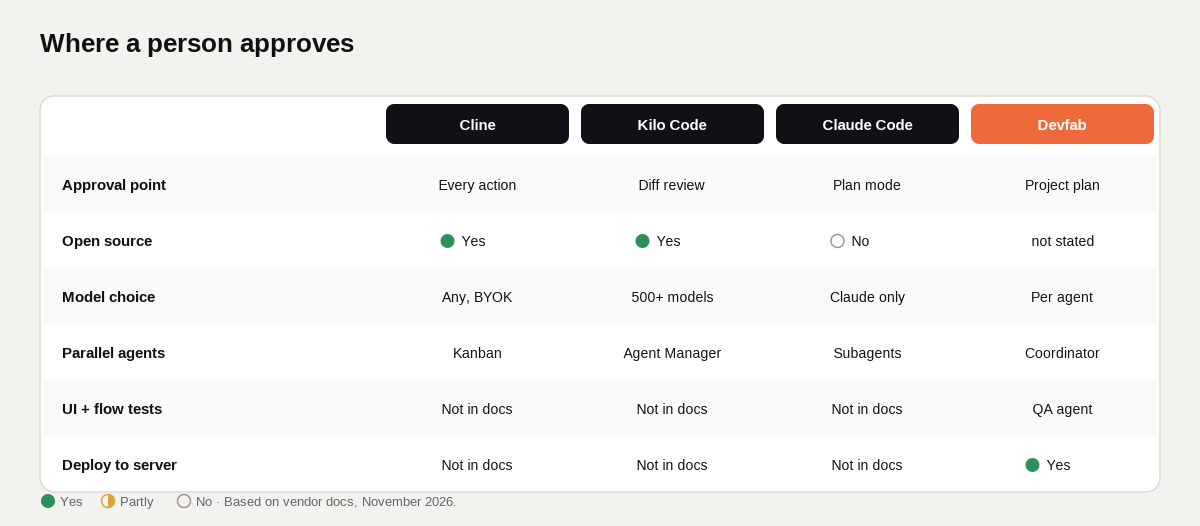
Quick comparison
| Tool | Where a person approves | Where it runs | Model choice | Open source | Pricing model |
|---|---|---|---|---|---|
| Cline (baseline) | Every action | VS Code, JetBrains, CLI, desktop | Any, BYOK or ClinePass | Yes | Free; pay for inference |
| Kilo Code | Diff review with line comments | VS Code, JetBrains, CLI, cloud agents | 500+ models, BYOK, local | Yes | Free; inference at provider rates |
| Claude Code | Plan mode, permissions | Terminal, IDEs, desktop, web | Claude only | No | Paid Claude plans or API |
| OpenCode | Plan agent asks before bash | Terminal UI, desktop, mobile | 200+ providers, local | Yes (MIT) | Free; BYOK or subscriptions |
| Cursor | Plan Mode; Bugbot on PRs | Own editor, CLI, cloud agents | Many vendors | No | Usage pool; Teams per seat |
| Devfab | The project plan | Web workspace + your GitHub | Per agent, or Devfab's default | No | Cost logged per task and per project (Beta) |
| OpenAI Codex | Approvals and permissions | ChatGPT apps, CLI, IDE, cloud | OpenAI models | CLI yes | Included in ChatGPT plans |
The alternatives
1. Kilo Code
Verdict: the closest open-source alternative to Cline. Best for: developers who want Cline's model freedom with multi-agent tabs. Trade-off: a 2026 research note flags a broad product range for a roughly 34-person team and 1,300+ open GitHub issues (rywalker.com). Pricing: free extension; inference at provider rates with a 5% fee on credit purchases; Teams per user; Enterprise custom (Kilo pricing).
- The VS Code extension was rebuilt on the open-source OpenCode server and became the default on April 2, 2026 (Kilo blog).
- Agent Manager runs several agent tabs, can isolate agents in git worktrees, and includes a diff reviewer with line comments.
- Kilo Gateway offers 500+ models from 60+ providers, or bring your own key or local models.
2. Claude Code
Verdict: the best pick if approval fatigue is your main reason to leave. Best for: developers who want one agent across terminal, IDE, web and CI. Trade-off: Claude models only, which is the opposite of Cline's model freedom. Pricing: included in paid Claude plans, or per token through the API (Claude pricing).
- Plan mode proposes an approach for approval before editing (Claude Code docs).
- Security teams can set managed permissions that local config can't override (Claude Code enterprise).
- Subagents, background agents and cloud scheduled tasks handle parallel work (Claude Code overview).
3. OpenCode
Verdict: the best free, MIT-licensed pick for terminal users. Best for: developers who want maximum model choice outside the IDE. Trade-off: a 2026 review notes permissive default permissions and releases that sometimes break features (rywalker.com). Pricing: free; free models, your own keys, or existing ChatGPT or GitHub Copilot subscriptions (OpenCode).
- A read-only "plan" agent denies edits by default and asks before bash commands (GitHub).
- 200+ providers through Models.dev, including local models.
- Kilo Code's VS Code extension runs on the OpenCode server, so the two share a core.
4. Cursor
Verdict: the pick if you're ready to leave VS Code for an AI-first editor. Best for: developers who code by hand and want plans, agents and PR review in one product. Trade-off: not open source; owned by SpaceX since August 2026 (Cursor blog). Pricing: free tier; individual tiers with a usage pool; Teams per seat (Cursor pricing).
- Plan Mode asks clarifying questions and drafts an editable plan (Cursor docs).
- Bugbot reviews pull requests for bugs and security issues (Cursor docs).
5. Devfab
Verdict: the pick if you want to approve the project plan, not each action. Best for: agencies and product teams delivering whole apps. Trade-off: new and in Beta; not an editor extension. Pricing: predictable cost: cost is logged after each run, per task and per project.
See Where Devfab fits and the full Devfab vs Cline comparison.
6. OpenAI Codex
Verdict: the pick for ChatGPT teams that want parallel cloud tasks. Best for: delegating well-defined fixes and tests, then reviewing PRs. Trade-off: OpenAI models only. Pricing: included in ChatGPT plans, with credits beyond limits (Codex pricing).
- Agent approvals, permissions and sandboxing are documented (Codex docs).
- The Codex CLI is open source under Apache-2.0 (GitHub).
Where Devfab fits
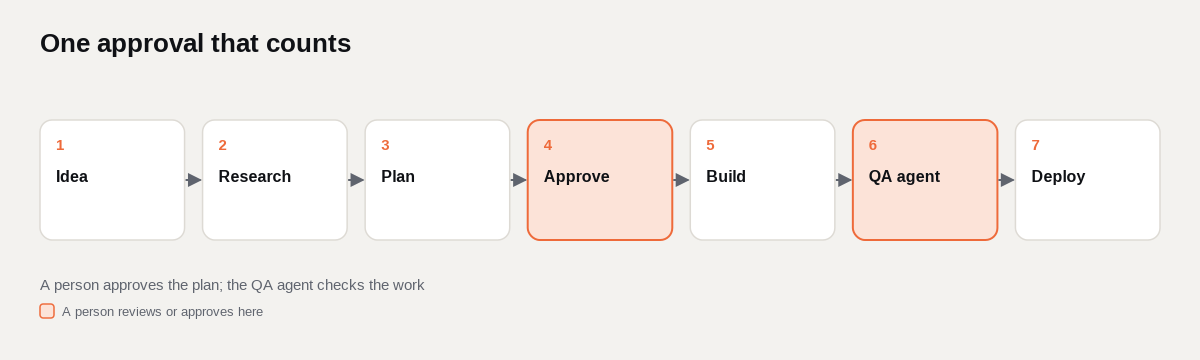
Cline puts a person at every step. Devfab puts a person at the step that matters most: the plan. Coding agents automate the developer. Devfab automates the development lifecycle.
- Research before the plan. Devfab's research step maps the domain first: key terms, best practices for that kind of app, and competitors. Then it suggests a prototype.
- One approval that counts. "Your turn: the Planner published the plan. Approve it so the Coordinator can create the tickets." Human in the loop is the default, with review between stages. Auto mode asks only when needed.
- ChainFlow. Maps which functions and APIs call each other and what is deployed, so developer agents see the impact of a change and don't break connected features.
- QA agent. Cline relies on you to check its output. Devfab's QA agent runs UI and flow tests (screens, buttons and user journeys clicked end to end) plus logic tests, with "QA agent · review before Done."
Like Cline, Devfab lets you choose the model for each agent, or keep Devfab's default. Code stays in your own GitHub account (or your organization's), and you deploy to your own server.
Devfab's honest limits:
- It's new and in Beta, with a far smaller community than Cline's.
- It isn't open source, and it has fewer integrations.
- It isn't an editor extension for hands-on coding.
- It needs a GitHub account.
Where Cline is still the better choice
- You want to approve every edit and command. For sensitive code, that's a feature.
- Open source and full model freedom. BYOK, local runtimes or ClinePass for open-weight models, with inference at cost.
- Single-repo work where you drive. Cline assists; you stay in charge of each step.
- Many surfaces. VS Code, JetBrains, CLI, desktop, Kanban and ACP-connected editors.
How to choose
- Want Cline, just with more agents and models? Kilo Code.
- Tired of approving every action? Claude Code or Cursor.
- Want free and MIT-licensed in the terminal? OpenCode.
- On ChatGPT already? OpenAI Codex.
- Want to approve a plan for a whole project, then get UI and flow tests and deploy to your own server? Devfab.
Skip Roo Code and Continue for new work; both are discontinued. If you came from Roo Code, see Roo Code alternatives.
FAQ
What is the closest alternative to Cline?
Kilo Code. It is open source, runs in VS Code and JetBrains and the terminal, routes 500+ models at provider rates or your own keys, and published a migration path for Roo Code users. Its VS Code extension is now built on the open-source OpenCode server.
Are Roo Code and Continue still good Cline alternatives?
No. Roo Code, a Cline fork, was shut down and its repo archived on May 15, 2026. Continue was acquired by Cursor in June 2026 and discontinued. Their code is still public, but neither gets updates.
Is Cline still maintained?
Yes. Cline shipped CLI 2.0, Kanban, an SDK rebuild, ClinePass, a new harness and a Desktop beta during 2026. OpenAI hired at least seven Cline employees in January 2026, which OpenAI said was not an acquisition.
How is Devfab's approval different from Cline's?
Cline asks you to approve every action: each file edit and command. Devfab asks a person to approve the plan for the project; agents then build from tickets and a QA agent runs UI, flow and logic tests. Human in the loop is the default, and you can switch to Auto.
Read next
- What is an AI software factory?
- Devfab vs Cline
- Kilo Code vs Cline
- Claude Code vs Cline
- Roo Code alternatives
Approve the plan once, then let the QA agent check the work. Try the Devfab Beta
Sources (checked November 13, 2026): Cline docs overview; Cline docs: Plan and Act; Cline pricing; Cline blog archive; Cline: How we migrated 11 million users (Sep 2, 2026); TEXXR: OpenAI hires seven employees from Cline; RooCodeInc/Roo-Code on GitHub (archived); The New Stack: Cursor acquires Continue; Kilo blog: New Kilo for VS Code; Kilo pricing; rywalker.com: Kilo research note; Claude Code overview; Claude Code: Manage costs; Claude Code: Enterprise deployment; Claude pricing; OpenCode; anomalyco/opencode on GitHub; rywalker.com: OpenCode research note; Cursor docs: Plan Mode; Cursor docs: Bugbot; Cursor pricing; Cursor blog: Joining SpaceX; ChatGPT + Codex docs; Codex pricing; openai/codex on GitHub.
Frequently asked questions
What is the closest alternative to Cline?
Kilo Code. It is open source, runs in VS Code and JetBrains and the terminal, routes 500+ models at provider rates or your own keys, and published a migration path for Roo Code users. Its VS Code extension is now built on the open-source OpenCode server.
Are Roo Code and Continue still good Cline alternatives?
No. Roo Code, a Cline fork, was shut down and its repo archived on May 15, 2026. Continue was acquired by Cursor in June 2026 and discontinued. Their code is still public, but neither gets updates.
Is Cline still maintained?
Yes. Cline shipped CLI 2.0, Kanban, an SDK rebuild, ClinePass, a new harness and a Desktop beta during 2026. OpenAI hired at least seven Cline employees in January 2026, which OpenAI said was not an acquisition.
How is Devfab's approval different from Cline's?
Cline asks you to approve every action: each file edit and command. Devfab asks a person to approve the plan for the project; agents then build from tickets and a QA agent runs UI, flow and logic tests. Human in the loop is the default, and you can switch to Auto.