Short answer: goose wins when you want one free agent for coding and other work, with a desktop app, 70+ MCP extensions, shareable YAML recipes, parallel subagents and frequent releases under the Linux Foundation. Aider wins when you want a lean terminal pair programmer that maps your repo, commits every edit to git and runs lint and tests after each change.
You like open source, you bring your own model key, and you want an agent that stays out of your way. Two names keep coming up.
One camp says Aider: small, precise, every change a git commit. The other camp says goose: broader, extensible, and now backed by a foundation. Both camps skip the same question: who is still shipping releases? This page answers it with sources checked in November 2026.
In this comparison:
Start with the release history; it changes the answer for some teams.
Goose and Aider at a glance
Two status facts first. goose left Block. It moved to the Agentic AI Foundation (AAIF) at the Linux Foundation, the repository moved to aaif-goose/goose and the docs to goose-docs.ai (goose blog, April 7, 2026). It still ships often: v1.58 and v1.59, released November 9 to 14, 2026, added a context window viewer, deferred MCP tools and resumable subagent delegates (goose releases).
Aider moves slowly. Its latest PyPI release is 0.86.2 from February 12, 2026, and the release before that was in August 2025 (PyPI). The release history lists support for newer models on the main branch, so work continues without a packaged release (Aider history). A 2026 review calls the project effectively "dormant" (CodeMySpec).
goose is a free, general-purpose AI agent built in Rust. It runs as a desktop app on macOS, Linux and Windows, as a CLI, and through an API you can embed (goose README). It targets coding but also research, writing, automation and data analysis.
Aider is an open-source AI pair programmer for the terminal. It edits files in your local git repo, builds a repo map for context, and commits changes as it goes (Aider on GitHub). It is for developers who want to see and approve each step.
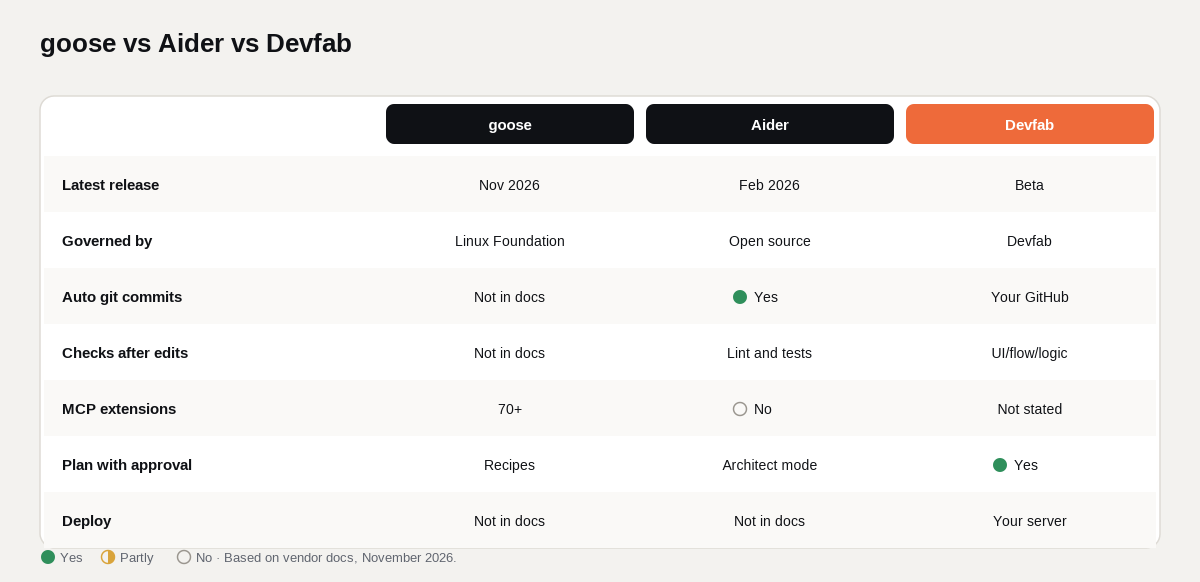
Feature comparison
| Aspect | goose | Aider | Source |
|---|---|---|---|
| Where it runs | Desktop app (macOS, Linux, Windows), CLI, API | Terminal or browser; Docker, Codespaces, Replit; IDE watch mode via code comments | goose README; Aider docs |
| Planning | Workflows saved as portable YAML recipes | Architect chat mode next to code, ask and help modes | goose docs; Aider docs |
| Agent autonomy | Spawns independent subagents in parallel | Not autonomous; the user confirms each step | goose docs; CodeMySpec review |
| Testing | Not covered in the docs we checked | Lints and tests after each change and fixes errors | Aider docs |
| Git | Not covered in the docs we checked | Commits every change to git automatically | Aider on GitHub |
| Extensions | 70+ extensions via MCP; ACP server for editors | No native MCP support | goose README; CodeMySpec review |
| Team and admin | Custom distributions with preset providers, extensions and branding | No team or collaboration features | goose README; CodeMySpec review |
| Model choice | 15+ providers incl. Anthropic, OpenAI, Google, Ollama, Bedrock; ACP agents as providers | OpenAI, Anthropic, Gemini, DeepSeek, Bedrock, OpenRouter, Ollama, LM Studio, any OpenAI-compatible API | goose README; Aider docs |
| Pricing model | Free (Apache 2.0); pay your model provider | Free (Apache 2.0); pay your model provider | goose docs; PyPI |
Cost model by team size
Neither tool has a price. The real cost is model usage, so the question at each size is how you share keys and settings.
| Team size | goose | Aider | Devfab |
|---|---|---|---|
| 1 person | Free; your provider key, an existing Claude, ChatGPT or Gemini subscription via ACP, or local models | Free; your provider key, or local models through Ollama or LM Studio | Cost logged per task and per project (Beta) |
| 5 people | Free; share recipes as YAML so everyone runs the same workflow | Free; each developer runs it alone, since it has no team features | Cost logged per task and per project (Beta) |
| 25 people | Free; build a custom distribution with preset providers and extensions | Free; standardize setup yourself, Python 3.10 to 3.12 only | Cost logged per task and per project (Beta) |
Sources: goose docs, goose README, PyPI, CodeMySpec review. Devfab is in Beta and offers predictable cost: cost is logged after each run, per task and per project.
Where goose wins
- You want active releases. goose shipped two versions in mid-November 2026; Aider's last PyPI release was in February.
- You need tools beyond the repo. 70+ MCP extensions connect goose to the systems you already use.
- You repeat the same job. Recipes save a workflow as YAML that a teammate or CI job can run.
- You want parallel work. goose can spawn subagents that run side by side.
- You want a desktop app, not only a terminal. goose ships native apps for three operating systems.
Where Aider wins
- You want every AI edit as a commit. Aider commits each change, so review and rollback stay simple.
- You want checks after each edit. Aider runs lint and tests after a change and tries to fix what fails.
- You want to approve each step. Aider is not autonomous by design, which some developers prefer.
- You care about project history. It has 49.8k GitHub stars, and the project says Aider wrote 88% of the new code in its last release (Aider on GitHub).
- You work offline or air-gapped. Local models through Ollama or LM Studio need no vendor account.
Both have documented weak spots. A September 2026 review notes goose has no default sandbox per run, no built-in model and community-only support with no SLA (PromptQuorum). For Aider, a 2026 review lists manual context management and a solo-maintainer risk (CodeMySpec).
Switching from one to the other
From Aider to goose. Install the goose desktop app or CLI and point it at the same provider key. Turn the prompts you repeat into a recipe. If you relied on Aider's automatic commits, add a git step to your recipe or commit by hand.
From goose to Aider. Install Aider from PyPI in a Python 3.10 to 3.12 environment and run it from your repo root (PyPI). Expect fewer integrations: Aider has no native MCP support, so goose extensions won't carry over.
Where Devfab fits
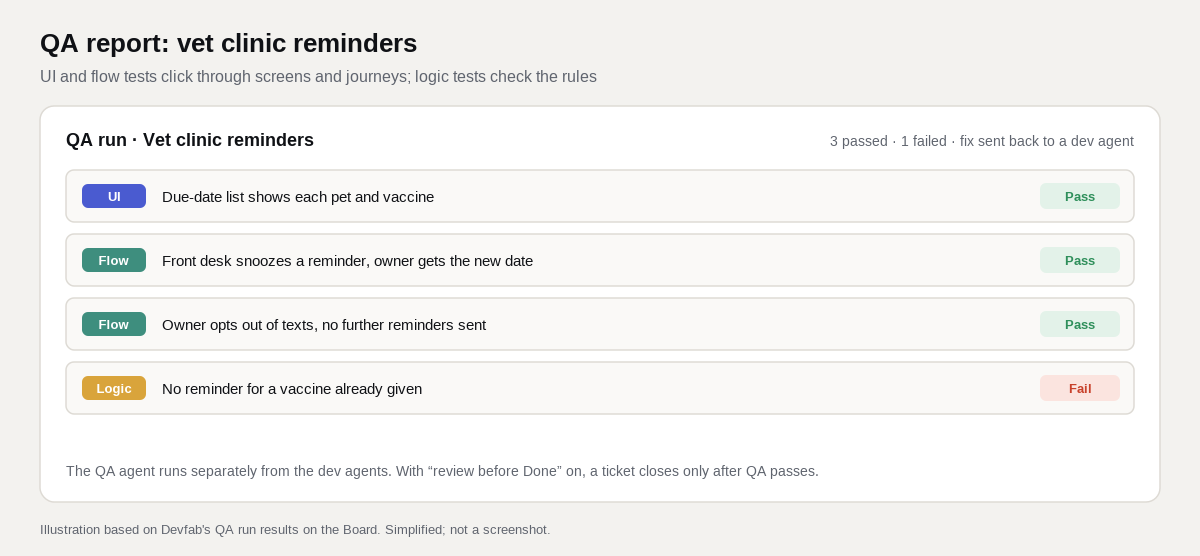
Picture a veterinary clinic that wants a reminder system: vaccine due dates, owner texts, front-desk overrides. goose or Aider can help a developer write that code. Neither, in the docs we checked, researches the clinic domain first, writes a plan for a person to approve, tests the screens end to end and deploys the app.
Coding agents automate the developer. Devfab automates the development lifecycle. Devfab's Researcher maps key terms, best practices and competitors before the Planner writes a plan, and a person approves the plan. The QA agent runs UI and flow tests, clicking screens, buttons and user journeys end to end, plus logic tests. You can choose the model for each agent or keep Devfab's default. Devfab is in Beta, has a smaller community, is not an editor for hands-on coding, and needs a GitHub account. See Devfab vs goose and Devfab vs Aider.
FAQ
Is Aider still maintained in 2026?
Partly. The latest PyPI release is 0.86.2 from February 12, 2026, and the one before it came out in August 2025. The release history shows newer model support on the main branch without a new PyPI release, and one 2026 review calls the project effectively dormant.
Are goose and Aider both free?
Yes. Both are open source under Apache 2.0 and neither has a vendor price. You pay your model provider directly, or you run local models: goose through Ollama, Aider through Ollama or LM Studio.
Which one is better for clean git history?
Aider. It commits each change to git automatically, so every AI edit is a separate commit you can review or revert. goose's docs we checked focus on recipes, extensions and subagents, not on automatic commits.
Can goose do more than coding?
Yes. goose describes itself as a general-purpose agent for coding, research, writing, automation and data analysis, with 70+ extensions through MCP. Aider is built for editing code in a git repository.
Read next
- What is an AI software factory?
- Aider alternatives
- Goose alternatives
- Best open-source AI coding agents
Want the plan, the tests and the deploy handled too, not only the edits? Try Beta
Sources (checked November 2026): goose moves to AAIF (goose blog, Apr 7, 2026); goose docs; goose README; goose releases; PromptQuorum: goose review (Sep 12, 2026); Aider docs; Aider-AI/aider on GitHub; aider-chat on PyPI; Aider release history; CodeMySpec: Aider review 2026.
Frequently asked questions
Is Aider still maintained in 2026?
Partly. The latest PyPI release is 0.86.2 from February 12, 2026, and the one before it came out in August 2025. The release history shows newer model support on the main branch without a new PyPI release, and one 2026 review calls the project effectively dormant.
Are goose and Aider both free?
Yes. Both are open source under Apache 2.0 and neither has a vendor price. You pay your model provider directly, or you run local models: goose through Ollama, Aider through Ollama or LM Studio.
Which one is better for clean git history?
Aider. It commits each change to git automatically, so every AI edit is a separate commit you can review or revert. goose's docs we checked focus on recipes, extensions and subagents, not on automatic commits.
Can goose do more than coding?
Yes. goose describes itself as a general-purpose agent for coding, research, writing, automation and data analysis, with 70+ extensions through MCP. Aider is built for editing code in a git repository.