Short answer: Cursor wins when developers want an AI-first editor, models from several providers, and cloud agents across GitHub, GitLab, Bitbucket and Azure DevOps. Claude Code wins when you want one scriptable agent in the terminal, IDEs, desktop, web and CI, with inference that can stay in your own cloud account.
Ask ten developers and you'll hear two answers. "Cursor is the better editor." "Claude Code is the better agent." The twist is that they overlap: Claude Code ships an extension that runs inside Cursor, and Cursor offers Claude models. So the real question is where your agent runs and how you pay for it. This page referees that question with sourced facts.
In this comparison:
- Cursor and Claude Code at a glance
- Feature comparison
- Cost model by team size
- Where Cursor wins
- Where Claude Code wins
Use the sections below as your checklist.
Cursor and Claude Code at a glance
Cursor: acquired by SpaceX. SpaceX agreed to buy Anysphere, Cursor's maker, in a deal confirmed on June 16, 2026; Cursor continues as a wholly owned subsidiary (The Next Web). Cursor's August 14 post says the acquisition has officially closed (Cursor blog). Plans now bundle Grok products (Cursor pricing).
Cursor is an AI code editor and coding agent with a CLI, cloud agents, mobile access and SDKs (Cursor docs). It is built for developers who want AI inside the editor.
Claude Code: active, with new ways to move sessions. Anthropic's agentic coding tool reads your codebase, edits files, runs commands and opens pull requests (Claude Code docs). In 2026, "routines" were renamed cloud scheduled tasks, and Remote Control, Dispatch and claude --teleport let you move sessions between phone, web, desktop and terminal (same source). It serves developers and engineering organizations; Anthropic recommends Team or Enterprise for most organizations (Claude Code docs).
Feature comparison
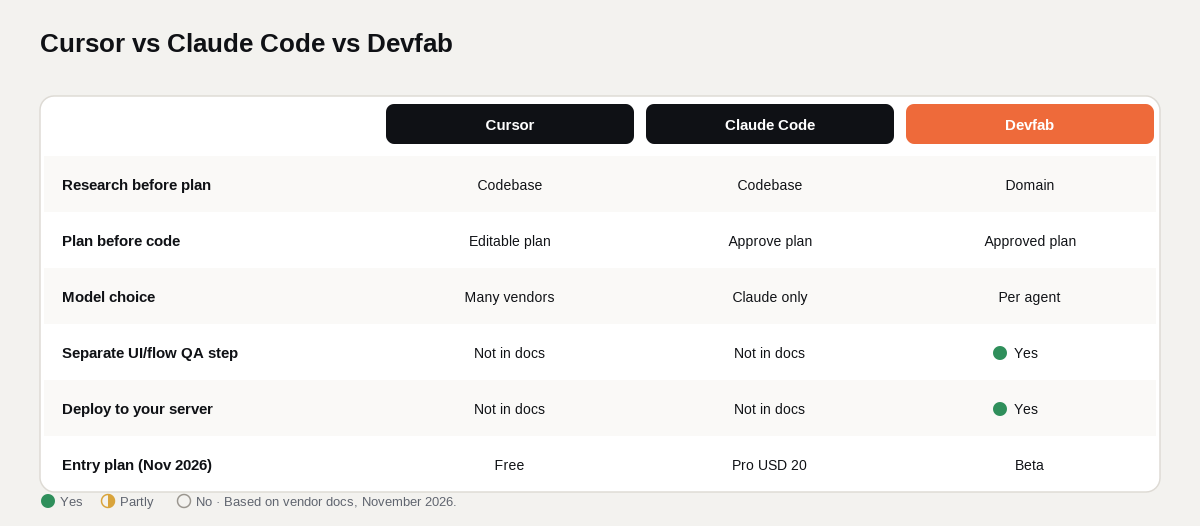
| Aspect | Cursor | Claude Code | Source |
|---|---|---|---|
| Where it runs | Desktop editor, CLI, cloud agents, mobile, SDKs | Terminal, VS Code and Cursor extension, JetBrains plugin, desktop app, web, iOS and Android | Cursor docs; Claude Code overview |
| Planning | Plan Mode drafts an editable plan after clarifying questions | Plan mode explores the codebase and proposes an approach for approval | Plan Mode; Claude Code costs |
| Agent autonomy | Cloud agents in isolated VMs, many in parallel | Subagents, a lead agent coordinating parallel agents, background agents; cloud scheduled tasks run when your computer is off | Cloud agents; Claude Code overview |
| Review and testing | Bugbot reviews PRs; Autofix pushes fixes | Code Review runs several agents per GitHub PR and verifies findings; reads the diff without building or running it | Bugbot; Code Review |
| Deploy and hosting | Not covered in the docs we checked | Not covered in the docs we checked | — |
| Where it executes | Cloud-agent tools can run on self-hosted machines | Inference via Anthropic, Bedrock, Google Cloud or Foundry; cloud sessions on self-hosted environments | Cloud agents; Enterprise deployment |
| Team and admin | SSO on Teams; SCIM, audit logs and model restrictions on Enterprise | Team: admin tools, SSO, server-managed settings; Enterprise: role-based permissions, compliance API | Cursor Enterprise; Enterprise deployment |
| Model choice | Claude, Gemini, GPT, Grok, Cursor Composer and others | Claude models only | Cursor docs; Claude Code costs |
| Pricing model | Subscription with a weekly usage pool; third-party models at API list price | Included in paid Claude plans; five-hour rolling and weekly limits; usage credits at API rates | Cursor pricing; Claude pricing |
Cost model by team size
| Team size | Cursor | Claude Code | Devfab |
|---|---|---|---|
| 1 person | Free; Plus USD 8/month (Grok models only); Premium USD 30/month with cloud agents and third-party models | Pro USD 20/month (USD 17 billed annually); Max USD 100/month | Cost logged per task and per project (Beta) |
| 5 people | Teams from USD 30 per user/month | Team Standard seat USD 25/month (USD 20 annually); Premium seat USD 125 (USD 100 annually) | Cost logged per task and per project (Beta) |
| 25 people | Teams, or Enterprise (custom) | Team, or Enterprise USD 20 per seat/month billed annually (20-seat minimum) plus usage at API rates | Cost logged per task and per project (Beta) |
Prices as of November 2026 from Cursor pricing and Claude pricing. For budgeting, Anthropic states an enterprise average of around USD 13 per developer per active day (Claude Code docs). Devfab is in Beta and offers predictable cost: cost is logged after each run, per task and per project.
Where Cursor wins
- You want a choice of model providers. Cursor lists Claude, Gemini, GPT, Grok and its own Composer.
- Developers think in an editor, and Plan Mode gives them a plan they can edit in chat or markdown before building.
- Your repos sit on GitLab, Bitbucket or Azure DevOps. Cursor's cloud agents support all three, plus GitHub.
- You want reviews that push fixes. Bugbot Autofix spawns a cloud agent to fix what it finds.
- You want a low entry price and are fine with Grok models on the Plus tier.
Where Claude Code wins
- You script agents. It runs in the terminal, in GitHub Actions and GitLab CI/CD, and through the Agent SDK.
- Inference must stay in your cloud account. Bedrock, Google Cloud and Microsoft Foundry are supported, as are your own LLM gateways.
- You want one agent everywhere, including inside Cursor through the extension, and sessions that move between phone, web, desktop and terminal.
- Work should run while you're offline. Cloud scheduled tasks run when your computer is off and can trigger on GitHub events.
- One subscription covers chat and coding. Paid Claude plans include Claude Code, with limits shared across the apps.
Switching from one to the other
From Cursor to Claude Code. You may not need to leave the editor: install the Claude Code extension in Cursor. Claude Code reads project instructions from CLAUDE.md or AGENTS.md (Claude Code docs), so move what matters from .cursor/rules into one of those files. Both tools support MCP servers, so add the same servers on the Claude Code side.
From Claude Code to Cursor. Cursor reads AGENTS.md in the project root and subdirectories (Cursor rules). Its rules docs don't mention CLAUDE.md, so copy that content into AGENTS.md. If you like Claude models, Cursor offers them; usage of third-party models is billed at API list price.
Where Devfab fits
Cursor and Claude Code both make a developer faster in a codebase. In the docs we checked, neither researches the domain before planning, routes a project plan to a person for approval, runs UI and flow tests as a separate QA step, or deploys the app.
Coding agents automate the developer. Devfab automates the development lifecycle. Its Researcher maps terms, best practices and competitors before the Planner writes a plan; a person approves it; dev agents work with ChainFlow, which maps which functions and APIs call each other so changes don't break connected features; and the QA agent runs UI, flow and logic tests before Deploy ships to your own server. Devfab is in Beta, with fewer integrations, and it is not an editor. See Devfab vs Cursor and Devfab vs Claude Code.
FAQ
Can I use Claude Code inside Cursor?
Yes. Anthropic's docs list a VS Code extension that also works in Cursor, alongside the terminal CLI, a JetBrains plugin, a desktop app, the web and mobile. Cursor's own model table also includes Claude models, so you can use Claude through either tool.
Which is cheaper for one developer?
As of November 2026, Cursor has a free tier, Plus at USD 8 a month (Grok models only) and Premium at USD 30. Claude Code needs a paid Claude plan: Pro is USD 20 a month (USD 17 billed annually) and Max is USD 100. Usage limits differ, so test with your real workload.
Can Claude Code use models other than Claude?
No. Claude Code uses Claude models only, switchable with the /model command. What you can change is where inference runs: Anthropic, Amazon Bedrock, Google Cloud or Microsoft Foundry, or through your own LLM gateway.
How do Bugbot and Claude Code's Code Review differ?
Bugbot reviews pull requests for bugs, security issues and quality problems, is billed by usage, and Autofix can push fixes. Claude Code's managed Code Review runs several agents on each GitHub pull request, verifies findings to filter false positives and never approves or blocks a PR. It is Team and Enterprise only.
Read next
- What is an AI software factory?
- Cursor alternatives
- Claude Code alternatives
- AI IDE vs CLI coding agent: which fits how you work?
Need the research, the approved plan and the QA report too? Try Beta
Sources (checked November 13, 2026): Cursor docs; Cursor pricing; Cursor Plan Mode; Cursor cloud agents; Cursor Bugbot; Cursor Enterprise; Cursor rules; Cursor blog: Joining SpaceX; The Next Web: SpaceX makes its Cursor takeover official; Claude Code docs: Overview; Claude Code docs: Enterprise deployment; Claude Code docs: Code Review; Claude Code docs: Manage costs; Claude pricing.
Frequently asked questions
Can I use Claude Code inside Cursor?
Yes. Anthropic's docs list a VS Code extension that also works in Cursor, alongside the terminal CLI, a JetBrains plugin, a desktop app, the web and mobile. Cursor's own model table also includes Claude models, so you can use Claude through either tool.
Which is cheaper for one developer?
As of November 2026, Cursor has a free tier, Plus at USD 8 a month (Grok models only) and Premium at USD 30. Claude Code needs a paid Claude plan: Pro is USD 20 a month (USD 17 billed annually) and Max is USD 100. Usage limits differ, so test with your real workload.
Can Claude Code use models other than Claude?
No. Claude Code uses Claude models only, switchable with the /model command. What you can change is where inference runs: Anthropic, Amazon Bedrock, Google Cloud or Microsoft Foundry, or through your own LLM gateway.
How do Bugbot and Claude Code's Code Review differ?
Bugbot reviews pull requests for bugs, security issues and quality problems, is billed by usage, and Autofix can push fixes. Claude Code's managed Code Review runs several agents on each GitHub pull request, verifies findings to filter false positives and never approves or blocks a PR. It is Team and Enterprise only.