Short answer: Choose Cursor if your developers live in an editor and want Plan Mode, Bugbot reviews and models from several vendors in one place. Choose OpenAI Codex if your team already pays for ChatGPT and wants a coding agent across the CLI, IDE, cloud and GitHub without buying another subscription.
You have heard both camps. Editor people say real work happens in Cursor. Agent people say Codex does the work in the cloud while they review. Both products changed homes in 2026, so many reviews you find are out of date. Cursor is now part of SpaceX. Codex now lives inside the ChatGPT apps and plans. This page is the referee: sourced facts, checked November 13, 2026.
In this comparison:
- Cursor and OpenAI Codex at a glance
- Feature comparison
- Cost model by team size
- Where Cursor wins and where OpenAI Codex wins
- Where Devfab fits
Each section answers one buying question.
Cursor and OpenAI Codex at a glance
Status first. SpaceX agreed to buy Anysphere, the company behind Cursor, in a deal confirmed on June 16, 2026. Cursor's own August 14, 2026 post says it "has officially been acquired by SpaceX". Cursor's pricing now bundles Grok products into its plans. On the OpenAI side, the Codex desktop app was folded into a combined ChatGPT desktop app on July 9, 2026. OpenAI says Codex "remains focused on software development", and its docs now sit under the ChatGPT docs.
Cursor describes itself as "a coding agent for building ambitious software". It is a desktop editor first, plus a CLI, cloud agents, mobile and SDKs. Its Plan Mode "creates detailed implementation plans before writing any code". Cloud agents run in isolated VMs, work on separate branches and push changes. It suits developers who write and review code every day.
OpenAI Codex is OpenAI's coding agent. It runs in the ChatGPT desktop, web and mobile apps, the Codex CLI, an IDE extension, Codex Cloud, GitHub and Slack. It runs several agents in parallel and checks its own work with computer and browser tools. The CLI is open source under Apache-2.0. It suits teams already on ChatGPT that want to hand off well-defined tasks.
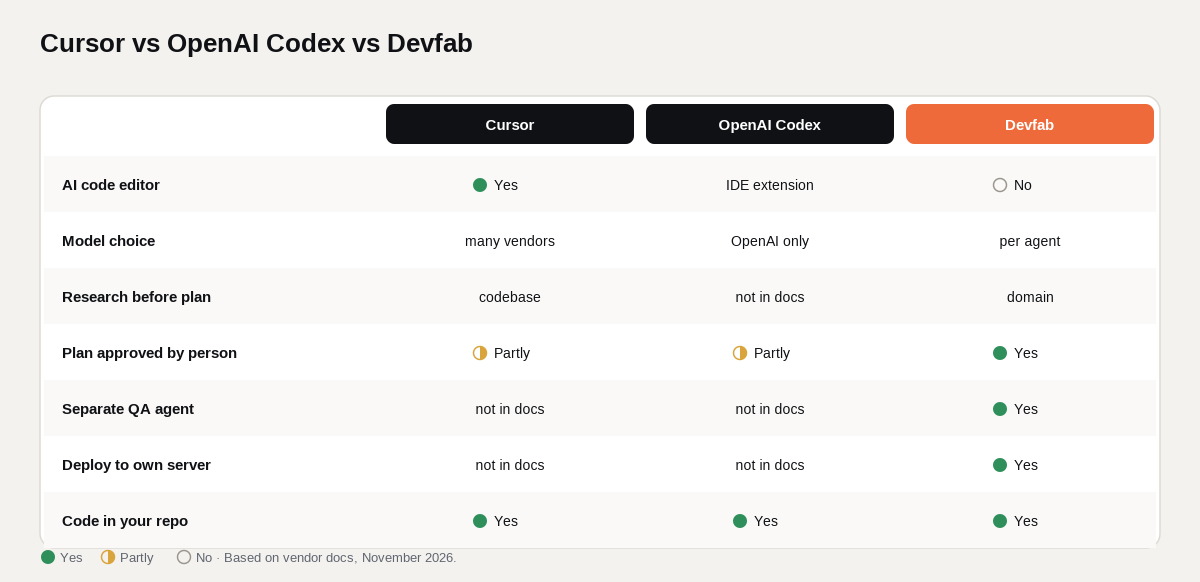
Feature comparison
| Aspect | Cursor | OpenAI Codex | Source |
|---|---|---|---|
| Where it runs | Desktop editor, CLI, cloud agents, mobile, SDKs; agents start from Slack, GitHub, Bitbucket, Linear or the API | ChatGPT desktop, web and mobile, Codex CLI, IDE extension, Codex Cloud, GitHub, Slack | Cursor docs; Codex docs |
| Planning | Plan Mode asks questions, researches the codebase and drafts an editable plan | AGENTS.md instructions, agent approvals and permissions; long-running and scheduled tasks | Cursor Plan Mode; Codex docs |
| Agent autonomy | Parallel cloud agents, each on its own branch | Parallel agents; cloud tasks keep running after you close your laptop | Cursor cloud agents; Codex |
| Testing and review | Bugbot reviews PRs; Autofix can push fixes | Checks its own work with computer and browser tools; automatic PR review | Bugbot; Codex |
| Deploy and hosting | Not a hosting product; self-hosted machines can run cloud-agent tools | Not a hosting product; sandboxed execution, including on Windows | Cursor cloud agents; Codex docs |
| Code ownership | Your repo on GitHub, GitLab, Bitbucket or Azure DevOps | Your repo; GitHub integration and GitHub Action | Cursor cloud agents; Codex docs |
| Team and admin | SSO on Teams; SCIM, audit logs and model restrictions on Enterprise | Business: admin controls, SAML SSO, no training on business data by default; Enterprise: SCIM, EKM, RBAC, audit logs | Cursor Enterprise; Codex pricing |
| Model choice | Claude, Gemini, GPT, Grok, Cursor Composer and others | OpenAI GPT models | Cursor docs; Codex pricing |
| Pricing model | Subscription tiers with a weekly usage pool; third-party models at API list price | Included in ChatGPT plans; credits after limits, or an API key at API rates | Cursor pricing; Codex pricing |
Cost model by team size
| Team size | Cursor | OpenAI Codex | Devfab |
|---|---|---|---|
| 1 person | Free tier with limited agent requests, or an individual tier with a usage pool. Cloud agents need Premium or higher | Included in your ChatGPT plan (Free, Go, Plus or Pro); credits after limits, or your own API key | Cost logged per task and per project (Beta) |
| 5 people | Teams, priced per seat, with SSO | Business, priced per user, with admin controls and SAML SSO | Cost logged per task and per project (Beta) |
| 25 people | Teams or custom Enterprise with group spend limits and access controls | Business or Enterprise through sales, with flexible pricing that scales with credits | Cost logged per task and per project (Beta) |
Pricing models as of November 13, 2026, from Cursor's pricing page and OpenAI's Codex pricing docs. Check both pages before you buy. One catch: OpenAI says its usage estimates "are not fixed message limits", and Fast modes use more of your allowance.
Where Cursor wins
- Hands-on editing. Developers who type alongside an agent get Plan Mode, chat and a full editor in one place.
- Model choice. Cursor lists models from Anthropic, Google, OpenAI and xAI next to its own Composer. Codex uses OpenAI models.
- Git hosts beyond GitHub. Cursor cloud agents support GitHub, GitLab, Bitbucket Cloud and Azure DevOps.
- Review with fixes. Bugbot finds bugs, security issues and quality problems, and Autofix can spawn a cloud agent to push the fix.
- Your own hardware. Self-Hosted Machines let cloud-agent tool execution run on machines you manage.
Where OpenAI Codex wins
- You already pay for ChatGPT. Codex is included in ChatGPT plans, so there is no new vendor to approve.
- Open-source CLI. The
openai/codexrepo is public under Apache-2.0, and you can run it with your own API key. - Delegation from anywhere. Cloud tasks keep running after you close your laptop, and you can pick them up on mobile.
- Business data defaults. OpenAI's Business plan states "No training on your business data by default", and Enterprise adds EKM and data residency controls.
Switching from one to the other
Your code stays in your own git repository with either tool, so there is nothing to export.
- Move shared instructions into AGENTS.md. Cursor supports AGENTS.md in the project root and subdirectories. Codex documents AGENTS.md too. Cursor-only project rules live in
.cursor/rulesand must use the.mdcextension. - Re-add your MCP servers. Both tools document MCP support.
- Check cloud access. Cursor cloud agents need Premium or higher, read-write repo access and a spend limit. Codex cloud review and Slack need a ChatGPT plan, not just an API key.
- Run both on one small ticket and compare the pull requests before you move the whole team.
Where Devfab fits
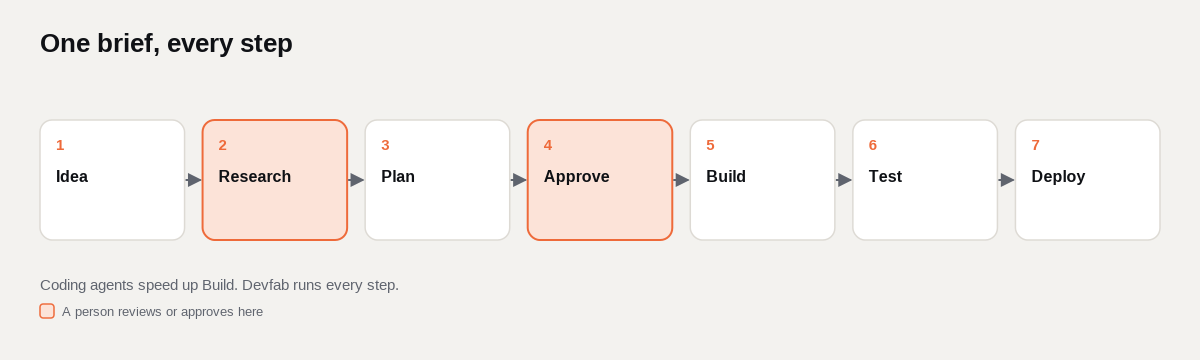
Cursor and Codex both speed up the coding step. Neither is built to run the whole project for people who don't code: the client who approves scope, or the project manager who signs off on testing.
Coding agents automate the developer. Devfab automates the development lifecycle. Devfab's Researcher maps the domain before the Planner writes anything, and a person approves the plan. Then the Coordinator creates tickets, dev agents build with ChainFlow (a map of which functions and APIs call each other), and the QA agent runs UI, flow and logic tests. The app deploys to your own server, and the code stays in your own GitHub account.
Be clear about the limits. Devfab is new and in Beta, with a smaller community and fewer integrations. It is not an editor, and it needs a GitHub account. Many teams keep Cursor or Codex for hands-on work on the same repo. See Devfab vs Cursor for the full side-by-side.
FAQ
Is OpenAI Codex free with ChatGPT?
OpenAI's pricing docs say Codex is included in ChatGPT plans, from Free and Go up to Business and Enterprise. Usage limits vary by model, task size and local or cloud work. When you reach them, credits let you keep working. Check OpenAI's pricing page for current limits.
Did the SpaceX acquisition change Cursor's models?
Cursor's pricing now bundles Grok products, and the entry Plus tier is limited to Grok models. Other tiers list models from Anthropic, Google, OpenAI, xAI and Cursor's own Composer. Third-party models are billed by usage at API list price, with spending caps.
Can my team use Cursor and Codex together?
Yes. Both work on your own git repository, and both read an AGENTS.md file, so one instruction file can serve both tools. A common split is Cursor for hands-on editing and Codex cloud tasks for parallel, well-defined fixes that come back as pull requests.
Which one is better for pull request review?
Both review pull requests. Cursor's Bugbot looks for bugs, security issues and code quality problems, uses usage-based billing, and can push fixes through Autofix. Codex offers automatic pull request review in its cloud features, which are not available when you run Codex with an API key.
Read next
- What is an AI software factory?
- AI software factory vs AI coding tools: what's the difference?
- Claude Code vs OpenAI Codex: which should your team use in 2026?
- Cursor alternatives for teams that ship to production (2026)
- Devfab vs Cursor: which fits a team that ships client work?
Need the plan, tests and deploy too, not just faster code? Try Devfab Beta
Sources (checked November 13, 2026): Cursor Docs; Cursor Plan Mode; Cursor Cloud Agents; Cursor Bugbot; Cursor Enterprise; Cursor Rules; Cursor Pricing; Cursor: Joining SpaceX; The Next Web: SpaceX makes its Cursor takeover official; OpenAI Codex; ChatGPT and Codex docs; Codex pricing; openai/codex on GitHub; The New Stack: Codex joins the ChatGPT desktop app.
Frequently asked questions
Is OpenAI Codex free with ChatGPT?
OpenAI's pricing docs say Codex is included in ChatGPT plans, from Free and Go up to Business and Enterprise. Usage limits vary by model, task size and local or cloud work. When you reach them, credits let you keep working. Check OpenAI's pricing page for current limits.
Did the SpaceX acquisition change Cursor's models?
Cursor's pricing now bundles Grok products, and the entry Plus tier is limited to Grok models. Other tiers list models from Anthropic, Google, OpenAI, xAI and Cursor's own Composer. Third-party models are billed by usage at API list price, with spending caps.
Can my team use Cursor and Codex together?
Yes. Both work on your own git repository, and both read an AGENTS.md file, so one instruction file can serve both tools. A common split is Cursor for hands-on editing and Codex cloud tasks for parallel, well-defined fixes that come back as pull requests.
Which one is better for pull request review?
Both review pull requests. Cursor's Bugbot looks for bugs, security issues and code quality problems, uses usage-based billing, and can push fixes through Autofix. Codex offers automatic pull request review in its cloud features, which are not available when you run Codex with an API key.