Short answer: goose wins when you want one free agent for coding and non-coding work, run from a desktop app or CLI, with recipes your team can share and run in CI. Cline wins when developers want an agent inside VS Code or JetBrains that plans first and asks before every file edit or command.
You want an open-source AI agent and no seat license. You've narrowed it to goose and Cline, and the forums can't agree.
One side says Cline: it lives in your editor and never acts without asking. The other says goose: it does more than code and your team can share its workflows. They're built around different moments of control. This page compares them with sources checked in November 2026.
In this comparison:
- Goose and Cline at a glance
- Feature comparison
- Cost model by team size
- Where goose wins
- Where Cline wins
We'll use one task throughout: adding a waitlist to a library's room booking app.
Goose and Cline at a glance
Both projects changed in 2026. goose moved from Block to the Agentic AI Foundation (AAIF) at the Linux Foundation. Its repo moved from block/goose to aaif-goose/goose and the docs to goose-docs.ai (goose blog, Apr 7, 2026). In January 2026, OpenAI hired at least seven Cline employees, which OpenAI said was not an acquisition (TEXXR). Cline kept shipping: CLI 2.0, Kanban, ClinePass, a new harness, Cline Desktop in beta, and Cline-Bench on November 19 (Cline blog archive).
goose is a free, general-purpose AI agent under Apache 2.0, built in Rust. It runs as a desktop app on macOS, Linux and Windows, as a CLI and through an API, for coding as well as research, writing and automation (goose README).
Cline is an open-source coding agent for VS Code, JetBrains, the terminal and desktop. It reads and writes files, runs commands and uses a browser, and "every action requires your approval" (Cline docs). Cline says its VS Code extension is installed by over 11 million developers, a vendor claim (Cline blog).
For the waitlist task, a Cline user stays in the editor and approves each step. A goose user might write a recipe once and let teammates rerun it on the next feature.
Feature comparison
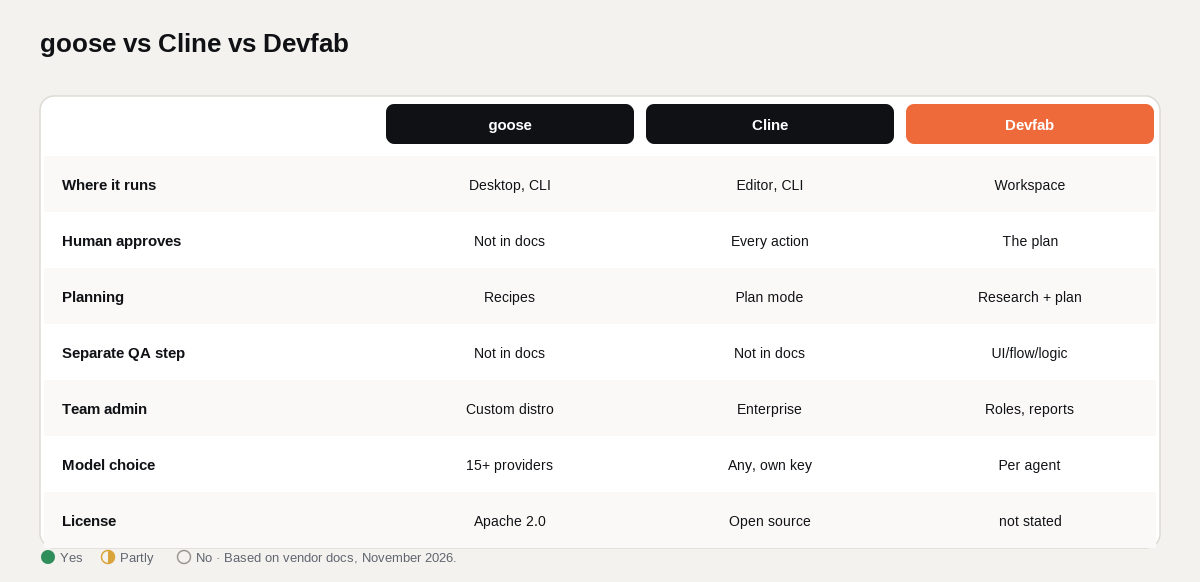
| Aspect | goose | Cline | Source |
|---|---|---|---|
| Where it runs | Desktop app (macOS, Linux, Windows), CLI, API | VS Code, JetBrains, CLI (interactive or headless), Desktop app, SDK, Kanban board; other editors via ACP | goose README; Cline docs |
| Planning | Recipes save workflows as portable YAML | Plan mode reads and discusses without editing; /deep-planning for longer planning | goose docs; Cline Plan & Act |
| Approvals | Not covered in the docs we checked; no default sandbox per run (Sep 2026 review) | Every action requires your approval; Checkpoints allow rollback | PromptQuorum; Cline docs |
| Parallel work | Independent subagents in parallel | Kanban runs many agents in parallel | goose docs; Cline docs |
| Testing | Not covered in the docs we checked | Not covered in the docs we checked | — |
| Extensions | 70+ extensions via MCP; ACP server and ACP agents as providers | MCP support; ACP for other editors | goose README; Cline docs |
| Team and admin | Custom distributions with preset providers, extensions and branding | Enterprise: SSO, SLA, RBAC, team dashboard, provider restrictions, VPC or self-hosting | goose README; Cline pricing |
| Model choice | 15+ providers incl. Ollama; Claude, ChatGPT or Gemini subscriptions via ACP | Cline usage billing, ClinePass for open-weight models, or your own key; different models for Plan and Act | goose README; Cline Plan & Act |
| Pricing model | Free; you pay your model provider | Free extension; inference billed; Enterprise custom | goose docs; Cline pricing |
Cost model by team size
| Team size | goose | Cline | Devfab |
|---|---|---|---|
| 1 person | Free; pay your provider, reuse a subscription via ACP, or run local models with Ollama | Free extension; pay inference through Cline, ClinePass or your own key | Cost logged per task and per project (Beta) |
| 5 people | Free; each person's provider usage, or a shared provider account | Free for individuals; inference per person; no team plan price shown | Cost logged per task and per project (Beta) |
| 25 people | Free; a custom distribution can preset providers and extensions | Enterprise, custom: SSO, centralized billing, RBAC, team dashboard | Cost logged per task and per project (Beta) |
As of November 2026. goose has no vendor pricing (goose docs). Cline's pricing page shows no plan prices; ClinePass appears only as a link. Devfab is in Beta and offers predictable cost: cost is logged after each run, per task and per project.
With both tools, the real bill is model usage. Budget for the provider, not the agent.
Where goose wins
- The work isn't only code. goose is built for research, writing, automation and data analysis too.
- Your team wants to share workflows. Recipes are portable YAML files you can share or run in CI.
- You want to ship your own agent. Custom distributions preset providers, extensions and branding.
- You already pay for another AI subscription. goose can use Claude, ChatGPT or Gemini subscriptions through ACP, or ACP agents such as Claude Code and Codex.
- Neutral governance matters. The project sits with a Linux Foundation body, not one company.
Where Cline wins
- Developers live in VS Code or JetBrains. Cline is an extension there, not a separate app.
- Every step needs a human yes. Each action requires approval, and Checkpoints let you roll back.
- You want to plan before edits. Plan mode reads and discusses without changing files, and you can use a different model for planning and acting.
- The company needs admin controls. Enterprise adds SSO, RBAC, a team dashboard, authentication logs and provider restrictions.
- CI should run the agent headless. The Cline CLI runs interactive or headless for CI/CD.
Both have documented weak spots. A September 2026 review of goose notes no default sandbox per run, no built-in model and community-only support with no SLA (PromptQuorum). Cline's 2026 harness migration deprecated "some less-used features," and a February 17, 2026 unauthorized npm publish of the Cline CLI got a post-mortem (Cline blog; Cline blog archive).
Switching from one to the other
Both work on your local repository, so no code needs to move.
From Cline to goose. Install the goose desktop app or CLI and point it at the same model provider or key. Re-add your MCP servers as goose extensions. If you liked Plan mode, write the planning prompt into a recipe so the whole team runs it the same way.
From goose to Cline. Install the extension in VS Code or JetBrains and connect your provider key, or use Cline billing. Move your MCP servers over. Turn your most-used recipes into a written prompt you paste into Plan mode, then switch to Act mode to run it with approvals.
Where Devfab fits
goose and Cline make one developer faster. Neither, in the docs we checked, researches the domain before a project plan, sends that plan to a person for approval, runs a separate UI and flow test pass, and deploys.
Coding agents automate the developer. Devfab automates the development lifecycle. Its Researcher maps key terms, best practices and competitors before the Planner writes a plan that a person approves. Dev agents use ChainFlow to see which functions and APIs a change touches: adding a waitlist to the booking app also affects cancellations, room calendars and reminder emails. The QA agent runs UI, flow and logic tests. Devfab is in Beta, has a smaller community, is not an editor for hands-on coding, and needs a GitHub account. See Devfab vs goose and Devfab vs Cline.
FAQ
Are goose and Cline both free?
Both agents are open source and free to install. You pay for the model. goose uses your own provider or local models through Ollama. Cline charges for inference through Cline usage billing, ClinePass for open-weight models, or your own key. Cline Enterprise is priced by quote.
Which one asks before it changes my code?
Cline. Its docs say every action requires your approval, and Plan mode only reads and discusses without editing. The goose pages we checked focus on recipes, subagents and extensions, and a September 2026 review notes goose has no default sandbox per run.
Is goose still a Block project?
No. goose moved from Block to the Agentic AI Foundation at the Linux Foundation, announced on April 7, 2026. The repository is now aaif-goose/goose and the docs live at goose-docs.ai.
Can I use goose inside VS Code like Cline?
goose is a desktop app, CLI and API, not an editor extension. It can act as an ACP server for editors that support ACP. Cline ships a VS Code extension and a JetBrains plugin, and also runs in other editors through ACP.
Read next
Need the whole project run, not just the next edit? Try Beta
Sources (checked November 2026): goose moves to AAIF (Apr 7, 2026); goose docs; goose README; PromptQuorum: goose review (Sep 12, 2026); Cline docs overview; Cline Plan & Act; Cline pricing; Cline blog archive; Cline: How we migrated 11 million users (Sep 2026); TEXXR: OpenAI hires seven employees from Cline (Jan 2026).
Frequently asked questions
Are goose and Cline both free?
Both agents are open source and free to install. You pay for the model. goose uses your own provider or local models through Ollama. Cline charges for inference through Cline usage billing, ClinePass for open-weight models, or your own key. Cline Enterprise is priced by quote.
Which one asks before it changes my code?
Cline. Its docs say every action requires your approval, and Plan mode only reads and discusses without editing. The goose pages we checked focus on recipes, subagents and extensions, and a September 2026 review notes goose has no default sandbox per run.
Is goose still a Block project?
No. goose moved from Block to the Agentic AI Foundation at the Linux Foundation, announced on April 7, 2026. The repository is now aaif-goose/goose and the docs live at goose-docs.ai.
Can I use goose inside VS Code like Cline?
goose is a desktop app, CLI and API, not an editor extension. It can act as an ACP server for editors that support ACP. Cline ships a VS Code extension and a JetBrains plugin, and also runs in other editors through ACP.