Short answer: Choose Dyad when one person wants to build web apps from prompts on their own computer, free with their own API key or fully offline with local models. Choose Devfab when a team delivers client projects: research first, a plan a person approves, agents that build and test, and deployment to the client's server.
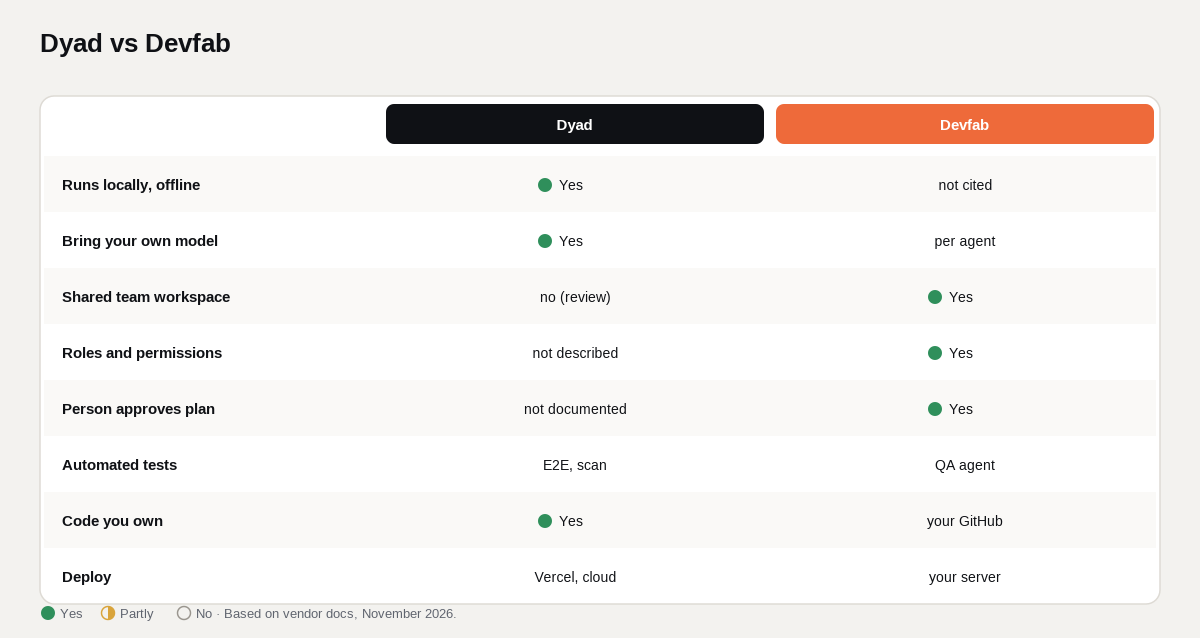
You care about owning your code. Good: Dyad and Devfab both agree with you. Dyad runs on your laptop and exports standard code. Devfab writes to your GitHub and deploys to your server. So ownership won't decide this one. What decides it is how many people touch the project and who needs to sign off before it ships. This page compares both on sourced facts.
In this comparison:
- What each tool is built for
- Switching triggers
- Moving from Dyad to Devfab
- Where Dyad is the better choice
- Where Devfab is the better choice
Read the sections in any order.
What each tool is built for
Dyad
Dyad is a free, open-source desktop app that builds web apps from prompts on your own machine. Its homepage pitch is "Turn your ideas into web apps without coding". It is actively shipping: the homepage highlights v1.23.0, with parallel end-to-end test runs and safer Neon development workflows.
What it offers:
- Local desktop app for macOS (Apple Silicon and Intel), Windows and Linux (.deb, .rpm, AppImage). Projects are stored on your computer.
- Any model: Anthropic, OpenAI, Google, or local models through Ollama and LM Studio. You bring your own keys, and with local models it can run fully offline.
- Backend in one click: Supabase or Neon for schemas, migrations and auth.
- A security scan before shipping, for SQL injection, OWASP best-practice issues, auth protection and misconfigurations.
- No lock-in: "Export clean, runnable code" in standard Next.js, edit it in VS Code, import existing repos, and deploy to GitHub and Vercel or your own cloud. Dyad doesn't host apps itself.
- Extensible through MCP servers.
- Licence: Apache 2.0 outside the
src/profolder, which uses the fair-source Functional Source License 1.1. The repo has about 22,000 GitHub stars.
Dyad's main user is a solo builder: a non-coder with an idea, or a developer who wants an MVP to continue in their own editor.
Devfab
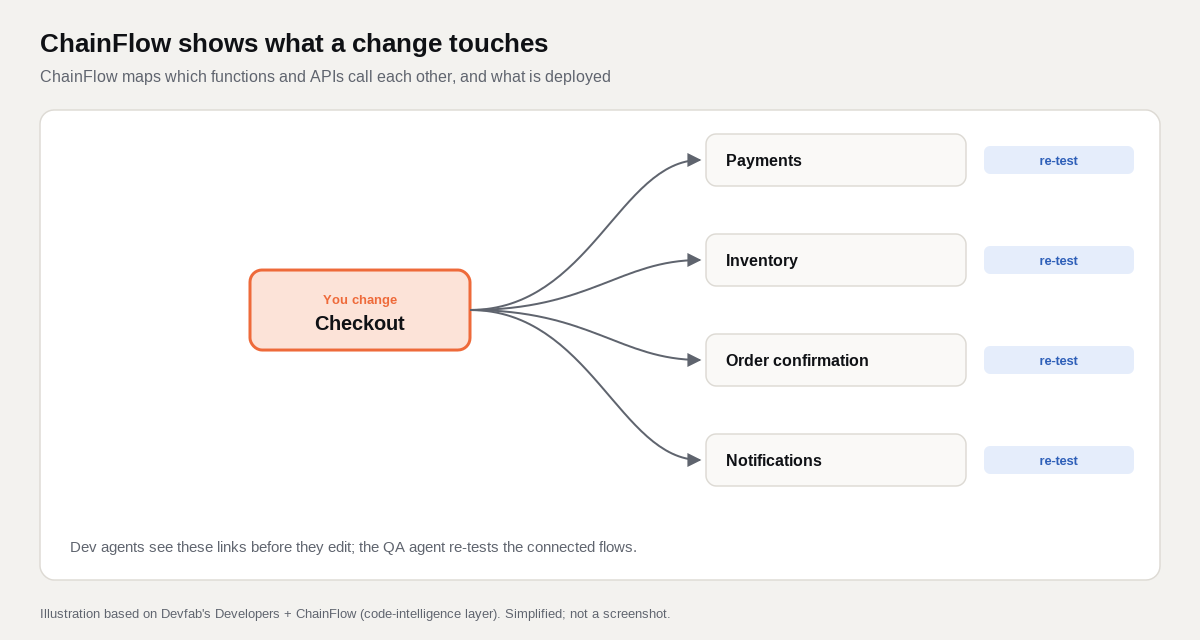
Devfab is an AI software factory for teams. Seven agents run each project. The Researcher maps the domain first: key terms, best practices and competitors, then suggests a prototype. The Planner writes the plan and a person approves it before the Coordinator creates tickets for Developers. They work with ChainFlow, which maps which functions and APIs call each other so a change doesn't break connected features. Blueprint draws screens, the QA agent runs UI and flow tests plus logic tests, and Deploy ships to your own server.
You can choose the model for each agent or keep Devfab's default. Code lives in your own GitHub account (or your organization's).
App builders automate the first version. Devfab automates the development lifecycle.
Switching triggers
| Trigger | Dyad | Devfab | Source |
|---|---|---|---|
| Several people work on one project | A September 2026 review notes no shared cloud workspace for teams | Shared workspace with roles, permissions, Kanban and Gantt | ToolDirectory review (Sep 2026) |
| You need SSO, roles or admin | Not described on Dyad's site | Roles and workspace permissions (Beta) | Dyad homepage |
| Output quality varies by model | The same review says quality "depends heavily on which model you point it at" | Choose the model per agent or keep the default; a QA agent checks results | ToolDirectory review |
| Token spend is on you | Free-tier users manage their own API keys and spend | Cost logged after each run, per task and per project | ToolDirectory review |
| Some features are experimental | Dyad says "some features are still experimental"; older machines may struggle with local models | Agents run inside the Devfab workspace | Dyad blog (Jan 2026) |
| The client must approve scope | Builds from your prompts | A person approves the plan by default before any ticket | Dyad homepage |
Cost model by team size
| Team size | Dyad | Devfab |
|---|---|---|
| 1 person | Free with no sign-up and your own API key, or a paid monthly tier with AI credits and Pro modes | Cost logged per task and per project (Beta) |
| 5 people | Each person installs Dyad and uses their own keys or plan; team plans are not described on the site | Cost logged per task and per project (Beta) |
| 25 people | Same per-person model; no team admin or central billing described | Cost logged per task and per project (Beta) |
Check Dyad's homepage pricing section for current plans. Your model provider bills its usage separately when you bring your own key.
Moving from Dyad to Devfab
Dyad already produces standard code you own, so moving is short.
- Push the project to GitHub. Connect the Dyad project to a repo in your own GitHub account or your organization's.
- Connect the repo to Devfab. Choose "Work on an existing project" and pick it.
- Leave the change box empty. ChainFlow maps the code first and suggests three small first tickets.
- Approve the plan. Human in the loop is the default; the Coordinator then creates tickets and assigns dev agents.
- Let the QA agent test UI, user flows and logic, with review before Done if you turn it on.
- Deploy to your own server, with a custom domain if you need one.
You can keep Dyad for quick local experiments on a branch while the main project runs through Devfab.
Where Dyad is the better choice
- You build alone and want everything on your own machine, including fully offline with local models.
- Budget comes first. The Free plan needs no sign-up, and you pay your model provider directly.
- You want open source you can read and change, with an Apache 2.0 core.
- The stack fits: a quick MVP on Next.js with Supabase or Neon, deployed to Vercel or your cloud.
- You want to pick any model, including local ones, for every prompt.
Where Devfab is the better choice
- A team shares the project: product owner, project manager, developers and the client, with roles and permissions.
- The domain needs research first. The Researcher maps terms, best practices and competitors before planning.
- Scope needs sign-off. A person approves the plan before agents build.
- You need a QA report from a separate agent that tests screens, user journeys and logic.
- The codebase is growing. ChainFlow shows what a change touches, such as checkout affecting payments, inventory, order confirmation and notifications.
- You report per project: user manuals, a Team Delivery Report and cost per task.
Devfab's honest limits: it is new and in Beta, with a smaller community than Dyad's open-source project and fewer integrations. This page cites no offline mode for Devfab, and it is not an editor for hands-on coding. It needs a GitHub account. For a solo weekend prototype, Dyad is less process.
FAQ
Is Dyad really free?
Dyad has a Free plan with no sign-up where you bring your own AI API key, plus paid monthly tiers with included AI credits and Pro modes for large codebases. Its code is Apache 2.0 outside a src/pro folder, which uses the Functional Source License.
Do Dyad and Devfab both let me own the code?
Yes. Dyad exports standard code you can edit in VS Code and deploys to GitHub, Vercel or your own cloud. Devfab keeps code in your own GitHub account and deploys to your own server. Ownership is not the difference; team process is.
Can a team use Dyad?
Dyad runs on each person's computer. A September 2026 review notes it has no shared cloud workspace for teams, and Dyad's site describes no SSO, roles or team admin. Teams can still share work through a GitHub repo.
Can I move a Dyad project into Devfab?
Yes. Connect the Dyad project to a GitHub repo, then in Devfab choose Work on an existing project, pick the repo and leave the change box empty. ChainFlow maps the code first and suggests three small first tickets.
Read next
- What is an AI software factory?
- Dyad vs Lovable: which should your team use in 2026?
- Open-source vs commercial AI coding agents: how to choose
- How to stop AI coding agents from breaking existing code
See a team project go from plan to deploy. Book a Devfab demo
Sources (checked November 13, 2026): Dyad homepage; dyad-sh/dyad on GitHub; Free AI app builders compared (Dyad blog, Jan 2026); Dyad review (ToolDirectory.ai, Sep 2026).
Frequently asked questions
Is Dyad really free?
Dyad has a Free plan with no sign-up where you bring your own AI API key, plus paid monthly tiers with included AI credits and Pro modes for large codebases. Its code is Apache 2.0 outside a src/pro folder, which uses the Functional Source License.
Do Dyad and Devfab both let me own the code?
Yes. Dyad exports standard code you can edit in VS Code and deploys to GitHub, Vercel or your own cloud. Devfab keeps code in your own GitHub account and deploys to your own server. Ownership is not the difference; team process is.
Can a team use Dyad?
Dyad runs on each person's computer. A September 2026 review notes it has no shared cloud workspace for teams, and Dyad's site describes no SSO, roles or team admin. Teams can still share work through a GitHub repo.
Can I move a Dyad project into Devfab?
Yes. Connect the Dyad project to a GitHub repo, then in Devfab choose Work on an existing project, pick the repo and leave the change box empty. ChainFlow maps the code first and suggests three small first tickets.