Short answer: AI coding agents break existing code when they change one part without seeing what depends on it. To stop it, map what each change touches, have a person approve a plan, keep changes small, add regression tests, test the user flows around the change, and block merges until tests and review pass.
You asked an agent for a small change, and something else broke. The tests passed, yet a customer found the bug first.
On an existing codebase, one change can reach features nobody opened. Catching that before merge is far cheaper than a fix in production.
In this guide, you'll learn:
- Why agents break code that already works
- Seven steps to keep each change safe
- How Devfab keeps agents from breaking connected features
- The mistakes that let breakage through
- A checklist to run before each merge
The rest of this page covers it in order.
Why agents break code that already works
Take a common request: "Add a discount code field to checkout." An agent opens the checkout code, adds the field, applies the discount to the total and writes a unit test. The test passes. The change looks right.
Then the problems show up somewhere else:
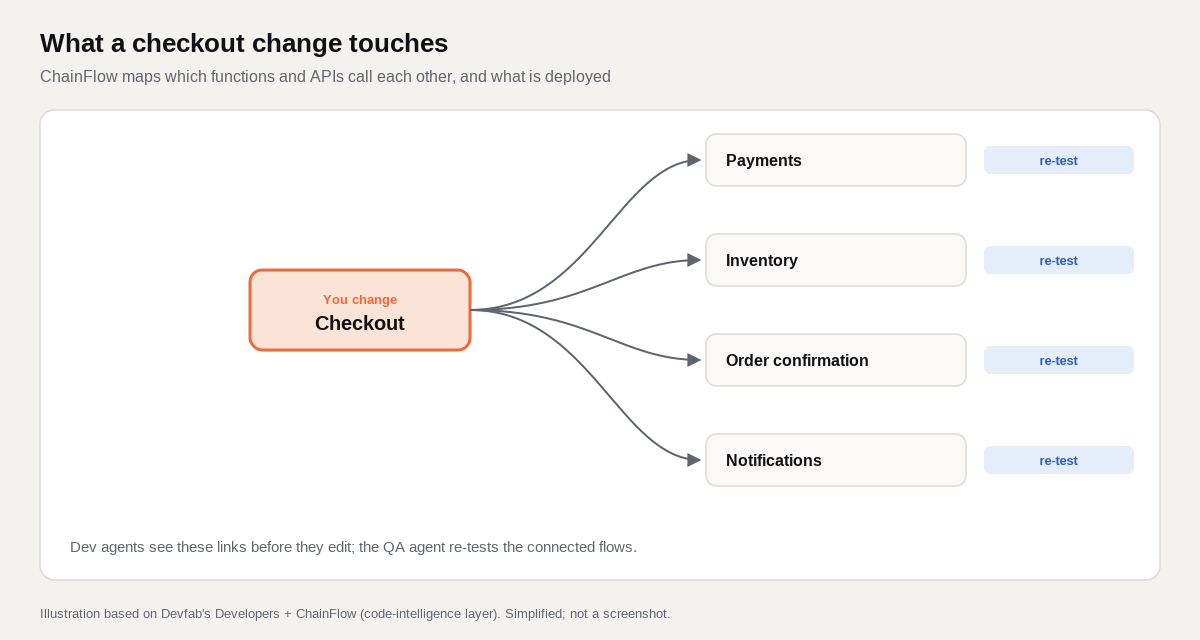
- Payments still charges the old total, because it reads the amount from a different function.
- Inventory reserves stock before the discount is checked, and a failed code leaves items locked.
- Order confirmation shows the price without the discount.
- Notifications send a receipt with the wrong amount.
None of these files were opened. The agent did what it was asked. It just couldn't see that checkout is connected to four other features. That is the core problem on existing codebases: not bad code, but correct code with an impact nobody mapped.
The steps below close that gap.
Step by step
Step 1: Map what the change touches
Before any code, find out which functions, APIs and jobs depend on the part being changed. For checkout, that means listing what calls it and what it calls: the payment call, the stock reservation, the confirmation page, the email and SMS sender.
You can do this by hand with a code search on small codebases. On larger ones you need a dependency map that is kept up to date, ideally one that also knows what is actually deployed and running, not just what is in the repository.
Step 2: Approve a plan before any code
Ask the agent for a plan first. A good plan for the discount change says:
- Which files and functions will change.
- Which connected features are affected (payments, inventory, order confirmation, notifications).
- How each one will be kept correct.
- Which tests will prove it.
A person reads the plan and approves it, or sends it back. This is the cheapest place to catch a missed dependency: before anything is built. Our guide on how to review a plan written by an AI agent covers what to look for.
Step 3: Keep each change small
One concern per change. "Add discount codes" is one ticket. "Refactor checkout and add discount codes and change the email template" is three. Small changes are easier to review, easier to test and easier to roll back if something slips through.
Step 4: Lock in current behavior with regression tests
Before the agent changes checkout, make sure tests describe how it works today. If the existing test suite is thin, the first ticket should be to add tests, not features. Then any change that alters behavior you didn't mean to alter fails a test instead of reaching users.
Martin Fowler's Test Pyramid recommends many more low-level unit tests than broad tests through the UI, because UI tests are "brittle, expensive to write, and time consuming to run." Keep that balance: lots of fast logic tests, plus a smaller set of flow tests on the journeys that matter most.
Step 5: Test the flows around the change, not only the function
This is where most AI breakage hides. Unit tests on checkout pass. What fails is the journey. So run flow tests that go end to end through the connected features:
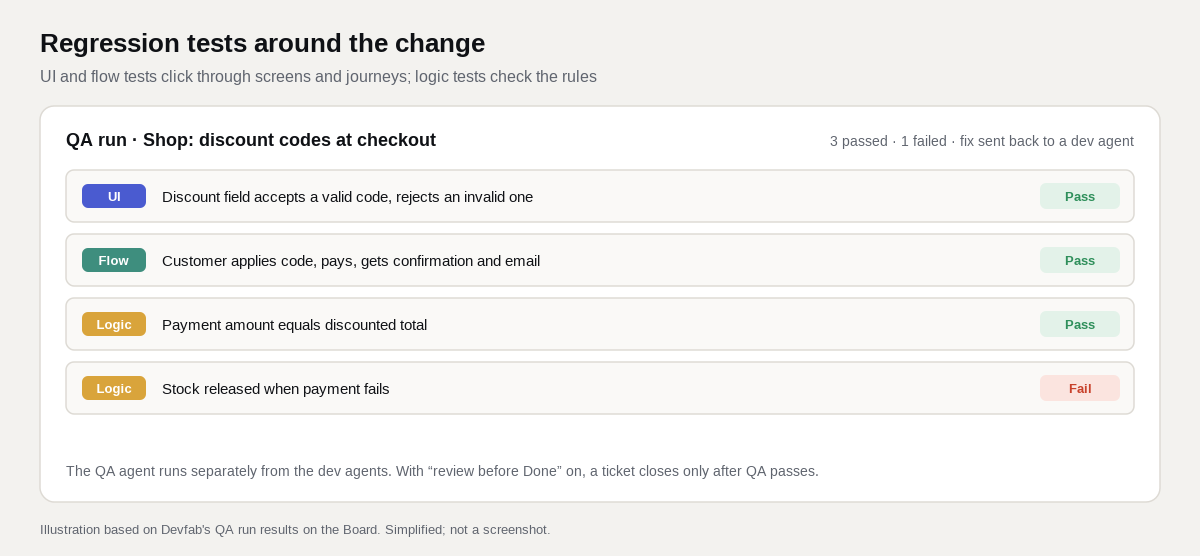
- UI test: the discount field appears, accepts a valid code and shows an error for an invalid one.
- Flow test: a customer adds items, applies a code, pays, sees the right confirmation and receives an email with the discounted total.
- Logic tests: payment amount equals the discounted total; stock is released if payment fails; an expired code is rejected.
Step 6: Gate merges on tests and review
Make the rules automatic. GitHub's protected branches can require status checks to pass and require approving reviews before a pull request is merged into a protected branch. Turn both on for your main branch. Then no agent, and no person in a hurry, can merge a change that failed its tests or skipped review.
Step 7: Turn every escaped bug into a test
Some bugs will still get through. When one does, write a test that reproduces it before you fix it. Fowler's advice for bugs found by high-level tests is to replicate them with a unit test first, so the fix stays fixed. Over time the test suite grows exactly where your code is fragile.
How Devfab keeps agents from breaking connected features
Devfab is a software factory. Coding agents automate the developer. Devfab automates the development lifecycle: research, plan, build, test and deploy, with a person approving the plan. On existing code, three parts work together:
- ChainFlow, Devfab's code-intelligence layer, maps which functions and APIs call each other and what is deployed. Developer agents see the impact of a change before they make it: change checkout, and payments, inventory, order confirmation and notifications show up as affected.
- Plan approval. The Planner publishes a plan and a person approves it before the Coordinator creates tickets. Affected features are visible in the plan, where they are cheap to discuss.
- QA agent. It runs UI and flow tests (screens, buttons and user journeys clicked end to end) plus logic tests. With "QA agent · review before Done" switched on, a ticket isn't Done until it passes.
If you connect an existing repo and leave the change box empty, Devfab maps the code first with ChainFlow and suggests three small first tickets. That is a sensible way to build trust before agents touch checkout.
Common mistakes
- Trusting a green unit test. It proves the function works, not the journey.
- No impact check before coding. The agent changes what it was told to and nothing else, including the things that needed to change.
- Big mixed changes. One pull request with five concerns can't be reviewed properly.
- Thin tests on old code. Without tests of current behavior, nothing tells you it changed.
- Fixing escaped bugs without a test. The same bug comes back with the next change.
Checklist
- [ ] Impact of the change mapped (callers, APIs, deployed services)
- [ ] Plan lists affected features and is approved by a person
- [ ] One concern per change
- [ ] Regression tests cover current behavior before the change
- [ ] UI, flow and logic tests run on the journeys around the change
- [ ] Main branch requires passing checks and an approving review
- [ ] Every escaped bug gets a test before the fix
FAQ
Why do AI coding agents break existing code?
Usually because they can't see what depends on the code they change. The edit looks correct in the file, but another feature calls that function or API and now gets something it doesn't expect.
Are unit tests enough to catch breakage from AI changes?
No. Unit tests catch broken logic in one function. Breakage between features often shows up only in flow tests that run a full user journey, like a checkout from cart to confirmation email.
Should I stop letting AI agents change core flows like checkout?
Not forever. Start them on low-risk work, and let them touch core flows once you have an impact map, a plan review step and regression tests that cover those flows.
How does Devfab prevent agents from breaking connected features?
ChainFlow maps which functions and APIs call each other and what is deployed, so dev agents see the impact of a change. A person approves the plan, and the QA agent runs UI, flow and logic tests before a ticket is Done.
Read next
- What is an AI software factory?
- How to use AI agents on a large existing codebase
- How to review a plan written by an AI agent
- Build: restaurant ordering app
- AI code review vs QA agent: what each one catches
- AI pair programmer vs autonomous coding agent: what's the difference?
Devfab is in Beta. Connect a repo and see what a change touches before it ships. Try the Devfab Beta
Sources (checked November 2026): Martin Fowler: Test Pyramid; GitHub Docs: About protected branches.
Frequently asked questions
Why do AI coding agents break existing code?
Usually because they can't see what depends on the code they change. The edit looks correct in the file, but another feature calls that function or API and now gets something it doesn't expect.
Are unit tests enough to catch breakage from AI changes?
No. Unit tests catch broken logic in one function. Breakage between features often shows up only in flow tests that run a full user journey, like a checkout from cart to confirmation email.
Should I stop letting AI agents change core flows like checkout?
Not forever. Start them on low-risk work, and let them touch core flows once you have an impact map, a plan review step and regression tests that cover those flows.
How does Devfab prevent agents from breaking connected features?
ChainFlow maps which functions and APIs call each other and what is deployed, so dev agents see the impact of a change. A person approves the plan, and the QA agent runs UI, flow and logic tests before a ticket is Done.