Short answer: Microsoft Power Apps wins when your company runs on Microsoft 365, Entra and Dataverse, and IT wants apps inside existing tenant policies and data loss prevention. Retool wins when your data sits in many databases and APIs, and you want a prompt-first builder that writes React and TypeScript you can inspect.
Your ops team needs one more internal app, and IT wants it governed. One camp says "we already pay for Microsoft, use Power Apps." The other says "Retool is what developers like." Both sides have a point. In 2026 both products also learned to run code-first React apps, which changes the question. This page is the referee: sourced facts, no hands-on claims.
In this comparison:
- Power Apps and Retool at a glance
- Feature comparison
- Cost model by team size
- Where Power Apps wins and where Retool wins
- Switching from one to the other
Read in order, or jump to your deciding factor.
Power Apps and Retool at a glance
Changes in 2026
- Power Apps: the September 2026 feature update made the "app-builder skill" generally available. It lets AI coding tools build whole model-driven apps, "creating nothing until the user approves the build plan." From November 15, 2026, new unmanaged developer environments and new Dataverse for Teams environments can't be created. Included AI Builder credits on attended RPA licenses were removed on November 1, 2026.
- Retool: on June 17, 2026, Retool announced its React-based AI app builder as generally available. In October 2026 it made bring-your-own AI key Enterprise-only; a Retool Forum thread shows users complaining that managed credits ran out, and staff acknowledged poor communication.
Microsoft Power Apps
Power Apps is Microsoft's low-code platform for business users, developers and IT "in one workspace." Users "describe what they need in natural language" to generate apps, and it supports "pro code, no code, low code, and generated apps." The Plans workspace uses AI agents as requirements analyst, data modeler and solution architect before generating assets. Data lives in Microsoft Dataverse. IT can "centralize policies for environments, data loss prevention, access, and auditing." Code apps let developers build React or Vue apps in Visual Studio Code and run them on Power Platform, with "1,500+ connectors, callable directly from JavaScript."
Retool
Retool builds internal apps, workflows and agents on top of company data. Its new builder is "optimized for prompt-first workflows" and accepts screenshots, PDFs, design files and spreadsheets. Apps are "written in React on the frontend and TypeScript on the backend," with a Code tab to inspect and edit. Permissions attach to data sources and apply "regardless of where an app was built," including apps imported from Lovable, Replit or Claude Code. Retool runs on Retool Cloud, in your VPC or fully on-prem.
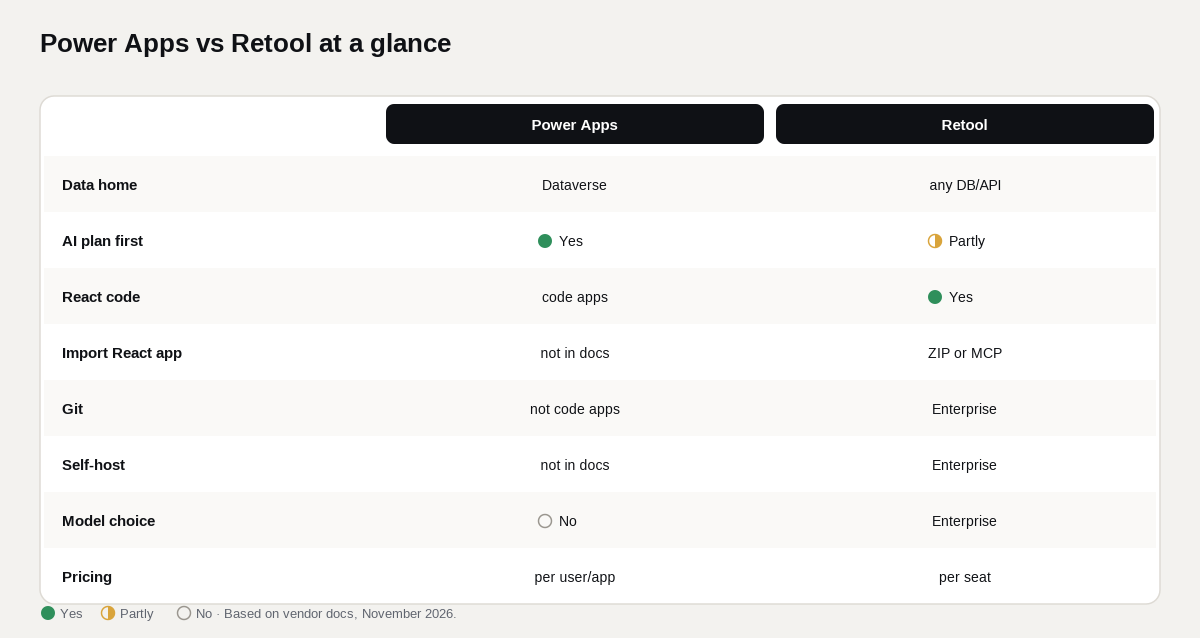
Feature comparison
| Aspect | Power Apps | Retool | Source |
|---|---|---|---|
| Where it runs | Maker studio in the browser; AI coding tools via app-builder skill | Browser editor on Retool Cloud, your VPC or on-prem; MCP server or CLI | Power Platform Sept 2026; Retool launch |
| Planning / spec | Plans workspace: AI requirements analyst, data modeler, solution architect | Prompt the whole app or one component | The New Stack; Retool launch |
| Agent autonomy | App-builder skill builds nothing until you approve the plan | Agent asks approval before running functions that change data | Power Platform Sept 2026; Jet Admin review |
| Code | Generative pages produce React; code apps in React or Vue | React frontend, TypeScript backend; Code and Data tabs | The New Stack; Code apps |
| Git / environments | Code apps don't support Power Platform Git integration | Git source control on Enterprise; staging on Team | Code apps; Retool pricing |
| Hosting | Self-hosting not covered in the docs we checked; on-prem data via connectors | Retool Cloud; self-hosted and air-gapped on Enterprise | Licensing FAQ; Retool pricing |
| Team / admin | Environment, DLP, access and audit policies; code apps sign in with Entra ID | Custom SSO, SCIM, granular roles on Enterprise; audit logs from Business | Power Apps; Retool pricing |
| Model choice | AI features draw on AI Builder or Copilot Credits | Retool-managed Anthropic and OpenAI models; any provider on Enterprise | Licensing FAQ; Retool models |
| Pricing model | Per user or per user per app; pay-as-you-go via Azure (preview) | Per seat (builder and internal-user rates); pooled AI credits; metered workflows | Licensing FAQ; Retool pricing |
Cost model by team size
| Team size | Power Apps | Retool |
|---|---|---|
| 1 person | Free Developer Plan for non-production work | Free tier for up to 5 users, production environment only |
| 5 people | Per-user (Premium, unlimited apps) or per-user-per-app licenses; some Microsoft 365 licenses include limited use | Team plan per seat, with separate builder and internal-user rates; staging plus production |
| 25 people | Same licenses, or pay-as-you-go billed only for monthly active users of one app (preview); Dataverse capacity and API requests are add-ons | Business for audit logs, or Enterprise for SSO, SCIM, Git and self-hosting |
Check the Power Platform licensing FAQ and Retool's pricing page for amounts as of November 2026. On Power Apps, premium, on-premises and custom connectors, and now SQL, Azure and Dynamics 365, need a standalone license beyond Microsoft 365 rights. On Retool, AI credits are pooled per plan with no rollover, agents are billed by model run time, and managed keys are rate-limited. Devfab (Beta), for reference, logs cost after each run, per task and per project.
Where Power Apps wins
- You are a Microsoft 365 shop. Apps sit inside your tenant's environments, DLP and audit policies.
- Your data is in Dataverse, SharePoint or Dynamics 365. Microsoft connectors are first-party.
- Large internal audiences. Some users already have seeded Microsoft 365 rights, and pay-as-you-go bills only monthly active users of an app.
- You want AI to plan first. The Plans workspace and the app-builder skill draft a plan you approve before anything is built.
Where Retool wins
- Your data lives everywhere. Retool connects to many databases and APIs, with permissions enforced at the data source.
- Developers want readable code. React and TypeScript, with a Code tab to inspect and edit.
- You must host it yourself. VPC, on-prem or air-gapped on Enterprise.
- You have AI prototypes to govern. Import apps from Lovable, Replit or Claude Code and apply one set of access rules.
Switching from one to the other
Power Apps to Retool. Retool's importer accepts React, HTML or JavaScript frontends with Node.js or Supabase backends, as a ZIP of up to 50 MB or through its MCP server. Retool warns that "migrated apps are not identical," and unmatched data sources fall back to mock data. A code app that calls Power Platform connectors will need its data calls rewired. Canvas and model-driven apps are a rebuild.
Retool to Power Apps. We found no Retool importer in the Microsoft docs we checked. The closest path is a code app: rebuild the React front end in Visual Studio Code, connect to data through Power Platform connectors, and have an admin enable code apps on the environment first.
Where Devfab fits
Both platforms are built for internal apps on company data. Some projects outgrow that: a customer portal, a field app, a product for a client. Then you need research, a reviewed plan, tested user journeys and code you can take anywhere.
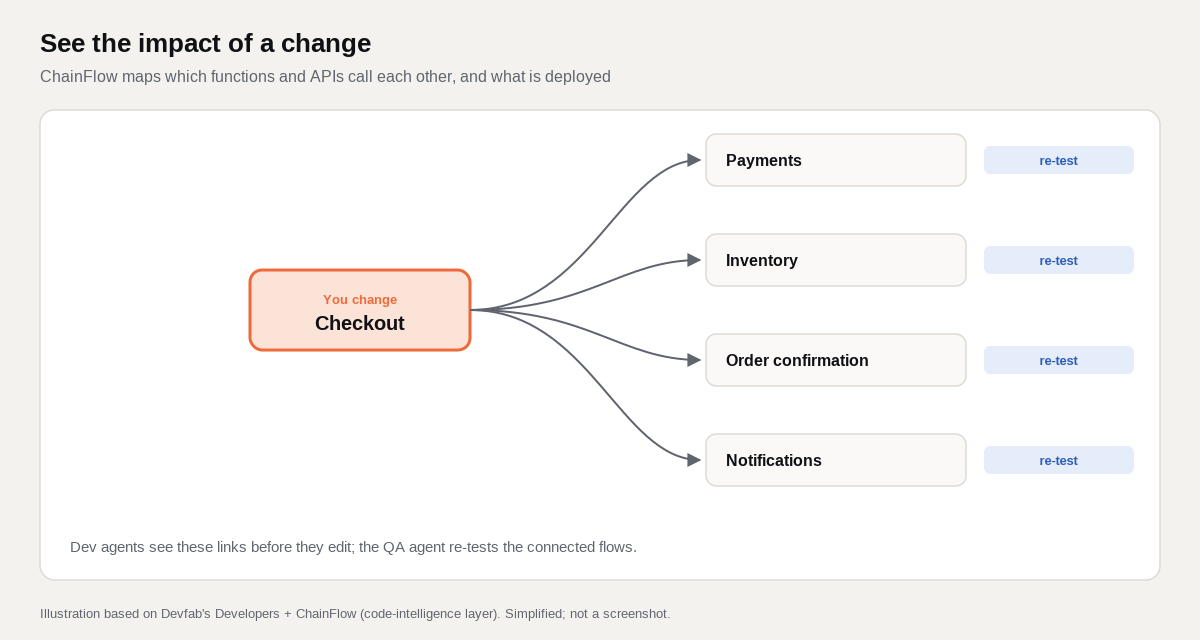
Coding agents automate the developer. Devfab automates the development lifecycle. Devfab's Researcher maps the domain first: key terms, best practices and competitors. A person approves the plan. On existing repos, ChainFlow maps which functions and APIs call each other, so a change to checkout doesn't quietly break payments or notifications. The QA agent runs UI, flow and logic tests. Code lives in your own GitHub account (or your organization's), and Deploy ships to your own server.
Devfab's honest limits: it is new and in Beta, with a smaller community and far fewer connectors than either platform. It is not a drag-and-drop tool or an editor for hands-on coding, and it needs a GitHub account. For a Teams-integrated form on SharePoint, Power Apps is the better pick. See Devfab vs Microsoft Power Apps.
FAQ
Is Power Apps free with Microsoft 365?
Partly. Some Microsoft 365 licenses include limited Power Apps use. Premium, on-premises and custom connectors, and now SQL, Azure and Dynamics 365 connectors, need a standalone license. Code apps also need Power Apps Premium, pay-as-you-go, an App Pass or auto-claim.
Can Retool and Power Apps both run React apps?
Yes, in different ways. Power Apps code apps let developers build React or Vue apps in Visual Studio Code and run them on Power Platform. Retool's new builder writes React and TypeScript, and it can import outside React apps as a ZIP of up to 50 MB or through its MCP server.
Which is better for a company that is not on Microsoft 365?
Usually Retool. It connects to any database or API and runs on Retool Cloud, in your VPC or on-prem. Power Apps stores data in Dataverse and fits best where Microsoft Entra, SharePoint, Teams and Dynamics 365 are already in place.
Can I self-host either one?
Retool lists self-hosted and air-gapped deployment on its Enterprise plan. Self-hosting Power Apps was not covered in the Microsoft docs we checked; on-premises data is reached through on-premises connectors, which need a standalone license.
Read next
- What is an AI software factory?
- Microsoft Power Apps alternatives
- Retool alternatives
- Devfab vs Microsoft Power Apps
- Low-code vs AI software factory
Need an app that leaves the tenant? Try Devfab Beta
Sources (checked November 13, 2026): Microsoft Power Apps product page; Power Platform licensing FAQs; What's new in Power Platform: September 2026; Power Apps code apps overview; The New Stack: Power Apps Plans (May 19, 2025); Retool launches a React AI app builder; Retool extends governance to vibe-coded apps; Retool pricing; Retool AI providers and models; Retool: import external apps; Retool Forum: BYOK gating thread (Oct 2026); Jet Admin: Retool review (competitor, Sep 26, 2026).
Frequently asked questions
Is Power Apps free with Microsoft 365?
Partly. Some Microsoft 365 licenses include limited Power Apps use. Premium, on-premises and custom connectors, and now SQL, Azure and Dynamics 365 connectors, need a standalone license. Code apps also need Power Apps Premium, pay-as-you-go, an App Pass or auto-claim.
Can Retool and Power Apps both run React apps?
Yes, in different ways. Power Apps code apps let developers build React or Vue apps in Visual Studio Code and run them on Power Platform. Retool's new builder writes React and TypeScript, and it can import outside React apps as a ZIP of up to 50 MB or through its MCP server.
Which is better for a company that is not on Microsoft 365?
Usually Retool. It connects to any database or API and runs on Retool Cloud, in your VPC or on-prem. Power Apps stores data in Dataverse and fits best where Microsoft Entra, SharePoint, Teams and Dynamics 365 are already in place.
Can I self-host either one?
Retool lists self-hosted and air-gapped deployment on its Enterprise plan. Self-hosting Power Apps was not covered in the Microsoft docs we checked; on-premises data is reached through on-premises connectors, which need a standalone license.