Short answer: Choose Tempo when a product team with an existing codebase wants agents on its own machines to turn issues, feedback and PRDs into reviewed pull requests, using its own coding-agent subscriptions. Choose Devfab when you deliver whole client projects: research first, an approved plan, agents that build and test, and deployment to the client's server.
For once, this isn't a factory versus a tool. Tempo now calls itself "the AI software factory for product teams", the same category Devfab uses. Both believe agents should do the work while people approve the key decisions. So the useful question isn't which one is a factory. It is where each factory starts, where it runs, and where it stops. We answer that with Tempo's own docs.
In this comparison:
- What each tool is built for
- Switching triggers
- Cost model by team size
- Where Tempo is the better choice
- Where Devfab is the better choice
We aim to be the fair referee here.
What each tool is built for
Tempo Labs
Tempo pivoted. Its migration guide says that "On June 14 we'll wind down the Tempo web editor and move everything to the desktop app", calling the new app "a significant rebuild of Tempo from the ground-up". The old app.tempo.build stays up as a read-only billing portal. Tempo's YC profile still shows the older tagline, "Visual Editor for React, powered by AI".
Today Tempo describes itself as "the AI software factory for product teams": it "turns customer feedback, issues, and product requirements into reviewed pull requests. AI agents do the work while your team approves key decisions."
How it works:
- Desktop app for macOS and Windows. It requires Git, and each chat session runs in its own git worktree.
- Agents are "a standing prompt wired to a trigger": an assigned issue, issue events, a cron schedule, Slack, or a GitHub webhook. New agents stay disabled until you enable them. "Agents use your Tempo identity and your machine", and "nothing runs while Tempo isn't running". Remote Control lets workspaces run on another machine.
- Your choice of coding agent: Claude Code, Codex or OpenCode with your own plan or API key, or Tempo's own inference.
- Docs, canvas and issues: long-form PRDs and specs that chat reads as context; a canvas where each frame is a live React route or component and edits write back to source; and a Kanban board whose cards link to branches, PRs, canvases and docs.
- Pipeline and review: an August 19, 2026 release added a "Software Factory default stage pipeline" to agent templates. The changelog also lists code-review findings in chat, a built-in /audit-tdd command, a daily PR review digest, Visual Review and commit-aware preview links.
Tempo's main user is a product team with designers, PMs and engineers on one codebase.
Devfab
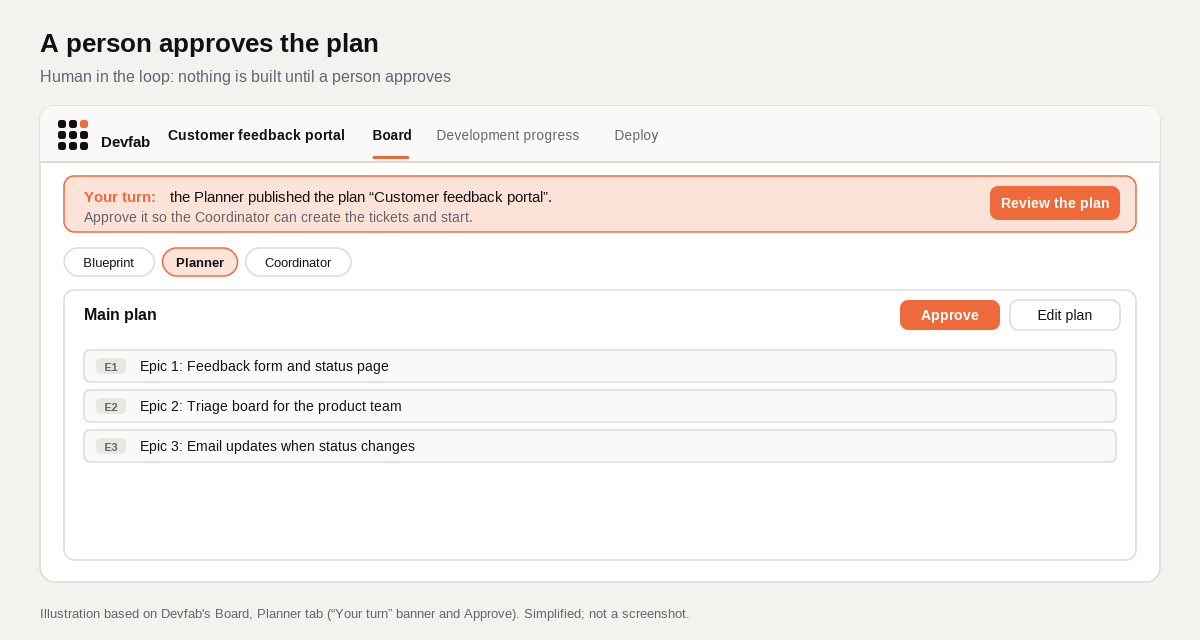
Devfab runs a client project through seven agents. The Researcher maps the domain first: key terms, best practices for that kind of app and competitors, then suggests a prototype. The Planner writes the plan; the banner reads "Your turn" until a person approves. The Coordinator creates tickets for Developers, who use ChainFlow to see which functions and APIs a change affects. Blueprint draws screens, the QA agent runs UI and flow tests plus logic tests, and Deploy ships to production on your own server.
You can choose the model for each agent or keep Devfab's default. Code lives in your own GitHub account (or your organization's).
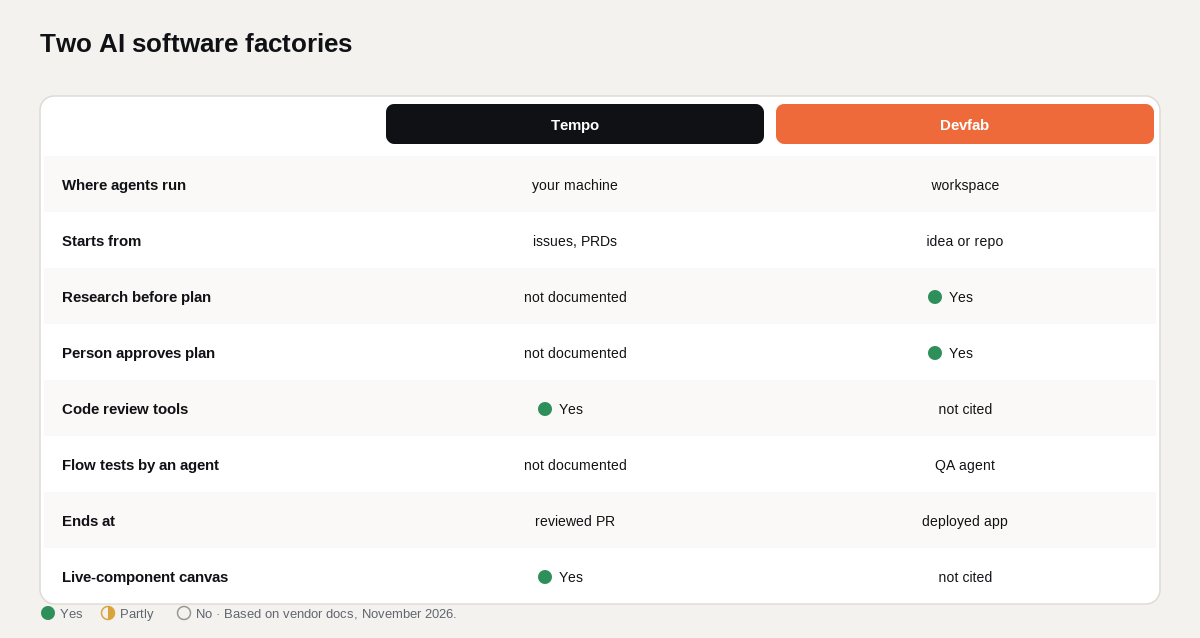
Our usual line is "Coding agents automate the developer. Devfab automates the development lifecycle." Tempo is a fair challenge to it, because Tempo also wraps coding agents in a lifecycle. The difference is scope: Tempo's documented loop runs from issue to reviewed pull request, while Devfab's runs from research to deployed app and user manual.
Switching triggers
| Trigger | Tempo | Devfab | Source |
|---|---|---|---|
| You want agents off personal machines | Agents use your machine; nothing runs while Tempo isn't running | Agents run inside the Devfab workspace, with Run mode and App status controls | Tempo agents docs |
| You start from an idea, not an issue board | Starts from feedback, issues and PRDs | Research step maps the domain before any plan exists | Tempo homepage |
| The client must approve scope first | New agents start disabled; the docs don't describe a formal approval step for agent output | A person approves the plan by default before tickets exist | Tempo agents docs |
| You need deployment included | Deployment is not covered in the docs we checked; previews and branch-live links are | Deploy tab: ship to production on your own server, custom domain optional | Tempo homepage, changelog |
| Cost depends on model effort | Docs warn top models on high effort can "burn credits extremely fast" on smaller plans | Cost logged after each run, per task and per project | Tempo billing docs |
| Your security review needs documents | Tempo's docs index lists no security or self-host page | Code in your GitHub; app on your server | Tempo docs index |
Cost model by team size
| Team size | Tempo | Devfab |
|---|---|---|
| 1 person | Subscription whose price is a monthly inference balance, metered in usage; or use your own coding-agent subscription | Cost logged per task and per project (Beta) |
| 5 people | Usage-metered balance with top-ups; each person can bring their own coding-agent plan or API key | Cost logged per task and per project (Beta) |
| 25 people | Same usage model; team or enterprise terms are not covered in the docs we checked | Cost logged per task and per project (Beta) |
Tempo says it bills at break-even API pricing and "does not make any profit on these plans". Check Tempo's billing guide for current amounts.
Moving from Tempo to Devfab
Tempo already works in your git repository, so there is no export step.
- Push to GitHub. If the repo is local only, push it to your own GitHub account or your organization's.
- Connect it to Devfab. Choose "Work on an existing project" and pick the repo.
- Leave the change box empty. ChainFlow maps the code first and suggests three small first tickets.
- Bring your PRDs. Attach specs from Tempo's docs so the Planner starts from what your team decided.
- Approve the plan. The Coordinator then creates tickets and assigns dev agents.
- Let the QA agent test UI, flows and logic, then deploy to your own server.
Many teams won't switch outright. A product team can keep Tempo for daily issues on its codebase while new client projects run through Devfab.
Where Tempo is the better choice
- You want agents on your own machines, acting under your identity, with your existing coding-agent plans.
- Designers and PMs edit the product visually. Tempo's canvas edits live React components and writes back to source.
- Work starts from an issue board, Slack or feedback, and the output you want is a reviewed pull request.
- You pick the coding agent: Claude Code, Codex or OpenCode, or Tempo's own inference.
- You want usage billing at cost. Tempo says its plans make no profit on inference.
Where Devfab is the better choice
- You deliver projects to clients, from a blank idea to a deployed app, and want the same steps each time.
- The domain needs research first. The Researcher maps terms, best practices and competitors before the plan.
- The client approves the plan before any ticket exists, and Human in the loop is the default.
- You need functional proof. The QA agent clicks through screens and user journeys and runs logic tests, with optional review before Done.
- Deployment is part of the job. Ship to production on the client's server, with deploy history.
- You need delivery docs: blueprints, sequence flows, user manuals and a Team Delivery Report, plus cost per task.
Devfab's honest limits: it is new and in Beta, with a smaller community and fewer integrations than Tempo's Slack, GitHub and agent ecosystem. This page cites no Devfab equivalent of Tempo's live-component canvas, and Devfab is not an editor for hands-on coding. It needs a GitHub account.
FAQ
Is Tempo Labs still a visual React editor?
Not in the browser. Tempo's migration guide says the web editor was wound down on June 14 and everything moved to a desktop app for macOS and Windows; app.tempo.build stays up as a read-only billing portal. The desktop app still has a canvas where you edit live React components.
Tempo and Devfab both say 'AI software factory'. Are they the same thing?
They share the idea that agents do the work and people approve key decisions. Tempo starts from your issue board, feedback and PRDs and ends at reviewed pull requests, with agents running on your machine. Devfab starts from an idea or a repo, researches the domain, gets a plan approved, then builds, tests with a QA agent and deploys to your server.
Do Tempo's agents run in the cloud?
Tempo's agents docs say agents use your Tempo identity and your machine, and nothing runs while Tempo isn't running. Remote Control lets you run workspaces on another machine. Tempo's changelog also lists cloud canvases and an MCP package for cloud agents.
How do Tempo and Devfab charge?
Tempo's plans give a monthly balance for inference, metered in dollars of usage rather than prompts, and Tempo says it bills at break-even API pricing; you can also use your own coding-agent subscription. Devfab is in Beta with predictable cost: cost is logged after each run, per task and per project.
Read next
- What is an AI software factory?
- AI software factory vs AI coding tools: what's the difference?
- Cloud coding agents vs local coding agents: pros and cons
- How to review a plan written by an AI agent
See Devfab's factory run one of your client projects. Book a Devfab demo
Sources (checked November 13, 2026): Tempo homepage; Tempo docs; Tempo docs: introduction; Tempo docs: quick start; Tempo docs: agents; Tempo docs: migrating from web to desktop; Tempo docs: web prompt credits and billing; Tempo changelog; Tempo docs index; Tempo on Y Combinator.
Frequently asked questions
Is Tempo Labs still a visual React editor?
Not in the browser. Tempo's migration guide says the web editor was wound down on June 14 and everything moved to a desktop app for macOS and Windows; app.tempo.build stays up as a read-only billing portal. The desktop app still has a canvas where you edit live React components.
Tempo and Devfab both say 'AI software factory'. Are they the same thing?
They share the idea that agents do the work and people approve key decisions. Tempo starts from your issue board, feedback and PRDs and ends at reviewed pull requests, with agents running on your machine. Devfab starts from an idea or a repo, researches the domain, gets a plan approved, then builds, tests with a QA agent and deploys to your server.
Do Tempo's agents run in the cloud?
Tempo's agents docs say agents use your Tempo identity and your machine, and nothing runs while Tempo isn't running. Remote Control lets you run workspaces on another machine. Tempo's changelog also lists cloud canvases and an MCP package for cloud agents.
How do Tempo and Devfab charge?
Tempo's plans give a monthly balance for inference, metered in dollars of usage rather than prompts, and Tempo says it bills at break-even API pricing; you can also use your own coding-agent subscription. Devfab is in Beta with predictable cost: cost is logged after each run, per task and per project.