Short answer: v0 wins when you want a Next.js app or UI built in the browser from a prompt, previewed live and deployed to Vercel. Tempo wins when a product team wants desktop agents, triggered by issues, Slack or schedules, to turn feedback and PRDs into reviewed pull requests on an existing codebase, using the team's own model subscriptions.
If you last looked at Tempo Labs as "the visual editor for React," look again. Tempo shut its browser editor and rebuilt itself as a desktop app. Its homepage now calls it "the AI software factory for product teams." Most v0 vs Tempo pages still compare two UI builders.
That matchup no longer exists. Today, v0 builds apps in the cloud and Tempo runs agents on your machine against your repo. This page compares the products as they are, from docs checked in November 2026.
In this comparison:
Start with Tempo's pivot; it changes the whole comparison.
v0 and Tempo Labs at a glance
Tempo pivoted to desktop. The browser-based Tempo web editor was wound down "On June 14" and replaced by a desktop app; app.tempo.build remains as a read-only billing portal, and old repos were kept for a limited period after the wind-down (Tempo migration guide). The desktop app runs on macOS and Windows, needs Git, and runs each chat session in an isolated git worktree (Tempo quick start). Tempo says it "turns customer feedback, issues, and product requirements into reviewed pull requests. AI agents do the work while your team approves key decisions" (Tempo). Releases continue: v0.0.145 through v0.0.150 shipped between November 13 and 19, 2026 (Tempo changelog).
v0 is active at v0.app. Vercel's agent builds Next.js apps and agents from prompts and deploys them to Vercel. The legacy Premium plan is being phased out; current plans are Free, Plus, Business and Enterprise (v0 FAQs). Its users include PMs, designers, engineers and founders (v0 docs).
Feature comparison
| Aspect | v0 | Tempo Labs | Source |
|---|---|---|---|
| Where it runs | Browser with live preview and editor; iOS app | Desktop app (macOS, Windows); agents run locally | v0 FAQs; Tempo agents |
| Specs and planning | Not covered in the docs we checked | Long-form PRDs and specs; a linked doc is read as context every turn | Tempo docs |
| Agents | Agent does web search, site inspection, error fixing | "A standing prompt wired to a trigger": assigned issue, cron, Slack, GitHub webhook; new agents start disabled | v0 docs; Tempo agents |
| Visual editing | Design Mode writes style edits back to code | Canvas: each frame is a live route or component; edits write back; Expo editing added | v0 Design Mode; Tempo docs |
| Task tracking | Not covered in the docs we checked | Built-in Kanban; cards link to branches, PRs, canvases and docs | Tempo docs |
| Deploy and hosting | One-click deploy to Vercel; per-branch previews | Not covered in the docs we checked; output is pull requests | v0 docs |
| GitHub | Import repos, branch work, opens and merges PRs, never pushes to main | Works in your local Git repo; agents open PRs | v0 GitHub; Tempo docs |
| Model choice | AI Gateway, providers or your keys for AI in your app | Claude Code, Codex, OpenCode, or Tempo Inference models | v0 AI models; Tempo quick start |
| Team and admin | Shared credit pool; Enterprise roles and SAML SSO | No security or self-host page in the docs index | v0 Teams; Tempo docs index |
Cost model by team size
| Team size | v0 | Tempo Labs |
|---|---|---|
| 1 person | Free (7 messages per day); Plus USD 30 per user per month | Bring your own Claude or ChatGPT plan, or a Tempo subscription billed as a usage balance |
| 5 people | Plus USD 30 per user per month with shared credits | Same model; plan prices not shown on the homepage |
| 25 people | Business USD 100 per user per month or Enterprise (custom) | Not stated on the pages we checked |
v0 prices as of November 2026 from v0 pricing. Tempo's homepage shows no plan prices; its docs say the monthly price becomes a dollar balance for inference, billed at break-even API pricing, with top-ups available (Tempo billing docs). Tempo warns that some high-effort models can "burn credits extremely fast" on smaller plans.
Where v0 wins
- You start with no codebase. v0 goes from prompt to a running, hosted Next.js app.
- Nothing should run on a laptop. v0 works in the browser, and previews run server code as in production.
- You need a link to share today. One-click deploy to Vercel with per-branch previews.
- Your company needs SSO and roles. Enterprise lists SAML SSO and Viewer and Creator roles.
- You want clear per-seat prices published on a pricing page.
Where Tempo Labs wins
- Your team already has a codebase and wants issues, PRDs and customer feedback turned into reviewed pull requests.
- You want agents on triggers. An assigned issue, a Slack message, a webhook or a schedule can start work.
- You want to reuse existing model plans such as Claude or ChatGPT subscriptions instead of buying credits.
- Designers want a live canvas of real React routes, including React Native through Expo.
- Specs should stay in the loop. Linked docs are read as context on every turn.
Switching from one to the other
From v0 to Tempo. Connect v0 to GitHub so the code is in your repo (v0 GitHub). Clone it, install Tempo Desktop, open the folder and pick a model provider (Tempo quick start). Keep in mind that Tempo's agents stop when the app is closed.
From Tempo to v0. Push your repo to GitHub and import it into v0. v0 will work on a branch and open PRs; it fits best if the app is Next.js.
Where Devfab fits
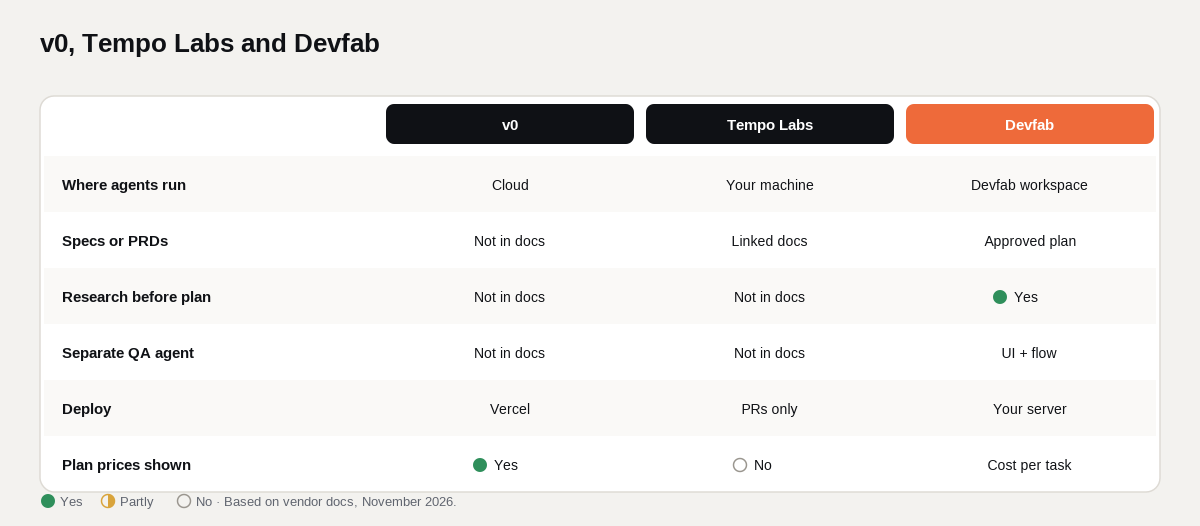
Tempo now uses the words "AI software factory," so the overlap with Devfab is real. The differences are in where the work starts and ends. In the docs we checked, Tempo has no research step on the domain before a plan, no separate QA agent, and no deploy step. Its agents run on your machine.
Coding agents automate the developer. Devfab automates the development lifecycle. Its Researcher maps the domain before the Planner writes a plan, and a person approves it. ChainFlow maps which functions and APIs call each other, so dev agents see what a change touches. The QA agent runs UI, flow and logic tests, and Deploy ships to your own server. Devfab is in Beta, with a smaller community. See Devfab vs Tempo Labs and Devfab vs v0.
FAQ
Is Tempo Labs still a visual React editor?
Not in the browser. Tempo wound down its browser-based web editor and replaced it with a desktop app for macOS and Windows. The desktop app still has a canvas where each frame is a live React route or component and edits write back to source, but it now centers on agents, docs and a Kanban board.
Does Tempo run agents in the cloud?
Tempo's docs say background agents use your Tempo identity and your machine, and nothing runs while Tempo isn't running. A July 2026 release added Remote Control to run workspaces on another machine. The docs we checked list no cloud agent option.
How does Tempo pricing compare with v0?
As of November 2026, v0 lists Free, Plus at USD 30 per user per month, Business at USD 100 per user per month and custom Enterprise. Tempo's homepage shows no plan prices; its docs describe a subscription whose monthly price becomes a usage balance, or you can bring your own Claude or ChatGPT plan.
Which is better for a product manager?
For a PM who wants a working app or UI from a prompt and a link to share, v0. For a PM on a product team with an existing codebase who wants issues, PRDs and feedback turned into reviewed pull requests by agents, Tempo.
Read next
- What is an AI software factory?
- Tempo Labs alternatives
- v0 alternatives
- Best AI tools for product managers
- Devfab vs Tempo Labs
Want research, QA and deploy in the same line as the code? Try Beta
Sources (checked November 2026): Tempo; Tempo docs; Tempo quick start; Tempo agents; Tempo: Migrating from web to desktop; Tempo billing docs; Tempo changelog; Tempo docs index; v0 docs; v0 FAQs; v0 pricing; v0 GitHub; v0 Design Mode; v0 AI models; v0 Teams.
Frequently asked questions
Is Tempo Labs still a visual React editor?
Not in the browser. Tempo wound down its browser-based web editor and replaced it with a desktop app for macOS and Windows. The desktop app still has a canvas where each frame is a live React route or component and edits write back to source, but it now centers on agents, docs and a Kanban board.
Does Tempo run agents in the cloud?
Tempo's docs say background agents use your Tempo identity and your machine, and nothing runs while Tempo isn't running. A July 2026 release added Remote Control to run workspaces on another machine. The docs we checked list no cloud agent option.
How does Tempo pricing compare with v0?
As of November 2026, v0 lists Free, Plus at USD 30 per user per month, Business at USD 100 per user per month and custom Enterprise. Tempo's homepage shows no plan prices; its docs describe a subscription whose monthly price becomes a usage balance, or you can bring your own Claude or ChatGPT plan.
Which is better for a product manager?
For a PM who wants a working app or UI from a prompt and a link to share, v0. For a PM on a product team with an existing codebase who wants issues, PRDs and feedback turned into reviewed pull requests by agents, Tempo.