Short answer: If you miss Tempo's browser editor, v0 (visual Design Mode on React) and Lovable (prompt to a hosted full-stack app) are the closest. If you want a team process from plan to deployed app, look at Devfab. Developers who want agents in their own tools should pick Cursor or Claude Code.
You picked Tempo to edit React visually in a browser. Then the web editor went away. Tempo now ships a desktop app where agents run on your machine and turn issues into pull requests. That is a different product, built for a different buyer. If it no longer fits, you need a new home for the work. This page compares six options, using vendor docs re-checked on November 20, 2026.
In this guide, you'll learn:
- Why teams leave Tempo Labs
- Quick comparison
- The alternatives
- Where Tempo Labs is still the better choice
- How to choose
Pick the trigger that matches yours, then read that block.
Why teams leave Tempo Labs
The product changed shape. Tempo's docs say the browser-based web editor was wound down "On June 14" and replaced by a desktop app for macOS and Windows. The old app.tempo.build site is now a read-only billing portal, and old repos were kept only for a limited period (Tempo: migrating from web to desktop). The homepage now calls Tempo "the AI software factory for product teams" and "The IDE for the whole team" (Tempo).
The common reasons people look elsewhere:
- Agents run on your machine. "Agents use your Tempo identity and your machine," and "nothing runs while Tempo isn't running" (Tempo: agents). A Remote Control release on July 25, 2026 lets you run workspaces on another machine (Tempo changelog), but the docs list no cloud agent option.
- Thin enterprise paperwork. The docs index lists no security page and no self-host page (Tempo docs index).
- Usage can spike. The subscription is a dollar balance for inference, and the docs warn that top models on high effort can "burn credits extremely fast" on plans under USD 100 (Tempo billing). No plan prices are shown on the homepage (Tempo).
- You need Git and an agent subscription. The desktop app requires Git, and agents run Claude Code, Codex, OpenCode or Tempo's own inference (Tempo quick start).
- Fast release pace. Desktop versions v0.0.145 to v0.0.150 shipped between November 13 and November 19, 2026 (Tempo changelog). Good for features; harder for change control.
Quick comparison
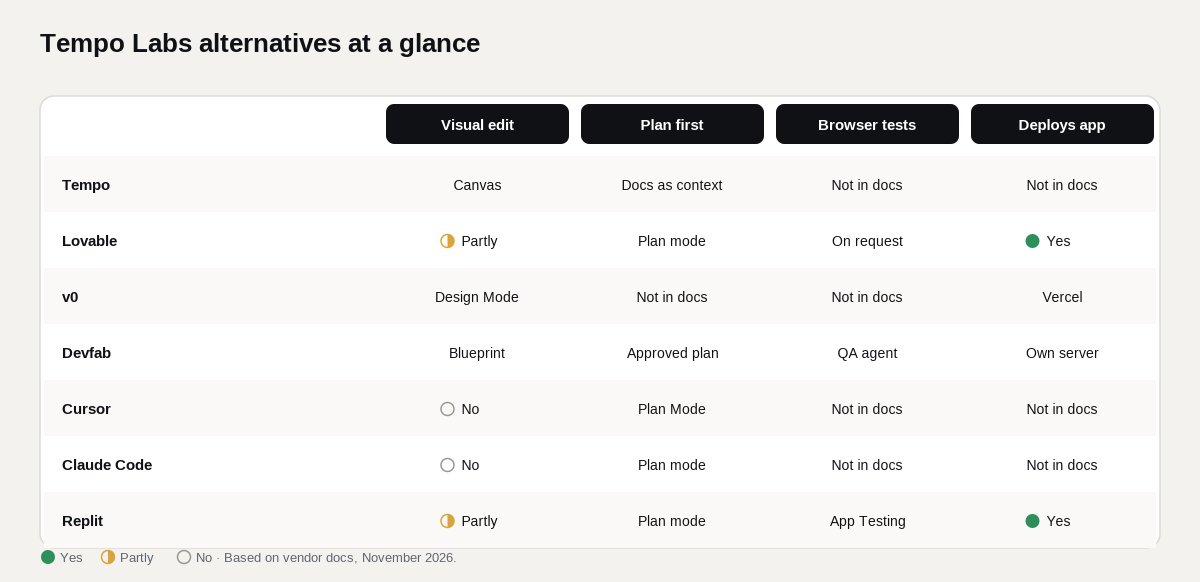
| Tool | Type | Visual editing | Plan before code | Testing | Deploy | Pricing (Nov 2026) |
|---|---|---|---|---|---|---|
| Tempo (baseline) | Desktop agent workspace | Canvas of live React routes | Docs and PRDs as context | Review of PRs | Not covered in docs we checked | Inference balance; no prices shown |
| Lovable | AI app builder | Chat and code editor | Plan mode | Browser testing on request; security scan on publish | Built-in hosting | Pro USD 25 per month |
| v0 | AI app builder | Design Mode on live preview | Not covered in docs we checked | Not covered in docs we checked | Vercel | Plus USD 30 per user per month |
| Devfab | AI software factory | Blueprint screens | Research, then a plan a person approves | QA agent: UI, flow and logic tests | Your own server | Cost logged per task and per project (Beta) |
| Cursor | AI IDE and agents | Editor | Plan Mode | Bugbot reviews PRs | Not covered in docs we checked | Teams USD 30+ per user per month |
| Claude Code | CLI and desktop agent | Editor or terminal | Plan mode | Code Review on PRs | Not covered in docs we checked | Included in Claude Pro, USD 20 per month |
| Replit | Cloud IDE and agent | Agent designs and code | Plan mode | App Testing in a real browser | Replit deployments | Core USD 20 per month |
The alternatives
Lovable
Verdict: the simplest way back to "describe it in a browser and publish." Best for: founders and product people who want a hosted full-stack web app without managing infrastructure. Trade-off: no choice of framework, database or model. Pricing: Free; Pro USD 25 per month; Business USD 50 per month, as of November 2026 (Lovable pricing).
Lovable has Build, Plan and Chat modes; Plan mode writes a plan for approval first. New apps since May 13, 2026 use TanStack Start. It includes a managed backend (PostgreSQL, login, file storage), publishes to its own URL, and syncs code to GitHub, GitLab or Bitbucket (Lovable FAQ). Git sync always creates a new repository and cannot link an existing one (Lovable GitHub docs).
v0
Verdict: the closest match to Tempo's old visual React editing. Best for: designers and front-end teams on Next.js who deploy to Vercel. Trade-off: the full experience assumes Vercel. Pricing: Free; Plus USD 30 per user per month; Business USD 100 per user per month, as of November 2026 (v0 pricing).
v0 builds with Next.js, React, TypeScript, Tailwind and shadcn/ui. Design Mode lets you select elements in the live preview and writes edits back to code (v0 Design Mode). It imports existing repos, works on a branch with per-branch previews, and "never pushes directly to main" (v0 GitHub docs). Its FAQ warns output "may be incomplete" and agents can fail repeatedly and use credits (v0 FAQ).
Devfab
Verdict: the pick when the problem is running a whole project, not editing components. Best for: agencies and product teams who want research, an approved plan, tests and deployment in one flow. Trade-off: no visual canvas for hand-editing components; it is in Beta. Pricing: predictable cost; cost is logged after each run, per task and per project.
Tempo and Devfab both use the words "software factory." The difference is where the work starts and ends. See Where Devfab fits below and the head-to-head in Devfab vs Tempo Labs.
Cursor
Verdict: an agent-first editor with cloud agents that keep working without your laptop. Best for: developers who want planning, parallel agents and PR review in one IDE. Trade-off: it is a developer tool; product managers and designers get less from it. Pricing: Free; Plus USD 8 per month (Grok models only); Premium USD 30 per month; Teams USD 30+ per user per month, as of November 2026 (Cursor pricing).
Plan Mode drafts an editable plan before code (Cursor Plan Mode). Cloud agents run in isolated cloud VMs, many at once, on GitHub, GitLab, Bitbucket Cloud or Azure DevOps (Cursor cloud agents). Bugbot reviews pull requests. Cursor's maker is now owned by SpaceX; the deal closed in August 2026 (Cursor blog).
Claude Code
Verdict: the agent Tempo often runs underneath, used directly. Best for: developers who were using Tempo mainly as a shell around Claude Code. Trade-off: Claude models only; no visual canvas. Pricing: included in paid Claude plans; Pro USD 20 per month; Team Standard USD 25 per user per month, as of November 2026 (Claude pricing).
Claude Code runs in the terminal, IDEs, a desktop app and the web. Cloud scheduled tasks run when your computer is off and can trigger on GitHub events, which covers a gap in Tempo's local agents (Claude Code overview). Plan mode proposes an approach for approval before edits. Managed Code Review comments on GitHub PRs but "never approves or blocks a PR" (Claude Code Review).
Replit
Verdict: an all-in-one cloud workspace where the agent builds, tests and hosts. Best for: teams that want building and hosting in one browser product. Trade-off: effort-based pricing for paid agent work can be hard to forecast. Pricing: Starter USD 0; Core USD 20 per month; Pro USD 100 per month, as of November 2026 (Replit pricing).
Replit Agent has a Plan mode that produces a task list to approve, checkpoints for rollback, and App Testing, which clicks through the app in a real browser for full-stack JavaScript and Streamlit apps (Replit Agent; Replit App Testing). Deployments include Autoscale, Reserved VM, Static and Scheduled (Replit publishing).
Where Tempo Labs is still the better choice
- Designers and PMs editing real components. Tempo's canvas shows each frame as a live iframe of a real route or component, and edits write back to source (Tempo docs).
- You want to use your own Claude or ChatGPT subscription. Tempo runs Claude Code or Codex on your plan, and says it bills its own inference at break-even API pricing (Tempo billing).
- Work should stay on your machines. Local agents are a feature if your policy forbids vendor clouds.
- Issues to PRs from Slack and GitHub. Agents are a standing prompt wired to a trigger, and new agents start disabled until you enable them (Tempo: agents).
Where Devfab fits
Tempo turns feedback, issues and PRDs into reviewed pull requests. Devfab starts earlier and ends later. Coding agents automate the developer. Devfab automates the development lifecycle.
- Research before the plan. Devfab's Researcher maps the domain first: key terms, best practices and competitors, then suggests a prototype. For a clinic booking app, that puts appointment types, no-show rules and reminder timing on the table before anyone writes a ticket.
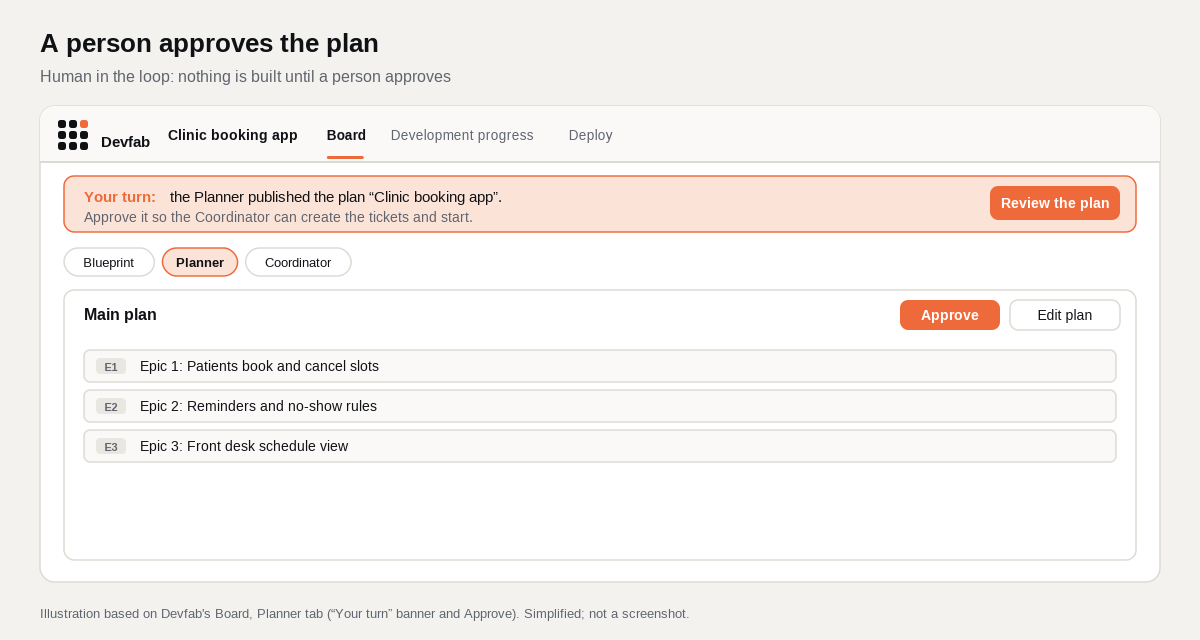
- A person approves the plan. The Planner publishes the plan, and the Coordinator creates tickets only after approval.
- ChainFlow on existing code. It maps which functions and APIs call each other and what is deployed, so dev agents see the impact of a change.
- QA agent. It runs UI and flow tests (screens, buttons and user journeys clicked end to end) plus logic tests.
- Deploy to your own server. Code lives in your own GitHub account, and Deploy ships to your server with an optional custom domain.
You can choose the model for each agent or keep Devfab's default. Honest limits: Devfab is in Beta, has a smaller community and fewer integrations, is not an editor for hands-on coding, has no component canvas like Tempo's, and needs a GitHub account.
How to choose
- You miss the browser visual editor: v0, or Lovable if you also want hosting and a backend.
- You want one browser product that builds, tests and hosts: Replit.
- Your developers drive and want the best agent tooling: Cursor or Claude Code.
- You need a project delivered with research, approval, QA and deployment: Devfab.
- You like the new desktop Tempo: stay, and pin a version in your change process.
FAQ
Is Tempo Labs shut down?
No. Tempo wound down its browser-based web editor and moved to a desktop app for macOS and Windows that it calls an AI software factory for product teams. The old app.tempo.build site stays as a read-only billing portal, and old repos were kept only for a limited period after the wind-down.
What is the closest alternative to the old Tempo web editor?
For editing React visually in the browser, v0's Design Mode is the closest: you select elements in a live preview and the edits are written back to code. Lovable is the closest for describing a full app in the browser and publishing it with a built-in backend.
Do Tempo's agents run in the cloud?
Not by default. Tempo's docs say agents use your Tempo identity and your machine, and nothing runs while Tempo isn't running. A July 2026 release added Remote Control to run workspaces on another machine. The docs we checked list no cloud agent option.
Is Devfab like the new Tempo?
Both call themselves software factories, but they work differently. Tempo runs Claude Code or Codex agents on your machine from triggers and turns issues into reviewed pull requests. Devfab researches the domain, has a person approve the plan, runs a QA agent on UI, flow and logic tests, and deploys to your own server.
Read next
- What is an AI software factory?
- Devfab vs Tempo Labs
- Lovable vs Tempo Labs
- v0 vs Tempo Labs
- AI software factory vs AI coding tools
Want research, an approved plan, QA and deployment in one flow? Try Beta
Sources (checked November 2026): Tempo homepage; Tempo docs; Tempo docs: Quick Start; Tempo docs: Agents; Tempo docs: Migrating from web to desktop; Tempo docs: web prompt credits; Tempo changelog; Tempo docs index; Lovable pricing; Lovable FAQ; Lovable GitHub integration; v0 pricing; v0 FAQ; v0 Design Mode; v0 GitHub; Cursor pricing; Cursor Plan Mode; Cursor cloud agents; Cursor blog: Joining SpaceX; Claude Code overview; Claude Code Review; Claude pricing; Replit pricing; Replit Agent; Replit App Testing; Replit publishing.
Frequently asked questions
Is Tempo Labs shut down?
No. Tempo wound down its browser-based web editor and moved to a desktop app for macOS and Windows that it calls an AI software factory for product teams. The old app.tempo.build site stays as a read-only billing portal, and old repos were kept only for a limited period after the wind-down.
What is the closest alternative to the old Tempo web editor?
For editing React visually in the browser, v0's Design Mode is the closest: you select elements in a live preview and the edits are written back to code. Lovable is the closest for describing a full app in the browser and publishing it with a built-in backend.
Do Tempo's agents run in the cloud?
Not by default. Tempo's docs say agents use your Tempo identity and your machine, and nothing runs while Tempo isn't running. A July 2026 release added Remote Control to run workspaces on another machine. The docs we checked list no cloud agent option.
Is Devfab like the new Tempo?
Both call themselves software factories, but they work differently. Tempo runs Claude Code or Codex agents on your machine from triggers and turns issues into reviewed pull requests. Devfab researches the domain, has a person approve the plan, runs a QA agent on UI, flow and logic tests, and deploys to your own server.