Short answer: Choose ToolJet when your developers want to keep their own coding agent but need the internal tools it builds to run in a governed, self-hostable platform with RBAC, SSO and audit logs. Choose Devfab when you deliver custom client software: research, an approved plan, agents that build and test, and deployment to the client's server.
Your developers already use a coding agent. It writes good code fast. Then someone asks who can access the tool it built, who approved it, and whether anyone tested the flows. ToolJet and Devfab both answer that, but at different points. ToolJet governs where agent-built apps run. Devfab governs how an app gets built, from research to deploy. We compared both on sourced facts.
In this comparison:
- What each tool is built for
- Switching triggers
- Cost model by team size
- Where ToolJet is the better choice
- Where Devfab is the better choice
Start with what each tool is for.
What each tool is built for
ToolJet
ToolJet is an open-source internal tool platform. In January 2026 its CEO described the move "from low-code to an AI-native enterprise platform". On September 2, 2026, ToolJet announced "the new ToolJet", built so teams can create governed internal tools from their own coding agents.
What it offers now:
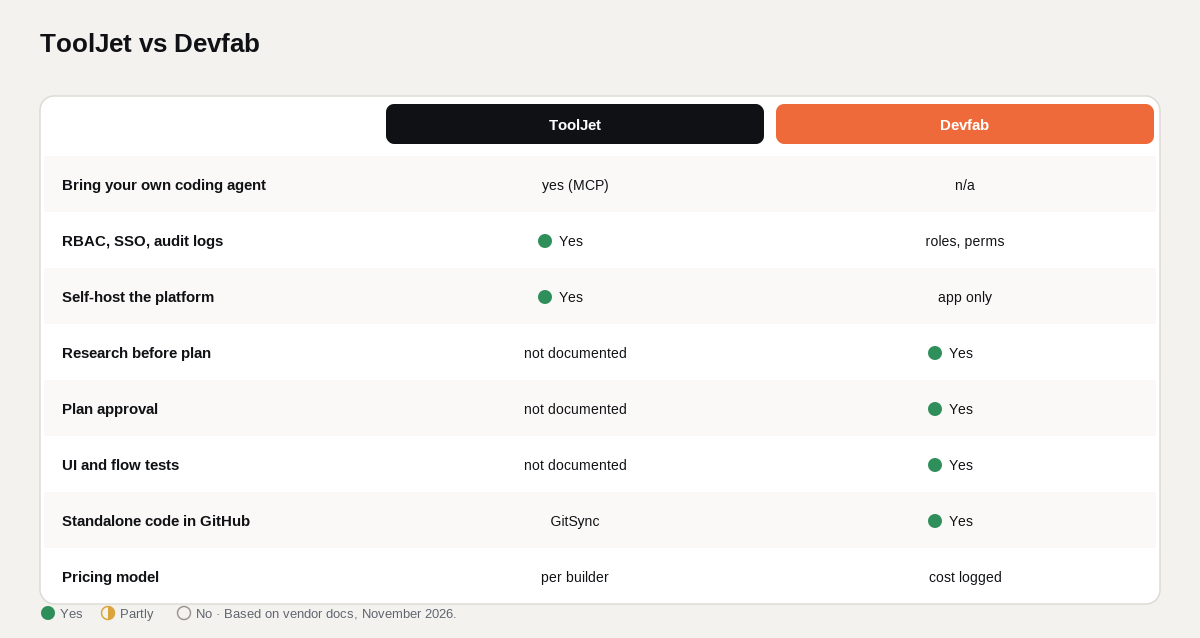
- AI Builder: "The new AI Builder can create complete business applications", working across 100+ integrations. Every generated app stays editable in the visual builder.
- Bring your own coding agent: ToolJet names Claude Code, Codex, Grok Build and Cursor. The ToolJet MCP server lets agents create, inspect and modify apps, and a Governance MCP manages permissions from the agent.
- AI assistant: generates multi-page apps and data bindings, reads API specs, makes bulk changes and auto-fixes component errors.
- Governance: authentication, RBAC, SSO, audit logs, Git-based workflows and dev and prod environments. Enterprise adds SCIM, fine-grained RBAC on queries, components and pages, and promote and release permissions. ToolJet lists SOC 2 Type II, ISO 27001 and GDPR.
- Workflows: scheduled and event-driven runs with external NPM libraries.
- Hosting and licence: ToolJet Cloud, a VPC or self-hosted on Docker, Kubernetes, AWS, Azure, GCP or on-prem. The Community Edition is AGPL-3.0 and the MCP server is MIT-licensed.
ToolJet's main user is a security-sensitive engineering or IT team that builds many internal tools.
Devfab
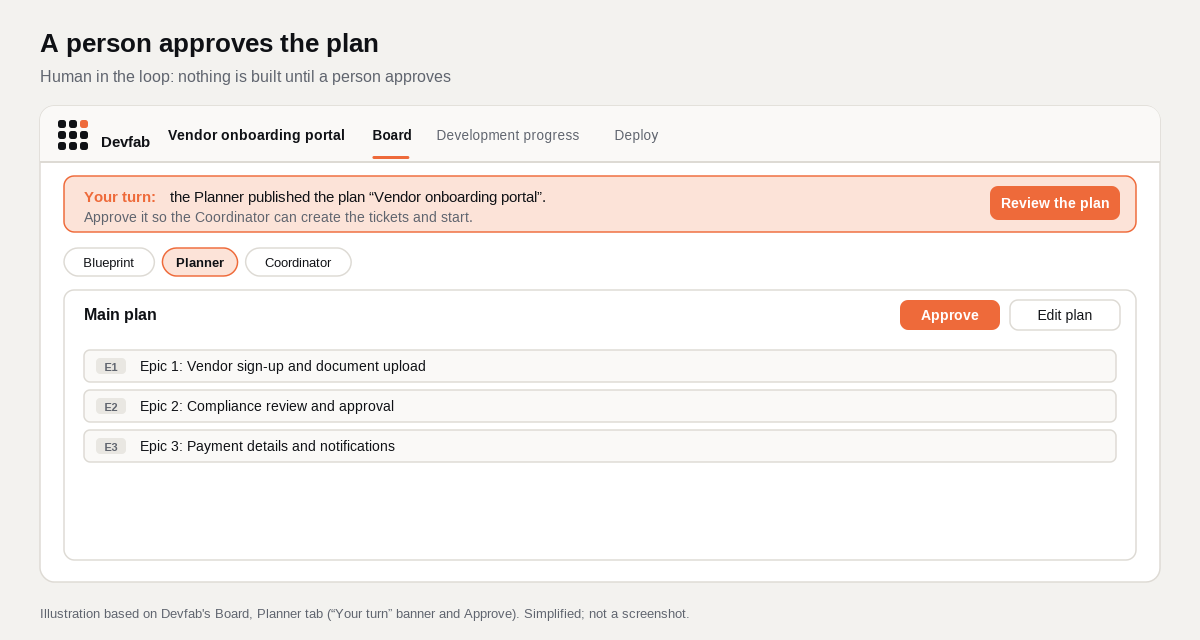
Devfab is an AI software factory. It runs a whole client project with seven agents. The Researcher maps the domain first: key terms, best practices and competitors, then suggests a prototype. The Planner writes the plan and a person approves it. The Coordinator creates tickets and assigns Developers, who work with ChainFlow, Devfab's code-intelligence layer that maps which functions and APIs call each other. Blueprint draws screens, the QA agent runs UI and flow tests plus logic tests, and Deploy ships to your own server.
You can choose the model for each agent or keep Devfab's default. Code lives in your own GitHub account (or your organization's).
Coding agents automate the developer. Devfab automates the development lifecycle.
Switching triggers
| Trigger | ToolJet | Devfab | Source |
|---|---|---|---|
| The client wants a custom product, not an internal tool | Built for governed internal tools and business apps | Research, approved plan, tickets, QA and deploy for any web app or API | ToolJet, Sep 2026 |
| AI-built apps need a safety net | A competitor's review says AI-built apps may lack input validation and need developer review | A separate QA agent runs UI, flow and logic tests; optional review before Done | Jet Admin (competitor, Jul 2026) |
| Self-hosting costs DevOps time | The same review says self-hosting adds infrastructure cost and needs "proper DevOps practices" | The app you build deploys to your server from the Deploy tab | Jet Admin (competitor, Jul 2026) |
| Some features need self-hosting | ToolJet lists workflows and AI agents as self-hosted only; air-gapped needs an Enterprise add-on | Deploy ships the app you build to your own server | ToolJet vs Superblocks page |
| You want standalone code | GitSync moves app changes between ToolJet instances through Git | Source code in your own GitHub account | ToolJet GitSync docs |
| Your own model keys | Builder bring-your-own-key is an Enterprise feature | Choose the model for each agent or keep the default | ToolJet vs Superblocks page |
Cost model by team size
| Team size | ToolJet | Devfab |
|---|---|---|
| 1 person | Free tier; or a paid builder seat with included AI credits | Cost logged per task and per project (Beta) |
| 5 people | Paid plan priced per builder, with AI credits per builder and top-ups; end users are not charged per seat | Cost logged per task and per project (Beta) |
| 25 people | Per builder on paid tiers, or custom Enterprise (SCIM, air-gapped add-on, BYOK) | Cost logged per task and per project (Beta) |
Building through an outside coding agent over MCP uses no ToolJet AI credits, though your agent has its own costs. Check ToolJet's pricing for current amounts.
Moving from ToolJet to Devfab
Most teams don't move a working ToolJet tool. They keep it, and use Devfab when a client needs a product rather than an internal screen. To rebuild one app as standalone code:
- Keep your data and APIs. ToolJet connects to your existing sources, so they stay where they are.
- Use GitSync as a reference. If the app is synced to Git, its files describe a ToolJet app that runs in ToolJet. Use them, plus screenshots, as the spec.
- Connect any existing code. If the backend is in GitHub, choose "Work on an existing project" in Devfab, pick the repo and leave the change box empty. ChainFlow maps the code first and suggests three small first tickets.
- Or start a new project and describe the app under "What should we build?"
- Approve the plan. The Coordinator then creates tickets for the dev agents.
- Let the QA agent test UI, user flows and logic, then deploy to the client's server.
Where ToolJet is the better choice
- Developers want to keep their coding agent and need the result to land in a governed, permissioned runtime.
- Security requires the whole platform self-hosted, with an AGPL core and a path to air-gapped operation.
- Few builders, many users. Per-builder pricing suits a large internal audience.
- You need fine-grained RBAC on queries, components and pages, plus audit logs, for every internal tool.
- The work is many internal tools over 100+ integrations, edited visually after the AI drafts them.
Where Devfab is the better choice
- You deliver projects to clients and want the same steps each time: research, approved plan, tickets, QA, deploy, docs.
- The domain needs research first. The Researcher maps terms, best practices and competitors before planning.
- Scope needs sign-off. A person approves the plan before agents build anything.
- Testing must be visible. The QA agent clicks through screens and user journeys and runs logic tests.
- You change a live codebase. ChainFlow shows what a change touches before it ships.
- You need a record: user manuals, a Team Delivery Report and cost per task and per project.
Devfab's honest limits: it is new and in Beta, with a smaller community and fewer integrations than ToolJet. It is not a visual internal tool builder or an editor for hands-on coding. It needs a GitHub account. If your team already likes its coding agent and only needs governance at runtime, ToolJet is the smaller change.
FAQ
What is the new ToolJet?
ToolJet announced it on September 2, 2026. It adds an AI Builder that creates complete business apps, plus a ToolJet MCP server so outside coding agents can create, inspect and modify ToolJet apps. Apps land in ToolJet's governed runtime with RBAC, SSO, audit logs and Git-based workflows.
If my developers already use a coding agent, why not just use ToolJet?
For internal tools, that is a good setup: your agent builds, ToolJet governs who can use what. Devfab covers a different gap: research before the plan, a plan a person approves, tickets across several agents, a separate QA agent and deployment of standalone code to your own server.
Can I take a ToolJet app out of ToolJet?
ToolJet's GitSync pushes app changes to a Git repository and pulls them into other ToolJet instances, such as from development to production. The docs we checked describe running those apps in ToolJet, not as standalone code.
How do ToolJet and Devfab charge?
ToolJet prices per builder, not per end user, with a free tier and AI credits per builder on paid plans; building through an outside coding agent over MCP uses no ToolJet AI credits. Devfab is in Beta with predictable cost: cost is logged after each run, per task and per project.
Read next
- What is an AI software factory?
- ToolJet alternatives for teams that ship to production (2026)
- Retool vs ToolJet: which should your team use in 2026?
- AI software factory vs AI coding tools: what's the difference?
See a client project go from research to deploy. Book a Devfab demo
Sources (checked November 13, 2026): Meet the new ToolJet (Sep 2, 2026); ToolJet at the start of 2026 (Jan 2026); ToolJet vs Superblocks (ToolJet's comparison and pricing page); ToolJet GitSync docs; ToolJet vs Retool 2026 (Jet Admin, a competitor, Jul 2026).
Frequently asked questions
What is the new ToolJet?
ToolJet announced it on September 2, 2026. It adds an AI Builder that creates complete business apps, plus a ToolJet MCP server so outside coding agents can create, inspect and modify ToolJet apps. Apps land in ToolJet's governed runtime with RBAC, SSO, audit logs and Git-based workflows.
If my developers already use a coding agent, why not just use ToolJet?
For internal tools, that is a good setup: your agent builds, ToolJet governs who can use what. Devfab covers a different gap: research before the plan, a plan a person approves, tickets across several agents, a separate QA agent and deployment of standalone code to your own server.
Can I take a ToolJet app out of ToolJet?
ToolJet's GitSync pushes app changes to a Git repository and pulls them into other ToolJet instances, such as from development to production. The docs we checked describe running those apps in ToolJet, not as standalone code.
How do ToolJet and Devfab charge?
ToolJet prices per builder, not per end user, with a free tier and AI credits per builder on paid plans; building through an outside coding agent over MCP uses no ToolJet AI credits. Devfab is in Beta with predictable cost: cost is logged after each run, per task and per project.