Short answer: Zencoder wins when an engineering team wants spec-driven coding agents inside VS Code or JetBrains, with multi-model routing, on-premise options and ISO 42001 certification. Devfab wins when an agency or IT team needs the whole client project run: research, a plan a person approves, QA on real user flows and deployment to its own server.
You lead delivery for client software, and every change already gets checked. Tests pass, linters are green, a second agent reviews the diff. Yet the client still asks the same questions. Was this the right thing to build? Does the booking flow work end to end? Where is it running?
One side says spec-driven agents with verification are enough. The other says the gap sits before and after the code. This page referees, using Zencoder's own pages checked in November 2026.
In this comparison:
- What each tool is built for
- Switching triggers
- Cost model by team size
- Where Zencoder is the better choice
- Where Devfab is the better choice
Each section stands on its own, so skip to the one you need.
What each tool is built for
Zencoder
Status as of November 2026: active. The product line now centers on Zenflow (Zenflow Code and Zenflow Work), IDE agents, a CLI and a newly promoted product called Hops, "collaborative AI for your whole team" (Zencoder pricing; Zencoder home). Legacy daily call limits are being retired in favor of credit-based plans (Zencoder pricing FAQ).
What Zencoder does, from its own pages:
- Where it runs: IDE agents for VS Code and JetBrains, Zenflow Desktop and a CLI. Zencoder itself can run in the cloud, on-premise or hybrid (Zencoder home).
- Spec before build: Zenflow Code offers "pre-built workflows for features, bugs, and refactors", and admins can "enforce spec → plan → build → verify across every team." Agents run in parallel in isolated environments (Zencoder home).
- Verification: "Tests, linting, and code review run on every change," and you can hand any output to a different agent for review (Zencoder home).
- Model routing: the site's example is to plan with one frontier model, build with another and review with a third. Bring-your-own-key use with OpenAI, Anthropic or Gemini does not consume Zencoder credits (Zencoder home; Zencoder pricing).
- Governance: SOC 2 Type II, ISO 27001 and ISO 42001; SSO with Okta or Google Workspace; role-based permissions, approval gates and rules on "who can deploy what and when" (Zencoder home).
- Beyond code: Zenflow Work runs goal-driven automations across Jira, Slack, Notion, Gmail and Calendar (Zencoder home).
- UI tests: Zentester, announced in June 2025 as a public beta, creates UI end-to-end tests from plain-language scenarios on Playwright. It is not mentioned on today's home or pricing page (Zentester announcement).
Zencoder's main user is an engineering team that already owns its process and wants agents to work inside it.
Devfab
Devfab is a Software Factory in the Autonomous Software Lifecycle category. Its unit of work is a project, run by seven agents: Researcher, Planner, Coordinator, Developers, Blueprint, QA agent and Deploy.
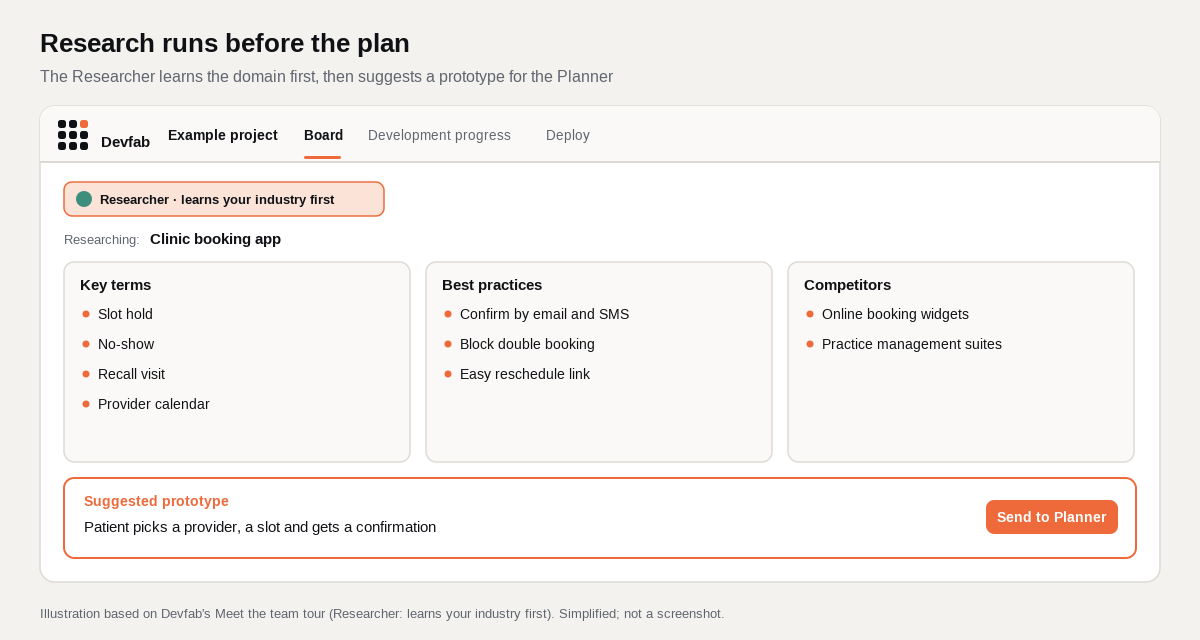
- The Researcher runs before the Planner. It maps the domain: key terms, best practices for that kind of app, and competitors. Then it suggests a prototype.
- The Planner publishes a plan, and a person approves it. The Coordinator turns it into tickets for the dev agents.
- ChainFlow, the code-intelligence layer, maps which functions and APIs call each other and what is deployed. Change the checkout, and the dev agents see that payments, inventory, order confirmation and notifications are connected.
- The QA agent runs UI and flow tests (screens, buttons and user journeys clicked end to end) plus logic tests. Deploy ships to your own server.
Coding agents automate the developer. Devfab automates the development lifecycle.
Both tools put a spec or plan before the code. The difference is the scope. Zencoder's spec covers a feature, bug or refactor in your repo. Devfab's plan covers a whole app, from domain research to a running deployment.
Switching triggers
| Trigger | Zencoder | Devfab | Source |
|---|---|---|---|
| Entry price is hard to justify for occasional users | Pro starts at USD 40 per user per month (annual); a review calls the entry price the highest in its category | No seat price published; cost logged per task and per project (Beta) | Zencoder pricing; AISO Tools review |
| Credit use is hard to predict | Credits expire monthly; top-ups are non-refundable; a review says usage is hard to predict | Cost is logged after each run, per task and per project | Zencoder pricing FAQ; AISO Tools review |
| Product names keep changing | A review notes frequent product renaming; Hops is the newest name on the site | Seven named agents, one workspace | AISO Tools review |
| Client needs domain research before a plan | Spec-driven workflows start from your spec | Researcher maps the domain, then suggests a prototype | Zencoder home |
| Client wants proof the user journeys work | Tests, lint and review on every change; Zentester not on current pages | QA agent clicks screens and journeys, plus logic tests | Zencoder home; Zencoder pricing |
| App must be shipped and hosted somewhere | Deploying your app is not covered in the pages we checked | Deploy ships to your own server, custom domain optional | Zencoder home |
Cost model by team size
| Team size | Zencoder | Devfab |
|---|---|---|
| 1 person | Free plan is BYOK only; Pro USD 40 per user per month annual (USD 45 monthly) with 30K credits | Cost logged per task and per project (Beta) |
| 5 people | Pro Plus USD 85 per user per month annual (USD 95 monthly) with 80K credits, shared credit pool, SSO and audit logs | Cost logged per task and per project (Beta) |
| 25 people | Pro Max USD 175 per user per month annual (USD 195 monthly) with 180K credits, or Enterprise (custom) | Cost logged per task and per project (Beta) |
Zencoder prices as of November 2026 from Zencoder pricing and the pricing FAQ. Credits expire monthly; top-ups start at USD 20. Devfab offers predictable cost: cost is logged after each run, per task and per project, and Devfab is in Beta.
Moving from Zencoder to Devfab
Zencoder's agents already work in your repository, so there is nothing to export.
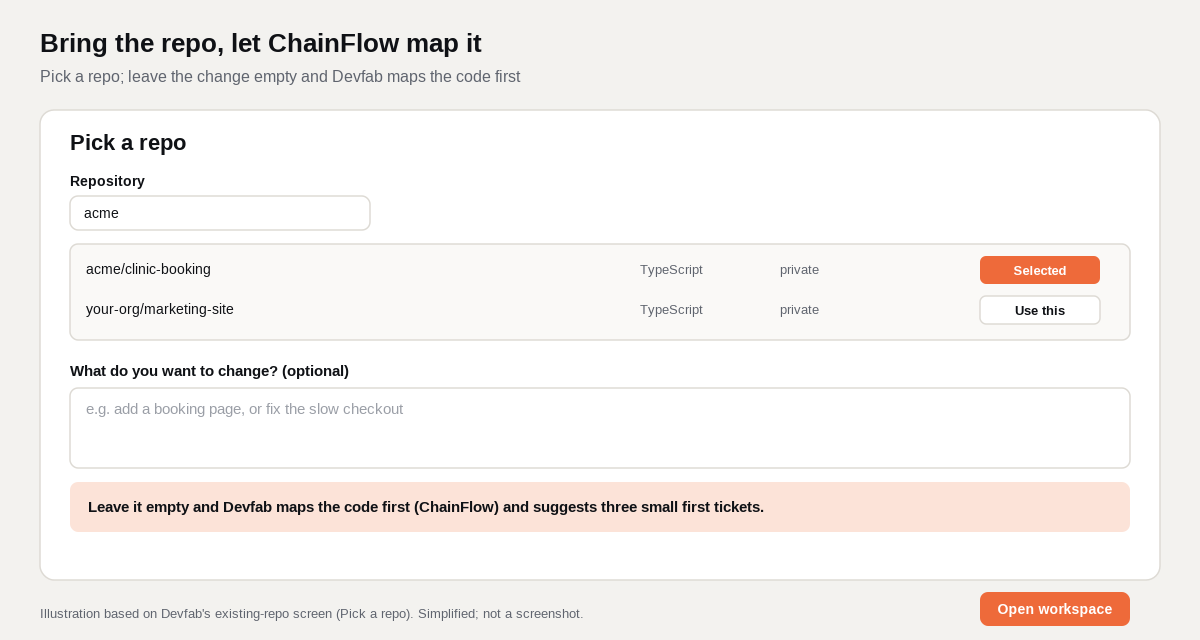
- Make sure the repo is on GitHub. Devfab works with a repository in your own GitHub account or your organization's.
- Choose "Work on an existing project" in Devfab and pick the repo.
- Leave the change box empty. ChainFlow maps the code first, then suggests three small first tickets.
- Approve the plan. The Coordinator creates tickets only after a person approves.
- Let the QA agent check the work. It runs UI, flow and logic tests on the tickets.
- Keep Zencoder in the IDE for hands-on fixes and refactors outside the plan.
Where Zencoder is the better choice
- Your developers live in VS Code or JetBrains and want agents that edit files, run tests and explore the codebase there.
- You want to mix models per step, or reuse existing OpenAI and Anthropic agreements through BYOK without spending credits.
- Compliance teams ask for certificates. SOC 2 Type II, ISO 27001 and ISO 42001 are listed, with on-premise or hybrid deployment.
- Your engineering process is already defined and you want spec, plan, build and verify enforced across every team.
- You want automations beyond code across Jira, Slack, Notion and Gmail with Zenflow Work.
Where Devfab is the better choice
- The project starts as an idea, not a ticket. The Researcher maps the domain before the Planner writes anything. For a clinic booking app, that means terms such as no-show and slot hold, best practices and competing products.
- A client or manager signs off on scope. A person approves the plan, in Human in the loop mode by default.
- Existing apps must not break. ChainFlow shows which connected features a change touches.
- You need proof at the screen level. The QA agent runs UI and flow tests, plus logic tests.
- The app must run on your server, with code in your own GitHub account and docs such as blueprints and user manuals.
- You report cost per project. Cost is logged after each run, per task and per project.
Devfab's honest limits: it is in Beta, with a smaller community and fewer integrations than mature platforms. Compliance certifications are not stated, so ask before you compare it with Zencoder's list. It is not an editor for hands-on coding, and it needs a GitHub account.
FAQ
Is Zencoder a software factory like Devfab?
Not in the same sense. Zencoder runs spec-driven agent workflows for features, bugs and refactors inside your engineering process, with tests, linting and review on every change. Devfab runs the whole client project: research, a plan a person approves, tickets, a QA agent, deployment to your server and docs.
Does Zencoder deploy the app it builds?
The Zencoder pages we checked describe cloud, on-premise or hybrid deployment of Zencoder itself and admin rules on who can deploy what. They do not describe hosting or shipping your application. Devfab's Deploy step ships the app to your own server.
How does Zencoder pricing work?
As of November 2026, Zencoder charges per user with monthly credits: Pro USD 40, Pro Plus USD 85 and Pro Max USD 175 per user per month on annual billing, plus a custom Enterprise plan. Credits expire monthly, and bring-your-own-key usage does not consume them.
Can my team keep Zencoder and add Devfab?
Yes. Zencoder's IDE agents work on your repositories in VS Code or JetBrains, and Devfab works with a repository in your own GitHub account or your organization's. Developers can keep Zencoder for hands-on work while Devfab runs planned, tested project work.
Read next
- What is an AI software factory?
- AI software factory vs AI coding tools
- Zencoder vs GitHub Copilot
- Best AI coding agents for software agencies
Run your next client project as a full delivery line. Try Beta
Sources (checked November 2026): Zencoder home; Zencoder pricing; Zencoder Docs: Pricing FAQ; Introducing Zentester (Zencoder blog, Jun 10, 2025); AISO Tools: Zencoder review 2026 (updated Aug 2026).
Frequently asked questions
Is Zencoder a software factory like Devfab?
Not in the same sense. Zencoder runs spec-driven agent workflows for features, bugs and refactors inside your engineering process, with tests, linting and review on every change. Devfab runs the whole client project: research, a plan a person approves, tickets, a QA agent, deployment to your server and docs.
Does Zencoder deploy the app it builds?
The Zencoder pages we checked describe cloud, on-premise or hybrid deployment of Zencoder itself and admin rules on who can deploy what. They do not describe hosting or shipping your application. Devfab's Deploy step ships the app to your own server.
How does Zencoder pricing work?
As of November 2026, Zencoder charges per user with monthly credits: Pro USD 40, Pro Plus USD 85 and Pro Max USD 175 per user per month on annual billing, plus a custom Enterprise plan. Credits expire monthly, and bring-your-own-key usage does not consume them.
Can my team keep Zencoder and add Devfab?
Yes. Zencoder's IDE agents work on your repositories in VS Code or JetBrains, and Devfab works with a repository in your own GitHub account or your organization's. Developers can keep Zencoder for hands-on work while Devfab runs planned, tested project work.