Short answer: Roo Code only makes sense if your team is frozen on its final release while it moves custom modes to Zoo Code, Cline or Kilo Code. Devfab is the better fit when the real need is client delivery: research, an approved plan, QA on user journeys and deployment, not another agent inside VS Code.
Your agency standardized on Roo Code. Architect mode wrote the plans, Code mode wrote the code, and a few custom modes held your house rules. Then the repo went read-only.
Now every developer is picking a new extension, and nobody owns the decision. Before you pick another editor agent, ask a wider question. Was the editor ever the bottleneck on client work? This page compares what Roo Code did with what Devfab does, using sources checked on November 23, 2026.
In this comparison:
- What each tool is built for
- Switching triggers
- Moving from Roo Code to Devfab
- Where Roo Code is the better choice
- Where Devfab is the better choice
Read the status section first; it changes the rest.
What each tool is built for
Roo Code is discontinued. The team announced the shutdown on April 21, 2026, to focus on Roomote, its cloud agent, after Roo had reached 3 million installs (Kilo blog). The README now says "The Roo Code Extension was shut down on May 15th," and the repo is archived and read-only (Roo Code on GitHub). As of May 2026, Roomote was in early development with no public release, per a competitor's page (kilo.ai).
Roo Code was an open-source AI coding agent for VS Code, forked from Cline, under the Apache-2.0 license. It offered Code, Architect (planning, specs, migrations), Ask, Debug and Custom modes. The archived repo has 24.3k stars (Roo Code on GitHub). The extension stays on the VS Code Marketplace in its final state (kilo.ai). The README recommends Zoo Code, a community fork, and Cline. Kilo Code published a Roo-to-Kilo migration guide (Morph, Oct 2026).
Devfab is a Software Factory in the Autonomous Software Lifecycle category. You describe what to build, or connect an existing GitHub repo. Seven agents share the work: Researcher, Planner, Coordinator, Developers (with ChainFlow), Blueprint, QA agent and Deploy. Human in the loop is the default mode, so a person approves the plan before tickets go out. Coding agents automate the developer. Devfab automates the development lifecycle.
Switching triggers
| Trigger | Roo Code | Devfab | Source |
|---|---|---|---|
| The tool is no longer maintained | Shut down May 15, 2026; repo archived | Active, in Beta | Roo Code on GitHub |
| New VS Code versions, model APIs or security issues | Archived repo gets no fixes | Not an editor extension; runs as a workspace | Morph |
| The vendor's next product is not public | Roomote in early development, no public release (as of May 2026) | Researcher, Planner, Coordinator, QA and Deploy agents in one workspace | kilo.ai |
| Plans lived in one developer's chat | Architect mode planned inside one editor session | Planner publishes a plan; a person approves it; Coordinator makes tickets | Roo Code on GitHub |
| Client wants proof the flows work | Debug mode helped a developer fix bugs | QA agent runs UI and flow tests plus logic tests | Roo Code on GitHub |
| The app must ship somewhere | Deploy not covered in the pages we checked | Deploy ships to your own server, custom domain optional | Roo Code on GitHub |
Cost model by team size
| Team size | Roo Code | Devfab |
|---|---|---|
| 1 person | Discontinued; no plans sold. Apache-2.0 code stays in the archived repo | Cost logged per task and per project (Beta) |
| 5 people | Discontinued; billing questions go to the address in the README | Cost logged per task and per project (Beta) |
| 25 people | Discontinued; no team or enterprise plan to buy | Cost logged per task and per project (Beta) |
Roo Code status from the archived README, checked November 2026. Devfab is in Beta and offers predictable cost: cost is logged after each run, per task and per project. You can choose the model for each agent or keep Devfab's default.
The real cost question is what you move to. Editor successors like Kilo Code and Cline bill inference separately. Devfab logs cost per task and per project, which maps to how agencies bill clients.
Moving from Roo Code to Devfab
Say the project is a B2B quote tool for an industrial parts distributor: sales reps build quotes, managers approve discounts, customers accept online.
- Get the code into GitHub. Roo Code already worked in your local repo, so push it to your own GitHub account or your organization's.
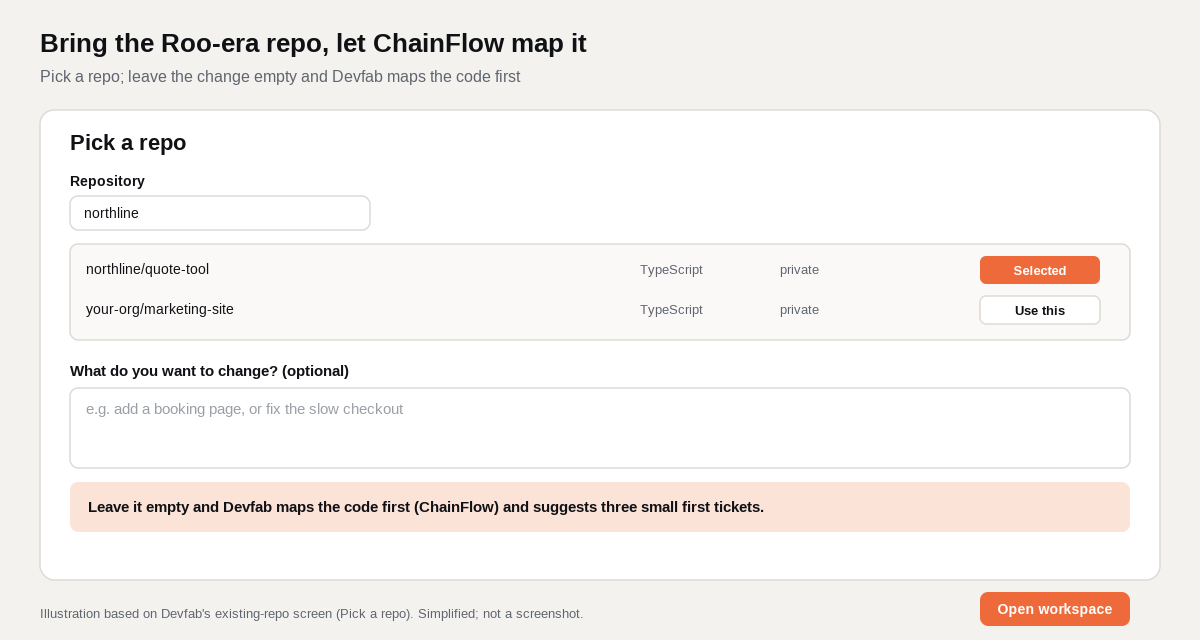
- Open Devfab and choose "Work on an existing project." Pick the repo.
- Leave the change box empty. ChainFlow maps which functions and APIs call each other and what is deployed, then suggests three small first tickets.
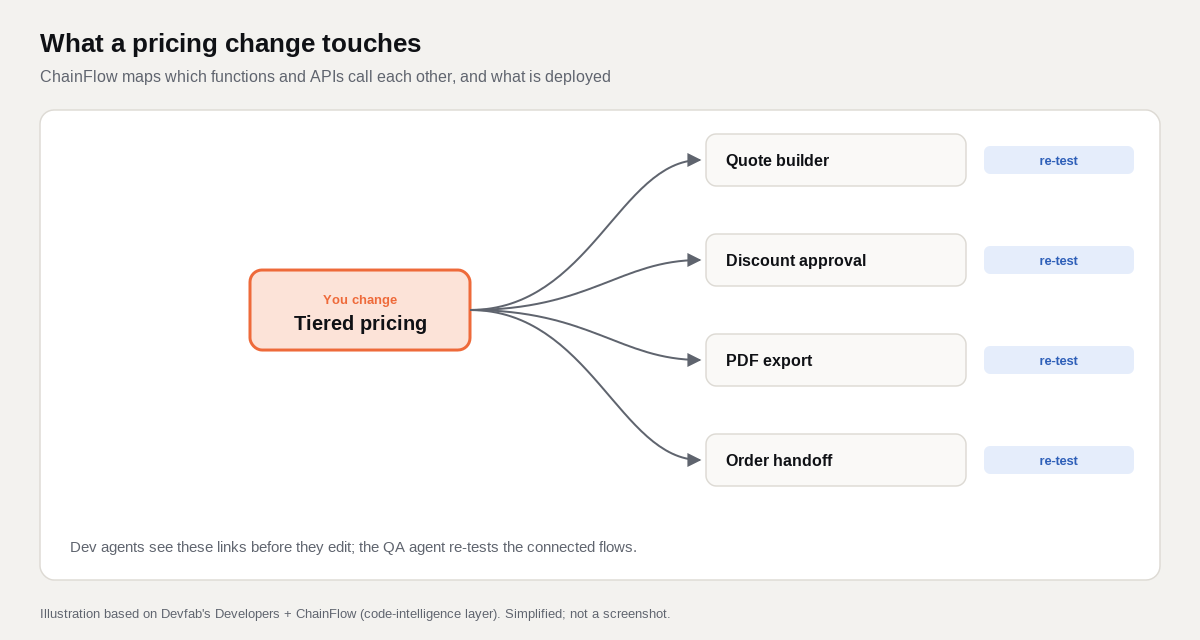
- Write the next change as a request. For example: "Add tiered pricing by customer group." ChainFlow shows what that touches: the quote builder, discount approval, PDF export and the order handoff.
- Approve the plan. The Planner publishes it, a person approves it, and the Coordinator creates tickets for developer agents.
- Let the QA agent test. It runs UI and flow tests, such as a rep building a quote and a customer accepting it, plus logic tests such as discount limits.
- Keep your old Roo rules as a spec. Paste the house rules from your custom modes into the project description so the plan reflects them.
Where Roo Code is the better choice
- You need a frozen, known setup for now. The final release still installs from the Marketplace, and nothing will change under you.
- Your workflow is built on custom modes. Until you port them, the old extension still runs them exactly as before.
- You want to fork it yourself. The Apache-2.0 code is still public, and Zoo Code shows a community can carry it on.
- You want an editor agent, not a project pipeline. For that, its successors (Zoo Code, Cline, Kilo Code) are closer to Roo than Devfab is.
Where Devfab is the better choice
- Research before the plan. The Researcher maps the domain first: for the quote tool, terms like price breaks, lead times and quote expiry, best practices and competing products. Then it suggests a prototype.
- ChainFlow on existing code. Developer agents see the impact of a change, so new pricing rules don't break approvals or order handoff.
- QA on real journeys. The QA agent clicks screens, buttons and user journeys end to end, plus logic tests.
- A plan a person approves. The client sees what will be built before tickets go out.
- Deploy and docs. Ship to production on your own server, with blueprints, sequence flows and user manuals.
- Cost per task. Cost is logged after each run, per task and per project.
Honest limits: Devfab is in Beta, with a smaller community and fewer integrations than mature tools. It is not an editor for hands-on coding, so developers who liked steering Roo line by line will still want an editor agent. It needs a GitHub account.
FAQ
Is Roo Code still available?
Not as a maintained product. The Roo Code README says the extension was shut down on May 15, 2026, and the GitHub repo is archived and read-only. The extension still sits on the VS Code Marketplace in its final state, but it gets no fixes for new VS Code versions, model APIs or security issues.
What do the Roo Code maintainers recommend instead?
The archived README points users to Zoo Code, a community fork by former Roo contributors, and to Cline. Kilo Code, which began as a Roo fork, also published a migration guide for Roo users. These are the closest like-for-like replacements inside VS Code.
Is Devfab a drop-in replacement for Roo Code?
No. Roo Code was an agent inside your editor that you steered task by task. Devfab is not an editor for hands-on coding. It runs a whole project: research, a plan a person approves, tickets for developer agents, QA tests and deployment to your own server. Some teams use both kinds of tool.
Can Devfab work on a repo we built with Roo Code?
Yes, if the repo is in your own GitHub account or your organization's. Choose Work on an existing project, pick the repo and leave the change box empty. Devfab maps the code with ChainFlow first and suggests three small first tickets.
Read next
- What is an AI software factory?
- Roo Code alternatives
- Kilo Code vs Roo Code
- Devfab vs Kilo Code
- Devfab vs Cline
Moving off Roo? Try a full delivery line on your next client project. Try Beta
Sources (checked November 2026): RooCodeInc/Roo-Code on GitHub (archived); Kilo blog: Thank you, Roo (Apr 21, 2026); kilo.ai: Roo Code shutdown and Roomote; Morph: Roo Code (2026), shut down May 15 (Oct 2026).
Frequently asked questions
Is Roo Code still available?
Not as a maintained product. The Roo Code README says the extension was shut down on May 15, 2026, and the GitHub repo is archived and read-only. The extension still sits on the VS Code Marketplace in its final state, but it gets no fixes for new VS Code versions, model APIs or security issues.
What do the Roo Code maintainers recommend instead?
The archived README points users to Zoo Code, a community fork by former Roo contributors, and to Cline. Kilo Code, which began as a Roo fork, also published a migration guide for Roo users. These are the closest like-for-like replacements inside VS Code.
Is Devfab a drop-in replacement for Roo Code?
No. Roo Code was an agent inside your editor that you steered task by task. Devfab is not an editor for hands-on coding. It runs a whole project: research, a plan a person approves, tickets for developer agents, QA tests and deployment to your own server. Some teams use both kinds of tool.
Can Devfab work on a repo we built with Roo Code?
Yes, if the repo is in your own GitHub account or your organization's. Choose Work on an existing project, pick the repo and leave the change box empty. Devfab maps the code with ChainFlow first and suggests three small first tickets.