Short answer: It depends on the job. Claude Code and OpenAI Codex suit developers who want a strong agent in the terminal and cloud. GitHub Copilot and Cursor fit teams living in the editor and on GitHub. Devin takes scoped tickets in the background (Google Jules shuts down December 31). Devfab runs whole client projects with plan approval and QA.
You run an agency, and every client codebase is different. Most coding agents are built for one product team in one repo. You need agents a mixed team can use, with code kept in client hands. Their cost also has to match the quote you signed. This list compares seven options against that agency reality. Six are coding agents, and Devfab is a different kind of tool.
In this guide, you'll learn:
- How we picked and compared
- All seven options in one table
- Each agent's best use and limits
- How to choose for your agency
The rest of this page covers it in order.
How we picked and compared
We compared tools from vendor documentation and official product pages, checked in November 2026. We did not run hands-on tests for this article. We scored each tool on what matters to agencies:
- Where it works. Terminal, editor, web, chat, or a background cloud environment.
- Hand-off. Can a project manager or account lead give it a task, or only a developer?
- Review. Is there a plan to approve, and does work arrive as a pull request to review?
- Many clients. How well it handles many repositories and parallel tasks.
- Cost visibility. How usage is billed and whether you can see it per task or project.
- Ownership. Whether code stays in the client's repository.
We describe pricing models, not prices. Devfab is our product; we include its limits.
Quick comparison table
| Tool | Type | Where you give it work | Plan before code | Best for agencies that… | Main limit |
|---|---|---|---|---|---|
| Claude Code | Coding agent | Terminal, IDE, desktop, web, Slack, CI | Plan review in IDE | want a scriptable agent across many client repos | Developer tool |
| OpenAI Codex | Coding agent | App, CLI, IDE, cloud, GitHub review | Depends on your prompts | already pay for ChatGPT business plans | Developer tool |
| GitHub Copilot cloud agent | Coding agent | GitHub, chat, IDE | Plans changes, works in background | live on GitHub and want PRs from issues | Needs a paid Copilot plan |
| Cursor | AI editor with cloud agents | Editor, web, Slack, Linear, GitHub | Agent-driven | want an AI-first editor plus parallel cloud agents | Usage billing needs a spend limit |
| Devin | Cloud software engineer | Web, Slack, Teams, tickets, CLI | Works from your prompt | have well-scoped backlogs | Needs clear tickets |
| Google Jules | Async coding agent | Web, GitHub repos | Yes, approve the plan | want background fixes on GitHub | Shutting down Dec 31, 2026 |
| Devfab | Software Factory | Plain-language description or GitHub repo | Yes, a person approves the plan | want one governed process per client project | New, in Beta |
The agents, one by one
Claude Code
Claude Code is an agentic coding tool that reads a codebase, edits files, runs commands and works with git: branches, commits and pull requests. It runs in the terminal, VS Code and JetBrains, a desktop app and the web, and you can mention it in Slack with a bug report and get a pull request back. Teams set coding standards in a CLAUDE.md file, package repeat workflows as skills, run shell commands before or after actions with hooks, and automate code review and triage in GitHub Actions or GitLab CI/CD. It can run several agents in parallel and schedule recurring tasks.
Best for: agencies with strong developers who want one agent they can shape to each client's conventions and run in CI.
Limits: it's built for developers. Clients and project managers won't work in it, and planning, sign-off and delivery reporting are up to you.
OpenAI Codex
Codex is OpenAI's coding agent for bug hunting, large refactors and new features. It runs in the Codex app, a CLI, an IDE extension and the cloud, where tasks keep running after you close your laptop. It can also review pull requests on GitHub. It's included in ChatGPT Plus, Pro and Business plans; Business adds a shared team workspace with admin controls. In July 2026 OpenAI folded the Codex desktop app into a combined ChatGPT desktop app, where Codex remains the coding product (The New Stack).
Best for: agencies already on ChatGPT Business who want an agent without another vendor.
Limits: it's a developer tool, and usage limits depend on your ChatGPT plan. Process around the code is yours to build.
GitHub Copilot cloud agent
GitHub's docs describe Copilot in the cloud researching a repository, planning changes and implementing them in the background, editing files and running tests and linters in a cloud environment. You can choose a cloud sandbox, a GitHub Actions-based environment (for custom setups or self-hosted runners) or a remote one. Copilot code review reviews pull requests and, with "Watch and fix," can fix failed workflows or merge conflicts. The agent features need a paid Copilot plan.
Best for: agencies whose clients' code is already on GitHub, and who want agents inside the pull request flow they use today.
Limits: it helps the team code and review; it doesn't run planning, client sign-off or deployment. Compute draws on your GitHub account allowance, so watch usage across clients.
Cursor
Cursor is an AI-first editor that also runs Cloud Agents in isolated virtual machines with full development environments. You can start them from the desktop app, the web, mobile, Slack or Linear with @cursor, or by commenting @cursor on a GitHub or Bitbucket pull request or issue. Cursor says they produce "merge-ready PRs with artifacts to demo their changes," such as screenshots, videos and logs, and they can open PRs across several repos. Cloud Agents use your plan's usage at the selected model's rate, and Cursor asks you to set a spend limit on first use. They need a higher-tier or team plan. Cursor said in an August 14, 2026 post that it has officially been acquired by SpaceX (Cursor blog).
Best for: developer teams that want the best editor experience plus parallel background agents.
Limits: usage-based cost can be hard to forecast in heavy agent use, so set limits per team. It's a tool for developers, not for client-facing delivery.
Devin
Devin, from Cognition, is "an autonomous AI software engineer that can write, run and test code." You give it work in its web app, through Slack or Teams threads, from tickets, through an API, or from the Devin CLI, which can hand longer tasks to cloud Devin. It works in a workspace with a shell, an embedded IDE you can take over, and a browser for docs and testing web apps. Its docs advise clear prompts with explicit completion criteria and tasks that are easy to verify, such as passing CI.
Best for: agencies with a backlog of well-defined tickets that a senior developer can scope and review.
Limits: results depend on how well the task is written. It takes tickets; it doesn't plan a client project from a brief.
Google Jules
Jules is Google's experimental coding agent for fixing bugs, adding documentation and building features. You connect GitHub and pick which repos it can access. For each task it clones your code into a virtual machine, installs dependencies and modifies files. You click "Give me a plan," review the plan and approve it before Jules changes code. It reads an AGENTS.md file if your repo has one, and notifies you when a task completes or needs input. Google announced on October 29, 2026 that Jules shuts down on December 31, 2026, and it stopped taking new tasks on November 11, so don't start new client work on it (Jules changelog).
Best for: small teams that want a background agent with a plan step, on GitHub.
Limits: Google labels it experimental, and it works only with GitHub.
Devfab, with honest limits
Devfab is a Software Factory, in the category we call the Autonomous Software Lifecycle. Coding agents automate the developer. Devfab automates the development lifecycle. That is why it sits on this list differently: agencies don't only need code, they need a process a client can see.
Devfab runs a team of seven agents: Researcher, Planner, Coordinator, Developers, Blueprint (screens), QA agent and Deploy. Three things set it apart from the coding agents above:
- Research before the plan. Devfab's research step maps the client's domain (key terms, best practices for that kind of app and competitors) and suggests a prototype. Useful when you're pitching in an industry your team doesn't know yet.
- ChainFlow on existing code. ChainFlow maps which functions and APIs call each other and what is deployed, so developer agents see the impact of a change. On an inherited client repo, leave the change box empty and Devfab maps the code first and suggests three small first tickets.
- QA that clicks through the app. The QA agent runs UI and flow tests (screens, buttons and user journeys clicked end to end) plus logic tests. With "QA agent · review before Done" on, tickets wait for review before they close.
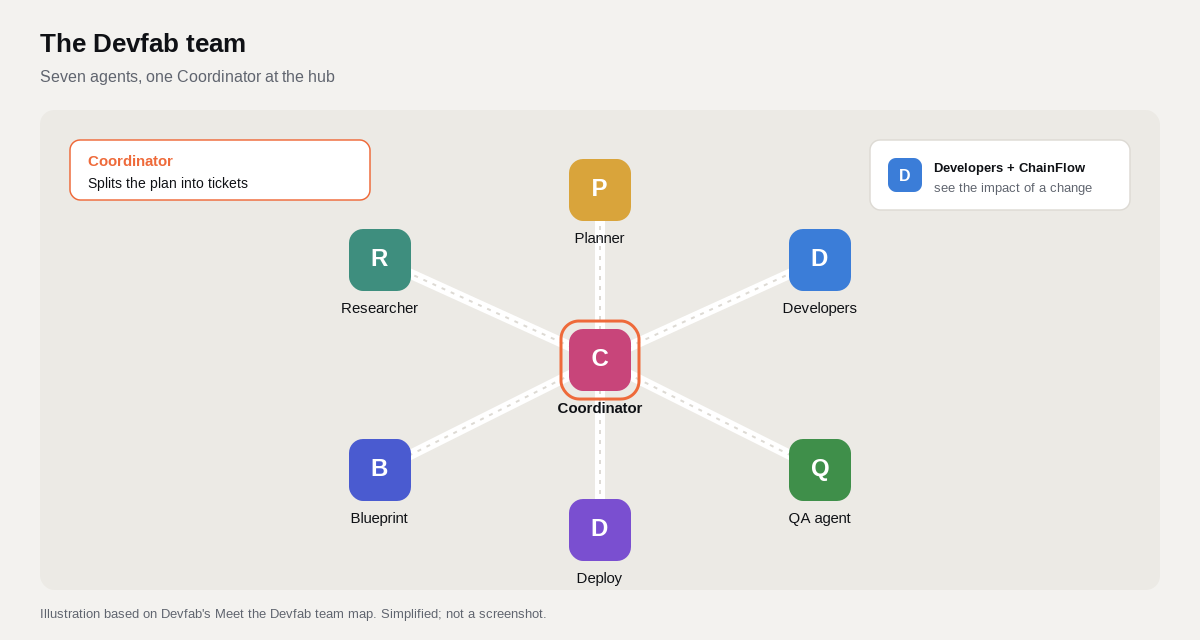
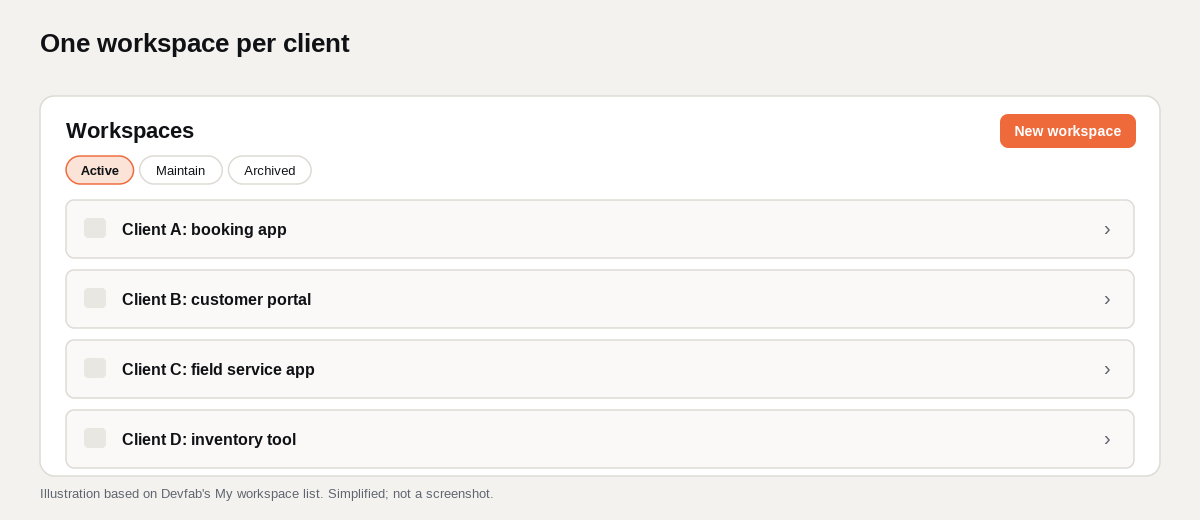
For agencies, the workflow maps to how client work already runs. Each client project gets its own workspace. A person approves the plan before the Coordinator creates tickets and assigns developer agents. Progress shows as Summary, Kanban and Gantt views. Apps deploy to the client's own server, and the code sits in the client's own GitHub account (or organization). Cost is logged after each run, per task and per project, which gives you predictable cost to check against your quote. You can choose the model for each agent or keep Devfab's default.
Best for: agencies that want one governed process per client, from brief to deployed app, with approvals and test evidence they can show.
Limits: Devfab is new and in Beta, with a smaller community and fewer integrations than the tools above. It isn't an editor for hands-on coding, so your developers will still want one of the coding agents for that. It needs a GitHub account.
How to choose
Match the tool to who gives the work and who checks it.
- Your developers want a better agent today. Claude Code or OpenAI Codex for terminal and cloud work; Cursor or GitHub Copilot if they live in the editor and on GitHub.
- You have more tickets than people. Devin (not Jules, which shuts down on December 31, 2026), with a senior developer writing and reviewing the tasks.
- You want to change how you deliver and price client work. Devfab, piloted on one client project, alongside the developer tools you already use.
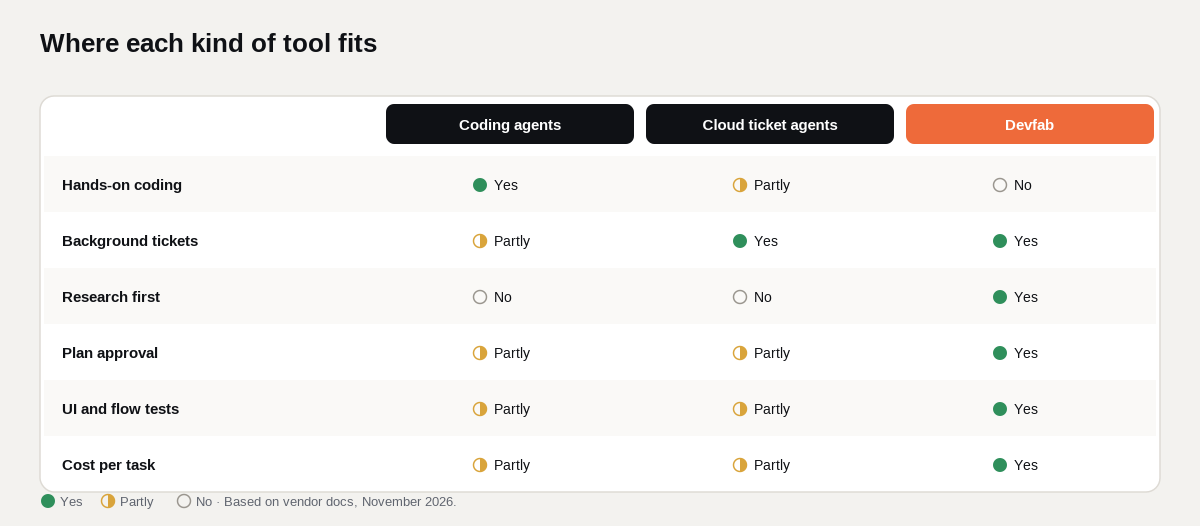
Before rolling any agent out across clients, check four things:
- Client data terms. Where code runs and whether it is stored or used for training.
- Review gate. Every change should land as a pull request or ticket a person approves.
- Cost per project. You need to see usage per client, not just one monthly bill.
- Ownership. Code in the client's repository, apps on infrastructure they control.
FAQ
What is the best coding agent for a software agency?
It depends on who does the work. For developers who code by hand, Claude Code, OpenAI Codex, GitHub Copilot or Cursor. For handing off well-scoped tickets, Devin (Google Jules shuts down on December 31, 2026). For running whole client projects with plan approval, QA and deploy, a software factory such as Devfab.
Can an agency use more than one coding agent?
Yes, and most do. A common setup is one agent in the editor for hands-on work, one cloud agent for background tickets, and a process tool on top for planning, review and delivery reports.
How should an agency control the cost of coding agents?
Pick tools whose usage you can see per task and per project, set spend limits where the vendor offers them, and compare the cost of each ticket with what you quoted. Devfab logs cost after each run, per task and per project.
Do coding agents keep client code private?
Check each vendor's data terms before connecting a client repo: where code runs, whether it is stored, and whether it is used for training. Keep code in the client's own GitHub account or organization where you can, and deploy to infrastructure the client controls.
Read next
- What is an AI software factory?
- AI software factory vs AI coding tools
- Devfab vs Cursor
- Devfab vs Devin
- The AI-native software agency: an operating model for 2027
- Google Jules alternatives for teams that ship to production (2026)
- Claude Code vs OpenAI Codex: which should your team use in 2026?
Run your next client project through one process, from brief to deploy. Try Beta
Sources (checked November 2026): Claude Code overview; OpenAI Codex; GitHub Docs: Copilot cloud agent; Cursor Docs: Cloud Agents; Devin Docs: Introduction; Jules Docs: Getting started; Jules changelog; The New Stack: Codex joins ChatGPT desktop app (Jul 9, 2026); Cursor blog: Joining SpaceX.
Frequently asked questions
What is the best coding agent for a software agency?
It depends on who does the work. For developers who code by hand, Claude Code, OpenAI Codex, GitHub Copilot or Cursor. For handing off well-scoped tickets, Devin (Google Jules shuts down on December 31, 2026). For running whole client projects with plan approval, QA and deploy, a software factory such as Devfab.
Can an agency use more than one coding agent?
Yes, and most do. A common setup is one agent in the editor for hands-on work, one cloud agent for background tickets, and a process tool on top for planning, review and delivery reports.
How should an agency control the cost of coding agents?
Pick tools whose usage you can see per task and per project, set spend limits where the vendor offers them, and compare the cost of each ticket with what you quoted. Devfab logs cost after each run, per task and per project.
Do coding agents keep client code private?
Check each vendor's data terms before connecting a client repo: where code runs, whether it is stored, and whether it is used for training. Keep code in the client's own GitHub account or organization where you can, and deploy to infrastructure the client controls.