Short answer: Roo Code shut down on May 15, 2026. If you relied on its custom modes, move to Zoo Code (the community continuation) or Kilo Code (a former Roo fork with a migration guide). For the largest community, Cline. For terminal work, OpenCode or Claude Code. Devfab fits teams that want the whole delivery process automated, not another editor agent.
Your team built its workflow around Roo Code: Architect mode for planning, custom modes for each job. Then the repo was archived. The extension still opens, but it won't get fixes for new VS Code versions, new model APIs or security reports. Every month you stay, the risk grows. The good news: several successors already speak Roo's language.
In this guide, you'll learn:
- Why teams leave Roo Code
- How six alternatives compare
- What each successor keeps and changes
- Where Roo Code is still the better choice
- How to choose
The rest of this page covers it in order.
Why teams leave Roo Code
Status first: Roo Code is discontinued. The shutdown was announced on April 21, 2026. The Roo Code README says "The Roo Code Extension was shut down on May 15th," and the repository is archived (read-only). The team shifted focus to Roomote, its cloud agent; a Kilo comparison page says Roomote had no public release as of May 2026.
What that means for a team still on Roo:
- No more fixes. Morph's review (Oct 2026) notes the archived repo gets no fixes for new VS Code versions, new model APIs or security issues.
- It still looks installed. The extension remains on the VS Code Marketplace in its final state, so nothing forces the move. That makes it easy to drift.
- Roo points elsewhere. The README recommends Zoo Code and Cline.
- Your modes need a new home. Roo had Code, Architect, Ask, Debug and custom modes. Only Zoo Code keeps them as-is.
- Roo was big. It reached 3 million installs, so many teams face the same move at once.
Quick comparison
| Tool | Type | Where it runs | License | Planning | Pricing model |
|---|---|---|---|---|---|
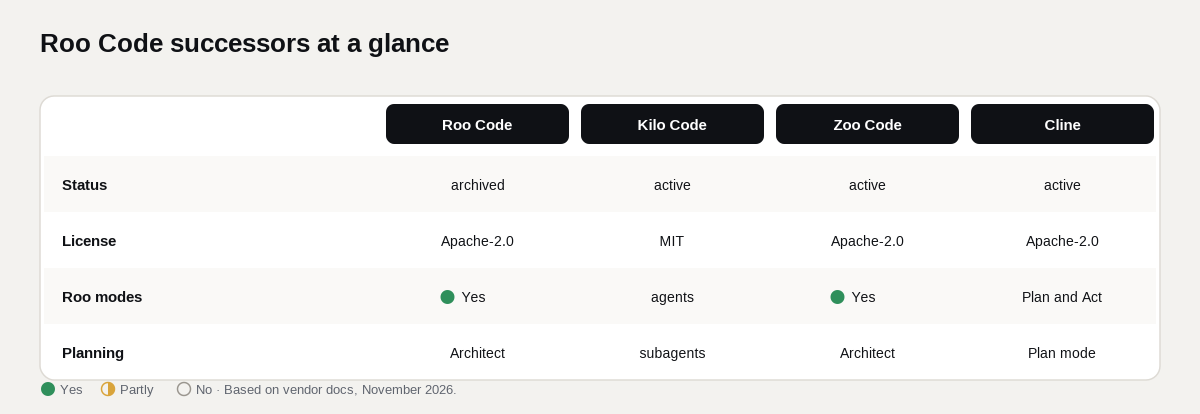
| Roo Code (baseline) | VS Code agent, discontinued | VS Code | Apache-2.0, archived | Architect mode | Not applicable |
| Kilo Code | Open-source agent, extension and CLI | VS Code, JetBrains, CLI, cloud agents | Open source (MIT per Morph) | Agents, subagents, Agent Manager | Free extension; inference at provider rates |
| Zoo Code | Community continuation of Roo | VS Code | Apache-2.0 | Roo's modes kept | Free; bring your own model |
| Cline | Open-source agent | VS Code, JetBrains, CLI, desktop | Apache-2.0 | Plan and Act modes | Free; usage-based or BYOK; Enterprise custom |
| OpenCode | Open-source CLI agent | Terminal, desktop, mobile | MIT | Read-only "plan" agent | Free agent; optional paid model plans |
| Claude Code | Coding agent | Terminal, IDEs, desktop, web | Commercial | Plan mode | Included in paid Claude plans |
| Devfab | AI software factory | Browser workspace on your GitHub repo | Your code is yours | Research, then a plan a person approves | Cost logged per task and per project (Beta) |
The alternatives
1. Kilo Code
Verdict: the most complete successor for teams, with a published migration path. Best for: teams that want an open-source agent in VS Code or JetBrains with team controls and free model choice. Trade-off: a broad product range for a small company, and many open issues. Pricing: the extension is free and open source; inference is billed at provider rates with a 5% fee on credit purchases; Teams is per user; Enterprise is custom; cloud compute is pay-as-you-go.
- Kilo Code started as a Roo fork and published a Roo-to-Kilo migration guide after the shutdown.
- Its VS Code extension was rebuilt on the open-source OpenCode server and became the default on April 2, 2026.
- Agent Manager runs several agent tabs, can isolate agents in git worktrees, and supports parallel and custom subagents.
- Kilo Gateway offers 500+ models from 60+ providers, plus BYOK and local models via Ollama or LM Studio.
- A dated research note (Jun 2026) lists 1,300+ open GitHub issues and a roughly 34-person team.
Compare it with Devfab in Devfab vs Kilo Code.
2. Zoo Code
Verdict: the least disruptive move if your team depends on custom modes. Best for: small teams who want Roo as it was, maintained. Trade-off: young project with a small maintainer base. Pricing: free and open source; you bring your own model provider.
- Built by former Roo contributors under Apache-2.0, and recommended in Roo's own README.
- It keeps Roo's modes and is published as
ZooCodeOrganization.zoo-code. - Its repo was created on April 23, 2026 and had about 2,000 stars when Morph checked in October 2026.
3. Cline
Verdict: the safe, well-known choice; Roo was originally forked from it. Best for: developers who want step-by-step approval of every edit and command. Trade-off: one general agent rather than Roo-style modes. Pricing: the extension is free and charges only for inference (usage-based or BYOK); ClinePass is a flat subscription for open-weight models; Enterprise is custom.
- Plan mode reads and discusses without editing; Act mode executes, and each mode can use a different model.
- It runs in VS Code, JetBrains, a CLI (interactive or headless for CI/CD), a desktop app and Kanban, a web board that runs many agents in parallel.
- Every action requires your approval.
- In January 2026 OpenAI hired at least seven Cline employees, which a news report described as a continuity challenge.
See Cline alternatives if you want to compare further.
4. OpenCode
Verdict: the pick for terminal-first developers who want maximum model choice. Best for: developers who are ready to leave the editor sidebar behind. Trade-off: steeper learning curve and permissive default permissions, per a dated review. Pricing: the agent is free; use free models, BYOK, existing ChatGPT or GitHub Copilot subscriptions, or optional paid model plans.
- MIT license; terminal UI, desktop app and mobile clients.
- A built-in read-only "plan" agent denies edits by default, which feels close to Roo's Architect mode.
- Works with 200+ providers via Models.dev, including local models.
5. Claude Code
Verdict: a strong commercial agent if you're fine with one model family. Best for: teams that want plan mode, subagents and managed PR review from one vendor. Trade-off: Claude models only, and no Roo-style custom modes. Pricing: included in paid Claude plans (Pro, Max, Team, Enterprise), not Free; usage limits apply, and usage credits let you continue at API rates.
- Plan mode explores the codebase and proposes an approach for approval before editing.
- Runs in the terminal, VS Code and JetBrains, a desktop app and the web.
- Managed Code Review posts severity-ranked comments on GitHub PRs on Team and Enterprise plans.
6. Devfab
Verdict: not a Roo replacement for hands-on coding, but a fit if what you really used Roo for was planning and shipping whole features. Best for: agencies and product teams that want research, an approved plan, tests and deploy handled as one process. Trade-off: it doesn't live in your editor. Pricing: predictable cost: cost is logged after each run, per task and per project. Devfab is in Beta.
Roo's Architect mode planned; you still ran the rest. Devfab runs the whole lifecycle with seven agents. A research step maps the domain before the plan: key terms, best practices and competitors. A person approves the plan, and the Coordinator turns it into tickets for developer agents. They work with ChainFlow, which maps which functions and APIs call each other, so a change to checkout shows its impact on payments, inventory, order confirmation and notifications before anyone merges. The QA agent runs UI and flow tests plus logic tests. On an existing repo, choose "Work on an existing project," leave the change box empty, and Devfab maps the code first and suggests three small first tickets. You can choose the model for each agent or keep Devfab's default.
Coding agents automate the developer. Devfab automates the development lifecycle. Many teams use both: an editor agent for hands-on work, Devfab for planned features.
Devfab's honest limits:
- It's new and in Beta, with a far smaller community than Cline or Kilo Code.
- It isn't an editor or an extension; it doesn't replace inline, hands-on coding.
- It has fewer integrations and no custom-modes system.
- It needs a GitHub account.
Where Roo Code is still the better choice
Honestly, for new work it isn't. These narrow cases remain:
- Finishing a task in flight. The extension still runs in its final state while you test a successor on one real backlog task.
- You plan to fork and maintain it yourself. The code is Apache-2.0, so a team with the time can take it over.
- A frozen, offline environment. If nothing around it changes, a pinned version can keep working for a while. Weigh that against missing security fixes.
How to choose
- Depend on custom modes, want minimal change? Zoo Code.
- Want a maintained, team-ready successor with a migration guide? Kilo Code.
- Want the largest community and approval of every step? Cline.
- Moving to the terminal? OpenCode (open source, any model) or Claude Code (one vendor, managed review).
- Want planning, testing and deploy automated as a process? Devfab, next to your editor agent. Read AI software factory vs AI coding tools.
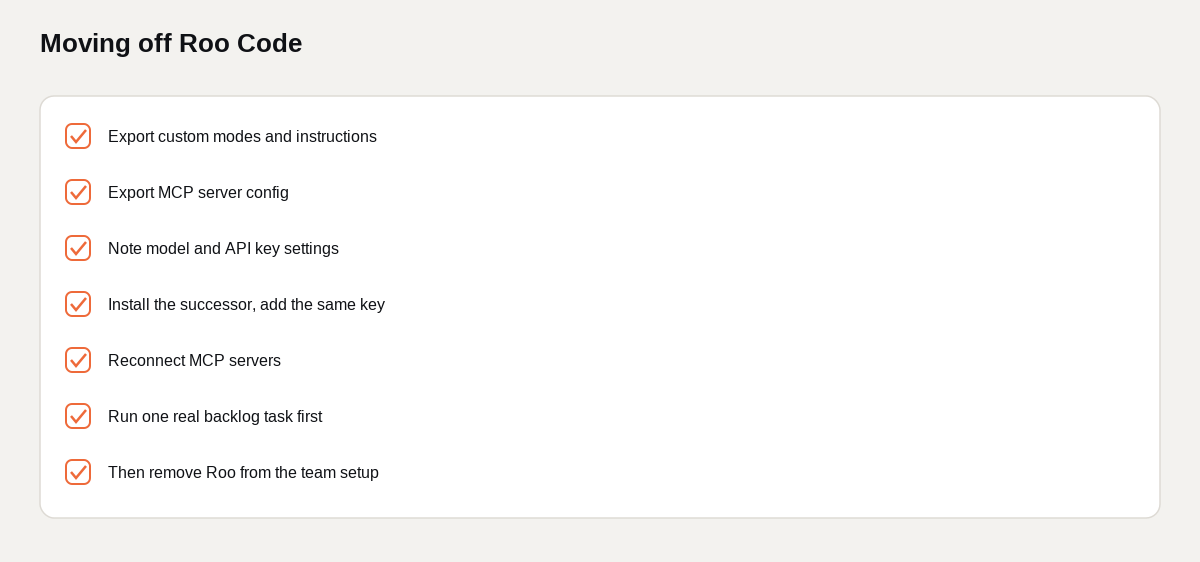
Before you uninstall: export custom modes and instructions, MCP server configuration, and model and API key settings. Then run one real task in the new agent first.
FAQ
Is Roo Code still available?
The Roo Code extension was shut down on May 15, 2026, and its GitHub repository is archived and read-only. The extension still sits on the VS Code Marketplace in its final state, but it gets no fixes for new VS Code versions, model APIs or security issues.
What is the closest alternative to Roo Code?
Zoo Code, a community continuation by former Roo contributors under Apache-2.0, keeps Roo's modes. Kilo Code, which started as a Roo fork, is the more established option and published a Roo-to-Kilo migration guide.
Why did Roo Code shut down?
The shutdown was announced on April 21, 2026. The team said it was shifting focus to Roomote, its cloud agent. As of May 2026, Roomote had no public release, according to a Kilo comparison page.
How do I move my Roo Code custom modes?
Before uninstalling, export your custom mode definitions and instructions, your MCP server configuration and your model and API key settings. Zoo Code keeps Roo's modes; in other agents you recreate them as prompts, agents or subagents.
Is Devfab a VS Code extension like Roo Code?
No. Devfab is an AI software factory that runs the whole lifecycle, from research and an approved plan to QA and deploy, on code in your own GitHub. Your developers keep their own editor and agent for hands-on work.
Read next
- What is an AI software factory?
- AI software factory vs AI coding tools
- Kilo Code vs Cline
- Devfab vs Kilo Code
- Cline alternatives
Want planned, tested features, not just a new sidebar? Try the Devfab Beta
Sources (checked November 13, 2026): RooCodeInc/Roo-Code on GitHub (archived); Zoo Code on GitHub; Thank you, Roo (Kilo blog, Apr 2026); Roo Code shutdown and Roomote (Kilo); Roo Code (2026): shut down May 15 (Morph, Oct 2026); The new Kilo Code for VS Code (Kilo blog, Apr 2026); Kilo pricing; Kilo docs: About plans; Kilo research note (rywalker.com, Jun 2026); Cline docs overview; Cline Plan and Act; Cline pricing; OpenAI hires seven employees from Cline (TEXXR, Jan 2026); OpenCode homepage; anomalyco/opencode on GitHub; OpenCode research note (rywalker.com, Jun 2026); Claude Code overview; Claude Code: manage costs; Claude Code: Code Review; Claude pricing.
Frequently asked questions
Is Roo Code still available?
The Roo Code extension was shut down on May 15, 2026, and its GitHub repository is archived and read-only. The extension still sits on the VS Code Marketplace in its final state, but it gets no fixes for new VS Code versions, model APIs or security issues.
What is the closest alternative to Roo Code?
Zoo Code, a community continuation by former Roo contributors under Apache-2.0, keeps Roo's modes. Kilo Code, which started as a Roo fork, is the more established option and published a Roo-to-Kilo migration guide.
Why did Roo Code shut down?
The shutdown was announced on April 21, 2026. The team said it was shifting focus to Roomote, its cloud agent. As of May 2026, Roomote had no public release, according to a Kilo comparison page.
How do I move my Roo Code custom modes?
Before uninstalling, export your custom mode definitions and instructions, your MCP server configuration and your model and API key settings. Zoo Code keeps Roo's modes; in other agents you recreate them as prompts, agents or subagents.
Is Devfab a VS Code extension like Roo Code?
No. Devfab is an AI software factory that runs the whole lifecycle, from research and an approved plan to QA and deploy, on code in your own GitHub. Your developers keep their own editor and agent for hands-on work.