Short answer: Choose no-code (Bubble, Softr, Glide) when non-technical staff will build and keep changing the app themselves, in a visual editor, on the vendor's platform. Choose an AI app builder (Lovable, Bolt.new, v0, Base44) when you want real code from a prompt that you can sync to GitHub and hand to developers later.
You need an app and you don't have developers. A few years ago, the answer was no-code. Now every no-code tool has an AI agent, and AI app builders say anyone can build. The demos look the same. The difference shows up later, when someone has to change the app or move it somewhere else.
In this guide, you'll learn:
- Definitions
- Side by side
- When to choose no-code
- When to choose an AI app builder
- Where an AI software factory fits
Read it with your app's next two years in mind.
Definitions
No-code. IBM describes no-code as "a completely hands-off approach, with 100% dependence on visual tools", aimed at business users and extended only "through templated feature sets". Microsoft says "no-code development doesn't require any coding" and is used by "business users without any knowledge of how coding works". You build with visual blocks and the platform runs the app.
No-code tools now have AI built in:
- Bubble's AI Agent (beta) builds a full app from a description, then you keep chatting or switch to direct visual editing. "Every component is visual, including the backend."
- Softr generates "the pages, database, permissions and workflows" from a prompt, and you refine visually or with AI.
- Glide relaunched as GlideOS in 2026. It turns the spreadsheets a business runs on into apps, and its SheetSense feature scans formulas, macros and pivot tables before building.
AI app builders turn a prompt into a working app made of real code, often with hosting included. Lovable generates and hosts full-stack web apps. Bolt.new runs the whole development environment in the browser. v0 builds Next.js apps and deploys them to Vercel. Base44 generates the frontend, backend and database. What they share: you can open the code, and most can sync it to GitHub.
The short version: no-code keeps your app as a visual model; an AI app builder keeps it as code.
Side by side
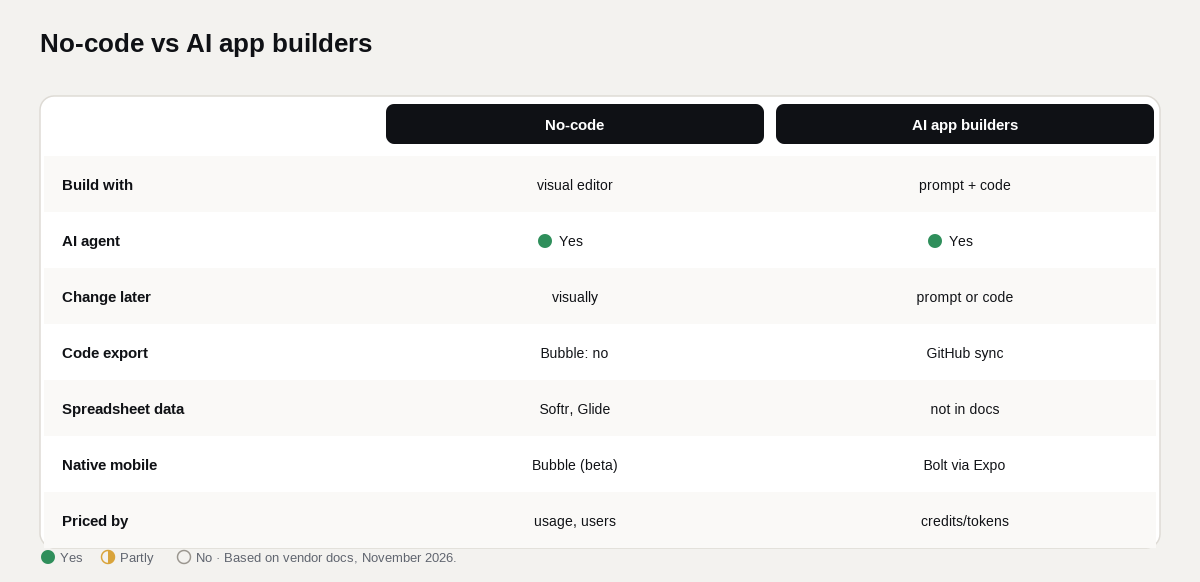
| Aspect | No-code (Bubble, Softr, Glide) | AI app builders (Lovable, Bolt.new, v0, Base44) |
|---|---|---|
| How you build | Visual editor, now with an AI agent | Prompt and chat; edit code if you want |
| What you change later | Pages, workflows and data in the editor | Code, by prompting again or by hand |
| Data | Built-in database or existing data (Softr: Airtable, Google Sheets, Notion; Glide: Excel, Sheets) | Built-in backend or Supabase (Lovable), Bolt Cloud databases, Base44 managed database |
| Mobile | Bubble builds iOS and Android apps (beta) | Bolt.new builds mobile apps through Expo; Lovable is web only |
| Code export | Bubble: none, data only | GitHub sync in Lovable, Bolt.new, v0, Base44 (Builder plan and up) |
| Outside AI agents | Softr MCP on every plan; Bubble MCP (beta) | Developers work on the synced repo with any coding agent |
| Pricing model | Bubble: workload units plus AI credits; Softr: plans by builders and app users; Glide: credits | Credits or tokens per plan; v0 per user |
| Best user | Ops staff and founders who will maintain it | Founders and teams who may hand off to developers |
When to choose no-code
No-code is the better choice when:
- The same non-technical people will maintain the app. Bubble lets you switch from the AI Agent to direct visual editing at any time, so changes don't need a developer.
- Your data already lives in spreadsheets or Airtable. Softr connects to Airtable, Google Sheets, Notion and more on every plan. Glide builds apps over Excel and Google Sheets.
- You're building a client portal or internal tool with permissions. Softr has user groups, record-level data restrictions and "preview as any user". Client portals are its "most common starting point".
- You need web and native mobile from one backend. Bubble builds iOS and Android apps that share data and workflows with the web app, with store submission (mobile is in beta).
- You want hosting, database and security in one bill and accept the platform in exchange. Bubble includes hosting, a built-in database and auto-scaling.
Check the exit first. Bubble's manual says: "Bubble apps can only be run on the Bubble platform; there's no way of exporting your application as code." Costs can also move: Bubble meters workload units, and a Glide community thread from June 2026 reports that credit costs are hard to predict.
When to choose an AI app builder
An AI app builder is the better choice when:
- You may hand the app to developers. Lovable syncs to GitHub, GitLab or Bitbucket; Bolt.new auto-commits each non-breaking change; v0 works on a branch and opens pull requests.
- You want a custom look, not a template. v0's Design Mode lets you adjust elements in the live preview and writes the edits back to code. Bolt.new can start from a Figma frame.
- You need a specific, mainstream stack. v0 uses Next.js, React, TypeScript, Tailwind CSS and shadcn/ui.
- You want to test an idea with a working prototype fast. Lovable's Free plan can build and publish.
- You want the option to leave. v0 says you can export code and deploy elsewhere, and "Vercel doesn't own the code generated".
Know the limits. Lovable offers no choice of framework, database or model, and its Git sync can't link an existing repository. Base44 has no GitHub sync on Free or Starter plans, and a Lovable comparison (a competitor's claim) says Base44's backend stays on Base44 when you export.
A quick test before you pick
Answer three questions before you build anything important:
- Who changes the app next year? Staff without code skills point to no-code. A developer or an agency points to an AI app builder.
- Where must the app run? If the vendor's platform is fine, either works. If it must run on your own server or a client's, you need code you can take with you.
- What if the vendor changes pricing or shuts down? Read the export page first. Bubble exports your data but not the app; builders with GitHub sync give you the code.
Where an AI software factory fits
Both categories are good at the first version. Both get harder when the app has real users, a client who signs off, and a server it must run on. App builders automate the first version. Devfab automates the development lifecycle.
Devfab is an AI software factory. You describe the app in plain words, as with an app builder, and seven agents (Researcher, Planner, Coordinator, Developers, Blueprint, QA agent and Deploy) take it through the full lifecycle:
- Research before the plan. The Researcher maps the domain (key terms, best practices, competitors) and suggests a prototype.
- A person approves the plan. Human in the loop is the default, so a non-technical owner reviews the plan and prototype before tickets are created.
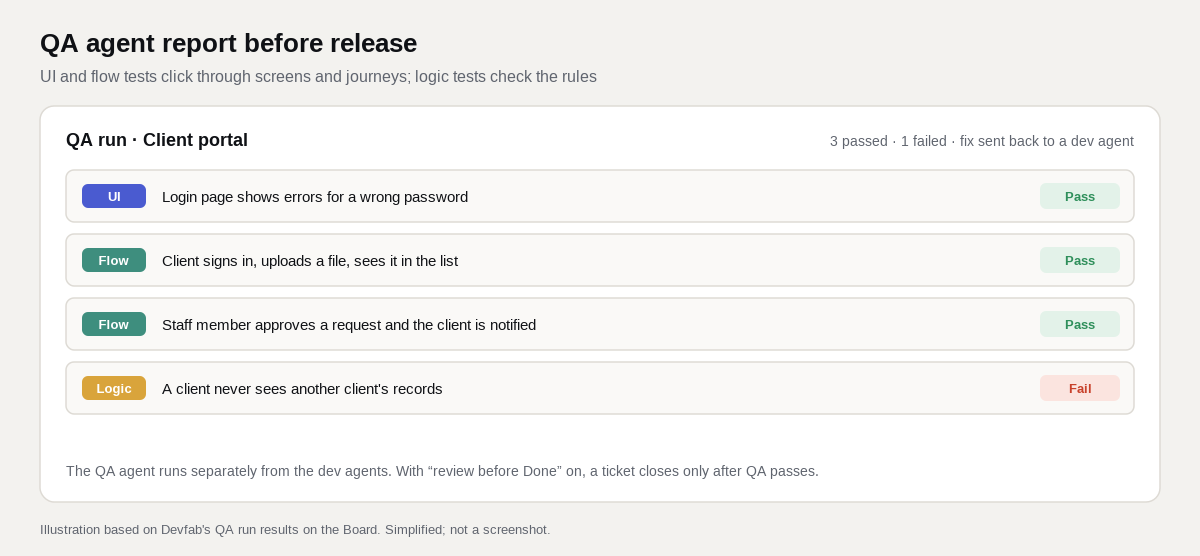
- QA agent. A separate agent runs UI and flow tests, clicking screens and user journeys end to end, plus logic tests.
- ChainFlow maps how functions and APIs connect, so later changes don't break connected features.
- Your code, your server. The code lives in your own GitHub account (or your organization's), and you deploy to your own server. Docs include blueprints, prototypes and user manuals.
Honest limits: Devfab is new and in Beta, with a smaller community and fewer integrations. It isn't a visual editor, so non-technical staff can't drag and drop changes the way they can in Bubble or Softr. It needs a GitHub account. Cost is predictable: it's logged after each run, per task and per project.
FAQ
What is the difference between no-code and an AI app builder?
A no-code tool lets you build and change an app with visual building blocks, and the app usually runs only on that platform. An AI app builder writes real code from your prompt, often with hosting included, and many sync that code to GitHub so developers can take over.
Do no-code tools have AI now?
Yes. Bubble's AI Agent builds a full app from a description, Softr generates pages, database, permissions and workflows from a prompt, and GlideOS turns spreadsheets into apps with its own agent. The output still lives in their visual editors and platforms.
Can I export my app from a no-code tool?
It depends on the tool. Bubble says its apps can only run on Bubble and cannot be exported as code, though you can export data. AI app builders such as Lovable, Bolt.new, v0 and Base44 (Builder plan and up) sync code to GitHub. Always check before you build something important.
Which is better for a non-technical team?
If the same people must keep changing the app for years, no-code usually wins, because they can edit it visually. If you plan to hand the app to developers later, an AI app builder that syncs code to GitHub gives you a cleaner path.
Read next
- What is an AI software factory?
- AI software factory vs AI coding tools: which does your team need?
- Bubble vs Lovable
- Bubble alternatives
- Softr alternatives
- Best AI tools for small businesses to build custom apps
Describe your app, approve the plan, own the code. Try Beta
Sources (checked November 13, 2026): IBM: Low-code vs no-code; Microsoft: Low-code vs no-code app development; Bubble homepage; Bubble AI app builder; What is Bubble AI? (Bubble blog, Aug 2026); Bubble pricing compare; Bubble manual: application and data ownership; Softr homepage; Softr AI app generator; Softr MCP; Softr pricing and plans; Glide homepage; GlideOS launch recap; Glide pricing; Pricing issues with GlideOS (Glide community); Lovable FAQ; Lovable GitHub sync; Intro to Bolt; Bolt Git integration; Bolt pricing; v0 FAQs; v0 Design Mode; v0 GitHub; v0 pricing; What is Base44?; Base44 pricing; Base44 GitHub sync; Lovable: Base44 vs Lovable.
Frequently asked questions
What is the difference between no-code and an AI app builder?
A no-code tool lets you build and change an app with visual building blocks, and the app usually runs only on that platform. An AI app builder writes real code from your prompt, often with hosting included, and many sync that code to GitHub so developers can take over.
Do no-code tools have AI now?
Yes. Bubble's AI Agent builds a full app from a description, Softr generates pages, database, permissions and workflows from a prompt, and GlideOS turns spreadsheets into apps with its own agent. The output still lives in their visual editors and platforms.
Can I export my app from a no-code tool?
It depends on the tool. Bubble says its apps can only run on Bubble and cannot be exported as code, though you can export data. AI app builders such as Lovable, Bolt.new, v0 and Base44 (Builder plan and up) sync code to GitHub. Always check before you build something important.
Which is better for a non-technical team?
If the same people must keep changing the app for years, no-code usually wins, because they can edit it visually. If you plan to hand the app to developers later, an AI app builder that syncs code to GitHub gives you a cleaner path.