Short answer: Vibe coding wins when the stakes are low: a prototype, a demo or a personal tool you can throw away. Spec-driven development wins once the software has real users, real data or more than one person changing it, because the spec gives agents and reviewers a fixed target. Most teams need both, in that order.
You prompted your way to a working demo. Then the third change broke the first one. Now someone says you should "write a spec first", and someone else says specs are waterfall with extra steps.
Both camps have a point. The choice decides who can review the work, what "done" means, and how much rework you buy later. This page is the referee. It uses primary sources and says where each side is wrong.
In this comparison:
- Definitions
- Side-by-side comparison
- When to choose vibe coding
- When to choose spec-driven development
- Where an AI software factory fits
Each section stands on its own, so skip to the one you need.
Definitions
Vibe coding
Andrej Karpathy named the practice in February 2025. He described a way of working where you "fully give in to the vibes, embrace exponentials, and forget that the code even exists", and called it "not too bad for throwaway weekend projects" (Wikipedia; Simon Willison). Collins Dictionary made "vibe coding" its Word of the Year 2025 and defined it as software development "that turns natural language into computer code using AI" (Dawn, Nov 6, 2025).
Simon Willison draws the useful line. If an LLM wrote the code and you then reviewed it, tested it and understood it, that is not vibe coding. The test is whether you read and understand the code, not whether an AI was involved (Simon Willison).
We covered the warning signs in detail in What is vibe coding, and when does it stop working?. This page is about the alternative.
Spec-driven development
Spec-driven development (SDD) means "writing a 'spec' before writing code with AI", and the spec becomes the source of truth for both the human and the agent. Birgitta Böckeler of Thoughtworks describes three levels on Martin Fowler's site (martinfowler.com, Oct 15, 2025):
- Spec-first: write a careful spec, then use it for the task at hand.
- Spec-anchored: keep the spec after the task and use it to maintain the feature.
- Spec-as-source: the spec is the main file; people edit the spec, never the code.
Two tools define the practice today:
- GitHub Spec Kit is an open source toolkit with four phases: Specify, Plan, Tasks and Implement. GitHub calls the spec "a contract for how your code should behave" and says each phase has a checkpoint where the developer verifies the output before moving on. It works with GitHub Copilot, Claude Code and Gemini CLI (GitHub Blog, Sep 2, 2025). The repository is MIT-licensed (GitHub).
- Kiro, from AWS, turns each spec into three files:
requirements.mdwith user stories and acceptance criteria in EARS format ("WHEN [condition] THE SYSTEM SHALL [behavior]"),design.mdwith architecture and sequence diagrams, andtasks.mdwith trackable tasks. Each phase is completed before the next begins (Kiro docs). Kiro also verifies specs with property-based tests (Kiro).
The middle ground is growing
The two practices are now a dial, not a switch. App builders known for the prompt-and-preview loop have added planning. Lovable's Plan mode writes a plan for approval before it changes the project (Lovable FAQ). Replit's Plan mode produces a task list to approve before Agent changes code or data (Replit docs). Bolt.new's Plan mode works through strategy without generating code (Bolt glossary).
A plan for one prompt is not the same as a spec for a product. But it shows the industry agrees on the direction.
Side-by-side comparison
| Aspect | Vibe coding | Spec-driven development |
|---|---|---|
| Starting point | A prompt, then the next prompt | A written spec: requirements, then design, then tasks |
| What a person reviews | The running app, usually the preview | The spec and plan first, then small, focused changes |
| What "done" means | It looks right when you click it | Acceptance criteria written before the code (EARS in Kiro) |
| Who can take part | Whoever holds the prompt | Anyone who can read the spec: client, product owner, developer |
| Speed to a first screen | Fastest | Slower: the spec comes first |
| Small changes and bug fixes | A good fit | Can be overkill |
| Existing codebases | Less reliable, per GitHub | A feature spec explains how new code meets the old |
| Typical failure | Fixes that break other features; nobody can explain the code | Long specs nobody reads; agents that drift from the spec |
| Cost pattern | Cheap to start; debugging loops add up | More work up front; in Kiro a spec task typically uses more credits than a simple prompt |
| Typical tools | Build modes in Lovable, Bolt.new, Replit | GitHub Spec Kit, Kiro specs, Tessl |
Sources for the table: GitHub on vibe coding being less reliable for existing codebases and on feature specs (GitHub Blog); Böckeler on overkill, verbose specs and agents ignoring instructions (martinfowler.com); Kiro credits (Kiro pricing).
When to choose vibe coding
Vibe coding is the better choice when learning matters more than lasting. Pick it when:
- You don't know what you want yet. A spec written before you've seen anything is a guess. A quick prototype turns vague ideas into things you can point at.
- The stakes are low. Willison's rule: the harm from bugs or security flaws should be limited (Simon Willison). Personal tools, scripts and internal experiments qualify.
- It is a demo, not a product. A pitch, a client conversation or a "would anyone use this?" test. If it gets thrown away, it has done its job.
- The change is tiny. Böckeler found Kiro's full spec flow a "sledgehammer to crack a nut" for a small bug (martinfowler.com). One-line fixes don't need three markdown files.
- You are learning. Watching an AI build something is a quick way to see how a feature could work.
When to choose spec-driven development
Spec-driven development is the better choice once other people depend on the result. Pick it when:
- Real users or real data are involved. Wikipedia's vibe coding entry lists incidents from 2025 and 2026, including vibe-coded apps that exposed personal data and an agent that deleted a production database despite instructions (Wikipedia). A spec with rules and acceptance criteria is where those risks get named.
- More than one person, or agent, changes the code. A shared spec stops two people prompting the same app in different directions. Kiro's
tasks.mdand Spec Kit's Tasks phase split work into small, trackable units. - You are adding a feature to an existing system. GitHub lists this "N-to-N+1" case as a core use: the spec clarifies how new code interacts with the old, and the plan encodes architectural constraints (GitHub Blog).
- Someone must sign off. A client, a manager or a regulator can read a spec. Nobody signs off on a prompt history.
- You are modernizing legacy code. GitHub suggests capturing the core business logic in a new spec and rebuilding on a fresh architecture (GitHub Blog).
The honest caveats
Spec-driven development has its own failure modes, and its fans should hear them. Böckeler found Spec Kit produced many repetitive markdown files and wrote, "I'd rather review code than all these markdown files." She saw agents ignore spec instructions and create duplicate classes, and called the structure a possible "false sense of control." She also notes that heavy up-front design pulls against the proven value of small, iterative steps (martinfowler.com).
The fix is not to skip the spec. It is to keep specs short, write them per feature, and test against them with something other than the agent that wrote the code.
Where an AI software factory fits
Spec tools give a developer a better way to brief an agent. They still leave three gaps: what the spec forgot to say, whether agents broke something the spec didn't mention, and whether the finished app actually meets the spec.
An AI software factory treats the spec as the start of a production line. Devfab is one. Coding agents automate the developer. Devfab automates the development lifecycle.
- Research before the plan. A spec is only as good as what you knew to write. Before any plan, Devfab's research step maps the domain: key terms, best practices for that kind of app, and competitors, then suggests a prototype. It covers what a busy founder forgets to say.
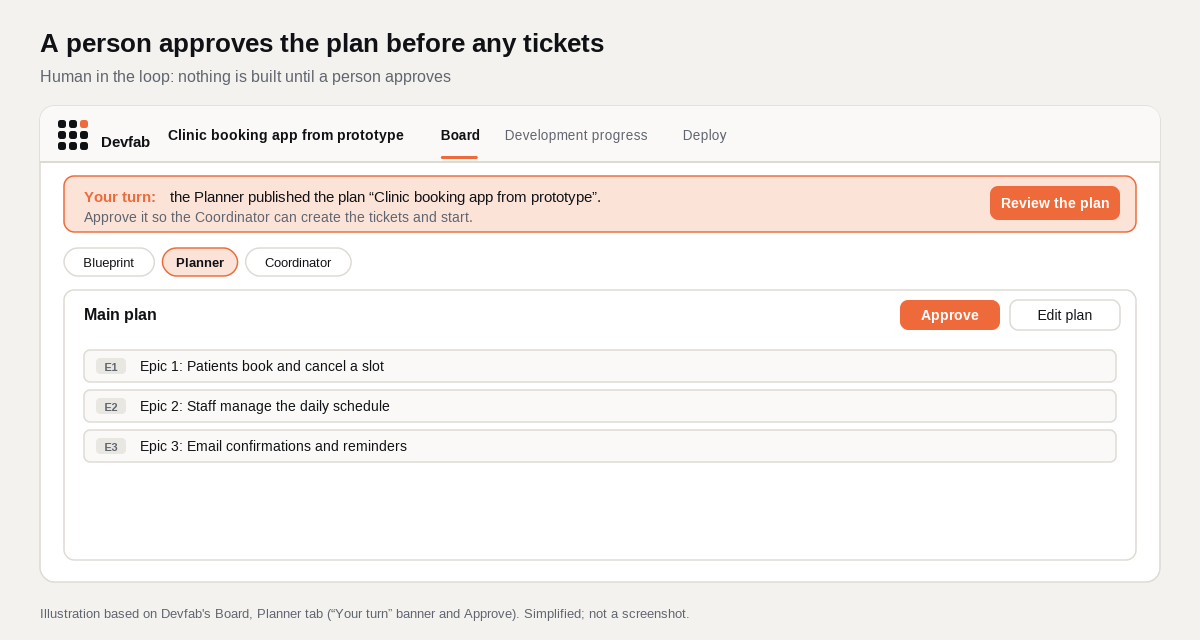
- A plan a person approves. The Planner writes the plan as epics. A person approves it before the Coordinator creates tickets and dev agents start. Human in the loop is the default mode; Auto mode handles the process and asks only when needed.
- ChainFlow against drift. ChainFlow maps which functions and APIs call each other and what is deployed, so dev agents see the impact of a change and don't break connected features.
- Tests that check the spec. A separate QA agent runs UI and flow tests (screens, buttons and user journeys clicked end to end) plus logic tests. That is how "done means" in the spec gets checked.
You don't have to throw the vibe-coded prototype away. On the Describe step, attach a spec, a doc or screenshots of the prototype, and let it feed the research and the plan. The code lives in your own GitHub account (or your organization's), and you deploy to your own server. Cost is predictable: it is logged after each run, per task and per project. You can choose the model for each agent or keep Devfab's default.
Devfab's honest limits: it is new and in Beta, with a smaller community and fewer integrations than Kiro or the coding agents Spec Kit runs with. It is not an editor for hands-on coding, and it needs a GitHub account. For a one-line fix, a coding agent or a quick vibe-coded change is the shorter path.
FAQ
Is spec-driven development just waterfall with AI?
Not in the classic sense. Tools like GitHub Spec Kit and Kiro write a spec per feature and check each phase before the next, in short loops. The risk is real, though: Birgitta Böckeler warns that heavy up-front design conflicts with the value of small, iterative steps. Keep specs short and per feature.
Can I vibe code first and write the spec later?
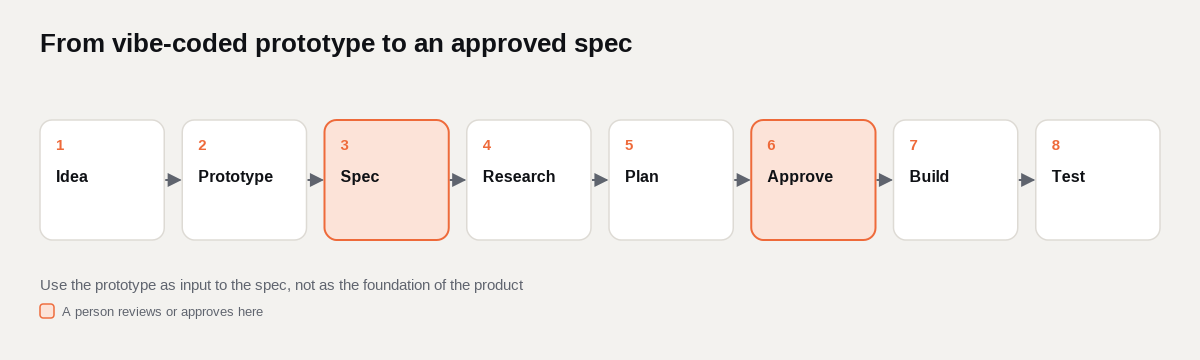
Yes, and it often works better. A prototype shows you what you actually want. Walk through it, write down what each screen is for, and turn that into a spec before you build the version people will depend on. In Devfab you can attach the spec, a doc or screenshots of the prototype when you describe the project.
Which tools support spec-driven development?
GitHub Spec Kit is an open source toolkit that runs Specify, Plan, Tasks and Implement with agents such as GitHub Copilot, Claude Code and Gemini CLI. Kiro generates requirements, design and task files for each spec. Lovable, Replit and Bolt.new now offer a Plan mode, a lighter version of the same idea. Devfab applies it to the whole project.
Does a spec guarantee the AI builds the right thing?
No. In Böckeler's tests, agents sometimes ignored instructions in the spec, which she called a false sense of control. A spec tells you what done means. You still need tests that check it, ideally run by something other than the agent that wrote the code.
Read next
- What is an AI software factory?
- AI software factory vs AI coding tools: what's the difference?
- What is vibe coding, and when does it stop working?
- Devfab vs Kiro
- How to review a plan written by an AI agent
Turn your prototype into an approved plan. Try Beta
Sources (checked November 13, 2026): Understanding Spec-Driven-Development: Kiro, spec-kit, and Tessl (martinfowler.com); Spec-driven development with AI (GitHub Blog); github/spec-kit; Kiro docs: Spec concepts; Kiro; Kiro pricing; Vibe coding (Wikipedia); Not all AI-assisted programming is vibe coding (Simon Willison); 'Vibe coding' named word of the year by Collins dictionary (Dawn); Lovable FAQ; Replit Agent; Bolt glossary.
Frequently asked questions
Is spec-driven development just waterfall with AI?
Not in the classic sense. Tools like GitHub Spec Kit and Kiro write a spec per feature and check each phase before the next, in short loops. The risk is real, though: Birgitta Böckeler warns that heavy up-front design conflicts with the value of small, iterative steps. Keep specs short and per feature.
Can I vibe code first and write the spec later?
Yes, and it often works better. A prototype shows you what you actually want. Walk through it, write down what each screen is for, and turn that into a spec before you build the version people will depend on. In Devfab you can attach the spec, a doc or screenshots of the prototype when you describe the project.
Which tools support spec-driven development?
GitHub Spec Kit is an open source toolkit that runs Specify, Plan, Tasks and Implement with agents such as GitHub Copilot, Claude Code and Gemini CLI. Kiro generates requirements, design and task files for each spec. Lovable, Replit and Bolt.new now offer a Plan mode, a lighter version of the same idea. Devfab applies it to the whole project.
Does a spec guarantee the AI builds the right thing?
No. In Böckeler's tests, agents sometimes ignored instructions in the spec, which she called a false sense of control. A spec tells you what done means. You still need tests that check it, ideally run by something other than the agent that wrote the code.