Short answer: Kiro is the most complete spec-first IDE, with requirements, design and task files. GitHub Spec Kit is the best free, open-source option for the agent you already use. Zencoder and Factory suit teams running many agents. Devfab fits when the spec should come from research and end in tested, deployed software.
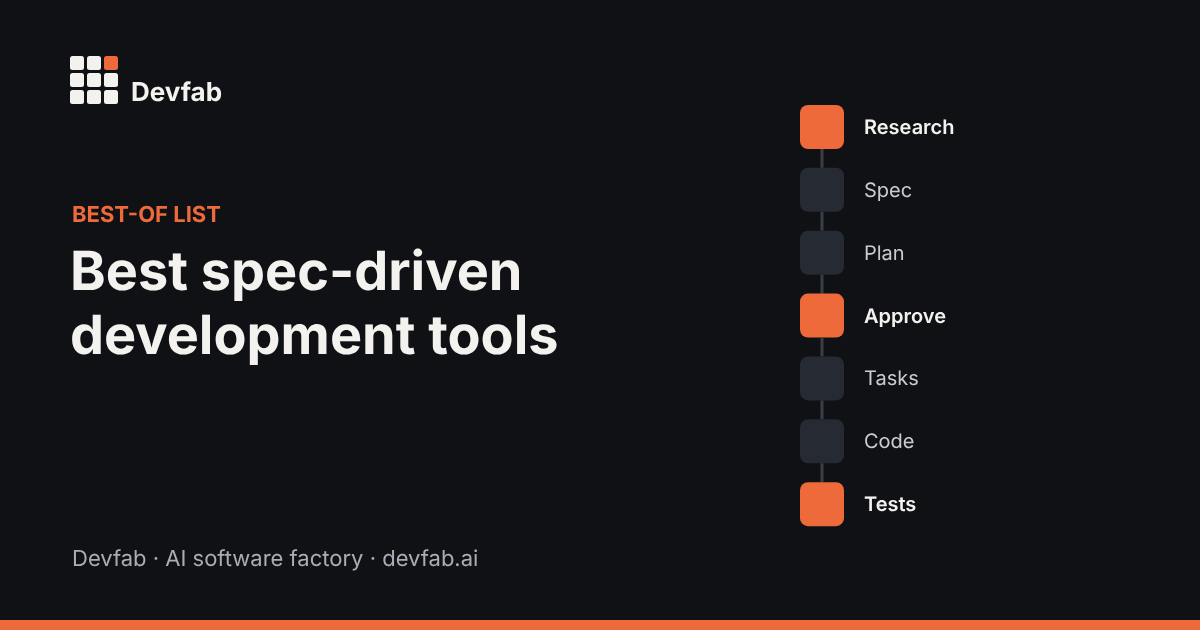
You tried vibe coding a B2B quote tool, and the agent built something close to what you said, but not what you meant. Specs promise to fix that. Write down requirements first, let the agent plan, then build in small tasks.
Every AI coding vendor now claims a spec mode. Some are files in your repo. Some are plans in a chat. One or two run the whole delivery line. The difference decides how much you still check by hand.
In this guide, you'll learn:
Use the sections below as your shortlist.
How we picked and compared
We included tools whose own docs describe a spec, plan or requirements step that comes before the agent writes code. We read vendor docs, pricing pages and changelogs, plus one independent review of spec-driven tools on Martin Fowler's site. Everything was checked in November 2026. We did not run hands-on tests, and we say so where it matters.
What we looked for:
- Spec artifact: does the tool write a spec you can read, edit and keep?
- Approval point: does a person sign off before code is written?
- Testing: does anything check the code against the spec?
- Scope: one developer's feature, or a whole project?
- Pricing model, with prices only from official pricing pages.
A useful frame from the Fowler review: tools are "spec-first" (the spec guides the first build), "spec-anchored" (the spec is kept and updated) or "spec-as-source" (people edit only the spec), and the definition is "still in flux" (martinfowler.com).
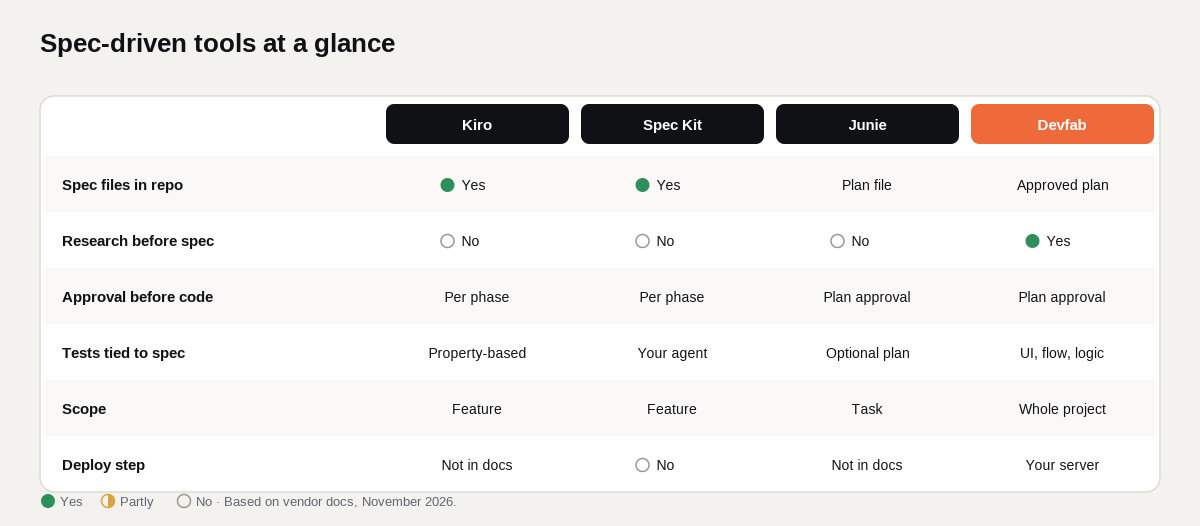
Quick comparison table
| Tool | Spec artifact | Approval before code | Testing tied to spec | Where it runs | Pricing (as of November 2026) |
|---|---|---|---|---|---|
| Kiro | requirements.md, design.md, tasks.md | Each phase completed before the next | Property-based tests | IDE, CLI, Web, Mobile, Crew agents | Free (50 credits); Pro USD 20 per user per month |
| GitHub Spec Kit | Spec, plan and task Markdown files | You review each phase before moving on | Not built in; your agent's tests | CLI plus your coding agent | Free, MIT license |
| Zencoder (Zenflow) | Spec-driven workflows for features, bugs, refactors | Approval gates listed | Verification on every change | IDE, desktop, CLI | Pro USD 40 per user per month (annual) |
| Factory | Spec mode | Autonomy levels and approval rules | PR review | CLI, desktop, IDEs, web | Free (bring your own inference); Pro USD 20 per user per month |
| JetBrains Junie | Plan saved in .junie/plans | You edit and approve the plan | Optional testing strategy in the plan | JetBrains IDEs, CLI, CI | AI Ultimate USD 25 per user per month |
| Warp Factories | Spec stage in a factory.yaml pipeline | Any stage can be automated or manual | Review and verification stages | Hosted or self-hosted control plane | Start USD 0 plus usage; Scale USD 250 per team per month |
| Devfab | Research, then an approved project plan | A person approves the plan | QA agent: UI, flow and logic tests | Web workspace, your GitHub, your server | Cost logged per task and per project (Beta) |
The tools, one by one
Kiro
Best for: developers who want the fullest spec-first workflow inside an IDE, backed by AWS.
Kiro is AWS's agentic coding system. Each spec produces three files: requirements.md with user stories and EARS-format acceptance criteria, design.md with architecture and sequence diagrams, and tasks.md with trackable implementation tasks (Kiro docs). The workflow runs requirements, then design, then implementation planning, then execution, finishing each phase before the next.
- Specs are verified with property-based tests "across hundreds of cases" (Kiro).
- Agent hooks run shell commands or prompts on events such as file save or before and after tool use (Kiro hooks).
- Runs as an IDE, CLI, Web, Mobile and Crew background agents; supports MCP, AGENTS.md and Skills (Kiro).
- Model choice includes Claude, GPT and open-weight models, or "Auto" routing per task.
- November 2026 updates include Kiro Crew LTS, an Enterprise Management preview and Kiro Web in Europe (Kiro changelog).
- Pricing: Free with 50 credits per month; Pro USD 20, Pro+ USD 40, Pro Max USD 100 and Power USD 200 per user per month; Teams USD 20 per seat per month with pooled credits, as of November 2026 (Kiro pricing).
Limits: a spec task usually costs more credits than a simple prompt (Kiro pricing). The Fowler review found Kiro turned a small bug into four user stories with sixteen acceptance criteria, which is heavy for small fixes. See Devfab vs Kiro.
GitHub Spec Kit
Best for: teams that want a free, open-source spec workflow on top of the coding agent they already use.
Spec Kit is GitHub's open-source toolkit for spec-driven development. It treats the spec as "a contract for how your code should behave" and runs four phases: Specify, Plan, Tasks and Implement, with a review at each phase before you move on (GitHub blog).
- MIT licensed, with about 145,000 GitHub stars as of November 2026 (GitHub repo).
- Commands include constitution, specify, plan, tasks, implement and converge, plus bundled extensions for bug fixing and idea assessment (GitHub repo).
- Works with agents such as GitHub Copilot, Claude Code and Gemini CLI (GitHub blog).
- Needs Python 3.11+, uv and a supported AI coding agent; installed with the
specifyCLI (GitHub repo). - The repo warns that catalog listings are "not audits or endorsements," so review community extensions before installing.
- Pricing: free; you pay for whichever coding agent you run.
Limits: GitHub called it an experiment at launch, and feature work in existing codebases may need extra context work (GitHub blog). The Fowler review found it produced many repetitive Markdown files that were tedious to review.
Zencoder (Zenflow)
Best for: engineering teams that want spec-driven workflows with several agents and several models in parallel.
Zenflow Code runs spec-driven workflows for features, bugs and refactors, with agents working in parallel in isolated environments (Zencoder). Its product line is now centred on Zenflow, IDE agents, a CLI and the new Hops (Zencoder pricing).
- Multi-model routing: "Plan with Opus. Build with Gemini. Review with Codex." (Zencoder).
- Bring your own key for OpenAI, Anthropic or Gemini without using credits (Zencoder pricing).
- Runs in VS Code and JetBrains, Zenflow Desktop and a CLI, with cloud, on-premise or hybrid deployment.
- SOC 2 Type II, ISO 27001 and ISO 42001; SSO, role-based access and approval gates (Zencoder).
- Pricing: Pro USD 40, Pro Plus USD 85 and Pro Max USD 175 per user per month billed annually, as of November 2026, with monthly credits that expire (Zencoder pricing).
Limits: a review updated in August 2026 calls the entry price the highest in its category, says credit use is hard to predict and notes frequent product renaming (AISO Tools). See Devfab vs Zencoder.
Factory
Best for: enterprises that want a Spec mode inside a larger agent platform, with on-prem options.
Factory's Droids offer three interaction modes, Normal, Spec and Mission, with autonomy levels from Off to High and permission rules to allow, require approval for, or block shell commands (Factory docs). Status: Factory now uses factory.com as its main domain, and "Factory 2.0" (June 15, 2026) repositioned it as a "software factory" (Factory).
- Missions split complex work into parallel tracks; Automations run recurring workflows (Factory 2.0).
- Runs from the Droid CLI (including headless in CI), a desktop app, IDEs and the web; work can be delegated from Slack, Linear, Jira, Teams and Google Chat (Factory docs).
- Inline pull request review and AutoWiki repo wikis (Factory).
- Model-agnostic, with a Router that picks a model per task and bring-your-own-key support.
- Pricing: Free (bring your own inference); Pro USD 20, Plus USD 100 and Max USD 200 per user per month; Teams USD 60 per team plus USD 40 per user per month, up to 10 seats, as of November 2026 (Factory pricing).
Limits: the pricing page gives usage only relative to Pro, not token or credit amounts. Spec mode is one mode in a broad platform, not a spec-file system like Kiro's.
JetBrains Junie
Best for: teams in JetBrains IDEs who want a reviewable plan before the agent codes.
Junie left beta in June 2026. Its Plan mode writes a structured plan with requirements, technical design, delivery stages and an optional testing strategy, which you can edit and approve; it is saved in .junie/plans so you can commit it (JetBrains blog).
- Modes: Default, Plan, Goal and Debug (Debug needs IntelliJ IDEA Ultimate) (Junie help).
- Uses the IDE's semantic index, build configurations, test runners and debugger.
- Model-agnostic, with bring-your-own-key for Anthropic, OpenAI and Google, and local runtimes.
- Junie CLI (beta since March 2026) runs in the terminal and in GitHub or GitLab CI (JetBrains blog).
- Pricing: free to start with Junie Lite; AI Pro USD 8.33 and AI Ultimate USD 25 per user per month, as of November 2026; the page does not say which billing period these reflect (Junie).
Limits: the docs warn that when the context window fills, "the agent may lose track of earlier parts of the session." No deploy or app-building features are described.
Warp Factories
Best for: teams that want to define their own spec-to-review pipeline as code.
Warp Factories, launched August 18, 2026, are built around triage, specification, implementation, review and verification, and any stage can be automated (TechCrunch). Factories are defined in a version-controlled factory.yaml, and a "foreman" agent splits work across spec, implementation and review subagents (Warp).
- Works with Warp's own agent, Claude Code and Codex as harnesses, with a model per pipeline stage (Warp article).
- Evals and scorers are part of a factory; managers can compare agent configurations and track token spend.
- Compute runs on Warp's cloud or self-hosted in your VPC on Enterprise (Warp pricing).
- Work enters from GitHub, GitLab, Linear, Jira, Slack or Teams.
- Pricing: Start USD 0 per month plus usage; Scale USD 250 per team per month plus usage, with USD 150 of usage included; Enterprise custom, as of November 2026 (Warp pricing).
Limits: the homepage still asks visitors to request early access, and some features are Research Preview or beta. Warp's CEO says it doesn't replace engineers and many tasks still need a human (TechCrunch).
Devfab, with honest limits
Best for: agencies and IT teams that deliver whole apps and want the spec to start from research and end in tested, deployed software.
Devfab is an AI software factory, not a spec tool for a single developer. Coding agents automate the developer. Devfab automates the development lifecycle.
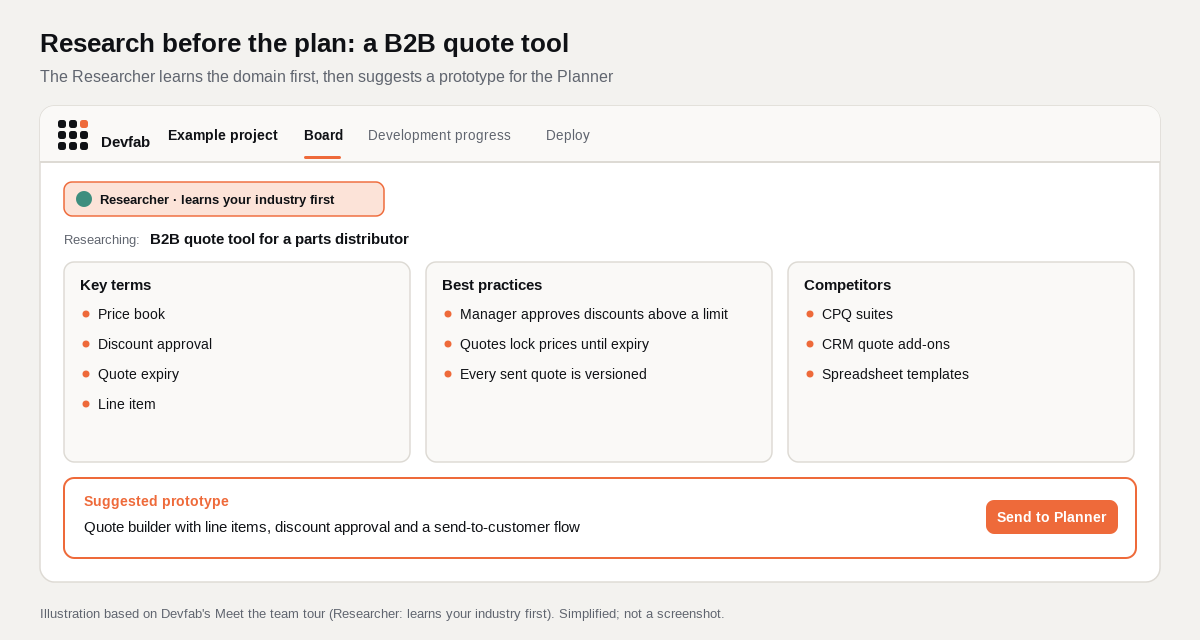
- Research before the plan. You describe the app under "What should we build?" and can attach a spec, doc or screenshots. Before any plan, the Researcher maps key terms, best practices for that kind of app and competitors, then suggests a prototype. For a B2B quote tool, that means price books, discount approvals and quote expiry rules.
- A person approves the plan. The Planner publishes it with a "Your turn" banner, and the Coordinator creates tickets only after approval. Human in the loop is the default; Auto is available.
- Impact before change. ChainFlow maps which functions and APIs call each other and what is deployed, so dev agents see what a change to pricing touches before they make it.
- Tests against the plan. The QA agent runs UI and flow tests (screens, buttons and user journeys clicked end to end) plus logic tests.
- Ownership. Code in your own GitHub account, deployed to your own server. You can choose the model for each agent or keep Devfab's default.
- Pricing: predictable cost; cost is logged after each run, per task and per project.
Limits: Devfab is in Beta, with a smaller community and fewer integrations than the tools above. It is not an editor for hands-on coding, so a developer who wants to drive each spec task in an IDE is better served by Kiro or Junie. It needs a GitHub account. And for a one-line fix, a full project plan is more process than the job needs.
How to choose
- You want spec files in your repo and an IDE: Kiro.
- You want free and open source, with your current agent: GitHub Spec Kit.
- You run several agents and models in parallel: Zencoder or Factory.
- Your team lives in JetBrains IDEs: Junie's Plan mode.
- You want to design your own pipeline as code: Warp Factories.
- You deliver whole apps to clients and need research, approval, QA and deploy: Devfab.
Whichever you pick, tie the spec to tests. The Fowler review's main warning is that agents don't always follow the spec. A spec only helps when something checks the result against it. For a deeper look at the trade-off, read Spec-driven development vs vibe coding and How to write a software spec that AI agents can build from.
FAQ
What is spec-driven development?
Spec-driven development means writing a spec before an AI agent writes code, then having the agent plan, split and build from it. GitHub's Spec Kit uses four phases: Specify, Plan, Tasks and Implement. Martin Fowler's site describes three levels: spec-first, spec-anchored and spec-as-source.
What is the best free spec-driven development tool?
GitHub Spec Kit. It is open source under the MIT license and works with coding agents you already use, such as GitHub Copilot, Claude Code and Gemini CLI. Kiro also has a free tier with 50 credits per month, as of November 2026.
Do AI agents actually follow the spec?
Not always. Testing on Martin Fowler's site found agents sometimes ignored notes about existing code, duplicated classes or over-applied rules, giving a false sense of control. Tie the spec to tests, such as Kiro's property-based tests or a QA step on user flows, so you can check the result.
Is spec-driven development worth it for small changes?
Usually not. In the same review, Kiro turned a small bug into four user stories with sixteen acceptance criteria, and Spec Kit felt heavy for a mid-size feature. Use full specs for new features and projects, and lighter plan modes for fixes.
How is an AI software factory different from a spec tool?
A spec tool helps one developer turn a spec into code. An AI software factory runs the whole project: research, a plan a person approves, tickets for several agents, tests and deployment. Devfab adds a research step before the plan and a QA agent that tests user journeys.
Read next
Want the spec to start from research and end in a tested app? Try Beta
Sources (checked November 2026): martinfowler.com: Understanding spec-driven development (Oct 15, 2025); GitHub blog: Spec-driven development with AI (Sep 2, 2025); github/spec-kit; Kiro; Kiro docs: spec concepts; Kiro docs: hooks; Kiro pricing; Kiro changelog; Zencoder; Zencoder pricing; AISO Tools: Zencoder review (updated Aug 2026); Factory; Factory pricing; Factory 2.0 (Jun 15, 2026); Factory docs index; Junie; JetBrains: Junie out of beta (Jun 2026); JetBrains: Junie CLI beta (Mar 2026); Junie agent help; TechCrunch: Warp Factories (Aug 18, 2026); Warp; Warp article: Terminal history and Factories; Warp pricing.
Frequently asked questions
What is spec-driven development?
Spec-driven development means writing a spec before an AI agent writes code, then having the agent plan, split and build from it. GitHub's Spec Kit uses four phases: Specify, Plan, Tasks and Implement. Martin Fowler's site describes three levels: spec-first, spec-anchored and spec-as-source.
What is the best free spec-driven development tool?
GitHub Spec Kit. It is open source under the MIT license and works with coding agents you already use, such as GitHub Copilot, Claude Code and Gemini CLI. Kiro also has a free tier with 50 credits per month, as of November 2026.
Do AI agents actually follow the spec?
Not always. Testing on Martin Fowler's site found agents sometimes ignored notes about existing code, duplicated classes or over-applied rules, giving a false sense of control. Tie the spec to tests, such as Kiro's property-based tests or a QA step on user flows, so you can check the result.
Is spec-driven development worth it for small changes?
Usually not. In the same review, Kiro turned a small bug into four user stories with sixteen acceptance criteria, and Spec Kit felt heavy for a mid-size feature. Use full specs for new features and projects, and lighter plan modes for fixes.
How is an AI software factory different from a spec tool?
A spec tool helps one developer turn a spec into code. An AI software factory runs the whole project: research, a plan a person approves, tickets for several agents, tests and deployment. Devfab adds a research step before the plan and a QA agent that tests user journeys.