Short answer: If you need SSO today and an agent-first editor, pick Cursor. If you live in JetBrains IDEs, pick Junie. For the lowest seat price on GitHub, pick GitHub Copilot. Choose Devin Desktop or Claude Code for agents that keep working in the cloud, and Devfab when you need a project delivered, not edited.
Your developers love how fast Zed is. Then procurement asks for single sign-on, and the answer is "planned." Or a manager asks who is testing what the agents write, and the editor has no answer. Zed is very good at being an editor. Some teams need more than an editor. This page compares six alternatives, using vendor docs re-checked on November 20, 2026.
In this guide, you'll learn:
- Why teams leave Zed
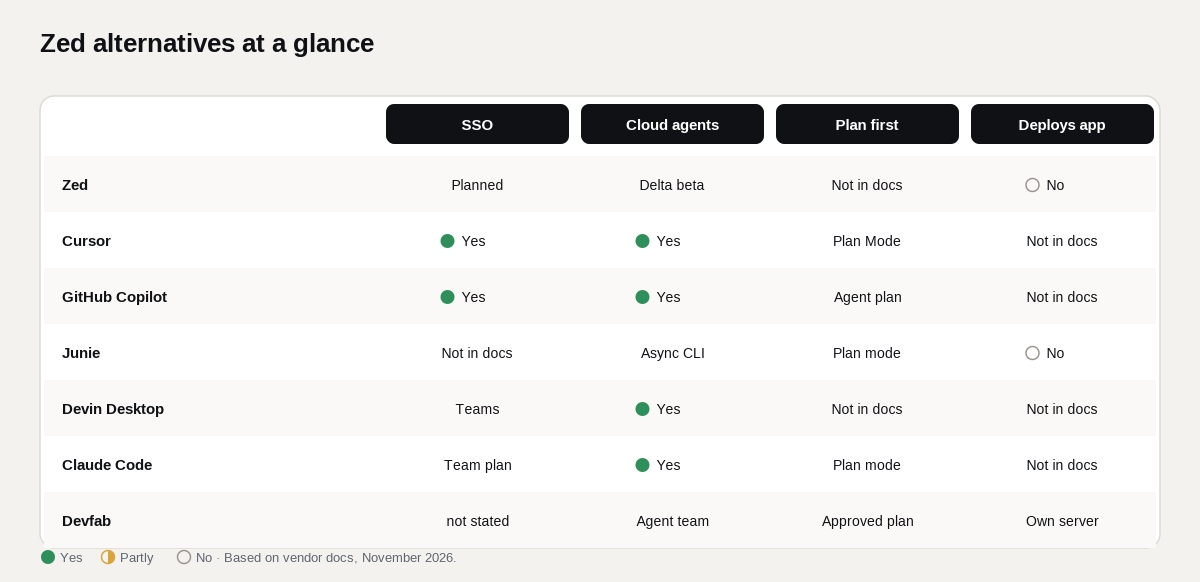
- Quick comparison
- The alternatives
- Where Zed is still the better choice
- How to choose
Use the sections below as your shortlist.
Why teams leave Zed
First, the status. Zed 1.0 shipped on April 29, 2026, together with Zed for Business (Zed blog). The same company launched Delta, a separate multiplayer agent-coding app, in private beta on August 12, 2026 (Zed blog: Delta). Zed is healthy and shipping. People leave for specific reasons:
- No SSO yet. "SSO, SAML, and SCIM are planned but not currently available" (Zed pricing). For many enterprises that ends the conversation.
- Desktop only. Zed runs on macOS, Linux and Windows, with no web version yet (Zed on GitHub).
- It is an editor, not a delivery tool. No app hosting or deployment features are described (Zed).
- Hosted AI costs extra. Pro includes USD 5 of tokens, then bills at API list price plus 10%; Business has no bundled tokens (Zed pricing).
- License fit. Zed is GPL-3.0-or-later, with some Apache-2.0 parts (Zed on GitHub). Some legal teams prefer other terms.
Quick comparison
| Tool | Type | SSO | Cloud agents | Plan first | Pricing (Nov 2026) |
|---|---|---|---|---|---|
| Zed (baseline) | Open-source editor | Planned, not available | No; Delta has cloud runners (beta) | Not covered in docs we checked | Free; Pro USD 10 per month; Business USD 30 per seat |
| Cursor | AI IDE + agents | Teams and Enterprise | Yes, isolated VMs | Plan Mode | Free; Teams USD 30+ per user per month |
| GitHub Copilot | Assistant in many IDEs + cloud agent | Through GitHub plans | Yes, opens PRs | Cloud agent plan | Free; Pro USD 10 per user per month |
| JetBrains Junie | Agent in JetBrains IDEs + CLI | Not covered in docs we checked | Async tasks via CLI | Plan mode saved in repo | Free to start; per-user AI plans |
| Windsurf (Devin Desktop) | IDE + agent command center | Teams | Yes, Devin Cloud | Not covered in docs we checked | Free; Pro USD 20 per month |
| Claude Code | Terminal, IDE, desktop and web agent | Team and Enterprise | Cloud sessions and scheduled tasks | Plan mode | In Claude Pro USD 20 per month |
| Devfab | AI software factory | Not stated | Agents run the project | Research, then a plan a person approves | Cost logged per task and per project (Beta) |
The alternatives
Cursor
Verdict: the most direct swap for a team that wants an AI-first editor with enterprise controls. Best for: developers who want Plan Mode, parallel cloud agents and PR review. Trade-off: not open source; the low Plus tier is limited to Grok models. Pricing: Free; Plus USD 8 per month; Premium USD 30 per month; Teams USD 30+ per user per month, as of November 2026 (Cursor pricing).
Cursor offers SAML/OIDC SSO on Teams and Enterprise, with SCIM, audit logs and model restrictions on Enterprise (Cursor Enterprise). Cloud agents run in isolated VMs and can execute on self-hosted machines (Cursor cloud agents). Bugbot reviews PRs and Autofix pushes fixes. A dated review reports inconsistent output that needs line-by-line review and no live support even on the top plan (dev.to, Apr 2026).
GitHub Copilot
Verdict: the low-cost choice that works in the editors your team already has. Best for: organizations on GitHub that want AI in VS Code, JetBrains, Xcode and the terminal. Trade-off: the cloud agent only works with GitHub-hosted repos and opens one PR per task. Pricing: Free; Pro USD 10 per user per month; Business USD 19 per granted seat; Enterprise USD 39, as of November 2026 (Copilot plans).
Copilot runs on GitHub.com, in IDEs, in the CLI and in a desktop app for parallel agent sessions (GitHub Docs: features). Completions and next-edit suggestions don't consume credits on any plan. Enterprise AI Controls went GA on February 26, 2026 (GitHub changelog).
JetBrains Junie
Verdict: the natural pick if your developers already use IntelliJ, PyCharm or another JetBrains IDE. Best for: teams that want an agent using the IDE's index, debugger and test runners. Trade-off: the deepest features need JetBrains IDEs; Debug mode needs IntelliJ IDEA Ultimate. Pricing: free to start with Junie Lite and your own keys; paid per-user JetBrains AI plans include monthly AI credits. Check the Junie page for current figures.
Junie left beta in June 2026 with Plan mode, agentic debugging and code review (JetBrains blog). Plans are saved in .junie/plans so they can be committed. Junie CLI runs in the terminal and in GitHub or GitLab CI (Junie CLI). It is model-agnostic, with your own keys or local runtimes.
Windsurf (Devin Desktop)
Verdict: an IDE built around running many agents. Best for: teams that want local and cloud agents, with sessions that keep running when the laptop closes. Trade-off: the Windsurf JetBrains plugin is in maintenance mode. Pricing: Free; Pro USD 20 per month; Max USD 200 per month; Teams USD 80 per month plus USD 40 per full dev seat, as of November 2026 (Devin pricing).
Windsurf became Devin Desktop on June 2, 2026, and the Agent Command Center is now the default screen (Devin Desktop FAQ). Teams includes SAML/OIDC SSO; Enterprise adds SCIM, RBAC and a VPC option. Integrations include Slack, Linear, Jira, Sentry and Datadog (Devin Desktop).
Claude Code
Verdict: a strong agent you can drive from Zed, a terminal, or the web. Best for: developers who want one agent everywhere, including scheduled cloud tasks. Trade-off: Claude models only. Pricing: included in paid Claude plans; Pro USD 20 per month; Team Standard USD 25 per user per month, as of November 2026 (Claude pricing).
Claude Code runs in the terminal, VS Code, JetBrains, a desktop app, the web and mobile (Claude Code overview). Cloud scheduled tasks run when your computer is off. Teams get SSO and server-managed settings; security teams can set managed permissions that local config can't override (Claude Code enterprise).
Devfab
Verdict: for when the question isn't "which editor" but "who delivers the project." Best for: agencies and IT teams that need research, an approved plan, tests and deployment. Trade-off: it is not an editor at all; developers keep their own. Pricing: predictable cost; cost is logged after each run, per task and per project.
See Where Devfab fits and the head-to-head in Devfab vs Zed.
Where Zed is still the better choice
- Speed and hands-on editing. Zed calls itself "The world's fastest IDE," and AI is optional (Zed).
- Open source and model freedom. Hosted models, your own keys from many providers, or local models through Ollama or LM Studio (Zed pricing).
- Bring any agent. Through ACP, Zed hosts Claude Agent, Codex, OpenCode and Cursor, in parallel (Zed agentic).
- Real-time pair programming. Multiplayer collaboration is built in, alongside Git, SSH remoting and a debugger (Zed 1.0).
- Reviewable agent edits. Agent changes appear in an editable unified diff you accept or reject.
Where Devfab fits
Every tool here, Zed included, makes a developer faster in a codebase. None of them, in the docs we checked, researches the domain, gets a project plan approved, tests user journeys end to end or deploys the app. Coding agents automate the developer. Devfab automates the development lifecycle.
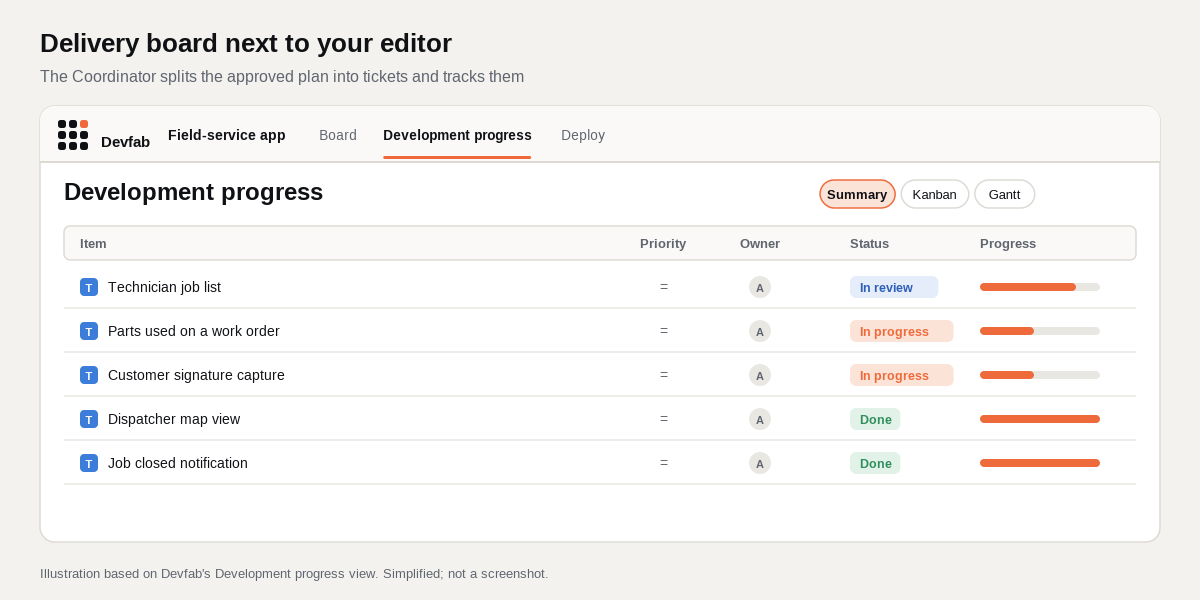
Devfab works alongside the editor you keep. Its Researcher maps the domain before the Planner writes a plan, and a person approves the plan. The Coordinator splits it into tickets for dev agents, who use ChainFlow to see which functions and APIs depend on the code they change. The QA agent runs UI and flow tests (screens, buttons and user journeys clicked end to end) plus logic tests. For a field-service app, the board might show tickets like "Technician job list" in review and "Parts used on a work order" in progress, while developers still open the repo in Zed.
Code lives in your own GitHub account and deploys to your own server. Honest limits: Devfab is in Beta, has a smaller community and fewer integrations, is not an editor for hands-on coding, and needs a GitHub account.
How to choose
- Must have SSO now and want an AI-first editor: Cursor.
- Team lives in JetBrains: Junie.
- Tight budget, code on GitHub, many editors: GitHub Copilot.
- Want agents running in the cloud from a desktop hub: Devin Desktop.
- Want one agent in every surface, including Zed: Claude Code.
- Need the project delivered with a plan, tests and deployment: Devfab, next to the editor you like.
FAQ
Does Zed support SSO?
Not yet. Zed's pricing page says SSO, SAML and SCIM are planned but not currently available. The Business plan does add org-wide AI policies, data governance, spend visibility and role-based access. If single sign-on is a hard requirement, Cursor, GitHub Copilot or Devin Desktop list it today.
Is Zed free?
Yes. Zed's Personal plan is USD 0 and lets you use your own API keys or external agents, without hosted AI. As of November 2026, Pro is USD 10 per month with unlimited edit predictions and USD 5 of tokens, and Business is USD 30 per seat per month.
What is Zed's Delta?
Delta is a separate app from the Zed team for multiplayer agent coding. It keeps agent conversations and code edits together between git commits, with cloud runners and browser access to shared threads. It entered private beta on August 12, 2026, and a public beta post followed on September 16.
Can I keep using Zed with another agent?
Yes. Through the Agent Client Protocol, Zed can host Claude Agent, Codex, OpenCode and Cursor, and run several agents in parallel. Many teams keep Zed as the editor and add an agent or a delivery tool next to it instead of switching.
Read next
Keep your editor and add a team that plans, tests and deploys. Try Beta
Sources (checked November 2026): Zed homepage; Zed pricing; Zed agentic editing; Zed blog: Zed is 1.0 (Apr 29, 2026); Zed blog: Introducing Delta (Aug 12, 2026); zed-industries/zed on GitHub; Cursor pricing; Cursor Enterprise; Cursor cloud agents; dev.to: Cursor 3 review (Apr 11, 2026); GitHub Copilot plans; GitHub Docs: Copilot features; GitHub Changelog: Enterprise AI Controls GA (Feb 26, 2026); Junie; JetBrains blog: Junie out of beta (Jun 2026); JetBrains blog: Junie CLI beta (Mar 2026); Devin Desktop; Devin Desktop FAQ; Devin pricing; Claude Code overview; Claude Code enterprise deployment; Claude pricing.
Frequently asked questions
Does Zed support SSO?
Not yet. Zed's pricing page says SSO, SAML and SCIM are planned but not currently available. The Business plan does add org-wide AI policies, data governance, spend visibility and role-based access. If single sign-on is a hard requirement, Cursor, GitHub Copilot or Devin Desktop list it today.
Is Zed free?
Yes. Zed's Personal plan is USD 0 and lets you use your own API keys or external agents, without hosted AI. As of November 2026, Pro is USD 10 per month with unlimited edit predictions and USD 5 of tokens, and Business is USD 30 per seat per month.
What is Zed's Delta?
Delta is a separate app from the Zed team for multiplayer agent coding. It keeps agent conversations and code edits together between git commits, with cloud runners and browser access to shared threads. It entered private beta on August 12, 2026, and a public beta post followed on September 16.
Can I keep using Zed with another agent?
Yes. Through the Agent Client Protocol, Zed can host Claude Agent, Codex, OpenCode and Cursor, and run several agents in parallel. Many teams keep Zed as the editor and add an agent or a delivery tool next to it instead of switching.