Short answer: Don't start with a rewrite. Use AI agents to read first: map what calls what, write down the business rules buried in the code, and lock current behavior with tests. Then replace one small slice at a time, with a person approving each plan and tests comparing old and new behavior before you cut over.
You inherited a system that nobody wants to touch. It works, mostly. The people who built it have left, and every change breaks something two screens away.
AI agents can now read and change old code quickly. That makes modernization cheaper, and also makes it easier to break things faster. The order of work matters more than the tool.
In this guide, you'll learn:
- Why big-bang rewrites fail
- Eight steps to modernize safely
- The mistakes to avoid
- A checklist for each slice
Use the sections below as your playbook.
Why big-bang rewrites fail
A legacy system is mostly undocumented decisions. A discount that applies only to one region. An order status that a nightly job sets. A report that finance depends on but nobody listed. A rewrite from scratch loses those quietly, and you find out from customers.
Old systems are a common blocker, not a rare one. A NASCIO forecast from January 2026 says state security chiefs name legacy infrastructure as their top barrier. The big vendor tools agree on where to start: GitHub Copilot modernization says modernization "starts with a comprehensive codebase analysis," and AWS Transform extracts business rules with traceability back to source code. Read first, change second.
Our example: a distributor's order system, an aging .NET app sharing one SQL Server database with a warehouse screen, invoicing and an email job.
Step by step
Step 1: Set the goal for each part of the system
"Modernize" means different things for different parts. For each part, pick one:
- Keep: works, rarely changes, low risk.
- Upgrade: same code, newer runtime or framework.
- Replace: rebuild this part as a new service or app.
- Retire: nobody uses it anymore.
Order system: keep invoicing for now, upgrade the warehouse screen, replace order entry, retire an unused fax export.
Step 2: Map the code and what calls what
Before any change, you need a map: which functions and APIs call each other, which jobs run, which tables each part reads and writes, and what is actually deployed.
In Devfab, you start with "Work on an existing project," pick the repository, and leave the change box empty. Devfab maps the code first with ChainFlow, its code-intelligence layer, and suggests three small first tickets.
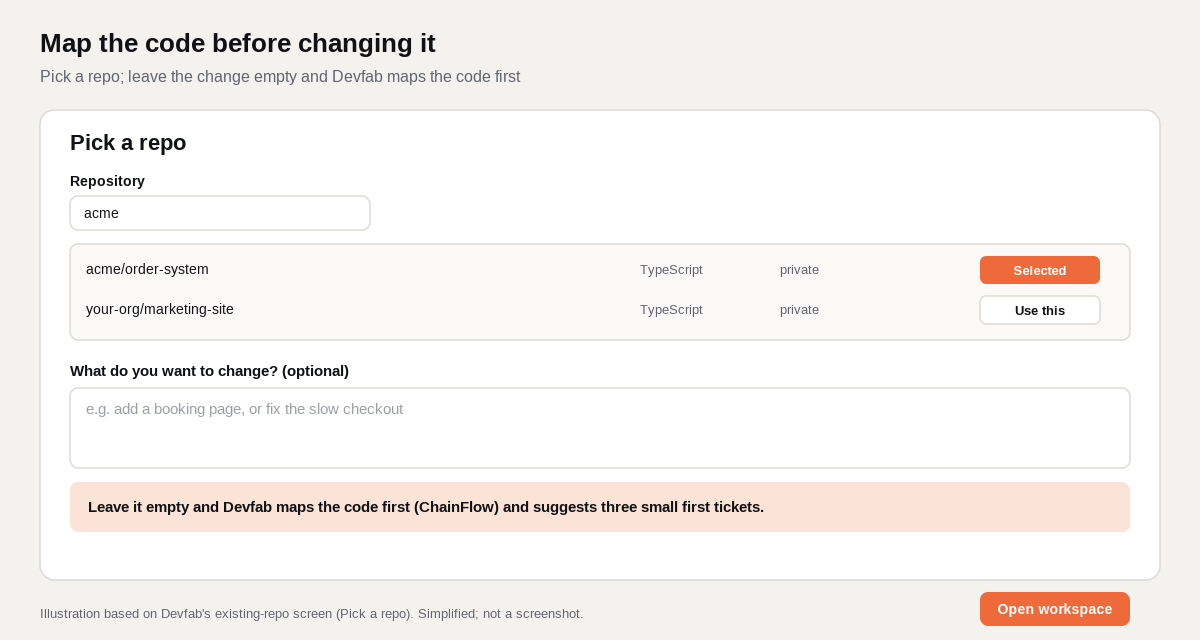
The map is what turns "every change breaks something" into a list you can check.
Step 3: Write down the business rules hiding in the code
Ask agents to extract rules into plain sentences, each linked to where it lives in the code. Then have the people who use the system confirm or correct them. They know the edge cases: "orders over a credit limit go to a manager," "back-orders ship together."
Rules nobody can confirm go on an open-questions list. Don't port a rule you don't understand without asking about it.
Step 4: Lock current behavior with tests
Before changing anything, write tests that describe what the system does today, even where it's odd. These are your safety net. Cover:
- Screens: the order form accepts and rejects what it does today.
- Journeys: an order goes from entry to warehouse to invoice to email.
- Logic: totals, taxes, discounts and credit checks give today's answers.
If the old system has no tests, this step is the biggest single improvement you'll make.
Step 5: Pick a small first slice
Choose a slice that is useful, small and has clear edges. Order entry is a good candidate if it talks to the rest through a few calls. Avoid starting with the part everything depends on.
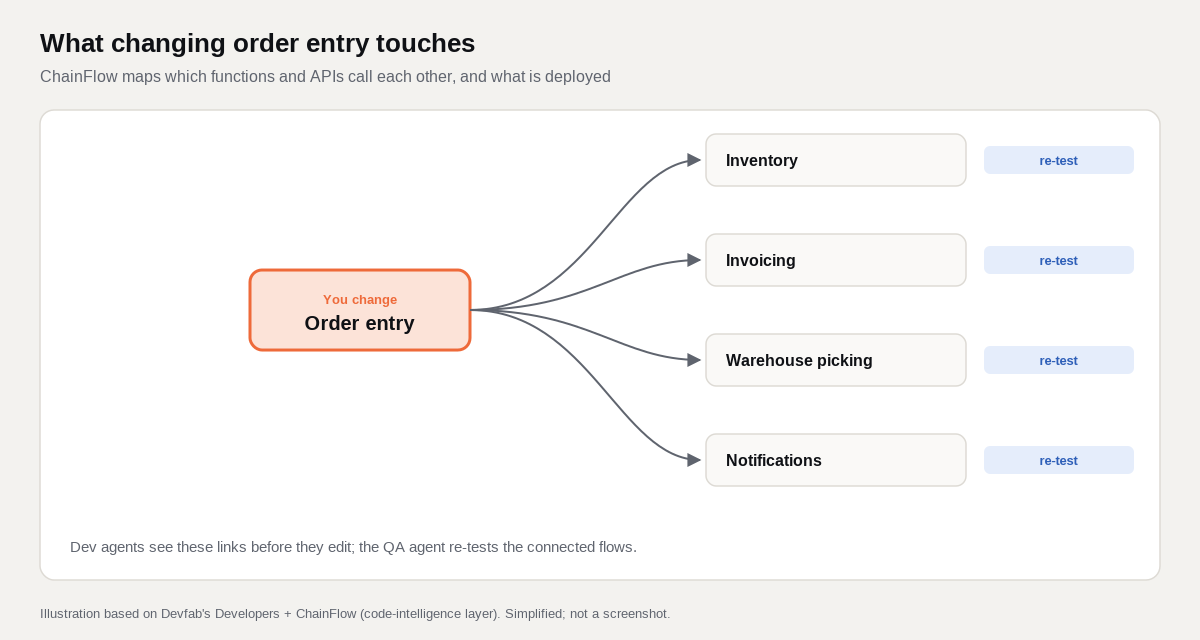
Look at the impact map for each candidate. If changing order entry touches inventory, invoicing, warehouse picking and notifications, those four need tests and a plan line each.
Step 6: Have a person approve the plan for each slice
For each slice, have an agent write a plan: what changes, what it affects, which rules it must keep, how it will be tested and how you'll switch over. A person reviews and approves it before any code.
In Devfab, the Planner publishes the plan and a person approves it before the Coordinator creates tickets and assigns developer agents. Human in the loop is the default mode. Our guide on how to use AI agents on a large existing codebase covers this review in more depth.
Step 7: Build, test and compare with the old system
Run the same inputs through old and new code and compare the outputs. Run the tests from step 4 against the new slice. Devfab's QA agent runs UI and flow tests (screens, buttons and user journeys clicked end to end) plus logic tests; with "QA agent · review before Done" switched on, a ticket isn't Done until it has been reviewed.
Keep each change small. For more on this, see How to stop AI coding agents from breaking existing code.
Step 8: Cut over slice by slice and retire the old parts
Route real traffic to the new slice in stages if you can. Keep the old path available until the numbers match. Then remove the old code, so you don't maintain two versions. Deploy to your own server; Devfab's Deploy step ships to your own infrastructure with an optional custom domain, and the code stays in your own GitHub account.
Then pick the next slice.
Common mistakes
- Rewriting before reading. You lose rules nobody wrote down.
- No tests of current behavior. Then you can't tell "changed" from "broken."
- Starting with the core. The most connected part is the worst first slice.
- Letting agents change many parts at once. Big mixed changes can't be reviewed.
- Keeping old and new forever. Plan when each old part is switched off.
- Ignoring users. Staff who use the system daily are your best source of edge cases.
Checklist
- [ ] Goal set for every part: keep, upgrade, replace or retire
- [ ] Code, jobs and tables mapped, including what is deployed
- [ ] Business rules written down and confirmed by users
- [ ] Tests of current behavior for screens, journeys and logic
- [ ] First slice chosen from the impact map
- [ ] Plan for the slice approved by a person
- [ ] Old and new outputs compared
- [ ] Old code removed after cut-over
For tools that help with each step, see Best AI tools for legacy system modernization.
FAQ
Can AI agents rewrite a whole legacy system at once?
They can generate a lot of code, but a full rewrite in one go is the riskiest way to modernize. Hidden rules get lost and nobody can check everything at once. Replacing one approved slice at a time, with tests that compare old and new behavior, is safer.
What should AI agents do first on a legacy codebase?
Read, not write. Have them map the code, its dependencies and its business rules, and produce documentation people can check. Vendor tools such as GitHub Copilot modernization and AWS Transform both start with assessment and analysis.
How do I stop AI agents from breaking the old system during modernization?
Lock current behavior with tests before any change, map what each change touches, keep each change small, and have a person approve the plan. In Devfab, ChainFlow shows which functions and APIs a change affects before developer agents make it.
Do I need the original developers to modernize a legacy system?
It helps, but it isn't required. Agents can map code and extract rules, and the people who use the system every day can confirm what it really does. Their knowledge of edge cases is often more valuable than the original design documents.
Read next
- What is an AI software factory?
- How to use AI agents on a large existing codebase
- How to stop AI coding agents from breaking existing code
- Best AI tools for legacy system modernization
- Build: public works asset tracker
Have a system nobody wants to touch? Connect the repo and let Devfab map it before anyone changes a line. Try the Devfab Beta
Sources (checked November 2026): Microsoft Learn: GitHub Copilot modernization overview; AWS Transform; NASCIO-PTI Tech Forecast, Jan 2026 (PDF).
Frequently asked questions
Can AI agents rewrite a whole legacy system at once?
They can generate a lot of code, but a full rewrite in one go is the riskiest way to modernize. Hidden rules get lost and nobody can check everything at once. Replacing one approved slice at a time, with tests that compare old and new behavior, is safer.
What should AI agents do first on a legacy codebase?
Read, not write. Have them map the code, its dependencies and its business rules, and produce documentation people can check. Vendor tools such as GitHub Copilot modernization and AWS Transform both start with assessment and analysis.
How do I stop AI agents from breaking the old system during modernization?
Lock current behavior with tests before any change, map what each change touches, keep each change small, and have a person approve the plan. In Devfab, ChainFlow shows which functions and APIs a change affects before developer agents make it.
Do I need the original developers to modernize a legacy system?
It helps, but it isn't required. Agents can map code and extract rules, and the people who use the system every day can confirm what it really does. Their knowledge of edge cases is often more valuable than the original design documents.