Short answer: For mainframe and COBOL work, look at AWS Transform, IBM watsonx Code Assistant for Z and Google Cloud Mainframe Modernization. For Java and .NET upgrades, GitHub Copilot modernization. For the same change across hundreds of repos, Moderne. For flexible migrations, Claude Code or OpenAI Codex. For safe feature work on existing apps, Devfab.
You own an old system that still runs the business, and few people understand it. A bank moving COBOL off a mainframe asks the same question as an agency. How do you change old code without breaking what still works? AI tools now read that code, document it, convert languages and upgrade frameworks. No single tool covers all of that work. This list groups eight tools by the job they suit best.
In this guide, you'll learn:
- How we picked and compared
- Eight tools in one table
- Which tool fits which kind of modernization
- How to choose
Find your kind of modernization below, then check that tool's limits.
How we picked and compared
We compared tools from vendor documentation, official product pages and published guides, checked in November 2026. We did not run hands-on tests for this article. For each tool we looked at:
- Scope. Which legacy stacks it supports: mainframe (COBOL, PL/I), Java, .NET, or any language.
- Understanding. Whether it maps dependencies and documents business logic before changing code.
- Change method. Whether changes come from deterministic rules, from AI agents, or both.
- Proof. How it checks that modernized code behaves like the original: unit tests, parity checks, replayed production traffic.
- Human control. Where people review and approve the work.
We describe pricing models where vendors publish them, and leave them out where they don't. We include Devfab, our own product, and we say plainly where it does not fit.
Quick comparison table
| Tool | Best for | Legacy scope | How it proves behavior | Main limit |
|---|---|---|---|---|
| AWS Transform | Portfolio-scale mainframe and Windows modernization on AWS | Mainframe, .NET, SQL Server, Java, Node.js, Python | Human review at each step; tracing source to target | Built around AWS as the target |
| IBM watsonx Code Assistant for Z | COBOL and PL/I on IBM Z | Mainframe | Generated unit tests for COBOL-to-Java equivalence | Mainframe only |
| Google Cloud Mainframe Modernization | Mainframe rewrite with live traffic comparison | Mainframe to Java or C# | Dual Run replays production traffic side by side | Mainframe only; Google Cloud target |
| GitHub Copilot modernization | Java, .NET and C++ upgrades; Azure migration | Java, .NET, C++ | Build fixes, test validation, CVE scans | Azure-focused for migration |
| Moderne | The same upgrade across thousands of repos | Java, JavaScript, Python, Go, C#, YAML | Deterministic recipes | Best when a recipe exists |
| Claude Code | Flexible, incremental migrations led by engineers | Any language | Tests the agent writes and runs | Developer tool; you design the process |
| OpenAI Codex | Plan-driven migrations with parity checks | Any language | Parity checks after each milestone | Developer tool; you design the process |
| Devfab | Changing existing apps without breaking connected features | GitHub repos of web apps and APIs | ChainFlow impact map plus UI, flow and logic tests | Not a mainframe or language-migration tool; in Beta |
The tools, one by one
AWS Transform
AWS Transform uses agentic AI to modernize infrastructure and applications. Its product page covers mainframe modernization (analysis, planning, code refactoring and "reimagining"), Windows modernization for .NET applications and SQL Server databases, and custom code transformations with built-in recipes for Java, Node.js and Python upgrades. It can run projects in parallel across a portfolio, and it offers a continuous mode that detects and fixes common findings such as end-of-life dependencies and outdated frameworks. You can start a job in your IDE and follow it in the web console. AWS says the service "keeps your teams in control with human review at each step."
Best for: large organizations modernizing many applications at once, especially when AWS is the target platform.
Limits: the value is strongest if you are moving to AWS. It is a program-level tool, so it brings more setup than a small team fixing one app needs.
IBM watsonx Code Assistant for Z
IBM's assistant is built for mainframe applications. It discovers and analyzes application relationships and dependencies, documents business logic, explains code in plain language, generates COBOL from prompts, refactors COBOL and PL/I into modular business services, and points to performance problems in COBOL modules. Its COBOL-to-Java feature uses generative AI and creates unit tests to check that the Java behaves the same as the original COBOL.
Best for: teams that run IBM Z and want to modernize in place or move selected services to Java.
Limits: it is a mainframe tool. If your legacy code is a Rails or .NET app, look elsewhere. IBM's product page does not list prices; it offers a demo and product tour.
Google Cloud Mainframe Modernization
Google Cloud's offering has three main parts. The Mainframe Assessment Tool reverse-engineers mainframe applications and data into a knowledge base with business rules, documentation, dependency maps and generated test cases. Mainframe Modernization Agents convert mainframe code into Java or C#. Dual Run captures live production traffic from the mainframe and replays it on the new cloud application, so you can compare outputs side by side before you go live.
Best for: mainframe rewrites where proving equal behavior on real traffic is the main risk.
Limits: mainframe only, and built around Google Cloud as the destination.
GitHub Copilot modernization
Microsoft documents GitHub Copilot modernization as an agentic tool that "analyzes and upgrades Java, .NET, and C++ applications, and helps migrate supported applications to Azure." A modernization agent in a CLI assesses applications and writes modernization plans; developers then run the changes in the IDE. It upgrades runtimes and frameworks (using tools like OpenRewrite), fixes build problems, validates tests, scans for CVEs after upgrades, and can generate infrastructure-as-code files and CI/CD pipelines for Azure. The docs say every change is reviewable and "humans remain in the loop throughout."
Best for: teams already using GitHub Copilot who need to move old Java or .NET versions forward, or move to Azure.
Limits: migration support is for Java and .NET to Azure; C++ gets upgrades only. It uses your Copilot access, so it fits teams already on Copilot.
Moderne
Moderne is the enterprise platform from the team behind OpenRewrite, the open-source refactoring framework. Changes run as "recipes," deterministic programs that search and change code using a type-aware model of the source that keeps the original formatting. OpenRewrite works on one repository at a time; Moderne stores that code model for each repository so one run can cover thousands. Moderne also exposes its recipes to agents such as Claude Code, Cursor and GitHub Copilot, so an agent plans the change and a recipe makes the edits.
Best for: platform teams that must apply the same framework upgrade or security fix across a large estate of repositories.
Limits: it shines when a recipe exists or can be written. One-off business logic changes in a single app are not its focus.
Claude Code
Claude Code is an agentic coding tool that reads a codebase, edits files, runs commands and opens pull requests, from the terminal, IDE, desktop app or web. Anthropic's code modernization page describes dependency mapping, finding dead code, documenting undocumented legacy code, incremental refactoring and writing regression tests, with humans in the loop. Teams can encode their own migration rules in project instruction files and skills.
Best for: engineering teams that want a flexible agent for migrations of any language and are happy to design the process themselves.
Limits: it is a developer tool. Planning, sign-off and proof of parity are up to your team.
OpenAI Codex
OpenAI's code migration guide for Codex recommends small, controlled steps rather than one big rewrite: inventory the legacy system, map old concepts to the new stack, then pick a strategy such as a compatibility layer, module-by-module port or strangler-style replacement. It suggests "ExecPlans," documents that spell out the end state and log validation after each pass, and running the smallest check that proves parity after each milestone. Codex runs in an app, CLI, IDE extension and the cloud.
Best for: teams already on ChatGPT plans who want a plan-driven way to run migrations.
Limits: like Claude Code, it is a developer tool. The discipline comes from how you use it.
Devfab, with honest limits
Devfab is a Software Factory: a team of AI agents that runs the development lifecycle, from research and planning to build, QA and deploy. Coding agents automate the developer. Devfab automates the development lifecycle.
Devfab is not a mainframe or COBOL migration tool. If you need to convert a language or move a whole estate to a new platform, the specialist tools above are the better choice. Devfab fits the work around and after modernization: adding features and fixing problems in existing web apps and APIs without breaking what is connected.
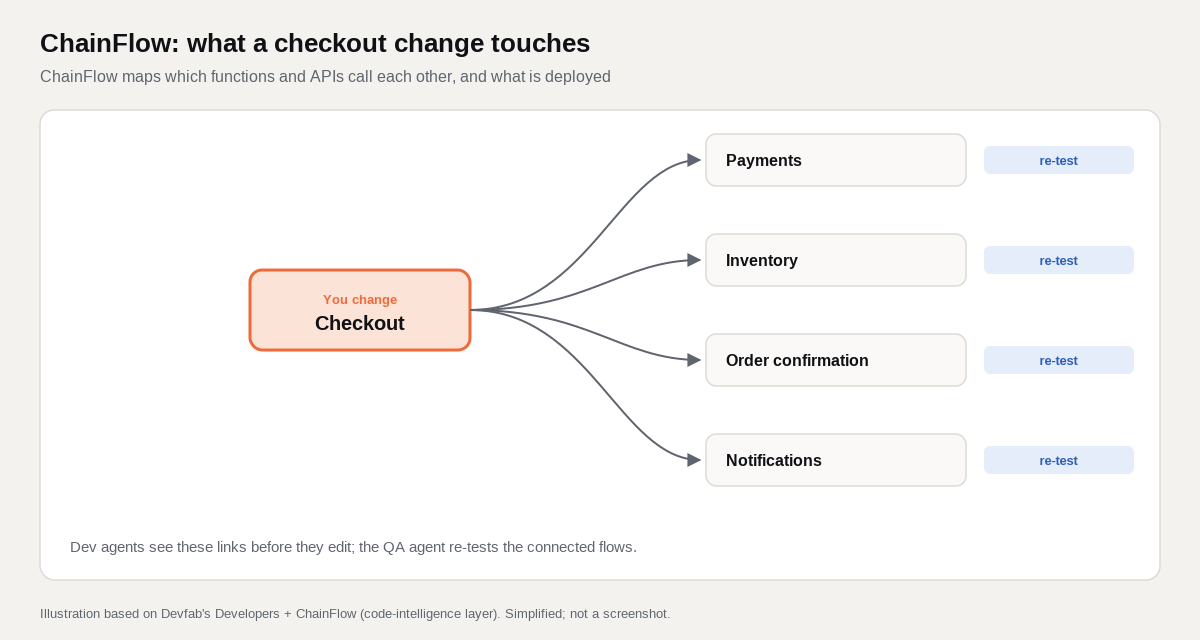
That is where ChainFlow, Devfab's code-intelligence layer, matters most. ChainFlow maps which functions and APIs call each other and what is deployed, so the developer agents see the impact of a change before they make it. Change checkout in an old shop app and ChainFlow shows the links to payments, inventory, order confirmation and notifications.
How it works on an existing project:
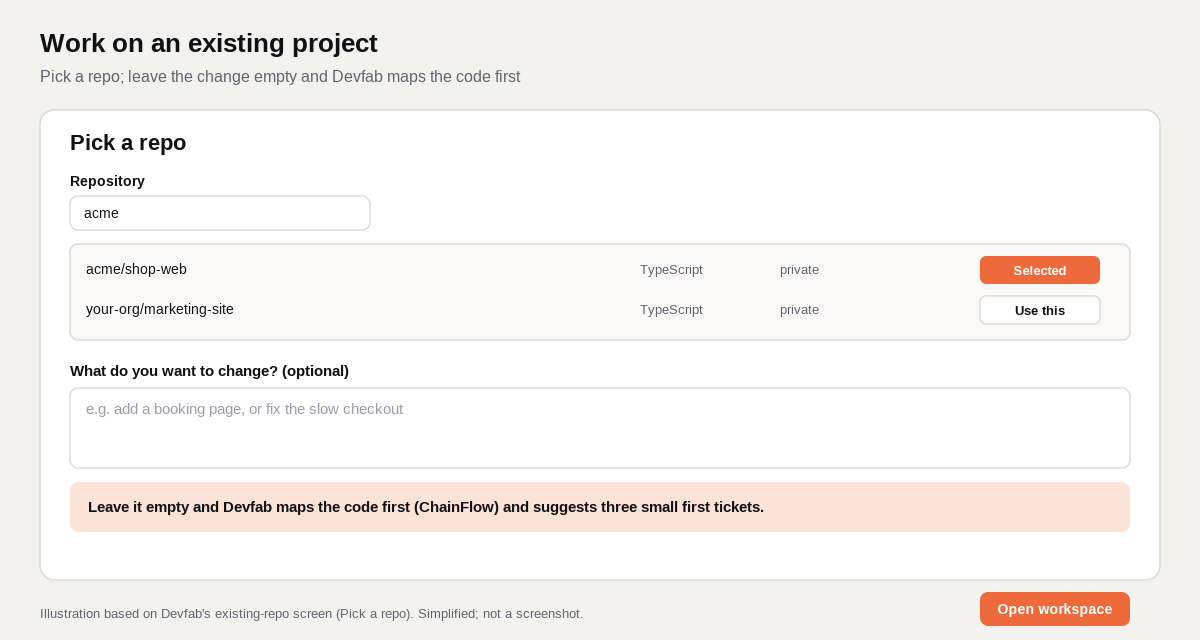
- Choose "Work on an existing project" and connect your GitHub repo. The code stays in your own GitHub account (or your organization's).
- Leave the change box empty and Devfab maps the code first (ChainFlow) and suggests three small first tickets. Or describe the change you want.
- Before planning, Devfab's research step maps the domain: key terms, best practices for that kind of app and competitors.
- The Planner writes a plan. A person approves the plan before the Coordinator creates tickets and assigns developer agents.
- The QA agent runs UI and flow tests (screens, buttons and user journeys clicked end to end) plus logic tests. Turn on "QA agent · review before Done" to review each ticket before it closes.
- Deploy to your own server.
Cost is logged after each run, per task and per project, so agencies can see what each change to an old client app really took. You can choose the model for each agent or keep Devfab's default.
Best for: agencies and teams maintaining older client apps on GitHub who want planned, tested changes with a clear record.
Limits: Devfab is new and in Beta, with a smaller community and fewer integrations than the established tools here. It is not built for large language or mainframe migrations; specialist tools above fit those better. It is not an editor for hands-on coding. It needs a GitHub account.
How to choose
Start with what "legacy" means for you.
- Mainframe code (COBOL, PL/I). Shortlist IBM watsonx Code Assistant for Z if you stay on IBM Z, AWS Transform or Google Cloud if you are moving to that cloud. Ask each vendor how they prove behavior: generated tests, side-by-side traffic, or both.
- Old Java or .NET versions. GitHub Copilot modernization or AWS Transform, depending on whether you target Azure or AWS.
- The same upgrade across many repos. Moderne, with its recipes, alone or called from your agent.
- A one-off migration in any language. Claude Code or OpenAI Codex, with a written plan and parity checks after each step.
- Changing an old app without breaking it. Devfab, if you want impact mapping, plan approval and UI and flow testing in one process.
Many teams will combine two tools: a specialist to move the code, then a lifecycle tool to keep shipping changes safely.
A few rules apply whatever you pick:
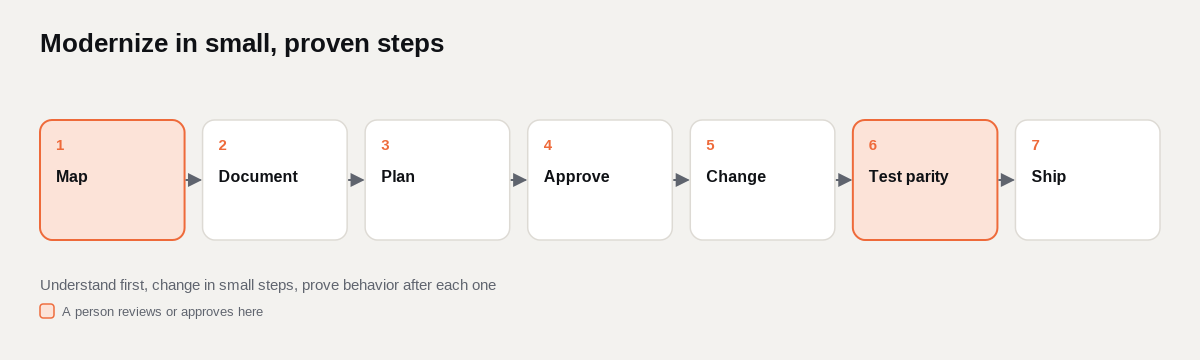
- Understand before you change. Let AI build the map: dependencies, business rules, dead code. Have someone who knows the system read it.
- Change in small steps. Module by module, with a way to roll back.
- Prove behavior, don't assume it. Use tests that compare old and new behavior, or replay real traffic where the tool allows.
- Keep people on the approvals. Every tool here keeps humans reviewing. Don't remove that step to go faster.
FAQ
Can AI convert COBOL to Java on its own?
Specialist tools such as IBM watsonx Code Assistant for Z, AWS Transform and Google Cloud's Mainframe Modernization Agents are built for this, and each pairs conversion with analysis and testing. All of them keep people reviewing the output. Treat AI output as a draft that must prove it behaves like the original.
What is the safest first step in legacy modernization with AI?
Understanding before changing. Use AI to map dependencies, document business rules and find dead code first. Then make small changes with tests that compare old and new behavior, so you can roll back if something breaks.
Is Devfab a mainframe or COBOL migration tool?
No. Devfab works on GitHub repositories and is built for adding features and fixing problems in existing apps without breaking connected code. For mainframe or large language migrations, use a specialist tool and consider Devfab for the work that follows.
Should we rewrite the legacy system or change it step by step?
Most vendor guidance in this list favors step-by-step change: upgrade, refactor or replace one module at a time and check parity after each step. A full rewrite only makes sense when the old system can't be changed safely at all.
Read next
- What is an AI software factory?
- How to use AI agents on a large existing codebase
- AI software factory vs AI coding tools
- Devfab vs GitHub Copilot
- Devfab vs Claude Code
- Claude Code vs OpenAI Codex: which should your team use in 2026?
- Claude Code vs GitHub Copilot: which should your team use in 2026?
Connect an old repo and see the impact map before you change anything. Try Beta
Sources (checked November 2026): AWS Transform; IBM watsonx Code Assistant for Z; Google Cloud Mainframe Modernization; Microsoft Learn: GitHub Copilot modernization overview; Moderne: Overview of OpenRewrite and Moderne; Claude: Code modernization with Claude Code; Claude Code overview; OpenAI: Code migrations with Codex; OpenAI Codex.
Frequently asked questions
Can AI convert COBOL to Java on its own?
Specialist tools such as IBM watsonx Code Assistant for Z, AWS Transform and Google Cloud's Mainframe Modernization Agents are built for this, and each pairs conversion with analysis and testing. All of them keep people reviewing the output. Treat AI output as a draft that must prove it behaves like the original.
What is the safest first step in legacy modernization with AI?
Understanding before changing. Use AI to map dependencies, document business rules and find dead code first. Then make small changes with tests that compare old and new behavior, so you can roll back if something breaks.
Is Devfab a mainframe or COBOL migration tool?
No. Devfab works on GitHub repositories and is built for adding features and fixing problems in existing apps without breaking connected code. For mainframe or large language migrations, use a specialist tool and consider Devfab for the work that follows.
Should we rewrite the legacy system or change it step by step?
Most vendor guidance in this list favors step-by-step change: upgrade, refactor or replace one module at a time and check parity after each step. A full rewrite only makes sense when the old system can't be changed safely at all.