Short answer: Pick one painful workflow, write success criteria the client signs before work starts, and price the pilot with a clear path to the next phase. Get the pilot plan approved, build in accounts the client can own, show progress, test results and cost as you go, and close with a review meeting that compares results to the criteria.
You ran a paid pilot, the client liked it, and then the thread went quiet. The follow-up call kept moving, and the budget went elsewhere.
A pilot that never converts costs you a sales cycle and some client trust. The fix sits in how you scope, price and report it.
In this guide, you'll learn:
- Why most pilots don't convert
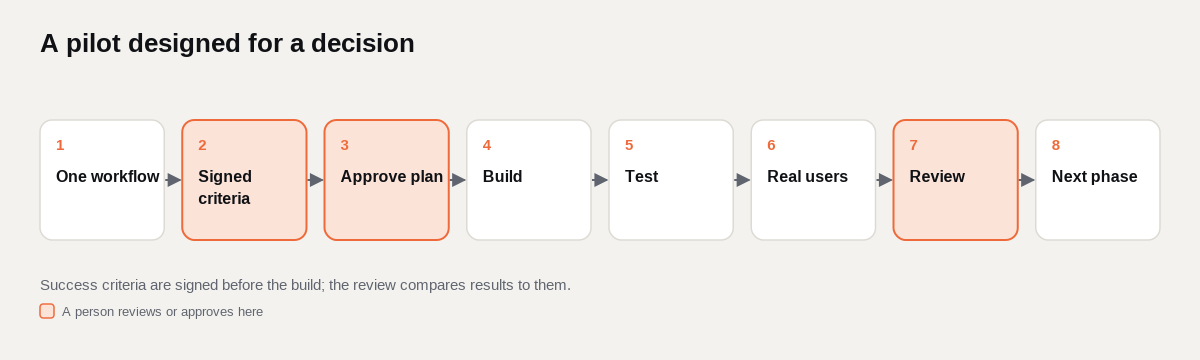
- Seven steps from first workflow to a signed next phase
- The mistakes that quietly stall a pilot
- A checklist to send with your next pilot offer
Each section builds on the one before it.
Why most pilots don't convert
A pilot should answer one question: "Should we buy the full project?" Many pilots never answer it. They start with goodwill and a loose scope. The client is busy, so feedback is slow. The scope grows because nobody wrote down what was out. At the end, there is a working demo and no decision.
Pilots that convert are designed backwards from the decision. You agree what "success" looks like, who decides, and what happens next, before you build anything. The pilot then becomes evidence for a decision the client already agreed to make.
This guide is for agencies, outsourcing firms and freelancers selling custom software to clients who are not ready to sign a large contract on trust.
Step by step
Step 1: Pick one painful workflow
Do not pilot the whole app. Pick one workflow where the client feels pain every week and can see the result clearly. Good pilot workflows:
- A paper or spreadsheet process with many handoffs (leave requests, work orders, intake forms).
- A step where staff copy data between two systems by hand.
- A customer-facing request that today arrives by email and gets lost.
Avoid workflows that need many integrations, legal sign-off or a data migration to show any value. Those are good second phases, not pilots.
Before you commit, research the domain so you pick the right slice. In Devfab, the Researcher maps key terms, best practices for that kind of app and competitors, then suggests a prototype. That often shows which flow is the core and which ones are extras.
Step 2: Write success criteria the client signs
This is the step that makes pilots convert. Write three to five criteria the client can check without your help. Each one should be observable, not a feeling. Examples:
- "Reception can see every booked appointment for the day on one screen."
- "A technician can close a work order from a phone, with a photo."
- "A manager can approve or reject a leave request, and the employee gets an email."
- "Ten named staff members use it for real requests during the pilot."
Add what is out of scope in the same document. Then ask the decision maker to sign it. If nobody will sign, you do not have a pilot yet; you have a conversation.
Step 3: Price the pilot and its exit
Charge for the pilot. A fee makes the client commit people, data and attention. Then make the next step easy to take:
- State in writing what the next phase covers if the criteria are met.
- Consider crediting the pilot fee toward the next phase. It rewards the client for moving forward.
- State what the client keeps if they stop: the code, the documents and the test results.
The last point builds trust. Clients worry about being locked in to a vendor after a pilot. If the code lives in their own GitHub account (or their organization's) and the app runs on their own server, that worry goes away.
Talk about cost the way you can prove it. With Devfab, you can offer predictable cost and show cost logged after each run, per task and per project. Do not quote figures your process cannot back up.
Step 4: Get the pilot plan approved
Turn the signed criteria into a plan before any code. The plan lists the screens, data, rules and tasks, and maps each task to a success criterion. Anything that does not serve a criterion is out.
In Devfab, the Planner writes the plan and the board shows "Your turn: the Planner published the plan. Approve it so the Coordinator can create the tickets." A person approves the plan. Invite the client to that review. When they approve the plan, they own the scope with you.
Keep the run mode on Human in the loop, the default, for pilots. Each stage waits for your review before the next one starts.
Step 5: Build in the client's own accounts
Where you can, set up the repository in the client's GitHub organization from the start, and deploy to a server the client controls. It makes handover a non-event and removes a common objection at the review meeting.
If the client is not ready for that, build in your own account and write the transfer into the pilot terms. Either way, nothing about the pilot should depend on a tool the client cannot leave.
Step 6: Show progress, tests and cost as you go
Silence kills pilots. The client should be able to see the work at any time without asking you.
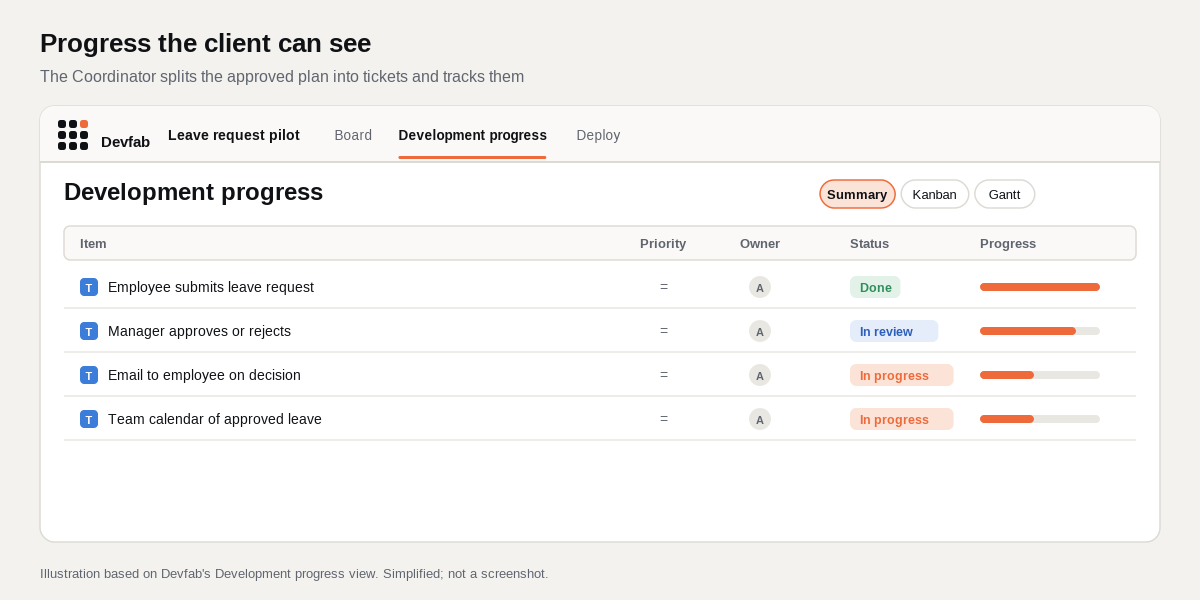
- Progress: share the development progress view. In Devfab it has Summary, Kanban and Gantt views, with priority, owner, status and progress on each item.
- Tests: share test results, not just "it works." Devfab's QA agent runs UI and flow tests, clicking screens, buttons and user journeys end to end, plus logic tests. With "QA agent · review before Done" switched on, tickets pass QA before they close.
- Cost: share the cost log per task and per project, so the client sees what each part used.
Put real users on it as soon as one flow works end to end. Feedback from the people who will use the app every day carries more weight in the review than anything you say.
Step 7: Run the review meeting and propose the next phase
Book the review meeting when you sign the pilot, not at the end. In the meeting:
- Go through each signed criterion. Show the evidence: the screen, the test, the user feedback. Mark it met or not met.
- Show what you learned that changes the full project: rules nobody mentioned, data that was messier than expected, flows users skipped.
- Present the next phase as a short plan, with the changes the pilot revealed.
- Ask for the decision in the meeting.
If criteria were not met, say so first. Explain why and what you would change. An honest review builds the trust that the next phase depends on.
Common mistakes
- Piloting too much. A pilot that tries to prove everything proves nothing.
- No signed success criteria. Without them, the review becomes a debate about feelings.
- No named decision maker. The pilot goes well and then waits for someone who never saw it.
- Hiding the work until the end. The client loses interest and the review is a surprise.
- Locking the client in. A pilot built in your private tools makes the client nervous about phase two.
- Skipping real users. A pilot only managers have seen is still a demo.
- Not planning the next phase. If you do not propose it in the review, the client has nothing to say yes to.
Checklist
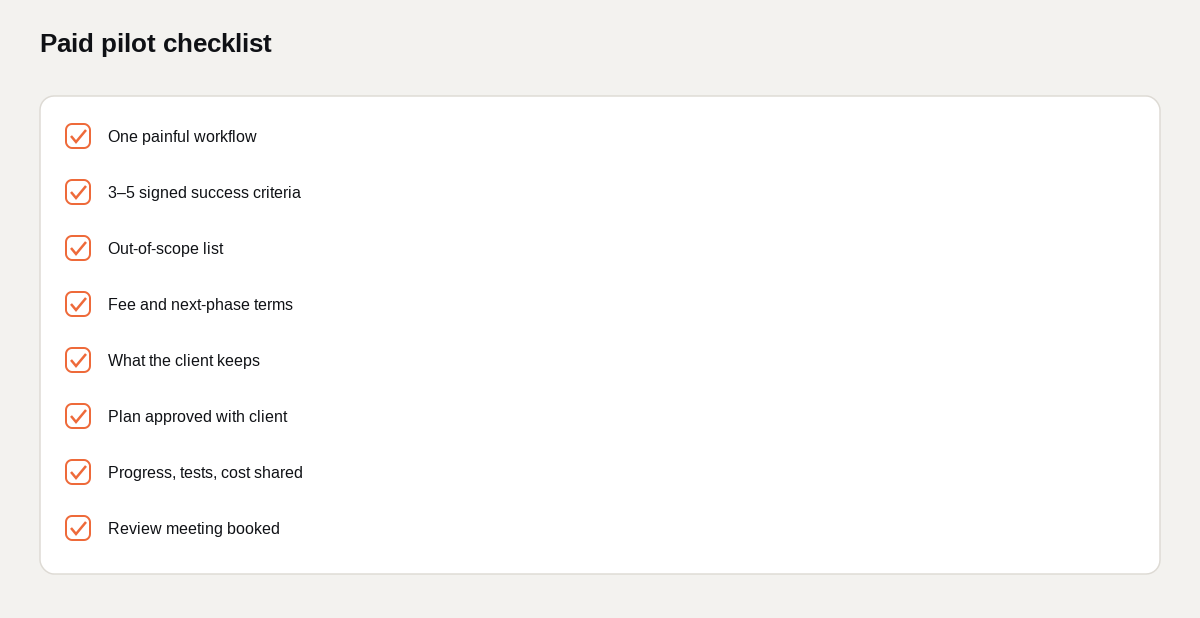
- [ ] One workflow chosen, with visible weekly pain
- [ ] Three to five observable success criteria, signed by the decision maker
- [ ] Out-of-scope list in the same document
- [ ] Pilot fee and next-phase terms written down
- [ ] What the client keeps if they stop is stated
- [ ] Plan approved by a person, with the client in the review
- [ ] Code in the client's or your GitHub account, transfer agreed
- [ ] Progress, test results and cost log shared throughout
- [ ] Real users on the app before the review
- [ ] Review meeting booked at the start
FAQ
Why charge for a pilot instead of offering it free?
A fee makes the client commit time, data and a decision maker. Free pilots tend to drift because nobody on the client side owns them. A paid pilot also tells you the client has budget.
How big should a software pilot be?
One workflow, one group of real users and a short list of success criteria. If you cannot describe the pilot on one page, it is too big.
What if the pilot fails its success criteria?
Then it did its job: it showed a problem cheaply. Review what failed and why, and offer a corrected next step or a clean exit. The client keeps the code and documents either way.
How does Devfab help with pilots?
Devfab researches the domain, writes a plan a person approves, builds with AI agents, runs UI, flow and logic tests, and logs cost after each run, per task and per project. Code lives in the client's or your own GitHub account.
Read next
- What is an AI software factory?
- How to send a working prototype with every proposal
- How agencies should price AI-built work
- Build: HR leave request system
- Software agency vs AI software factory: which should build your app?
- In-house developers vs AI agents: what each does best
Devfab is in Beta. Run your next pilot with it. Try Beta
Frequently asked questions
Why charge for a pilot instead of offering it free?
A fee makes the client commit time, data and a decision maker. Free pilots tend to drift because nobody on the client side owns them. A paid pilot also tells you the client has budget.
How big should a software pilot be?
One workflow, one group of real users and a short list of success criteria. If you cannot describe the pilot on one page, it is too big.
What if the pilot fails its success criteria?
Then it did its job: it showed a problem cheaply. Review what failed and why, and offer a corrected next step or a clean exit. The client keeps the code and documents either way.
How does Devfab help with pilots?
Devfab researches the domain, writes a plan a person approves, builds with AI agents, runs UI, flow and logic tests, and logs cost after each run, per task and per project. Code lives in the client's or your own GitHub account.