Short answer: Choose a cloud IDE when you need identical environments for many developers and agents, work that keeps running after laptops close, and source code kept off personal machines. Choose a local IDE when developers work offline, want full control of tools, or you want no per-hour compute bill. For agents running long tasks, the cloud is pulling ahead.
You lead an agency that just won a school portal contract, and five contractors start next sprint. Half of them will run AI agents on the repo. One senior developer says give everyone a cloud workspace so nobody spends the first day installing tools. Another says agents should run on the laptop where the developer can watch them. Both have heard it before; the difference now is that agents, not people, do much of the typing. This page sorts out what changed in 2026, using vendor docs checked in November.
In this guide, you'll learn:
- Definitions
- Cloud IDE vs local IDE compared
- When to choose a cloud IDE
- When to choose a local IDE
- Where an AI software factory fits
The 2026 status changes come first, because they reshape the shortlist.
What changed in 2026
Three moves matter more than any feature list:
- Gitpod became Ona, and OpenAI is buying it. Gitpod rebranded as Ona in September 2025 and rebuilt itself around AI agents running in remote environments (The Register; Ona). In June 2026 OpenAI announced it would acquire Ona and fold its platform into Codex. The deal still needs regulatory approval, and until it closes the two companies "stay separate" (The Next Web).
- Firebase Studio is sunsetting. Google's browser-based workspace, the successor to Project IDX, shuts down on March 22, 2027. New workspaces and sign-ups have been disabled since June 22, 2026, and remaining data "is permanently deleted" after shutdown (Firebase Studio; migration guide). One of Google's suggested destinations, Antigravity, is a local agent-first IDE (same source).
- Cloud agents became normal. GitHub's Copilot cloud agent works "in a cloud development environment, rather than your local IDE," powered by GitHub Actions (GitHub Docs), and Codex cloud tasks run in a container with internet access "off by default," a page OpenAI now labels Legacy (OpenAI).
So the question is less "browser or desktop" and more "where does the agent's work live while nobody is watching."
Definitions
Local IDE. An editor installed and run on the developer's own machine, such as VS Code, a JetBrains IDE or an AI editor. Coder's guide calls this "the most common way of working for developers" (Coder, Jun 2021). AI agents in this setup run on the same laptop, in the editor or the terminal.
Cloud IDE. An environment where "the bulk of the development environment resides" on remote machines, usually reached through a browser or a thin client (same source). Examples include GitHub Codespaces, Ona and Replit's workspace. In 2026 the term covers both human workspaces and the sandboxes cloud agents run in.
Remote environment for agents. The newer variant: an isolated, often short-lived machine where an agent clones the repo, runs commands and opens a pull request. Ona describes environments that are isolated and short-lived, with guardrails such as short-lived cloud credentials, blocked commands and audit logs (The Register).
Cloud IDE vs local IDE compared
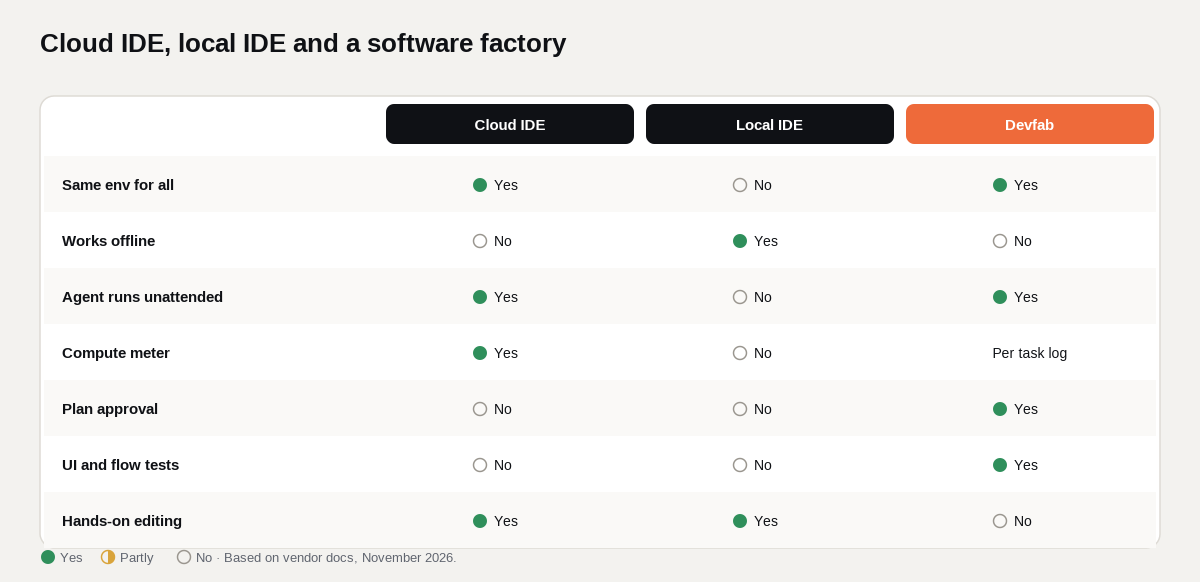
| Aspect | Cloud IDE | Local IDE | Source |
|---|---|---|---|
| Setup for a new developer | Pre-configured workspace from the repo | Install tools and dependencies on each machine | Coder |
| Same environment for everyone | Yes, reproducible by design | Drifts between machines over time | Coder |
| Works offline | No; needs a connection | Yes | Coder |
| Agent keeps running when the laptop closes | Yes on Ona; Copilot cloud agent runs in GitHub Actions | No, unless you add a cloud service | The Next Web; GitHub Docs |
| Where source code sits | Vendor cloud, or your own cloud on some plans (Ona in an AWS VPC) | Each developer's machine | The Register |
| Compute cost | Metered; Codespaces from USD 0.18 per hour for 2 cores | The laptop you already bought | GitHub billing |
| Customization | Narrower; depends on the product | Full control of extensions and tools | Coder |
| Vendor risk | Products can be sold or shut down (Ona, Firebase Studio) | Low; the editor keeps working | The Next Web; Firebase Studio |
On cost. As of November 2026, GitHub Codespaces bills compute from USD 0.18 per hour for a 2-core machine up to USD 2.88 per hour for 32 cores, plus USD 0.07 per GB-month of storage. Personal GitHub Free and Pro accounts get a monthly free allowance, but "GitHub plans for organizations and enterprises do not include a free quota" (GitHub billing). Ona meters usage in Ona Compute Units, with a Core plan that includes a monthly allowance (The Register). Replit prices its Agent by effort, with Core at USD 20 per month and Pro at USD 100 per month, as of November 2026 (Replit pricing). A local IDE has no meter, but the model your agent calls still does.
When to choose a cloud IDE
- You onboard people often. Contractors on a client project get a working environment from the repo instead of a long round of installs. Coder's guide cites a new hire committing code on day one because they "could onboard immediately" (Coder).
- Agents run long tasks unattended. Ona's pitch is persistent environments where an agent keeps working after a developer closes the laptop (The Next Web).
- Source code must not live on laptops. A remote workspace keeps the repo on servers you or your vendor control, and Ona can run in a customer's own AWS VPC (The Register).
- You want agent actions isolated. Short-lived environments, scoped credentials and blocked commands limit what a misbehaving agent can touch (same source).
- You want build, run and publish in one place. Replit's workspace runs the Agent, checkpoints and deployments (Autoscale, Reserved VM, Static and Scheduled) together (Replit docs; Replit publish).
When to choose a local IDE
- Connections are unreliable. A local IDE keeps working offline; a cloud IDE needs a connection (Coder).
- Developers want to steer agents closely. Running the agent in your own editor or terminal means you see every step as it happens. Tempo's docs make the trade-off explicit: its background agents use your machine, and "nothing runs while Tempo isn't running" (Tempo docs).
- You don't want a compute meter. Organizations get no free Codespaces quota, so every active workspace bills by the hour of compute (GitHub billing).
- You don't want to bet on one vendor's roadmap. Firebase Studio users must migrate before March 22, 2027, and Ona's standalone future depends on the OpenAI deal. A local editor and a Git repo don't disappear.
- Customization matters. Local setups allow any extension, any debugger and any toolchain (Coder).
Many teams split it: developers code locally, and agents and new joiners use cloud environments.
Where an AI software factory fits
Both setups answer one question: where does the code get typed? Neither answers who researches the domain, writes the plan, approves it, tests the user journeys and ships the app. A cloud IDE gives an agent a better room to work in. It does not give the project a process.
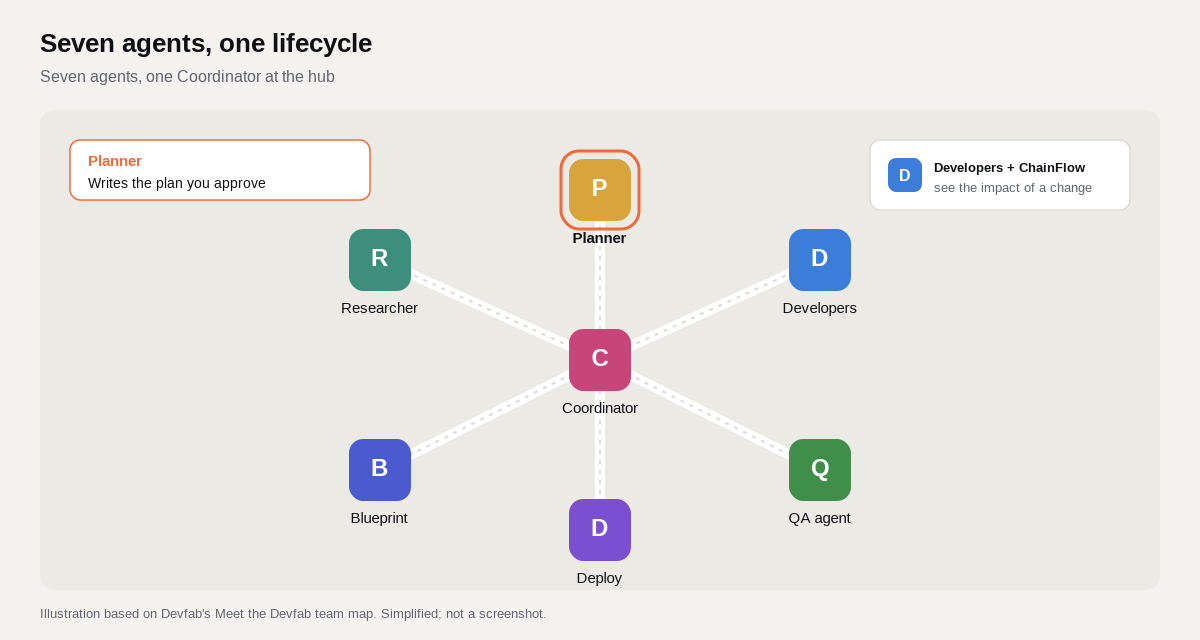
Coding agents automate the developer. Devfab automates the development lifecycle. Devfab is not an IDE, cloud or local; it is not an editor for hands-on coding. It runs the project from its own workspace: the Researcher maps the domain, the Planner writes a plan a person approves, the Coordinator turns it into tickets, dev agents build with ChainFlow so a change shows its impact on connected features, the QA agent runs UI, flow and logic tests, and Deploy ships to your own server. The code lives in your own GitHub account, so developers can still open it in any IDE they like. Devfab is in Beta, with a smaller community and fewer integrations, and it needs a GitHub account.
FAQ
Is a cloud IDE better than a local IDE for AI coding?
Neither wins everywhere. A cloud IDE gives every developer and agent the same environment, keeps work running when a laptop closes and keeps source off personal machines. A local IDE works offline, costs nothing per compute hour and lets developers tune every extension. Many teams use both: local for hands-on work, cloud for agents and onboarding.
How much does GitHub Codespaces cost?
As of November 2026, GitHub bills compute by machine size, from USD 0.18 per hour for a 2-core machine to USD 2.88 per hour for 32 cores, plus USD 0.07 per GB-month of storage. Personal GitHub Free and Pro accounts get a monthly free allowance. Organizations and enterprises get no free quota.
What happened to Gitpod?
Gitpod renamed itself Ona in September 2025 and rebuilt its product around AI agents that run in remote environments. In June 2026 OpenAI announced it would acquire Ona and fold its platform into Codex, subject to regulatory approval. Until the deal closes, the two companies stay separate.
Is Firebase Studio still a good cloud IDE choice?
Not for new work. Google is sunsetting Firebase Studio on March 22, 2027, and new workspaces and sign-ups have been disabled since June 22, 2026. Google points users to Google AI Studio or Google Antigravity, which it describes as a local agent-first IDE. Remaining data is deleted after shutdown.
Read next
- What is an AI software factory?
- Cloud coding agent vs local coding agent
- AI software factory vs AI coding tools
- Devfab vs Firebase Studio
- Replit vs Firebase Studio
Want the whole project run, not just a place to type? Try Beta
Sources (checked November 2026): Coder: Cloud IDE vs local IDE (Jun 30, 2021); GitHub Docs: How use of GitHub Codespaces is measured; GitHub Docs: About Copilot coding agent; OpenAI: Codex cloud environment; The Register: Gitpod reinvents itself as Ona (Sep 3, 2025); Ona: Gitpod is now Ona; The Next Web: OpenAI acquires Ona (Jun 2026); Firebase Studio docs; Firebase Studio migration guide; Replit Agent overview; Replit: publish your app; Replit pricing; Tempo docs: Agents.
Frequently asked questions
Is a cloud IDE better than a local IDE for AI coding?
Neither wins everywhere. A cloud IDE gives every developer and agent the same environment, keeps work running when a laptop closes and keeps source off personal machines. A local IDE works offline, costs nothing per compute hour and lets developers tune every extension. Many teams use both: local for hands-on work, cloud for agents and onboarding.
How much does GitHub Codespaces cost?
As of November 2026, GitHub bills compute by machine size, from USD 0.18 per hour for a 2-core machine to USD 2.88 per hour for 32 cores, plus USD 0.07 per GB-month of storage. Personal GitHub Free and Pro accounts get a monthly free allowance. Organizations and enterprises get no free quota.
What happened to Gitpod?
Gitpod renamed itself Ona in September 2025 and rebuilt its product around AI agents that run in remote environments. In June 2026 OpenAI announced it would acquire Ona and fold its platform into Codex, subject to regulatory approval. Until the deal closes, the two companies stay separate.
Is Firebase Studio still a good cloud IDE choice?
Not for new work. Google is sunsetting Firebase Studio on March 22, 2027, and new workspaces and sign-ups have been disabled since June 22, 2026. Google points users to Google AI Studio or Google Antigravity, which it describes as a local agent-first IDE. Remaining data is deleted after shutdown.