Short answer: An AI pair programmer works beside you: it suggests, you steer, and you approve each change as it happens. An autonomous coding agent takes a whole task, works in its own environment and returns a pull request. Pair programmers win for judgment-heavy, hands-on work. Autonomous agents win for well-scoped tickets you can review afterward.
You turned on an AI assistant, and your developers typed less. Then a vendor told you to stop typing at all and hand the ticket to an agent.
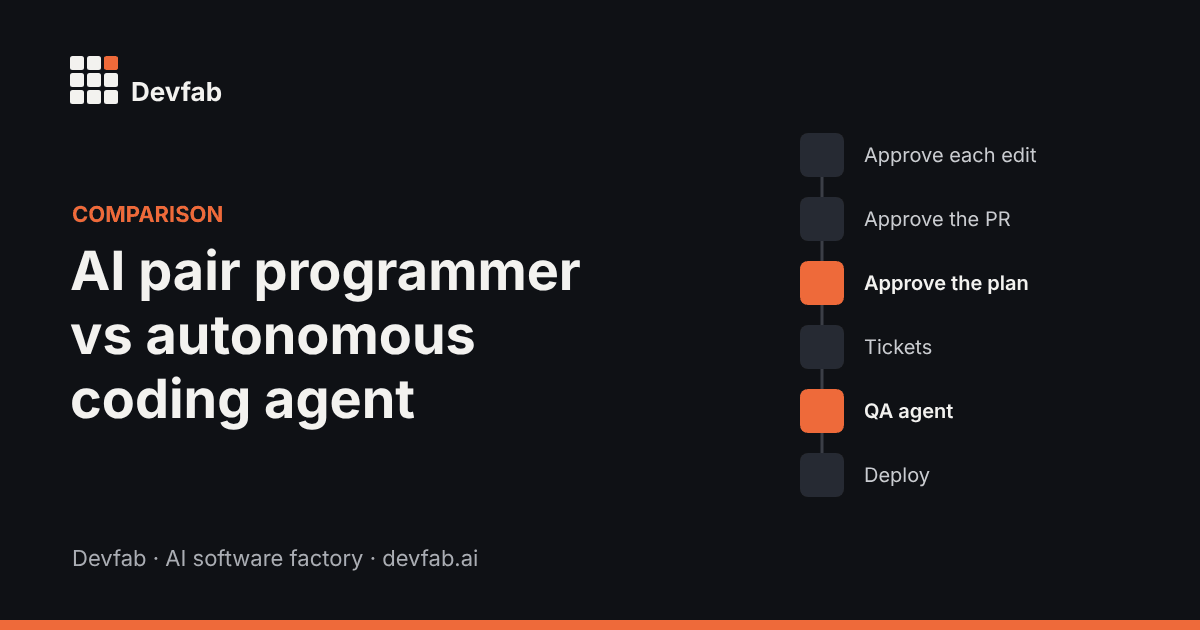
One side says agents are the future and the editor is a relic. The other says agents produce pull requests nobody wants to review. Both describe real tools. The difference is where a person approves the work, and that decides your team's review load.
In this comparison:
- Definitions
- Side-by-side comparison
- When to choose an AI pair programmer
- When to choose an autonomous coding agent
- Where an AI software factory fits
Read it in order, or jump to the decision you're facing.
Definitions
Pair programming, before AI
In classic pair programming, two people share one task. The driver is "the person at the wheel, i.e. the keyboard", focused on the immediate goal. The navigator reviews the code as it's written and watches for bigger issues and next steps. Martin Fowler's site lists the benefits as knowledge sharing, keeping focus, and "code review on the go" (martinfowler.com, Jan 15, 2020).
AI pair programmer
An AI pair programmer takes one of those seats inside your editor or terminal. You stay in the loop for every step.
- Aider calls itself "AI pair programming in your terminal" (Aider). It edits files in your local git repository, commits each change, and lints and tests after each change (Aider docs). A 2026 review notes it is not autonomous: the user confirms each step (CodeMySpec).
- GitHub Copilot in the IDE offers inline suggestions, chat and an agent mode in which Copilot decides which files to change and asks for your approval on changes and terminal commands (GitHub Docs).
- Claude Code has a plan mode in which it explores the codebase and proposes an approach for your approval before editing (Claude Code docs).
Even GitHub's own spec-driven development guide describes agents as "literal-minded pair programmers" that need clear instructions (GitHub Blog).
Autonomous coding agent
An autonomous coding agent takes a task, works in its own environment and hands back a result, usually a pull request. You review the outcome, not each keystroke.
- Devin describes itself as "an autonomous AI software engineer that can write, run and test code". Each session has its own shell, IDE and browser, and you can watch or take over (Devin docs).
- Copilot cloud agent works in a GitHub Actions-based environment or a cloud sandbox, "rather than your local IDE". An Actions-based session changes only the repository named at the start, has a capped session length, works on one branch and opens one pull request per task (GitHub Docs).
- Cursor cloud agents "run in isolated VMs in the cloud with full development environments", and many can run in parallel, each on its own branch (Cursor docs).
- OpenAI Codex cloud tasks keep running after you close your laptop and can be picked up from another device (OpenAI).
A status change worth knowing: Google Jules, an asynchronous cloud agent, stopped accepting new tasks on November 11, 2026 and shuts down on December 31, 2026. Code, branches and pull requests stay in GitHub (Jules changelog). The category is young, and products come and go.
It's a dial, not a product category
Notice that Copilot, Cursor and Claude Code appear on both sides. Most vendors now sell both modes. So the useful question isn't "which tool?" It is: at which point does a person approve the work? Every edit, or the finished pull request?
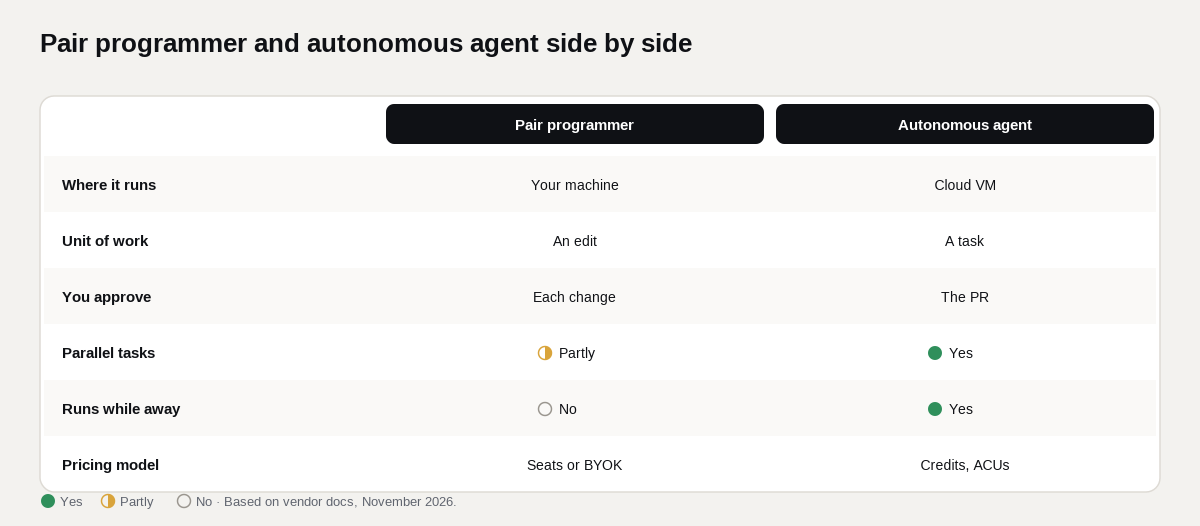
Side-by-side comparison
| Aspect | AI pair programmer | Autonomous coding agent |
|---|---|---|
| Where it runs | Your editor or terminal, on your machine | A cloud VM, sandbox or Actions runner |
| Unit of work | An edit, a command, a step | A whole task or ticket |
| Who drives | You; the AI suggests or acts per step | The agent; you brief and review |
| When you approve | Each change or command as it happens | The pull request at the end |
| Context | What you open and point it at, plus a repo map (Aider) | The repo it clones, plus instructions files |
| Parallel work | One session per developer, mostly | Many agents at once (Cursor, Devin subagents) |
| Runs while you're away | No | Yes (Codex cloud tasks) |
| Main risk | Slower on routine work; depends on your focus | Large pull requests that need careful review |
| Pricing model | Seats, or free tool plus your model bill (Aider) | Seats plus credits or compute units (Copilot credits, Devin ACUs) |
Sources: Aider docs; GitHub Copilot features; Copilot cloud agent; Copilot plans; Cursor cloud agents; Devin; Devin usage; OpenAI Codex.
When to choose an AI pair programmer
Pair programming with AI is the better choice when the developer's judgment is the scarce part. Pick it when:
- The code is tricky or unfamiliar. Security-sensitive changes, concurrency, a payment flow. You want to see each command before it runs, which is exactly what Copilot's agent mode asks you to approve.
- You are learning a codebase. The navigator role works both ways. Asking questions as you go builds the knowledge that Fowler's site calls the main benefit of pairing.
- The context lives in your head. Half-finished refactors, unwritten conventions, a decision from yesterday's meeting. A pair programmer uses that as you type; an agent only gets what you write in the brief.
- You need local or air-gapped models. Aider works with Ollama, LM Studio and any OpenAI-compatible API, so the code never has to leave your machine (Aider docs).
- The change is small. For a one-file fix, writing a ticket for an agent and reviewing its pull request takes more effort than doing it together.
When to choose an autonomous coding agent
Autonomous agents are the better choice when the task is clear and the developer's attention is better spent elsewhere. Pick one when:
- You have a backlog of well-scoped tickets. Cognition lists parallel tickets from Linear or Jira, migrations, refactors, bug reproduction and unit tests as good fits (Devin docs).
- The work can run in parallel. Cursor runs many cloud agents at once, each on its own branch (Cursor docs). A pair programmer is limited by one person's focus.
- The task should keep going while you're away. Codex cloud tasks continue after you close the laptop (OpenAI).
- The request starts outside the editor. Devin takes tasks from Slack and Microsoft Teams, and Copilot's cloud agent can start from an issue, GitHub Mobile or a code scanning alert (Devin docs; GitHub Docs).
Two cautions apply. First, results depend on the brief: Cognition says agents need clear prompts with explicit completion criteria, and harder work should be broken into scoped steps (Devin docs). Second, the review load moves to the pull request. GitHub warns Copilot "can produce incorrect or suboptimal code, including code that contains security vulnerabilities" (GitHub Docs), and a 2026 review of Cursor reported output quality that needed line-by-line review (DEV Community).
Where an AI software factory fits
Both modes answer the same question: how should code get written? Neither decides what to build, who approves it, who tests the user flows, or how it reaches production. An autonomous agent hands you a pull request. Someone still has to plan the next ten.
An AI software factory moves the approval point up a level, from the edit or the pull request to the plan. Devfab is one. Coding agents automate the developer. Devfab automates the development lifecycle.
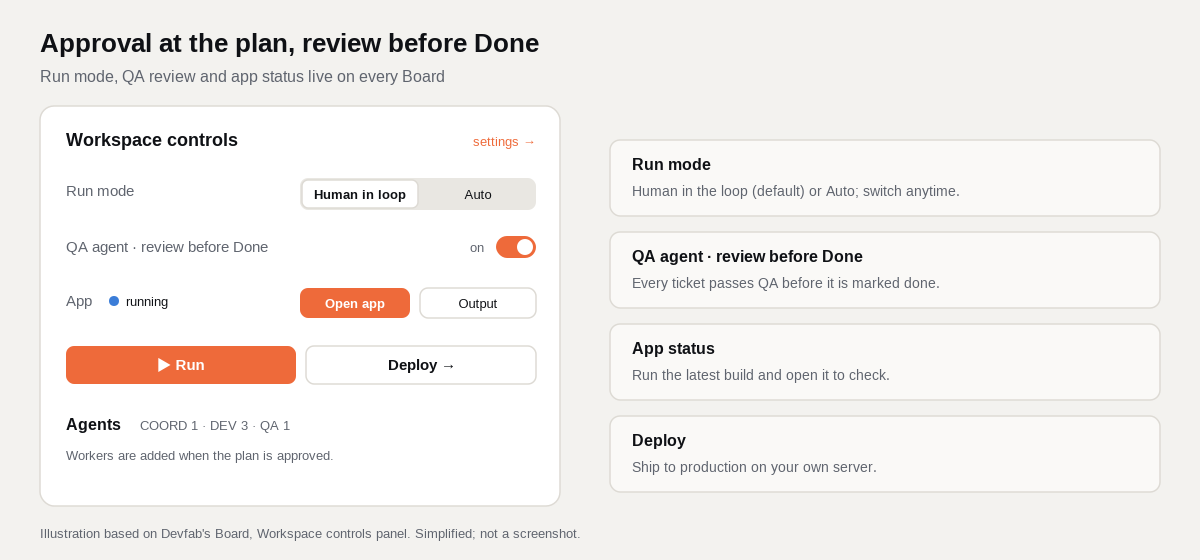
- A person approves the plan. The Planner writes the plan. A person approves it, and the Coordinator splits it into tickets and assigns dev agents. Human in the loop is the default; Auto mode runs the process and asks only when needed. You can switch modes in workspace settings.
- Agents that see the impact of a change. Devfab's dev agents work with ChainFlow, which maps which functions and APIs call each other and what is deployed. A change to checkout shows its links to payments, inventory, order confirmation and notifications before the edit.
- A separate QA agent. It runs UI and flow tests (screens, buttons and user journeys clicked end to end) plus logic tests. Turn on "QA agent · review before Done" so a ticket only moves to Done after that review.
- Research before the plan, deploy after QA. The research step maps the domain before planning. Deploy ships to your own server.
Code lives in your own GitHub account (or your organization's), so developers can keep their pair programmer on the same repository. Cost is predictable: it is logged after each run, per task and per project. You can choose the model for each agent or keep Devfab's default.
Devfab's honest limits: it is new and in Beta, with a smaller community and fewer integrations than Copilot, Cursor or Devin. It is not an editor for hands-on coding, so keep a pair programmer for that. It needs a GitHub account. And for a single quick ticket, a coding agent is the shorter route.
FAQ
Is GitHub Copilot a pair programmer or an autonomous coding agent?
Both. In the IDE, Copilot gives inline suggestions and an agent mode that asks for your approval on file changes and terminal commands. That is pair programming. Its cloud agent works in a GitHub Actions-based environment rather than your IDE and opens a pull request. That is an autonomous agent. Cursor and Claude Code offer a similar split.
Are autonomous coding agents safe to use on production code?
They can be, with guardrails. Agents work on a branch and return a pull request, so nothing merges without review. GitHub warns its agent can produce incorrect code, including code with security vulnerabilities, and branch protection rules apply to it. Review every pull request and run tests before merge.
Will autonomous coding agents replace developers?
Not on the evidence in the vendors' own docs. Cognition advises clear prompts with explicit completion criteria and splitting harder work into scoped steps. Someone still has to define the task, review the pull request and own the result. The developer's job shifts toward briefing and reviewing.
Which is cheaper: a pair programmer or an autonomous agent?
It depends on use, not the label. Copilot sells seats with a pool of AI credits that agent work consumes. Devin's enterprise usage is measured in Agent Compute Units that include compute. Aider is free, and you pay your model provider directly. Check each pricing page against how many tasks you actually delegate.
Read next
- What is an AI software factory?
- AI software factory vs AI coding tools: what's the difference?
- What is autonomous software development?
- Devfab vs Devin
- Devfab vs GitHub Copilot
- Human in the loop software development: where people must decide
Move the approval point to the plan. Try Beta
Sources (checked November 13, 2026): On Pair Programming (martinfowler.com); Aider; Aider documentation; Aider in 2026 review (CodeMySpec); GitHub Copilot features; About Copilot cloud agent; Plans for GitHub Copilot; Claude Code costs and plan mode; Spec-driven development with AI (GitHub Blog); Introducing Devin; Devin Desktop; Devin usage and billing; Cursor cloud agents; Cursor 3 review (DEV Community); OpenAI Codex; Jules changelog.
Frequently asked questions
Is GitHub Copilot a pair programmer or an autonomous coding agent?
Both. In the IDE, Copilot gives inline suggestions and an agent mode that asks for your approval on file changes and terminal commands. That is pair programming. Its cloud agent works in a GitHub Actions-based environment rather than your IDE and opens a pull request. That is an autonomous agent. Cursor and Claude Code offer a similar split.
Are autonomous coding agents safe to use on production code?
They can be, with guardrails. Agents work on a branch and return a pull request, so nothing merges without review. GitHub warns its agent can produce incorrect code, including code with security vulnerabilities, and branch protection rules apply to it. Review every pull request and run tests before merge.
Will autonomous coding agents replace developers?
Not on the evidence in the vendors' own docs. Cognition advises clear prompts with explicit completion criteria and splitting harder work into scoped steps. Someone still has to define the task, review the pull request and own the result. The developer's job shifts toward briefing and reviewing.
Which is cheaper: a pair programmer or an autonomous agent?
It depends on use, not the label. Copilot sells seats with a pool of AI credits that agent work consumes. Devin's enterprise usage is measured in Agent Compute Units that include compute. Aider is free, and you pay your model provider directly. Check each pricing page against how many tasks you actually delegate.