Short answer: Cursor is the best all-round AI code editor for most developers. Devin Desktop (formerly Windsurf) suits teams that run many agents at once. VS Code with GitHub Copilot or JetBrains IDEs with Junie fit teams that won't switch editors. Zed is the fast open-source pick, and Kiro is best when you want specs before code.
You open your editor every morning. In 2026, the editor opens an agent too. Some products now start on an agent dashboard, not a file tree. Two of last year's big names changed owners or names.
Picking wrong costs more than a subscription. It changes how your team reviews code, who controls the models, and what you pay as usage grows. This list compares eight options on facts from vendor pages checked in November 2026, with where each one falls short.
In this guide, you'll learn:
- How we picked and compared
- The quick comparison table
- Each editor's strengths and limits
- How to choose for your team
The rest of this page covers it in order.
How we picked and compared
We included tools where the editor itself, or an AI agent built into a mainstream editor, is the product. Terminal-only agents are out; see our separate list of AI coding CLI tools.
For each tool we opened the vendor's docs, pricing page and 2026 changelog or blog, plus dated reviews where the vendor was silent. We compared:
- Where it runs: desktop, web, mobile, other editors.
- Agent depth: plan before code, parallel or cloud agents, review.
- Model choice: one vendor, many vendors, your own key, local models.
- Team controls: SSO, SCIM, audit logs, model restrictions.
- Pricing model: seats, credits, usage. Prices only from official pricing pages, as of November 2026.
- Status in 2026: renames, acquisitions and mergers.
We did not run hands-on benchmarks for this version of the page, and we don't claim any.
Quick comparison table
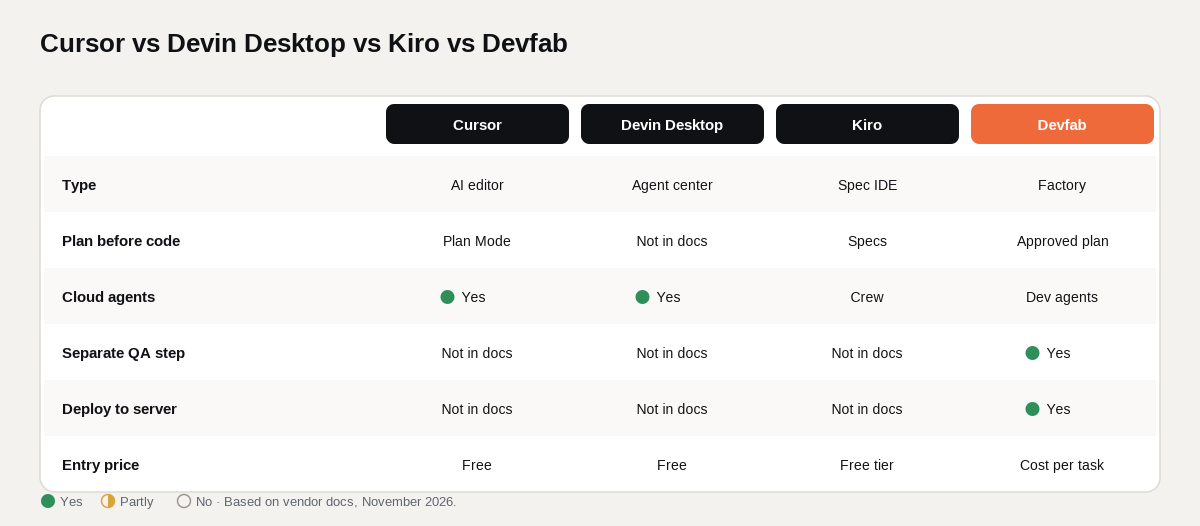
| Tool | Type | Plan before code | Agents beyond the editor | Model choice | Team controls | Entry price (Nov 2026) |
|---|---|---|---|---|---|---|
| Cursor | AI-first editor | Plan Mode | Cloud agents, CLI, mobile | Many vendors | SSO on Teams; SCIM, audit logs on Enterprise | Free; Teams from USD 30 per user per month |
| Devin Desktop (ex-Windsurf) | Agent command center + IDE | Not covered in docs we checked | Devin Cloud, ACP agents | Many vendors, SWE-2 | SSO on Teams; SCIM, RBAC on Enterprise | Free; Pro USD 20 per month |
| VS Code + GitHub Copilot | Extension in your editor | Cloud agent plans first | Cloud agent opens PRs | Many vendors, by plan | Policies, audit logs, AI Controls | Free; Pro USD 10 per user per month |
| Zed | Open-source native editor | Not covered in docs we checked | External agents via ACP | Hosted, BYOK, local | Business: AI policies, RBAC; no SSO yet | Free; Pro USD 10 per month |
| Kiro | Spec-driven IDE | Specs: requirements, design, tasks | CLI, web, mobile, Crew | Claude, GPT, open-weight, Auto | SSO, pooled credits, usage limits | Free (50 credits); Pro USD 20 per user per month |
| JetBrains + Junie | Agent in JetBrains IDEs | Plan mode, saved as files | Junie CLI, GitHub/GitLab CI | BYOK, local, Junie Lite | Org plans; SOC 2 stated | Free to start; paid AI plans (see page) |
| Trae | ByteDance AI IDE | Not covered in docs we checked | Agent/SOLO mode; desktop, web, mobile | Third-party or custom (Enterprise) | Enterprise: SSO, audit logs, caps | Free to start; see pricing page |
| Devfab | AI software factory (not an editor) | Research, then a plan a person approves | Seven agents incl. QA and Deploy | Choose per agent or keep the default | Roles, permissions, delivery report | Cost logged per task and per project (Beta) |
The editors, one by one
Cursor
Best for: developers who want the AI built into every part of the editor, plus agents that keep working in the cloud.
Cursor is an AI code editor plus a coding agent that also runs in a CLI, cloud agents, mobile and SDKs (Cursor docs). Status: SpaceX agreed to buy Cursor's maker, Anysphere, in a deal confirmed on June 16, 2026, and Cursor's August 14 post says the acquisition has closed (The Next Web; Cursor blog).
- Plan Mode asks clarifying questions, researches the codebase and drafts an editable plan before writing code (Cursor Plan Mode).
- Cloud agents run in isolated VMs, many in parallel, and support GitHub, GitLab, Bitbucket Cloud and Azure DevOps (Cursor cloud agents).
- Bugbot reviews PRs for bugs and security issues; Autofix can push fixes to a branch (Cursor Bugbot).
- Models: Claude, Gemini, GPT, Grok, Cursor Composer and others (Cursor docs).
- Pricing, as of November 2026: Free; Plus USD 8 per month (Grok models only); Premium USD 30 per month; Teams USD 30+ per user per month; Enterprise custom (Cursor pricing).
Limits: cloud agents are not included on Free or Plus (Cursor cloud agents). An April 2026 review reports uneven output quality, "opaque" credit pricing and no live support (DEV Community).
Devin Desktop (formerly Windsurf)
Best for: teams that run several agents at once and want sessions to move between laptop and cloud.
Status: Windsurf was renamed Devin Desktop on June 2, 2026, and windsurf.com redirects to devin.ai/desktop (Devin Desktop FAQ). Cascade was replaced by the Devin Local agent and removed on July 1, 2026 (DEV Community).
- Opens on an Agents view (Sessions, Automations, Security, Review, Wiki, Customize); the full IDE is still there (Devin Desktop).
- Sessions move to Devin Cloud with the same context and keep running when you close your laptop (same source).
- ACP support runs several agents and frontier models from one place; Devin Review handles diffs (same source).
- Fusion pairs a lead model with a cheaper "sidekick" model (same source).
- Pricing, as of November 2026: Free; Pro USD 20 per month; Max USD 200 per month; Teams USD 80 per month plus USD 40 per full dev seat; Enterprise custom (Devin pricing).
Limits: no free trials of paid plans (Devin usage docs). The Windsurf JetBrains plugin is in maintenance mode (Devin Desktop FAQ).
VS Code with GitHub Copilot
Best for: teams that want to keep their editor and whose code already lives on GitHub.
Copilot runs in IDEs with chat, inline and next-edit suggestions and agent mode, plus GitHub.com, Copilot CLI and a desktop app (Copilot features).
- Agent mode in the IDE picks which files to change and asks you to approve changes and terminal commands (same source).
- The cloud agent works in a GitHub Actions environment or a cloud sandbox and can write an implementation plan first (Copilot cloud agent).
- PR code review is included on paid plans (Copilot plans).
- Models come from OpenAI, Anthropic, Google, Microsoft, Moonshot AI and xAI, depending on plan (Copilot models).
- Pricing, as of November 2026: Free; Pro USD 10, Pro+ USD 39 and Max USD 100 per user per month; Business USD 19 and Enterprise USD 39 per granted seat per month (Copilot plans).
Limits: the cloud agent only works with repositories hosted on GitHub, and each Actions-based task opens one PR on one repo (Copilot cloud agent). Chat and agent work use AI Credits.
Zed
Best for: developers who want a very fast, open-source editor where AI is optional.
Zed calls itself "The world's fastest IDE. Open source. AI optional." (zed.dev). Status: Zed 1.0 shipped on April 29, 2026 (Zed blog).
- Agent panel edits files and shows changes in an editable diff you accept or reject (Zed agentic).
- External agents such as Claude Agent, Codex, OpenCode and Cursor run inside Zed through ACP (Zed blog).
- Zeta edit predictions are open-weight and open-data (Zed agentic).
- Built in: Git, SSH remoting, a debugger and real-time multiplayer editing (Zed blog).
- Pricing, as of November 2026: Personal USD 0; Pro USD 10 per month; Business USD 30 per seat per month (Zed pricing).
Limits: the pricing page says SSO, SAML and SCIM are planned but not yet available (Zed pricing). There is no web version yet (GitHub).
Kiro
Best for: teams that want written requirements and a design before any code, especially on AWS.
Kiro is AWS's agentic coding system, offered as an IDE, CLI, web, mobile and "Crew" background agents (kiro.dev).
- Specs produce requirements.md (user stories with EARS acceptance criteria), design.md and tasks.md (Kiro specs).
- Each phase is completed before the next: requirements, design, planning, execution (same source).
- Agent hooks run commands or prompts on events such as file save (Kiro hooks).
- Enterprise Management, in preview since November 10, 2026, applies one AWS-console policy across IDE, CLI, web and Crew (Kiro changelog).
- Pricing, as of November 2026: Free USD 0 (50 credits); Pro USD 20 per user per month; Pro+ USD 40; Teams USD 20 per seat per month with pooled credits (Kiro pricing).
Limits: spec tasks use more credits than simple prompts, and premium models burn credits faster (Kiro pricing).
JetBrains IDEs with Junie
Best for: teams standardized on IntelliJ IDEA, PyCharm, Rider and the rest.
Status: Junie left beta and became generally available in June 2026 (JetBrains blog).
- Runs in all JetBrains IDEs, in Junie CLI, and in GitHub Actions or GitLab for code review (same source).
- Plan mode writes requirements, technical design and delivery stages to
.junie/plans, so the plan can be committed (same source). - Agentic debugging starts debug sessions, sets breakpoints and inspects runtime state (same source).
- Uses the IDE's semantic index, test runners and debugger (same source).
- Model choice: BYOK for Anthropic, OpenAI and Google, plus Ollama, LM Studio and LiteLLM (same source).
Pricing: free to start with Junie Lite and BYOK; paid JetBrains AI plans per user include monthly AI Credits (junie.jetbrains.com). Check the page for current amounts and billing period.
Limits: Debug mode needs IntelliJ IDEA Ultimate 2026.1.1+, and the docs warn long sessions can lose earlier context (Junie help).
Trae
Best for: individual developers who want a low-cost AI IDE with an autonomous mode, and BytePlus enterprise customers.
Status: branding is in flux. On October 9, 2026, ByteDance merged TraeWork and TraeCode into one TRAE app, though the report cites only Chinese docs (TechNode). A report citing Bloomberg says ByteDance plans to fold Trae into Doubao (AI Weekly).
- IDE mode for hands-on coding and an agent (SOLO) mode for autonomous tasks (diyai.io review).
- The merged app runs on desktop, web and mobile (TechNode).
- Enterprise indexing of up to 100K files (BytePlus).
- Enterprise adds SSO, audit logs, spending caps and role-based permissions (same source).
- Pricing: "Get started for Free. Upgrade to increase limits." No plan prices are shown on the official page as of November 2026 (Trae pricing).
Limits: a review cites up to 200 tool calls per session and notes codebase files may be uploaded temporarily for embeddings (diyai.io review). Check data terms before connecting client code.
Devfab, with honest limits
Best for: teams that already have an editor they like but need the work around the code: research, an approved plan, QA and deployment.
Devfab is not an AI code editor, and we list it here so readers comparing editors can see where it fits. It is an AI software factory. Coding agents automate the developer. Devfab automates the development lifecycle.
- The Researcher maps the domain, key terms, best practices and competitors before the Planner writes a plan. Then it suggests a prototype.
- A person approves the plan, and the Coordinator turns it into tickets for dev agents.
- Dev agents work with ChainFlow, which maps which functions and APIs call each other and what is deployed. In a warehouse picking app, a change to the pick list shows its links to stock counts, packing and alerts.
- The QA agent runs UI and flow tests, clicking screens and journeys end to end, plus logic tests.
- Deploy ships to your own server, and code stays in your own GitHub account.
Pricing: predictable cost; cost is logged after each run, per task and per project.
Limits: Devfab is in Beta, with a smaller community and fewer integrations than the editors above. It is not an editor for hands-on coding, and it needs a GitHub account. Most teams pair it with one of the editors on this list. See Devfab vs Cursor.
How to choose
- You want the most complete AI editor today: Cursor. Compare it with its closest rival in Cursor vs Windsurf.
- You run many agents and want them to keep working in the cloud: Devin Desktop.
- You won't change editors: Copilot in VS Code, or Junie in JetBrains. For JetBrains teams weighing a move, see JetBrains Junie vs Cursor.
- You want speed and open source, with AI optional: Zed.
- You want specs and acceptance criteria before code: Kiro.
- Cost matters most and you accept a changing brand: Trae, after checking its data terms.
- The editor isn't your bottleneck, delivery is: pair your editor with Devfab.
Trial two finalists on the same task in the same repo. Compare the plan each wrote, the diff, and how easy it was to review.
FAQ
What is the best AI code editor in 2026?
For most developers who want AI at the center of the editor, Cursor. For running many local and cloud agents from one desktop app, Devin Desktop (formerly Windsurf). For staying in VS Code or JetBrains, add GitHub Copilot or Junie. For a fast open-source editor where AI is optional, Zed.
What happened to Windsurf?
Windsurf was renamed Devin Desktop on June 2, 2026, through a regular update. Windsurf.com now redirects to devin.ai/desktop, the Agent Command Center became the main view, and Cognition says pricing is unchanged.
Is there a free AI code editor?
Several have free tiers. Zed's Personal plan is free with your own key or external agents, Cursor and Devin Desktop have free plans, Kiro's free tier includes 50 credits per month, and GitHub Copilot Free includes 2,000 completions per month, as of November 2026.
Is Devfab an AI code editor?
No. Devfab is an AI software factory. It researches, plans, builds, tests and deploys an app with AI agents and keeps the code in your own GitHub account. Use an AI editor for hands-on coding and Devfab for the lifecycle around it.
Read next
Keep the editor you love. Add a factory for plans, tests and deploys. Try Beta
Sources (checked November 2026): Cursor docs; Cursor pricing; Cursor Plan Mode; Cursor cloud agents; Cursor Bugbot; Cursor blog: Joining SpaceX; The Next Web: SpaceX makes its Cursor takeover official; DEV Community: Cursor 3 review (Apr 2026); Devin Desktop; Devin Desktop FAQ; Devin usage docs; Devin pricing; DEV Community: Windsurf is now Devin Desktop (Jun 2026); GitHub Copilot plans; GitHub Docs: Copilot features; GitHub Docs: Copilot cloud agent; GitHub Docs: Supported AI models; Zed homepage; Zed pricing; Zed agentic editing; Zed is 1.0; zed-industries/zed on GitHub; Kiro; Kiro pricing; Kiro specs; Kiro hooks; Kiro changelog; Junie by JetBrains; Junie out of beta (JetBrains blog); Junie agent help; Trae pricing; TRAE Enterprise (BytePlus); TRAE AI review (diyai.io, Aug 2026); TechNode: ByteDance merges TraeWork and TraeCode (Oct 10, 2026); AI Weekly: ByteDance folds Trae into Doubao (Aug 24, 2026).
Frequently asked questions
What is the best AI code editor in 2026?
For most developers who want AI at the center of the editor, Cursor. For running many local and cloud agents from one desktop app, Devin Desktop (formerly Windsurf). For staying in VS Code or JetBrains, add GitHub Copilot or Junie. For a fast open-source editor where AI is optional, Zed.
What happened to Windsurf?
Windsurf was renamed Devin Desktop on June 2, 2026, through a regular update. Windsurf.com now redirects to devin.ai/desktop, the Agent Command Center became the main view, and Cognition says pricing is unchanged.
Is there a free AI code editor?
Several have free tiers. Zed's Personal plan is free with your own key or external agents, Cursor and Devin Desktop have free plans, Kiro's free tier includes 50 credits per month, and GitHub Copilot Free includes 2,000 completions per month, as of November 2026.
Is Devfab an AI code editor?
No. Devfab is an AI software factory. It researches, plans, builds, tests and deploys an app with AI agents and keeps the code in your own GitHub account. Use an AI editor for hands-on coding and Devfab for the lifecycle around it.