Short answer: For most developers, GitHub Copilot is the safest VS Code AI extension: free tier, many models, and admin controls. Pick Cline or Kilo Code for an open-source agent with your own model keys, Claude Code or OpenAI Codex if you already pay for Claude or ChatGPT, and Qodo for pull-request review.
Extensions break in two ways. The first is a bad update. The second, which 2026 made common, is a business event. Continue joined Cursor and shut down. Roo Code archived its repository. Kilo Code, Tabnine and Augment Code changed owners. Amazon Q Developer has an end-of-support date.
So "which extension is best?" now has a second half: which one will still be maintained next year? This list answers both, using each vendor's pages checked in November 2026. We did not run hands-on tests for this version.
In this guide, you'll learn:
Start with the status table if you already have an extension installed.
How we picked and compared
We looked for AI tools that run inside VS Code as an extension and that are on sale in November 2026. For each, we read the vendor's own docs, pricing page and changelog, plus dated reviews or press where status changed. Each fact links to its source.
We compared six things: what the extension does (completions, chat, agent, review), model choice, who controls actions, team and admin features, pricing model, and status: who owns it and whether it is still maintained. Prices are quoted only from official pricing pages, as of November 2026.
Left out, and why:
| Tool | Status, November 2026 | Source |
|---|---|---|
| Continue | Acquired by Cursor (June 2026) and discontinued; homepage reads "Continue has joined Cursor" | continue.dev; The New Stack |
| Roo Code | Shut down; repository archived May 15, 2026; team moved to the Roomote cloud agent | GitHub; Kilo blog |
| Amazon Q Developer | IDE plugins and paid subscriptions reach end of support on April 30, 2027; AWS points users to Kiro | AWS blog |
| Augment Code | Select assets acquired by Harness on October 8, 2026; the future of the IDE plugins is unstated | Harness; BERI |
Tabnine and Kilo Code also changed owners, but both remain on sale, so they are in the list with a status note.
Quick comparison
| Extension | What it does in VS Code | Open source | Model choice | Pricing (official, Nov 2026) | Status |
|---|---|---|---|---|---|
| GitHub Copilot | Completions, chat, agent mode, diff review | No | Many providers, by plan | Free; Pro USD 10 per user per month | Active |
| Cline | Agent that edits files, runs commands, uses a browser | Yes | Any provider or local | Free extension; pay for inference | Active |
| Kilo Code | Agent with multi-agent tabs and diff review | Yes | 500+ models, BYOK, local | Free; Teams USD 15 per user per month | Acquired by Anaconda |
| Claude Code | Agent: edits, commands, PRs | No | Claude models only | Included in Claude Pro, USD 20 per month | Active |
| OpenAI Codex | Agent in the IDE extension, plus cloud tasks | CLI is open source | OpenAI models | Included in ChatGPT Plus, USD 20 per month | Active |
| Zencoder | Spec-driven IDE agents with verification | No | Multi-model, BYOK | Seat plus credits (see page) | Active |
| Qodo | Code review agents in the IDE and on PRs | No | Not stated | USD 0.015 per credit (Pro Team) | Active |
| Tabnine | Completions and agents; private deployment | No | Self-managed models | Per seat (no prices shown) | Acquired by Tricentis |
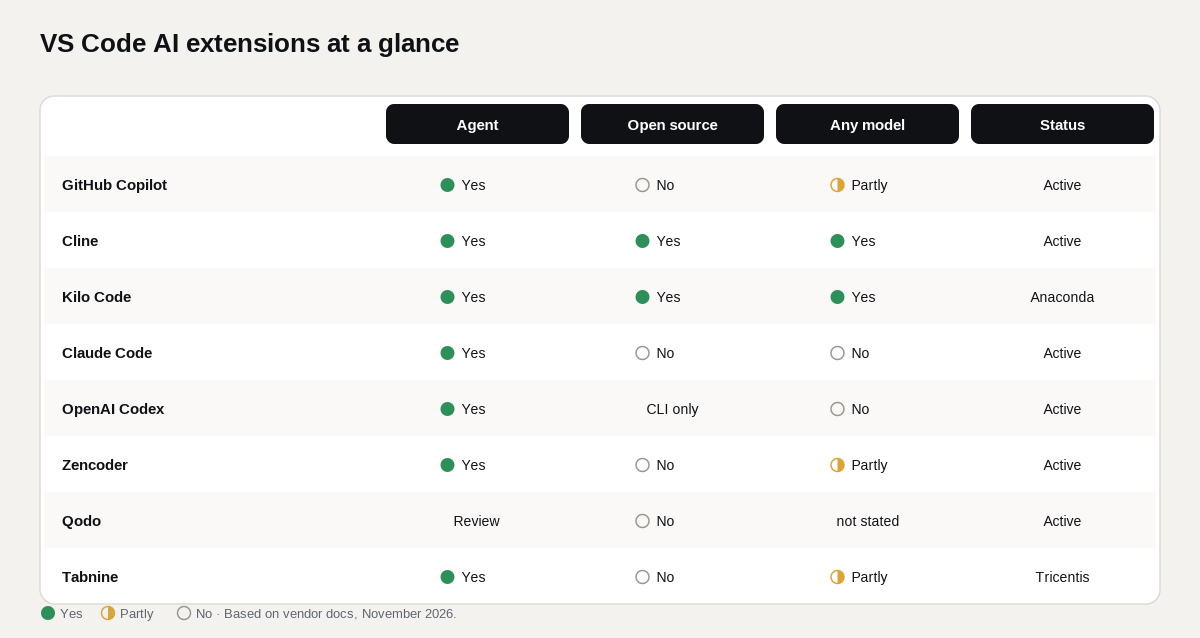
The extensions
1. GitHub Copilot
Verdict: the default choice, and the easiest to roll out to a company.
Best for: developers who want completions, chat and an agent in one extension, and teams already on GitHub.
- In the IDE, agent mode means "Copilot will determine which files to make changes to," and it asks for approval on changes and terminal commands (GitHub docs).
- Models come from OpenAI, Anthropic, Google, Microsoft, Moonshot AI and xAI, depending on plan and surface (supported models).
- Customization includes MCP servers, custom instructions, prompt files, agent skills, custom agents and Copilot Memory (preview) (GitHub docs).
- Business and Enterprise add policy management, usage data and file exclusions; Enterprise adds audit logs (same source).
- The same subscription starts cloud agent tasks from the IDE that open pull requests on GitHub (coding agent).
Limits: all plans now use GitHub AI Credits; chat and agent work consume credits, completions do not (plans). The cloud agent only works with repositories hosted on GitHub. GitHub itself warns Copilot "can produce incorrect or suboptimal code, including code that contains security vulnerabilities" (coding agent).
Pricing: Free USD 0 (2,000 completions a month); Pro USD 10 per user per month; Pro+ USD 39; Max USD 100; Business USD 19 and Enterprise USD 39 per granted seat per month, as of November 2026 (plans).
2. Cline
Verdict: the most widely installed open-source agent, with a human approval on every action.
Best for: developers who want an agent that edits files and runs commands, with full control over which model it uses.
- Every action requires your approval (Cline docs).
- Plan mode reads and discusses without editing; Act mode carries out the plan, and each mode can use a different model. Checkpoints allow rollback (Plan and Act).
- Runs as a VS Code extension, JetBrains plugin, CLI, desktop app and SDK (Cline docs).
- Cline says the VS Code extension is installed by over 11 million developers (vendor claim) (Cline blog).
- Enterprise adds SSO, RBAC, a team dashboard, authentication logs and provider restrictions (Cline pricing).
Limits: the 2026 harness migration deprecated "some less-used features" (Cline blog, above). In January 2026, OpenAI hired at least seven Cline employees, reported as a continuity challenge (texxr). Model costs are separate, so heavy agent use needs a budget.
Pricing: the extension is free; you pay for inference through Cline or bring your own key. ClinePass is a flat subscription for open-weight models; the pricing page shows no plan prices (Cline pricing).
3. Kilo Code
Verdict: an open-source agent with the widest model menu, now owned by Anaconda.
Best for: developers who want many models at provider rates, and teams that want per-user billing on an open-source extension.
- Status: Anaconda announced the acquisition on July 15, 2026, and says Kilo "remains available today with no changes to existing products, plans, or support for current users" (Anaconda).
- The VS Code extension was rebuilt on the open-source OpenCode server and became the default on April 2, 2026 (Kilo blog).
- Agent Manager runs several agent tabs, can isolate agents in git worktrees, and includes a diff reviewer with line-level comments (same source).
- Kilo Gateway offers 500+ models from 60+ providers, bring-your-own-key, or local models via Ollama or LM Studio (Kilo pricing).
- Kilo published a migration path for Roo Code users after Roo shut down (Kilo blog).
Limits: a dated review notes a broad product range and 1,300+ open GitHub issues (review, Jun 2026). A 5% processing fee applies to credit purchases, and Teams includes no credits (Kilo pricing).
Pricing: free and open source (usage billed separately); Teams USD 15 per user per month; Enterprise custom; optional Kilo Pass from USD 19 per month, as of November 2026 (Kilo pricing).
4. Claude Code
Verdict: the strongest pick if your company already pays for Claude.
Best for: developers who want an agent that plans, edits, runs commands and opens pull requests, and moves between the editor, terminal and web.
- Available as a VS Code (and Cursor) extension, JetBrains plugin, terminal CLI, desktop app and on the web (Claude Code docs).
- Plan mode explores the codebase and proposes an approach for approval before editing (costs docs).
- Stages changes, writes commit messages, creates branches and opens pull requests (Claude Code docs).
- Project instructions (CLAUDE.md or AGENTS.md), skills, hooks and MCP servers customize it (same source).
- Teams gets admin tools, SSO and server-managed settings; security teams can set managed permissions local config cannot override (third-party integrations).
Limits: Claude models only. Not included in the Free plan; usage limits are shared across Claude web, desktop, mobile and Claude Code (Claude pricing). Agent teams use far more tokens than standard sessions (costs docs).
Pricing: Pro USD 20 per month (USD 17 billed annually); Max USD 100 per month; Team Standard USD 25 per user per month, as of November 2026 (Claude pricing).
5. OpenAI Codex
Verdict: the natural choice for teams on ChatGPT plans, with cloud tasks that keep running after you close the laptop.
Best for: developers who want an IDE agent plus cloud tasks and pull request review from one subscription.
- Codex runs in an IDE extension, the CLI, the ChatGPT apps, Codex Cloud, GitHub and Slack (ChatGPT docs).
- Cloud tasks keep running after you close your laptop and can be picked up on another device (OpenAI Codex).
- AGENTS.md, MCP, sandboxing, agent approvals and permissions are documented (ChatGPT docs).
- The Codex CLI is open source under Apache-2.0 (GitHub).
- Business adds admin controls, SAML SSO and MFA, with no training on business data by default (Codex pricing).
Limits: OpenAI models only. Usage limits vary by model and task size and "are not fixed message limits." With an API key, GitHub code review and Slack integration are not available (Codex pricing).
Pricing: included in ChatGPT plans. Plus USD 20 per month adds Codex in the IDE extension; Business USD 25 per user per month billed monthly (USD 20 annually), as of November 2026 (Codex pricing).
6. Zencoder
Verdict: for teams that want spec-driven agents with verification built in.
Best for: engineering teams who want agents inside VS Code that follow a spec and check their own changes.
- IDE agents run in VS Code and JetBrains; Zenflow Desktop and a CLI sit alongside (Zencoder).
- Zenflow Code runs spec-driven workflows for features, bugs and refactors, with agents in parallel in isolated environments (same source).
- Multi-model routing; bring-your-own OpenAI, Anthropic or Gemini keys does not consume credits (Zencoder pricing).
- SOC 2 Type II, ISO 27001 and ISO 42001, with SSO, role-based access and approval gates (Zencoder).
- Deploys in the cloud, on-premise or hybrid (Zencoder pricing).
Limits: a review updated in August 2026 calls the entry price the highest in its category, says credit usage is hard to predict and notes frequent product renaming (review). Credits expire monthly, and the Free plan is bring-your-own-key only (pricing FAQ).
Pricing: a seat price plus monthly credits; see the Zencoder pricing page.
7. Qodo
Verdict: a reviewer, not a builder; useful next to any of the agents above.
Best for: teams that want AI-written code (from any agent) checked against their own rules before merge.
- IDE plugins for VS Code, JetBrains and Visual Studio, plus a CLI (Qodo).
- Multiple review agents check every pull request against team rules and the wider codebase (same source).
- Works with GitHub, GitLab, Bitbucket and Azure DevOps (same source).
- Formerly CodiumAI; raised a USD 70M Series B on March 30, 2026 (Globes).
- New in November 2026: Auto Approval Workflows and Agent Session Review (Qodo).
Limits: Qodo reviews and governs code; it does not build, host or deploy applications. No permanent free tier, and credits expire monthly (Qodo pricing).
Pricing: Pro Team USD 0.015 per credit, pooled, in monthly packs; Enterprise custom for 30+ users, as of November 2026 (Qodo pricing).
8. Tabnine
Verdict: for privacy-first enterprises, with a roadmap question after its acquisition.
Best for: companies that must run the assistant in a VPC, on-premises or air-gapped.
- Status: acquired by Tricentis (announced July 30, 2026); the announcement does not say whether the standalone assistant will continue (Tricentis).
- Runs in VS Code, JetBrains IDEs, Android Studio, Eclipse, Visual Studio and a CLI (review, Jun 2026).
- Can be deployed as SaaS, in a VPC, on-premises or air-gapped (same source).
- The Enterprise Context Engine launched in March 2026, and self-managed models were added in April (SD Times).
- Two seat tiers: Code Assistant, and Agentic Platform with agents and CLI (review, above).
Limits: no free tier, only a trial; the review calls it the most expensive per-seat option in its bracket. Analysts flag roadmap risk after the acquisition (BERI).
Pricing: per-seat subscription billed annually; the official pricing page showed no plan prices in November 2026.
Devfab (not an extension)
Verdict: not a VS Code extension, and not a replacement for one. It sits one level up.
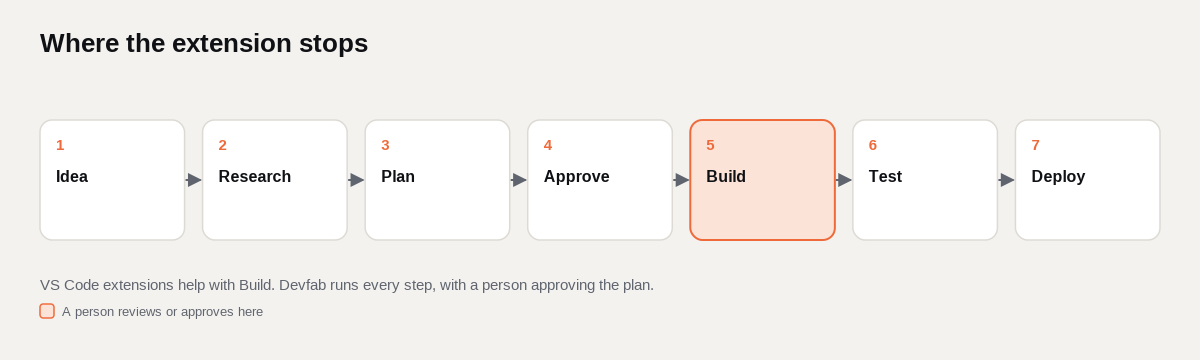
Every tool above helps a developer write or review code in the editor. Coding agents automate the developer. Devfab automates the development lifecycle. It is an AI software factory: you describe a project, or connect an existing GitHub repository, and seven agents take it through research, planning, building, testing and deployment.
- Research before the plan. The Researcher maps key terms, best practices and competitors, then suggests a prototype.
- A person approves the plan. The Coordinator then creates tickets for dev agents.
- ChainFlow maps which functions and APIs call each other and what is deployed, so a change to checkout shows its effect on payments, inventory, order confirmation and notifications.
- QA agent runs UI and flow tests (screens, buttons and journeys clicked end to end) plus logic tests.
- Deploy ships to your own server; code stays in your GitHub. Cost is logged per task and per project.
Limits: Devfab is in Beta, with a smaller community and fewer integrations than these extensions. It is not an editor for hands-on coding, and it needs a GitHub account. Developers keep using Copilot, Cline or any other extension on the same repository.
How to choose
- Check status first. If you run Continue or Roo Code, move now. If you run Amazon Q Developer, plan for its end of support. For Tabnine, Kilo Code or Augment, watch the new owner's roadmap.
- Decide who picks the model. Want one vendor's models? Claude Code or Codex. Want any model, or local ones? Cline or Kilo Code. Want a broad menu with admin control? Copilot.
- Decide how much the agent may do alone. Cline asks before every action. Copilot asks for approval on changes and commands. Cloud agents (Copilot, Codex) work while you are away.
- Match your admin needs. SSO, audit logs and policies differ by plan. Read the plan page, not the homepage.
- Add review. Whatever writes the code, a reviewer such as Qodo, or a human, should check it before merge.
- Look past the editor. If the bottleneck is planning, testing and releases rather than typing, an extension won't fix it. That is where an AI software factory fits.
FAQ
What is the best free AI extension for VS Code?
GitHub Copilot Free includes 2,000 completions a month with limited chat and agent use. Cline and Kilo Code are free, open-source extensions where you pay only for model usage or bring your own key. Pick Copilot for completions, Cline or Kilo for an agent that edits files and runs commands.
Are Continue and Roo Code still worth installing?
No. Continue was acquired by Cursor in June 2026 and discontinued. Roo Code was shut down and its repository archived on May 15, 2026; the extension stays on the Marketplace in its final state with no fixes. Kilo Code published a migration path for Roo users.
Can I use Claude Code or Codex inside VS Code?
Yes. Claude Code has a VS Code extension (it also works in Cursor), included in paid Claude plans. OpenAI's Codex has an IDE extension included with ChatGPT plans; Plus adds it along with web, CLI and iOS access.
Which VS Code AI extension is best for a company?
GitHub Copilot Business or Enterprise if you want policy management, usage data and audit logs tied to GitHub. Cline or Kilo Code Enterprise if you want an open-source agent with SSO and provider restrictions. Check each vendor's admin features against your security review.
Is Devfab a VS Code extension?
No. Devfab is an AI software factory that runs outside the editor. Its agents research, plan, build, test and deploy a project in your GitHub repository. Developers can keep using any VS Code extension on the same repository.
Read next
- What is an AI software factory?
- AI software factory vs AI coding tools
- Cline vs GitHub Copilot
- Claude Code vs GitHub Copilot
- Devfab vs Cline
- Best AI code editors and IDEs
Your extension writes the code. Let a factory run the lifecycle around it. Try Beta
Sources (checked November 2026): GitHub Copilot features; GitHub Copilot plans; Copilot coding agent; Copilot supported models; Cline docs; Cline Plan and Act; Cline pricing; Cline harness migration; texxr on Cline staff; Anaconda acquires Kilo Code; New Kilo for VS Code; Kilo pricing; Kilo: Thank you, Roo; Kilo review (Jun 2026); Claude Code overview; Claude Code costs; Claude Code third-party integrations; Claude pricing; OpenAI Codex; ChatGPT/Codex docs; Codex pricing; openai/codex on GitHub; Zencoder; Zencoder pricing; Zencoder pricing FAQ; Zencoder review (Aug 2026); Qodo; Qodo pricing; Globes on Qodo Series B; Tricentis acquires Tabnine; Tabnine review (Jun 2026); SD Times on Tabnine; BERI on Tabnine; Tabnine pricing; continue.dev; The New Stack on Continue; Roo Code repository; AWS: Q Developer end of support; Harness acquires Augment Code; BERI on Augment.
Frequently asked questions
What is the best free AI extension for VS Code?
GitHub Copilot Free includes 2,000 completions a month with limited chat and agent use. Cline and Kilo Code are free, open-source extensions where you pay only for model usage or bring your own key. Pick Copilot for completions, Cline or Kilo for an agent that edits files and runs commands.
Are Continue and Roo Code still worth installing?
No. Continue was acquired by Cursor in June 2026 and discontinued. Roo Code was shut down and its repository archived on May 15, 2026; the extension stays on the Marketplace in its final state with no fixes. Kilo Code published a migration path for Roo users.
Can I use Claude Code or Codex inside VS Code?
Yes. Claude Code has a VS Code extension (it also works in Cursor), included in paid Claude plans. OpenAI's Codex has an IDE extension included with ChatGPT plans; Plus adds it along with web, CLI and iOS access.
Which VS Code AI extension is best for a company?
GitHub Copilot Business or Enterprise if you want policy management, usage data and audit logs tied to GitHub. Cline or Kilo Code Enterprise if you want an open-source agent with SSO and provider restrictions. Check each vendor's admin features against your security review.
Is Devfab a VS Code extension?
No. Devfab is an AI software factory that runs outside the editor. Its agents research, plan, build, test and deploy a project in your GitHub repository. Developers can keep using any VS Code extension on the same repository.