Short answer: JetBrains Junie with AI Assistant is the best fit for most JetBrains users because it drives the IDE's own index, debugger and test runners. GitHub Copilot is the pick for GitHub-centered teams, Claude Code for terminal-first developers, and Tabnine when code can't leave your network. Skip plugins that are discontinued or winding down.
You chose IntelliJ IDEA, PyCharm or Rider for a reason: the refactoring, the inspections, the debugger. Then the AI wave arrived, and most tools launched in VS Code first. JetBrains users got plugins later, or a note telling them to switch editors.
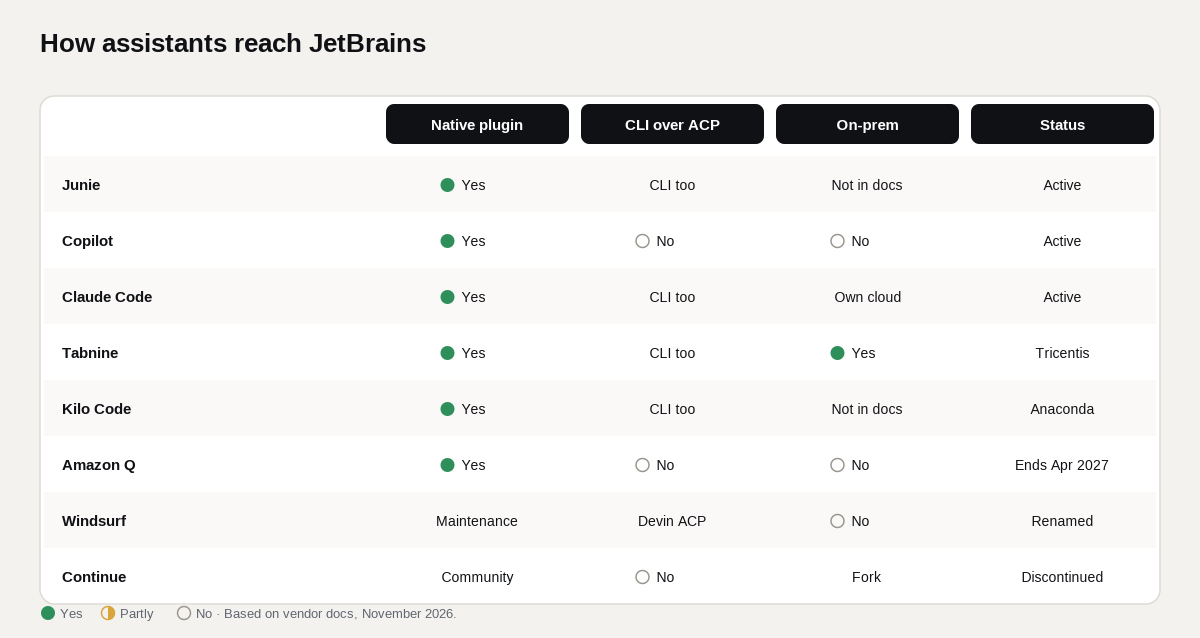
That gap has mostly closed in 2026, but not evenly. Some JetBrains plugins are first-class. Some are a CLI that talks to the IDE. A few are quietly winding down. This guide sorts them using vendor pages checked in November 2026.
In this guide, you'll learn:
The status warnings come early, because they save the most time.
How we picked and compared
We included tools that run inside JetBrains IDEs (a plugin) or are documented to work with them (a CLI or agent connected through the IDE). We compared:
- How it connects: native plugin, plugin plus CLI, or CLI through the Agent Client Protocol (ACP).
- What it does: completion and chat only, or agents that plan and change many files.
- Deployment: SaaS only, or VPC, on-premises and air-gapped.
- Model choice: one vendor's models, many models, or your own keys and local models.
- Pricing: from the official pricing page, written with "as of November 2026". Where a page doesn't give a clear price, we describe the model.
- Status: active, acquired, or winding down.
Facts come from vendor docs, pricing pages and dated reviews. We did not run hands-on tests for this version.
Plugins to avoid for new work in 2026:
- Continue was acquired by Cursor around June 16, 2026, and discontinued; its JetBrains plugin was already community-maintained in February 2026 (The New Stack; Continue blog).
- Amazon Q Developer IDE plugins and paid subscriptions reach end of support on April 30, 2027, and AWS points users to Kiro, whose JetBrains route is Kiro CLI over ACP (AWS; Kiro docs).
- Windsurf became Devin Desktop on June 2, 2026; its JetBrains plugin is in maintenance mode, and the FAQ recommends Devin over ACP (Devin Desktop FAQ).
- Augment Code sold its main assets to Harness on October 8, 2026; an analyst notes neither announcement names the IDE plugins, "so their future is unstated" (BERI, Oct 9, 2026).
Quick comparison table
| Tool | How it reaches JetBrains | Agent and planning | Deployment options | Model choice | Pricing (as of November 2026) |
|---|---|---|---|---|---|
| Junie + AI Assistant | Built by JetBrains; all JetBrains IDEs | Plan, Goal and Debug modes | Not covered in the pages we checked | BYOK, local runtimes | Free start; AI Pro and AI Ultimate subscriptions with AI Credits |
| GitHub Copilot | JetBrains plugin plus cloud agent on GitHub | Agent mode; cloud agent writes a plan | GitHub cloud | Models from six providers | Pro USD 10 per user per month; Business USD 19 per granted seat |
| Claude Code | JetBrains plugin plus CLI | Plan mode, subagents | Inference via Anthropic, Bedrock, Google Cloud or Foundry | Claude models only | In paid Claude plans; Pro USD 20 per month |
| Tabnine | JetBrains plugin plus CLI | Agentic tier; CLI Plan mode | SaaS, VPC, on-prem, air-gapped | Self-managed models | Per-seat, annual; no prices on the official page |
| Kilo Code | Open-source JetBrains extension | Agents, subagents, diff reviewer | SaaS gateway or your own keys | 500+ models, BYOK, local | Extension free; Teams USD 15 per user per month |
| Zencoder | JetBrains IDE agent | Spec-driven workflows | Cloud, on-prem or hybrid | Multi-model routing, BYOK | Pro USD 40 per user per month, billed annually |
| Factory | Droids in JetBrains or its terminal | Spec and Mission modes | SaaS; on-prem and airgapped on Enterprise | Router, BYOK, local | Free with your own inference; Pro USD 20 per user per month |
| Cline | JetBrains plugin (listed under Enterprise on pricing) | Plan and Act modes | VPC and self-hosting mentioned | BYOK, local, ClinePass | Free extension plus inference; Enterprise custom |
| Devfab | Not a plugin; works on your GitHub repo | Researcher, plan a person approves, QA agent | Deploys apps to your own server | Choose per agent or keep default | Cost logged per task and per project (Beta) |
The assistants, one by one
JetBrains Junie and AI Assistant
Best for: teams standardized on JetBrains that want the agent to use the IDE itself. Limits: Debug mode is limited to IntelliJ IDEA Ultimate 2026.1.1 or later, and no deploy or app-building features are described.
JetBrains' AI Assistant is the in-IDE layer: context-aware chat, inline completion, next edit suggestions, code explanations, and generation of docs, unit tests, commit messages and PR summaries. The 2026.3 help covers CLion, DataGrip, GoLand, IntelliJ IDEA, PhpStorm, PyCharm, Rider, RubyMine, RustRover and WebStorm, and it can run on a JetBrains AI subscription, your own API keys or external coding agents (AI Assistant help).
Junie is JetBrains' coding agent. It left beta in June 2026 (JetBrains blog).
- Uses the IDE's semantic index, build configurations, test runners and debugger via ACP, and connects to databases through DataGrip (JetBrains blog).
- Plan mode writes requirements, a technical design and delivery stages that you edit and approve; plans are saved in
.junie/plansso you can commit them. - Modes: Default, Plan, Goal and Debug. By default it asks before running commands or making changes, and changes can be rolled back per file (Junie docs).
- LLM-agnostic, with BYOK for Anthropic, OpenAI and Google and local runtimes such as Ollama and LM Studio.
- Junie CLI (beta since March 2026) runs in the terminal and in GitHub or GitLab CI (JetBrains blog, Mar 2026).
Pricing: free to start with the Junie Lite model; BYOK is billed at provider rates with no markup. Paid AI Pro and AI Ultimate subscriptions are per user with monthly AI Credits. The Junie page shows prices with annual and monthly toggles but doesn't say which period they reflect, so check it directly.
GitHub Copilot
Best for: teams whose code, issues and reviews live on GitHub. Limits: the cloud agent works only with GitHub-hosted repos, and each Actions-based session changes one repository and opens one PR.
- Runs in IDEs with chat, inline and next-edit suggestions and agent mode, which asks for approval on changes and terminal commands (GitHub Docs).
- The cloud agent can research a repository and create an implementation plan before changing code.
- Models from OpenAI, Anthropic, Google, Microsoft, Moonshot AI and xAI, depending on plan (GitHub Docs: models).
- Business and Enterprise add policy management, usage data and file exclusions; Enterprise adds audit logs.
- Completions and next-edit suggestions don't consume AI credits; chat and agent work do (Copilot plans).
Pricing: Free; Pro USD 10 per user per month; Business USD 19 and Enterprise USD 39 per granted seat per month, as of November 2026 (Copilot plans).
Claude Code
Best for: developers who like a terminal agent but want it to see their IDE. Limits: Claude models only, and it isn't included on the free Claude plan.
- Runs as a CLI, a JetBrains plugin, a VS Code extension, a desktop app and on the web (Claude Code docs).
- Plan mode explores the codebase and proposes an approach for approval before editing (Claude Code costs).
- Subagents, background agents and a lead agent that coordinates parallel agents.
- Inference can run through Anthropic, Amazon Bedrock, Google Cloud's Agent Platform or Microsoft Foundry (Claude Code enterprise).
- Managed Code Review posts severity-ranked comments on GitHub PRs on Team and Enterprise (Claude Code review).
Pricing: included in paid Claude plans; Pro USD 20 per month and Team Standard USD 25 per user per month, as of November 2026 (Claude pricing).
Tabnine
Best for: organizations where no code may leave the network. Limits: owned by Tricentis since July 30, 2026, with no stated roadmap for the standalone assistant.
- Plugins for JetBrains IDEs, Android Studio, Eclipse, Visual Studio and VS Code, plus the Tabnine CLI (DEV review, Jun 2026).
- Deploys as SaaS, in your VPC, on-premises or fully air-gapped (SD Times).
- The Enterprise Context Engine builds a graph of code, docs, tickets and APIs for impact analysis.
- Agents can implement Jira issues and check code against the issue (Tabnine pricing).
- Tricentis will build the Context Engine into its quality-engineering platform (Tricentis).
Pricing: per-user seats billed annually; the official page showed no prices in November 2026.
Kilo Code
Best for: developers who want an open-source agent and free choice of models. Limits: now owned by Anaconda, and a June 2026 review counted 1,300+ open GitHub issues (rywalker.com).
- Open-source extension for VS Code and JetBrains IDEs (Kilo docs).
- Kilo Gateway routes 500+ models from 60+ providers, or bring your own keys or local models (Kilo pricing).
- Agent Manager runs several agents, can isolate them in git worktrees, and includes a diff reviewer (Kilo blog).
- Anaconda acquired Kilo (announced July 15, 2026) and says products, plans and support are unchanged (Anaconda).
- Enterprise adds model limits, audit logs and SSO.
Pricing: extension free, inference billed at provider rates; Teams USD 15 per user per month, as of November 2026 (Kilo pricing).
Zencoder
Best for: teams that want spec-driven agent workflows and on-prem options. Limits: a 2026 review calls the entry price the highest in its category and says credit use is hard to predict (AISO Tools).
- IDE agents in JetBrains and VS Code, plus a desktop app and CLI (Zencoder).
- Spec-driven workflows for features, bugs and refactors, with parallel agents in isolated environments.
- Multi-model routing; BYOK for OpenAI, Anthropic or Gemini doesn't consume credits.
- SOC 2 Type II, ISO 27001 and ISO 42001; cloud, on-premise or hybrid deployment (Zencoder pricing).
Pricing: Pro USD 40 per user per month billed annually (USD 45 monthly), as of November 2026; credits expire monthly (Zencoder pricing).
Factory
Best for: delegating tickets to agents from Jira, Slack or CI while developers stay in JetBrains. Limits: the pricing page states usage only as multiples of Pro, with no token or credit amounts.
- Droids work in JetBrains, VS Code, Cursor, Zed or any editor terminal, plus a desktop app and web (Factory docs).
- Spec and Mission modes, with autonomy levels and rules to allow, approve or block shell commands.
- Work can be delegated from Slack, Linear, Jira, Microsoft Teams and Google Chat.
- Enterprise adds on-prem deployment and data residency; docs cover airgapped setups (Factory pricing).
- Factory 2.0 (June 15, 2026) added Missions, Automations and Droid Computers (Factory news).
Pricing: Free with your own inference; Pro USD 20 per user per month, as of November 2026 (Factory pricing).
Cline
Best for: developers who want to approve every action an open-source agent takes. Limits: Cline's docs list a JetBrains plugin, but its pricing page lists JetBrains under Enterprise, so confirm which plan you need.
- Plan mode reads and discusses without edits; Act mode executes, with Checkpoints for rollback (Cline docs).
- Runs in VS Code, JetBrains, a CLI and a desktop app (Cline docs).
- Bring your own key, local runtimes or ClinePass for open-weight models.
- Enterprise adds SSO, RBAC and provider restrictions; the FAQ mentions VPC and self-hosting (Cline pricing).
Pricing: the extension is free, with inference billed separately; Enterprise is custom. The pricing page shows no plan prices.
Devfab, with honest limits
Best for: teams whose bottleneck is the lifecycle around the code, not typing speed in the IDE. Limits: not a JetBrains plugin and not an editor for hands-on coding; in Beta, with a smaller community and fewer integrations; needs a GitHub account.
Every tool above helps a developer inside the IDE. Coding agents automate the developer. Devfab automates the development lifecycle. It works on your GitHub repository, so your developers keep coding in PyCharm or IntelliJ IDEA on the same code.
- Research before the plan. The Researcher maps key terms, best practices and competitors, then suggests a prototype.
- A plan a person approves before the Coordinator creates tickets for dev agents.
- ChainFlow maps which functions and APIs call each other and what is deployed. On an existing repo, leave the change box empty and Devfab maps the code first and suggests three small first tickets.
- QA agent runs UI and flow tests (screens, buttons and user journeys clicked end to end) plus logic tests.
- Deploy to your own server; docs such as blueprints and user manuals; cost logged after each run, per task and per project.
You can choose the model for each agent or keep Devfab's default.
How to choose
- Want the agent to use JetBrains' debugger and test runners? Junie.
- Code and reviews live on GitHub? GitHub Copilot.
- Prefer a terminal agent that also connects to the IDE? Claude Code or Factory.
- No SaaS AI allowed? Tabnine, or Zencoder's on-prem option; check Factory Enterprise too.
- Want open source and any model? Kilo Code or Cline.
- Already on Continue, Amazon Q or the Windsurf plugin? Plan a move now, before support ends.
- The IDE isn't the bottleneck? If plans, tests and deploys are where work stalls, look at a software factory like Devfab next to your IDE assistant.
FAQ
What is the best AI assistant for JetBrains IDEs?
For most JetBrains users, Junie with JetBrains AI Assistant, because it uses the IDE's own index, test runners and debugger. GitHub Copilot is the best pick for teams standardized on GitHub. Claude Code suits terminal-first developers, and Tabnine suits teams that can't use SaaS AI.
Which JetBrains AI plugins should I avoid in 2026?
Avoid starting new work on four. Continue was discontinued after Cursor bought it. Amazon Q Developer's IDE plugins reach end of support on April 30, 2027. The Windsurf JetBrains plugin is in maintenance mode. Augment Code's plugin future is unstated since Harness bought Augment's main assets.
Can I use my own model in JetBrains IDEs?
Yes, with several tools. Junie supports bring-your-own-key for Anthropic, OpenAI and Google plus local runtimes such as Ollama. Kilo Code routes 500+ models or your own keys. Cline and Factory support your own keys or local models. Tabnine offers self-managed models on its agentic tier.
Is Devfab a JetBrains plugin?
No. Devfab is an AI software factory, not an IDE plugin. Its agents research, plan, build, test and deploy an app, with code in your GitHub account. Your developers can keep working in IntelliJ IDEA or PyCharm on the same repository.
Read next
- What is an AI software factory?
- GitHub Copilot vs JetBrains Junie
- Devfab vs JetBrains Junie
- JetBrains Junie alternatives
- Tabnine vs Continue
Keep your IDE; add research, an approved plan, QA and deploy around it. Try Beta
Sources (checked November 2026): JetBrains AI Assistant help 2026.3; Junie; Junie out of beta (JetBrains blog, Jun 2026); Junie CLI beta (JetBrains blog, Mar 2026); Junie agent docs; GitHub Copilot plans; GitHub Docs: features; GitHub Docs: models; Claude Code overview; Claude Code costs; Claude Code enterprise; Claude Code review; Claude pricing; Tricentis acquires Tabnine; SD Times: Tabnine context engine; DEV Community: Tabnine review 2026; Tabnine pricing; Kilo pricing; Kilo docs: plans; Kilo blog: new Kilo for VS Code; Anaconda acquires Kilo Code; rywalker.com: Kilo research note; Zencoder; Zencoder pricing; AISO Tools: Zencoder review 2026; Factory docs; Factory pricing; Factory 2.0; Cline docs; Cline Plan and Act; Cline pricing; The New Stack: Cursor acquires Continue; Continue blog; AWS: Amazon Q Developer end of support; Kiro: migrating from Q Developer; Devin Desktop FAQ; BERI: Harness buys Augment's Cosmos (Oct 9, 2026).
Frequently asked questions
What is the best AI assistant for JetBrains IDEs?
For most JetBrains users, Junie with JetBrains AI Assistant, because it uses the IDE's own index, test runners and debugger. GitHub Copilot is the best pick for teams standardized on GitHub. Claude Code suits terminal-first developers, and Tabnine suits teams that can't use SaaS AI.
Which JetBrains AI plugins should I avoid in 2026?
Avoid starting new work on four. Continue was discontinued after Cursor bought it. Amazon Q Developer's IDE plugins reach end of support on April 30, 2027. The Windsurf JetBrains plugin is in maintenance mode. Augment Code's plugin future is unstated since Harness bought Augment's main assets.
Can I use my own model in JetBrains IDEs?
Yes, with several tools. Junie supports bring-your-own-key for Anthropic, OpenAI and Google plus local runtimes such as Ollama. Kilo Code routes 500+ models or your own keys. Cline and Factory support your own keys or local models. Tabnine offers self-managed models on its agentic tier.
Is Devfab a JetBrains plugin?
No. Devfab is an AI software factory, not an IDE plugin. Its agents research, plan, build, test and deploy an app, with code in your GitHub account. Your developers can keep working in IntelliJ IDEA or PyCharm on the same repository.