Short answer: For mixed teams that build by chatting, start with Lovable, Replit, Bolt.new, v0 or Base44. For developer teams, Cursor adds shared rules and pull-request review. If your team needs a planned, tested project with a person approving the plan, Devfab runs the whole lifecycle. Pick by who builds, who approves and how you pay.
What changes when a team vibe codes
Vibe coding is building software by describing what you want and letting AI write the code. One person with one prototype can work this way for a while. A team runs into problems faster. (We cover the solo limits in what vibe coding is and when it stops working.)
Here is what a team needs that a solo builder does not:
- Roles. Who can edit, who can only view, and who can publish to real users.
- A way to review. Changes from five people need a place to land before they go live.
- Shared cost control. Credits and tokens drain faster when several people prompt the same project.
- A shared source of truth. Code in a repository the team controls, not only inside one person's account.
- Tests of whole user flows. When three people change the same app, a working screen is not proof that the sign-up flow still works.
So the question is not "which tool writes the best code from a prompt?" It is "which tool lets several people build, review and ship without breaking each other's work?"
How we picked and compared
We picked tools that teams actually use to build apps from prompts, plus one AI editor for developer-heavy teams. We compared them from vendor documentation and dated reviews, checked in November 2026. We did not run hands-on tests for this version of the page.
For each tool we looked at:
- Team features: workspaces, roles, sharing and admin controls.
- Review and publishing: where changes land and who can push them live.
- Testing: whether the tool tests the app it builds, and how.
- Code ownership: GitHub sync and whether you can deploy elsewhere.
- Cost model: seats, credits, tokens or effort-based usage. We describe the model, not the price, because prices change often.
Quick comparison table
| Tool | Best for teams that... | Team features | Testing | Code and hosting | Cost model |
|---|---|---|---|---|---|
| Lovable | mix designers, PMs and developers | Workspace and project roles, real-time editing, drafts | Security scan on publish | Two-way GitHub sync; can deploy elsewhere | Shared workspace credits |
| Replit | want build, test and hosting in one place | Shared workspaces, groups, admin controls | Agent tests the app in a real browser | Runs on Replit deployments | Effort-based usage and credits |
| Bolt.new | want quick full-stack prototypes with hosting | Team access management, central billing | Not described in the docs we read | GitHub sync to main; Bolt Cloud hosting | Per seat plus tokens |
| v0 | build web UIs and Next.js apps on Vercel | Shared chats, team templates | Not described in the docs we read | Deploy to Vercel or open a pull request | Per-seat credits plus shared pool |
| Base44 | want an all-in-one builder with simple roles | Owner, admin, editor, viewer, guest roles | Not described in the docs we read | Two-way GitHub sync on higher plans | Shared workspace credits |
| Cursor | are mostly developers | Shared rules, cloud agents, PR review bot | Agents can test their own work | Your own repository | Per seat plus usage |
| Devfab | want a planned, tested project with approval | Workspaces, roles, a person approves the plan | QA agent: UI, flow and logic tests | Your GitHub; deploy to your own server | Cost logged per task and project |
The tools, one by one
Lovable
Lovable is a chat-based app builder that many mixed teams start with. Its collaboration model is one of the most complete in this group. You can invite people to a single project or to the whole workspace. Collaborators see each other's changes in real time. Each person can also work in their own draft, with its own chat and preview, and the draft reaches the project only when someone accepts it. That draft step is a simple form of review, and it matters for teams.
Roles are Viewer, Editor, Admin and Owner, at both project and workspace level. Admin roles and granular permissions need a paid plan. On Enterprise, workspace policies can require approval before publishing, or block publishing. Lovable syncs a project two ways with a GitHub repository, one branch at a time, and its docs say you can clone the repository and deploy outside Lovable.
Best for: product teams where designers, PMs and developers all want to prompt the same app.
Limits: all projects in a workspace share one credit pool, so one heavy user can drain it (admins can cap each collaborator's monthly credits). Approval before publishing is an Enterprise feature. The docs we read describe security scans on every publish, not a separate test stage for user journeys.
Replit
Replit combines an AI agent, an online workspace and hosting. For teams, it offers shared workspaces with groups and permissions, and admins can control how apps are published, including whether security scans must pass first. Paid plans set limits on collaborators and builders.
Replit's strongest team feature is App Testing. Its Agent opens the app in a real browser and uses it like a person would: clicking buttons, filling in forms with mock data and moving between pages. It then reports what it found, fixes issues and gives you a video replay. That is close to the flow testing teams need. The docs list limits: it supports Full Stack JavaScript and Streamlit Python web apps, it runs only in the paid agent modes, and the Agent decides when enough has changed to test.
Best for: teams that want building, testing and hosting in one place, with little setup.
Limits: paid agent work uses effort-based pricing that grows with how complex each request is, so cost per feature varies. Testing is also usage-based. The workflow is built around Replit's own deployments.
Bolt.new
Bolt.new builds websites and full-stack apps in the browser. Bolt Cloud adds hosting, a PostgreSQL-based database with built-in sign-up and login, and custom domains on paid plans. A Plan mode lets you discuss the approach before Bolt writes code.
The Teams plan adds central billing, team-level access management, admin controls and user provisioning, sharing within your organization, private NPM registry support and design system knowledge. Bolt syncs to GitHub and commits each working change, which gives the team a history. Enterprise adds SSO and audit logs.
Best for: small teams that want fast full-stack prototypes with hosting and a database included.
Limits: Teams is priced per seat with a token allowance per member, and tokens are not shared between members. The GitHub integration pushes to main only, you cannot switch the project to another branch, and only the project owner can connect or manage it. Collaborators' changes sync the next time the owner opens the project. Those rules make parallel work harder for larger teams.
v0
v0, from Vercel, is an AI agent for building UIs, full-stack apps and agents from prompts. It works with Next.js, Tailwind and shadcn/ui, and you can deploy to Vercel in one click or open a pull request for review first. That pull-request option is a good fit for teams that already review code on GitHub.
Team features need a Plus, Business or Enterprise plan linked to a Vercel team. You can share chats with specific people or the whole team, set default visibility, and publish team-only templates so everyone starts from approved components. On Plus, every member is a Builder who can create, edit and deploy. Finer roles (Builder, Creator, Viewer), SAML SSO and audit logs are Enterprise features.
Best for: front-end and full-stack teams already on Vercel and Next.js.
Limits: usage is metered by tokens and converted to credits. Each seat has its own monthly credits, with an optional shared pool after that runs out. On lower team plans everyone can deploy, which some teams will not want.
Base44
Base44 is an all-in-one app builder organized around workspaces. Each workspace has its own plan and a shared credit pool, and invited members use the workspace's credits, so they do not each need a paid plan. Roles are clear: Owner, Admin, Editor, Viewer and Guest. Guests can only edit the apps they are invited to, which is useful for contractors or client reviewers.
Base44 offers two-way GitHub sync on its higher plans. Changes made in the editor push to main automatically, and developers can clone the repository, run the app locally with the Base44 CLI and merge back.
Best for: small business and agency teams that want simple roles and a shared credit pool.
Limits: the Admin role needs a Business or Enterprise plan. The editor pushes to main with no manual push step, and Base44 cannot resolve merge conflicts on its own (an AI option for this uses credits). Shared credits need watching when several people build.
Cursor
Cursor is not a chat-to-app builder. It is an AI code editor for developers. We include it because many teams that "vibe code" are developer teams prompting agents inside an editor, and Cursor's team features are strong.
Cursor Teams lets you share rules, skills and workflows across the team. Cloud agents keep running when a laptop is closed and can test and verify their own work. Bugbot reviews each pull request against your team's rules for logic bugs, security issues and performance problems. Teams also includes SSO, enforced privacy mode, usage analytics and agents you can start from Slack, GitHub or Linear.
Best for: developer teams that want AI agents inside their existing Git and review workflow.
Limits: non-developers will not use it to build apps. Pricing is per seat with a weekly usage pool per person, and usage beyond the pool or on third-party models is billed from a shared prepaid balance, so heavy agent use needs admin limits.
Devfab
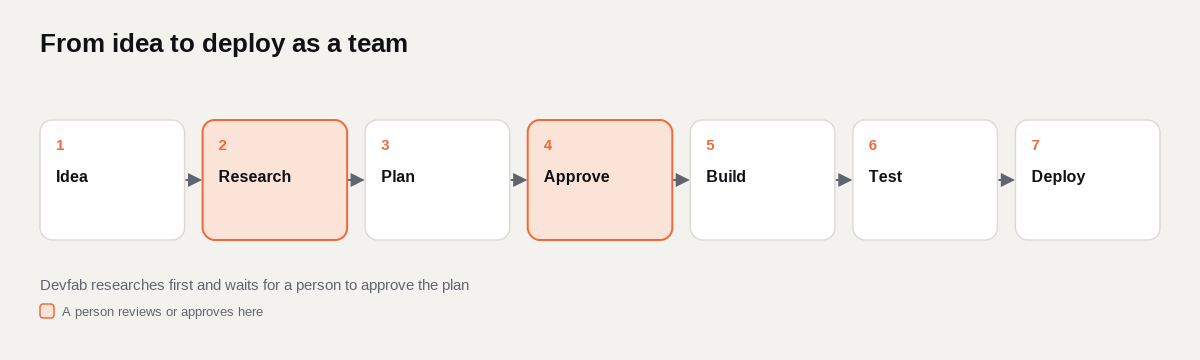
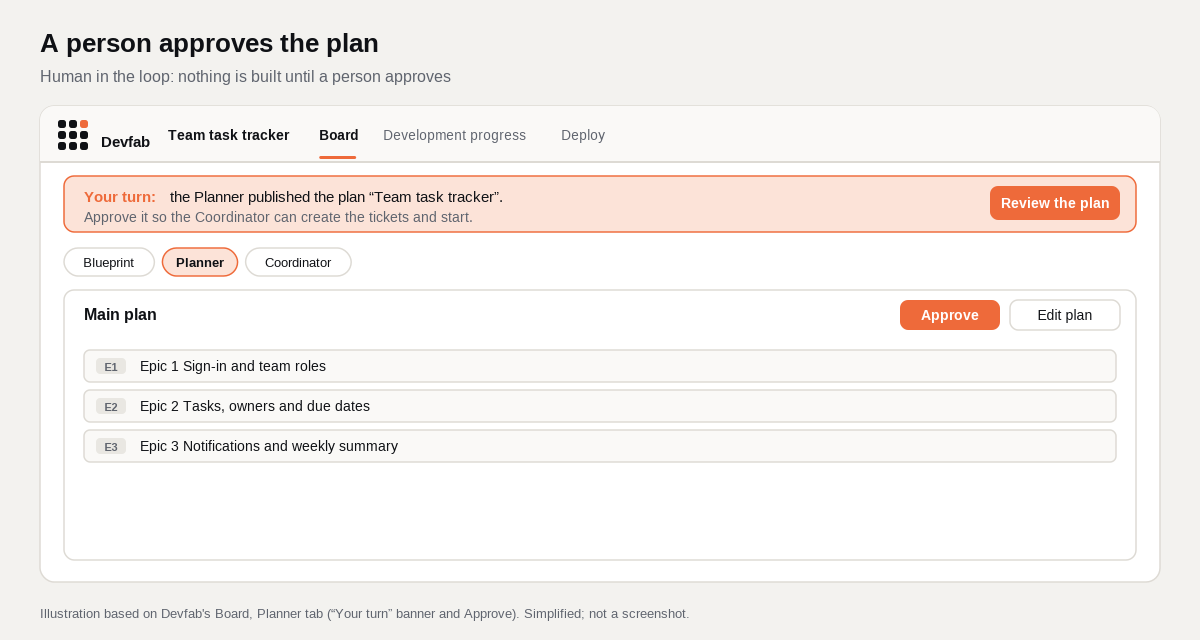
Devfab is a different kind of tool. It is a Software Factory in the Autonomous Software Lifecycle category. Coding agents automate the developer. Devfab automates the development lifecycle. A team of seven agents (Researcher, Planner, Coordinator, Developers, Blueprint, QA agent and Deploy) takes a project from idea to deployed app, and a person approves the plan.
For a team, this changes where the work happens. Instead of five people prompting one app and hoping nothing breaks, someone describes what to build, Devfab plans it, a person approves the plan, and the Coordinator splits it into tickets for developer agents. Progress shows on a Summary, Kanban and Gantt view with owner, status and due date for each item.
Three things set Devfab apart from the builders above:
- Research before the plan. Before the Planner writes anything, Devfab's research step maps your domain: key terms, best practices for that kind of app and competitors. It then suggests a prototype. Most vibe coding tools start writing code from the first prompt.
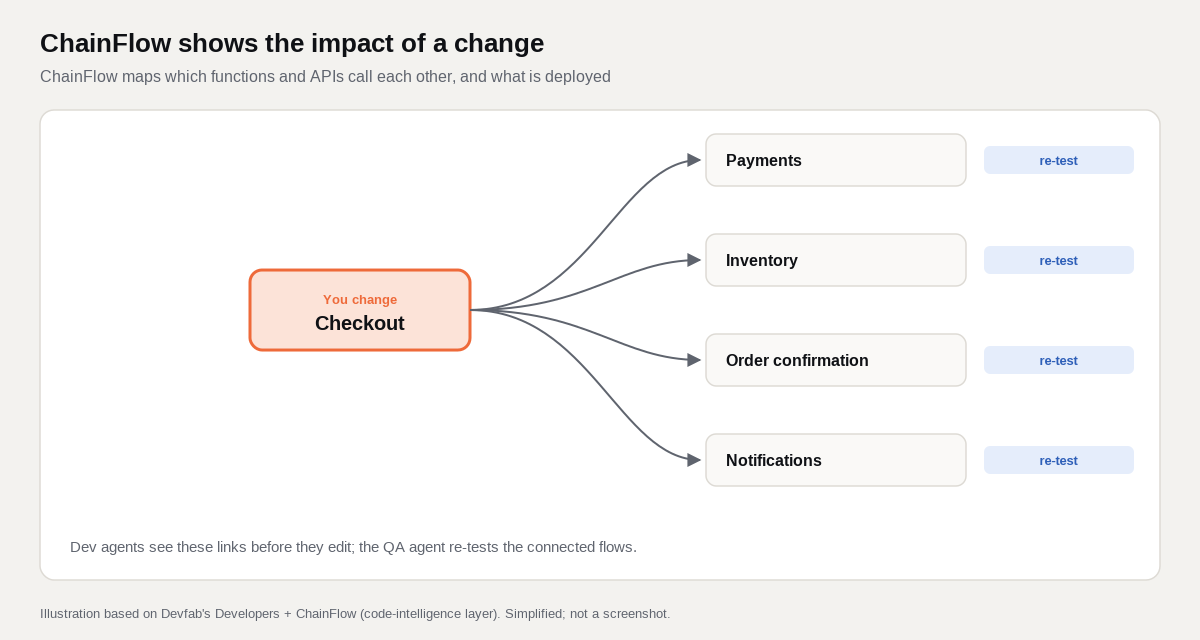
- ChainFlow. Devfab's code-intelligence layer maps which functions and APIs call each other and what is deployed. Developer agents see the impact of a change before they make it. A change to checkout can touch payments, inventory, order confirmation and notifications, and ChainFlow shows that. On an existing repository, leave the change box empty and Devfab maps the code first and suggests three small first tickets.
- A QA agent that tests flows, not just code. The QA agent runs UI and flow tests, clicking through screens, buttons and user journeys end to end, plus logic tests. Turn on "QA agent · review before Done" and nothing is marked Done until it passes review.
Run mode is your choice. Human in the loop is the default: Devfab works step by step and waits for your review before the next stage. Auto handles the process and asks only when needed. You can switch modes anytime in workspace settings, and you can choose the model for each agent or keep Devfab's default.
Code lives in your own GitHub account or your organization's, and you deploy to your own server, with an optional custom domain. Cost is logged after each run, per task and per project, so a team lead can see where the spend went. That gives you predictable cost instead of a credit balance that drops with no explanation.
Best for: teams and agencies that need a planned, tested app with a clear approval step, and teams taking a vibe-coded prototype to production.
Honest limits:
- Devfab is new and in Beta. Expect changes and a smaller community than the tools above.
- It has fewer integrations than established builders.
- It is not an editor for hands-on coding. Developers who want to type alongside AI should pair it with an editor like Cursor.
- It needs a GitHub account (yours or your organization's).
- It is more structured than a chat builder. If you only want to try a UI idea in an afternoon, a chat builder is quicker to start.
How to choose
Start with who will build and who will approve.
- Designers, PMs and developers all prompting one app? Lovable, for real-time editing and drafts. Watch the shared credits.
- Want building, browser testing and hosting in one place? Replit. Budget for effort-based usage.
- Small team, fast full-stack prototype? Bolt.new or Base44. Check the GitHub rules before more than two people build at once.
- Already on Vercel and Next.js? v0, and use the pull-request option for review.
- Mostly developers? Cursor, with shared rules and Bugbot on every pull request.
- Need a plan someone signs off, flow tests and code you own on your own server? Devfab.
Many teams use two tools. A common pattern: a chat builder to explore an idea, then a planned, tested build once the idea has real users. Our guide on prototype vs MVP vs production app explains where that switch usually happens. For the bigger picture, see what an AI software factory is and how it differs from AI coding tools.
Before you commit, run one small project through your top two tools. Note who could publish, what was tested, where the code ended up and what it cost.
FAQ
What is the best vibe coding tool for a team?
It depends on who builds. Lovable, Replit, Bolt.new, v0 and Base44 suit mixed teams that build by chatting. Cursor suits developer teams. Devfab suits teams that want a planned, tested project with a person approving the plan.
Can several people vibe code on the same project?
Yes, on most tools. Lovable has real-time editing and personal drafts, Base44 and Lovable have workspace roles, and v0 shares chats with the team. Check who can publish, because that is where teams get hurt.
How do teams control vibe coding costs?
Look at the billing model first. Most tools bill by credits, tokens or effort, so cost grows with the size of each request. Pick a tool with per-member limits or a per-task cost log, and review it weekly.
Who owns code written with vibe coding tools?
Read each tool's terms. Many sync to a GitHub repository you control, which makes it easier to move or review the code. Devfab keeps the code in your own GitHub account or your organization's and deploys to your own server.
When does vibe coding stop working for a team?
Usually when the app has real users, real data and several people changing it. At that point you need a plan, reviews, tests of whole user flows and a clear record of what changed.
Read next
- What is an AI software factory?
- AI software factory vs AI coding tools
- What is vibe coding and when does it stop working
- Devfab vs Bolt.new
- Devfab vs v0
Give your team a plan to approve, tests that click through real flows and code in your own GitHub. Try Beta
Sources (checked November 2026): Lovable Docs: Collaboration; Lovable Docs: GitHub integration; Lovable Docs: Lovable for enterprise; Replit Docs: App Testing; Replit Docs: Pricing and plans; Replit Docs: Teams; Bolt pricing; Bolt Help: Glossary; Bolt Help: Git integration; v0 Docs: Introduction; v0 Docs: Teams; Vercel: Updated v0 pricing; Base44 Docs: About workspaces; Base44 Docs: GitHub; Cursor Teams; Cursor Docs: Team pricing.
Frequently asked questions
What is the best vibe coding tool for a team?
It depends on who builds. Lovable, Replit, Bolt.new, v0 and Base44 suit mixed teams that build by chatting. Cursor suits developer teams. Devfab suits teams that want a planned, tested project with a person approving the plan.
Can several people vibe code on the same project?
Yes, on most tools. Lovable has real-time editing and personal drafts, Base44 and Lovable have workspace roles, and v0 shares chats with the team. Check who can publish, because that is where teams get hurt.
How do teams control vibe coding costs?
Look at the billing model first. Most tools bill by credits, tokens or effort, so cost grows with the size of each request. Pick a tool with per-member limits or a per-task cost log, and review it weekly.
Who owns code written with vibe coding tools?
Read each tool's terms. Many sync to a GitHub repository you control, which makes it easier to move or review the code. Devfab keeps the code in your own GitHub account or your organization's and deploys to your own server.
When does vibe coding stop working for a team?
Usually when the app has real users, real data and several people changing it. At that point you need a plan, reviews, tests of whole user flows and a clear record of what changed.