Short answer: For AI inside your existing GitHub workflow, GitHub Copilot. For a terminal-first agent with strong managed settings, Claude Code. For an AI editor with cloud agents, Cursor. For backlog tickets handed to an agent, Devin. For review, CodeRabbit or Qodo; for end-to-end tests, QA Wolf. For whole projects run end to end, Devfab.
You gave every developer an AI assistant. Code arrives faster. Delivery didn't move much. Reviews queue up, a dispatch portal for a logistics client ships with a broken flow, and finance asks what the AI bill is buying. That's the CTO's version of the AI question: not "which tool writes the best code?" but which tools fix the slowest stage, and can you govern them?
This list is sorted by delivery stage, not hype. Each entry covers governance, cost control and limits from the vendor's own pages.
In this guide, you'll learn:
Start with the table, then read the tools that match your bottleneck.
How we picked and compared
We looked for tools a CTO can roll out across teams, not personal favourites. Each tool had to meet three tests:
- It covers a clear stage of delivery: coding, review, testing or the full lifecycle.
- It has admin controls: SSO, roles, audit logs or policies.
- It has a visible cost model you can explain to finance.
We used vendor docs, pricing pages and dated news, checked in November 2026. We did not run hands-on benchmarks, and we don't quote vendor benchmark claims as fact. Prices appear only where the official pricing page lists them.
Quick comparison table
| Tool | Delivery stage | Governance highlights | Cost control | Pricing model (Nov 2026) |
|---|---|---|---|---|
| GitHub Copilot | Coding, cloud agent, PR review | Enterprise AI Controls, agent audit logs | Pooled credits per org | Per seat (Business USD 19, Enterprise USD 39) plus AI credits |
| Claude Code | Coding, agents, managed PR review | Managed permissions, SSO, server-managed settings | Org spend limits, per-user reporting | Included in paid Claude plans; Team per seat |
| Cursor | Coding in an editor, cloud agents | SSO; SCIM, audit logs, model limits on Enterprise | Group spend limits (Enterprise) | Teams USD 30+ per user per month |
| Devin | Backlog tickets, migrations | SCIM, RBAC, VPC deployment | Team cost controls | Teams USD 80 plus USD 40 per dev seat |
| CodeRabbit | PR review, behaviour tests (beta) | SSO, roles, audit logs on Enterprise | Fair-usage cap on reviews | USD 24 to 72 per user per month |
| Qodo | PR review and code governance | SSO, audit logs, on-prem, zero retention | Credit spending cap | Pooled credits, USD 0.015 each |
| QA Wolf | End-to-end testing | Doesn't train on customer data | Per run, no seats | USD 1 per web run |
| Devfab | Full lifecycle: research to deploy | Plan approval, roles, Team Delivery Report | Cost logged per task and per project | Beta; predictable cost |
The tools one by one
GitHub Copilot
Best for: organizations whose code, issues and reviews already live on GitHub.
- Runs in GitHub.com, IDEs, the Copilot CLI, a desktop app for parallel agent sessions and GitHub Mobile (GitHub Docs: features).
- The cloud agent can research a repository and "create an implementation plan" before changing code (GitHub Docs: features).
- Enterprise AI Controls and the agent control plane went GA on February 26, 2026, with an AI administrator role and
actor_is_agentin audit logs (GitHub Changelog). - Models from OpenAI, Anthropic, Google, Microsoft and others, depending on plan (GitHub Docs: models).
- Business is USD 19 and Enterprise USD 39 per granted seat per month, with pooled AI credits, as of November 2026 (Copilot plans).
Limits: Actions-based cloud agent sessions change one repository, run to a max session length, and open one PR per task. The agent works only with repositories on GitHub (GitHub Docs: cloud agent).
Claude Code
Best for: engineering orgs that want a strong agent in the terminal and IDE, under central settings.
- Runs in the terminal, VS Code, JetBrains, a desktop app, the web and mobile, and plugs into GitHub Actions, GitLab CI/CD and Slack (Claude Code docs).
- Plan mode explores the codebase and proposes an approach for approval before editing (Claude Code costs).
- Security teams can set managed permissions that local config cannot override; Teams adds SSO and server-managed settings (Claude Code deployment).
- Inference can run through Anthropic, Amazon Bedrock, Google Cloud or Microsoft Foundry, with LLM gateways and proxies supported (Claude Code deployment).
- Cost controls include org spend limits, an analytics dashboard, OpenTelemetry export and per-user reporting (Claude Code costs).
- Team Standard is USD 25 per user per month (USD 20 billed annually), as of November 2026 (Claude pricing).
Limits: Claude models only. Managed Code Review is Team or Enterprise only and GitHub only, and it reads the diff without running the code (Claude Code review docs).
Cursor
Best for: developer teams that want AI in the editor plus cloud agents across several Git hosts.
- Status: Cursor's maker Anysphere is now a wholly owned SpaceX subsidiary; Cursor says the acquisition closed in its August 14, 2026 post (Cursor blog).
- Plan Mode "creates detailed implementation plans before writing any code" (Cursor docs).
- Cloud agents run in isolated VMs, support GitHub, GitLab, Bitbucket Cloud and Azure DevOps, and can execute tools on self-hosted machines (Cursor cloud agents).
- Bugbot reviews pull requests for bugs and security issues (Cursor Bugbot).
- Enterprise adds SCIM, audit logs, model access restrictions and group-level spend limits (Cursor Enterprise; Cursor pricing).
- Teams starts at USD 30 per user per month, as of November 2026 (Cursor pricing).
Limits: cloud agents need Premium or higher, Teams or Enterprise (Cursor cloud agents). The pricing page says subscriptions are sold through X Subscription Corp., which may matter to procurement (Cursor pricing).
Devin
Best for: teams with a backlog of well-scoped tickets, migrations and refactors.
- Each session has a shell, IDE and browser; you can watch and take over (Devin docs).
- Cognition lists parallel tickets from Linear or Jira, migrations, PR review, bug reproduction and unit tests as good fits (Devin docs).
- Deployment options include multi-tenant Enterprise Cloud, a single-tenant VPC and customer-managed keys (Devin enterprise).
- Teams (up to 100 users) has SSO and cost controls; Enterprise adds SCIM and RBAC (Devin pricing).
- Teams is USD 80 per month plus USD 40 per full dev seat, as of November 2026 (Devin pricing).
- Since June 2, 2026, the product line also includes Devin Desktop, formerly Windsurf (Devin Desktop FAQ).
Limits: results depend on clear prompts and easy-to-verify tasks, and Devin's core always runs in Cognition's cloud, even in dedicated deployments (Devin docs; Devin enterprise).
CodeRabbit
Best for: teams that need an automated review gate on every pull request across Git hosts.
- Works on GitHub, GitLab, Azure DevOps and Bitbucket, plus IDE extensions and a CLI for pre-commit reviews (CodeRabbit docs).
- Features include PR summaries, autofix, pre-merge checks and security review; blast-radius analysis on Advanced (CodeRabbit pricing).
- Verify, in beta and free during the beta, runs the app in a sandbox and reports bugs with recordings (CodeRabbit Verify).
- Raised a USD 143M Series C on August 12, 2026 (CodeRabbit newsroom).
- Essentials USD 24, Team USD 48 and Advanced USD 72 per user per month, as of November 2026 (CodeRabbit pricing).
Limits: SSO, audit logs and self-hosting are Enterprise only, and reviews per developer are capped under a fair-usage policy (CodeRabbit pricing).
Qodo
Best for: regulated or multi-repo organizations that need review and code governance.
- Multi-agent PR review enforces your organization's standards on each pull request (Qodo).
- Cross Repo Review flags changes that could break downstream repos; Software Map shows how services connect (Qodo).
- Supports GitHub, GitLab, Bitbucket and Azure DevOps, including self-managed versions (Qodo).
- On-prem or air-gapped deployment, zero data retention, SOC 2 Type II, and bring-your-own model keys on Enterprise (Qodo pricing).
- Pro Team uses pooled credits at USD 0.015 each with a user-set spending cap, as of November 2026 (Qodo pricing).
Limits: no permanent free tier, credits expire each month, and it reviews code rather than building or deploying apps (Qodo pricing).
QA Wolf
Best for: teams whose agents ship code faster than anyone can test it.
- Agents plan coverage, write tests, pick the tests each PR needs and file bugs to Linear or Jira (QA Wolf pricing).
- Covers web, iOS, Android and Windows, including real iPhone and iPad devices (QA Wolf).
- Tests export as open-source Playwright and Appium code (QA Wolf pricing).
- States it "doesn't train or fine-tune models on customer data" (QA Wolf).
- USD 1 per web run and USD 2 per mobile or desktop run, no seat fees, as of November 2026 (QA Wolf pricing).
Limits: per-run billing grows with suite size and frequency, and flakes are retried rather than removed (QA Wolf pricing).
Devfab
Best for: CTOs at agencies and IT departments who want whole projects delivered, not just faster typing.
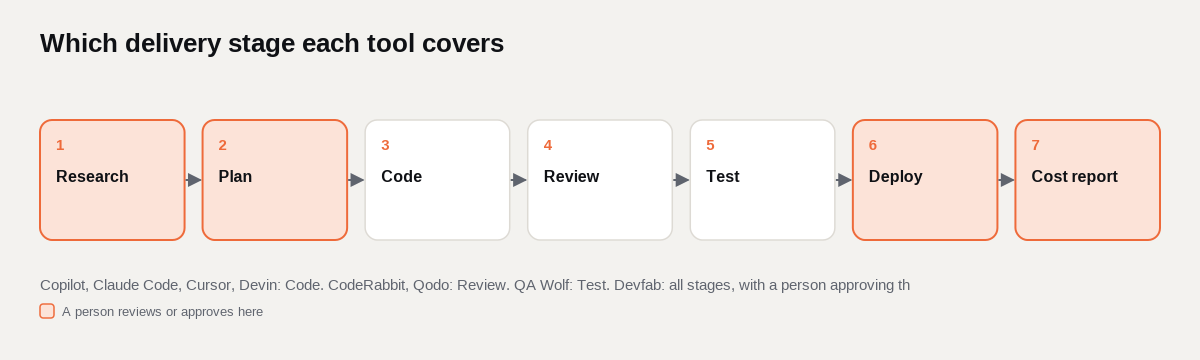
Coding agents automate the developer. Devfab automates the development lifecycle. A project runs through seven agents: Researcher, Planner, Coordinator, Developers, Blueprint, QA agent and Deploy.
- Research before the plan. The Researcher maps domain terms, best practices and competitors, then suggests a prototype. For the logistics dispatch portal: loads, carriers, proof of delivery.
- A person approves the plan. The Coordinator creates tickets for dev agents only after approval.
- ChainFlow maps which functions and APIs call each other and what is deployed, so a change to load assignment shows its impact on driver apps, invoices and customer alerts.
- The QA agent runs UI and flow tests (screens, buttons and user journeys clicked end to end) plus logic tests.
- Deploy ships to your own server; code sits in your own GitHub account or your organization's.
- Predictable cost. Cost is logged after each run, per task and per project. You can choose the model for each agent or keep Devfab's default.
- Oversight. Roles, workspace permissions, a Team Delivery Report, and Summary, Kanban and Gantt views of progress.
Honest limits: Devfab is in Beta, with a smaller community and fewer integrations than mature platforms. It is not an editor for hands-on coding, and it needs a GitHub account. If your bottleneck is one developer's typing speed, a coding assistant is the better buy.
How to choose
- Find the slowest stage. Time spent waiting on review, testing or deploys points to different tools than time spent writing code.
- Match governance to your risk. Regulated work favours on-prem or VPC options (Qodo, Devin) and central settings (Claude Code, Copilot Enterprise).
- Pick a cost unit finance can follow. Per seat (Copilot, Cursor, CodeRabbit), credits (Qodo), runs (QA Wolf) or cost per task and project (Devfab).
- Pair writers with checkers. A coding agent plus a reviewer plus a testing layer is more common than one tool doing all three. Anthropic itself warns a clean review "doesn't mean your code is error-free or secure" (Claude Code review docs).
- Pilot on one real project. Measure what reaches users, not lines written.
For the bigger picture, read AI software factory vs AI coding tools.
FAQ
What AI tools should a CTO roll out first?
Start where your delivery is slowest. If developers are the bottleneck, a coding assistant such as GitHub Copilot or Claude Code is the usual first step. If pull requests pile up, add a reviewer such as CodeRabbit or Qodo. If bugs reach users, add a testing layer such as QA Wolf.
Which AI coding tools have the strongest admin controls?
On the pages we checked, GitHub Copilot Enterprise has AI Controls and an agent control plane with agent activity in audit logs. Claude Code lets security teams set managed permissions local config can't override. Cursor Enterprise adds SCIM, audit logs and model restrictions. Devin offers SCIM, RBAC and VPC deployment.
How do I control AI spend across teams?
Use the controls each vendor offers: org spend limits and per-user reporting in Claude Code, group-level spend limits on Cursor Enterprise, pooled credits on Copilot Business and Enterprise, and team cost controls in Devin. Devfab logs cost after each run, per task and per project.
Do I need both a code reviewer and a testing tool?
Often yes. Reviewers read the diff; Anthropic notes a review with no findings doesn't mean code is error-free. Testing tools such as QA Wolf run the app and click through flows. They catch different problems.
Where does Devfab fit in a CTO's stack?
Devfab is not another coding assistant. It runs a whole project: research, a plan a person approves, tickets for dev agents, QA tests and deploy to your own server. It fits client or internal projects you want delivered end to end, and it is in Beta.
Read next
- What is an AI software factory?
- AI software factory vs AI coding tools
- Devfab vs Claude Code
- Devfab vs CodeRabbit
- How to track AI cost per task and per project
Want one project run end to end, with a plan you approve? Try Beta
Sources (checked November 2026): GitHub Copilot plans; GitHub Docs: Copilot features; GitHub Docs: Copilot cloud agent; GitHub Docs: supported models; GitHub Changelog: Enterprise AI Controls GA (Feb 26, 2026); Claude Code overview; Claude Code costs; Claude Code enterprise deployment; Claude Code review; Claude pricing; Cursor blog: joining SpaceX; Cursor Plan Mode; Cursor cloud agents; Cursor Bugbot; Cursor Enterprise; Cursor pricing; Devin docs; Devin enterprise deployment; Devin pricing; Devin Desktop FAQ; CodeRabbit docs; CodeRabbit Verify; CodeRabbit pricing; CodeRabbit Series C (Aug 12, 2026); Qodo homepage; Qodo pricing; QA Wolf homepage; QA Wolf pricing.
Frequently asked questions
What AI tools should a CTO roll out first?
Start where your delivery is slowest. If developers are the bottleneck, a coding assistant such as GitHub Copilot or Claude Code is the usual first step. If pull requests pile up, add a reviewer such as CodeRabbit or Qodo. If bugs reach users, add a testing layer such as QA Wolf.
Which AI coding tools have the strongest admin controls?
On the pages we checked, GitHub Copilot Enterprise has AI Controls and an agent control plane with agent activity in audit logs. Claude Code lets security teams set managed permissions local config can't override. Cursor Enterprise adds SCIM, audit logs and model restrictions. Devin offers SCIM, RBAC and VPC deployment.
How do I control AI spend across teams?
Use the controls each vendor offers: org spend limits and per-user reporting in Claude Code, group-level spend limits on Cursor Enterprise, pooled credits on Copilot Business and Enterprise, and team cost controls in Devin. Devfab logs cost after each run, per task and per project.
Do I need both a code reviewer and a testing tool?
Often yes. Reviewers read the diff; Anthropic notes a review with no findings doesn't mean code is error-free. Testing tools such as QA Wolf run the app and click through flows. They catch different problems.
Where does Devfab fit in a CTO's stack?
Devfab is not another coding assistant. It runs a whole project: research, a plan a person approves, tickets for dev agents, QA tests and deploy to your own server. It fits client or internal projects you want delivered end to end, and it is in Beta.