Short answer: For quick prototypes, Lovable and v0. For a cloud workspace with plan approval and hosting, Replit. For turning PRDs and issues into pull requests on a real codebase, Tempo. For web plus app-store mobile, Emergent. For Gemini-powered ideas, Google AI Studio. For a whole project with research, QA and deploy, Devfab.
You write the PRD, run the roadmap and answer for the release. And for years you could not build anything yourself. Now you can. A prompt gets you a working screen before the design review. The hard part has moved. It is no longer "can I make a prototype?" It is "what happens to it after the demo?"
Most lists of AI tools for product managers cover meeting notes and roadmap assistants. This one covers tools that produce software, judged on what a PM needs to hand it on.
In this guide, you'll learn:
- How we picked and compared
- All seven tools in one table
- Each tool's best use and limits
- How to choose for your situation
Start with the table if you're short on time.
How we picked and compared
We picked tools that a product manager can use to produce working software, not just documents. We compared them from vendor docs and pricing pages, re-checked in November 2026. We did not run hands-on tests for this article. For each tool we asked:
- Start. Can a PM start from a prompt or a spec, without a developer?
- Plan. Is there a plan or spec step a person can approve before code changes?
- Hand-off. Does the work end up in a GitHub repo engineers can pick up?
- Testing. Does the tool test the app, and how?
- Shipping. Where does the app run, and who controls it?
- Cost. How is usage billed? We give prices only from official pricing pages.
Devfab is our product. We list its limits like everyone else's.
Quick comparison table
| Tool | Best for PMs who… | Plan step | Code in GitHub | Testing | Where it runs | Pricing (Nov 2026) |
|---|---|---|---|---|---|---|
| v0 | want Next.js UI and a link today | Not in docs | Yes, branch and PRs | Not in docs | Vercel | Free; Plus USD 30 per user per month |
| Lovable | want a hosted full-stack app fast | Plan mode | Two-way sync, new repo | Browser tests when asked; security scans | Lovable hosting | Free; Pro USD 25 per month |
| Replit | want a workspace with hosting options | Plan mode | Import and export | App Testing for some stacks | Replit hosting | Free; Core USD 20 per month |
| Tempo | have a codebase and a backlog | Linked PRDs and specs | Works in your repo | Not in docs | Your machine; output is PRs | Usage-balance subscription |
| Emergent | need web plus app-store mobile | Not in docs | Save to GitHub (Standard+) | Unit, integration, smoke tests | Emergent hosting | Free; Standard USD 20 per month |
| Google AI Studio | want Gemini features with little setup | Approval before backend setup | Two-way sync | Not in docs | Cloud Run | Gemini API free and paid tiers |
| Devfab | need a whole project delivered | A person approves the plan | Your own GitHub account | QA agent: UI, flow, logic | Your own server | Cost logged per task and project (Beta) |
The tools, one by one
v0
v0 is Vercel's AI agent at v0.app. It builds Next.js apps and agents from prompts and deploys them to Vercel. Vercel lists PMs, designers, engineers and founders among its users (v0 docs).
- The default stack is Next.js, React, TypeScript, Tailwind CSS and shadcn/ui (v0 FAQs).
- Design Mode lets you select elements in the live preview and change styles; edits are written back to code (Design Mode).
- v0 imports existing repos, works on a branch, opens and merges PRs, and "never pushes directly to
main" (v0 GitHub). - Previews run server code, API routes and database connections as in production (v0 FAQs).
- As of November 2026: Free (7 messages per day), Plus USD 30 per user per month, Business USD 100 per user per month, Enterprise custom (v0 pricing). The legacy Premium plan is closed to new users.
Best for: PMs who want to show a real UI in a review and hand engineers a pull request, not a mockup. Limits: v0's docs say output "may be incomplete" and may contain bugs, and agents can fail repeatedly and use credits. The full experience needs Vercel.
Lovable
Lovable is a browser-based AI app builder that generates and hosts full-stack web apps. It targets people with no coding experience as well as developers who edit the code (Lovable FAQ).
- Three modes: Build changes the project, Plan writes a plan for approval first, Chat answers without changing code (same source).
- A built-in backend covers managed PostgreSQL, login and file storage, or you can use Supabase (same source).
- Lovable can test apps in a browser and write frontend tests when asked; a quick security scan runs on every publish (same source).
- Git sync to GitHub, GitLab or Bitbucket; two-way sync with GitHub on one active branch, but it always creates a new repository (Lovable GitHub).
- As of November 2026: Free, Pro USD 25 per month, Business USD 50 per month, priced by credits rather than seats (Lovable pricing).
Best for: PMs testing an idea with real users on a hosted app, with no repo or servers to set up. Limits: web apps only; no choice of framework, database or model. Since September 9, 2026, Free and Pro data may be used for training unless you opt out (Lovable FAQ).
Replit
Replit is a cloud development platform whose Agent builds, tests and publishes apps from plain-language requests. Teams use it for internal tools, customer apps, dashboards and even slide decks (Replit Teams).
- Plan mode lets you brainstorm and approve a task list before the Agent changes code or data (Replit Agent).
- App Testing has the Agent click through the app in a real browser; it covers Full Stack JavaScript and Streamlit apps (App Testing).
- Deploy as Autoscale, Reserved VM, Static or Scheduled, with custom domains (Publish your app).
- From chat you can query connected services such as BigQuery, Linear, Slack and Notion (Replit Agent).
- As of November 2026: Starter free, Core USD 20 per month, Pro USD 100 per month, Enterprise custom; paid Agent work is priced by effort (Replit pricing).
Best for: PMs building internal tools that pull data from company systems and need to stay running. Limits: Plan mode can incur charges even without changing code, and App Testing covers only some stacks (pricing docs).
Tempo
Tempo is a desktop app for macOS and Windows that calls itself "the AI software factory for product teams." It "turns customer feedback, issues, and product requirements into reviewed pull requests" (Tempo). Status: Tempo wound down its browser-based visual editor and moved to the desktop app (migration guide).
- Docs hold long-form PRDs, specs and notes; a linked doc is read as context on every turn (Tempo docs).
- A built-in Kanban board links cards to branches, PRs, canvases and docs, and agents can pick up an issue and open a PR (same source).
- Agents are "a standing prompt wired to a trigger": an assigned issue, a schedule, Slack or a GitHub webhook (Tempo agents).
- The canvas shows real routes and components as live frames; edits write back to source (Tempo docs).
- Pricing: no plan prices on the homepage; the subscription's monthly price becomes a usage balance, or you bring your own Claude or ChatGPT plan (billing docs).
Best for: PMs on a team with an existing codebase who want agents to work from the backlog and the PRD. Limits: agents run on your machine under your identity and stop when the app is closed; the docs list no cloud agent option and no security page (Tempo agents).
Emergent
Emergent is a chat-driven platform where agents "design, code, and deploy your application." It names product managers, SMB owners, IT agencies and operations teams as users (Emergent).
- Builds web apps with React or Next.js and mobile apps with React Native and Expo (Emergent FAQs).
- Submits mobile apps to the App Store and Google Play through Expo EAS, using your developer accounts (same source).
- Agents run unit, integration and basic end-to-end smoke tests during the build (same source).
- Save to GitHub on Standard and above; no ZIP download (same source).
- As of November 2026: Free (10 credits per month), Standard USD 20 per month, Pro USD 200 per month, Business and Enterprise custom (Emergent pricing).
Best for: PMs who need a web app and a store-ready mobile app without a mobile team. Limits: each published app is billed monthly in credits (Emergent deployment); data is stored in the US and India with no self-serve EU-only hosting.
Google AI Studio
Google AI Studio's Build mode creates and deploys full-stack web apps and native Android apps from prompts, using the Antigravity agent (Build mode docs). It is also the named destination for Firebase Studio users; Firebase Studio shuts down on March 22, 2027 (Firebase migration).
- Web apps use React by default, with Next.js and Angular available, on a Node.js server runtime (Build mode docs).
- The agent can provision Firestore and Firebase Authentication after you approve (same source).
- Google Workspace apps (Gmail, Sheets, Docs, Drive, Calendar) connect with OAuth handled for you (same source).
- Two-way GitHub sync with a new or existing repo, plus ZIP export; deploy to Cloud Run (same source).
- Pricing model: AI Studio access is part of the Gemini API Free plan; paid use is billed per million tokens (Gemini API pricing).
Best for: PMs exploring Gemini-powered features, such as image, voice or Live API, with a free start. Limits: no team, SSO or role features in the Build mode docs; no real-time co-editing; storage must be connected externally.
Devfab, with honest limits
Devfab is a Software Factory. A PM describes the app in plain words, or connects an existing GitHub repo, and seven agents run the project: Researcher, Planner, Coordinator, Developers, Blueprint, QA agent and Deploy.
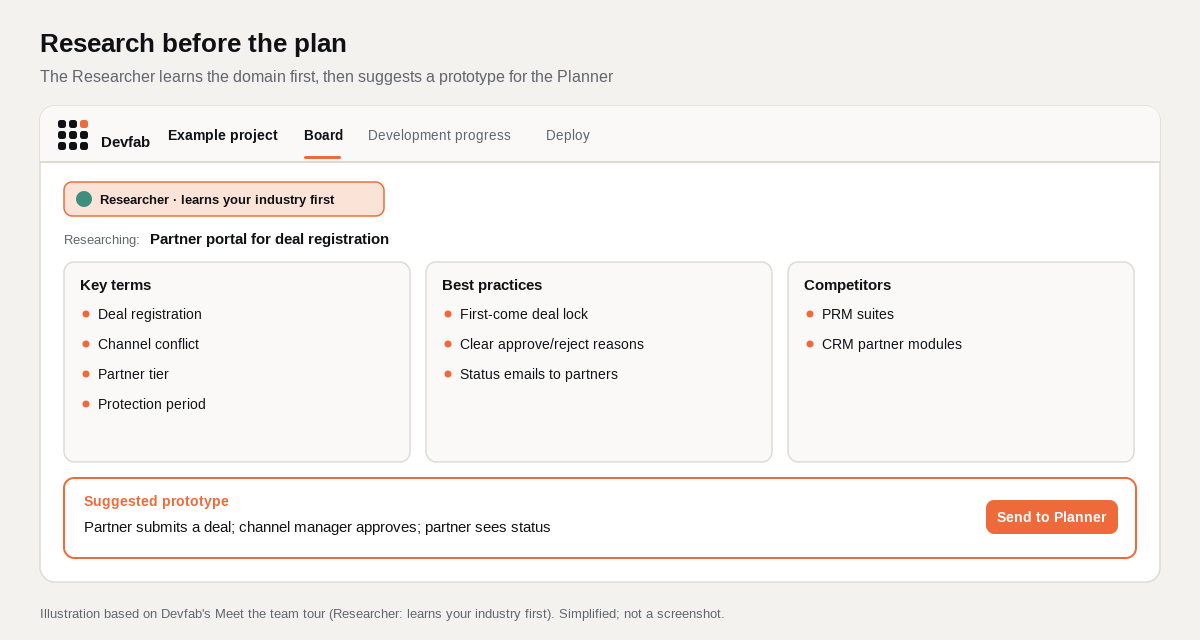
- Research before the plan. Say you need a partner portal for deal registration. The Researcher maps key terms (deal registration, channel conflict), best practices and competing products, then suggests a prototype.
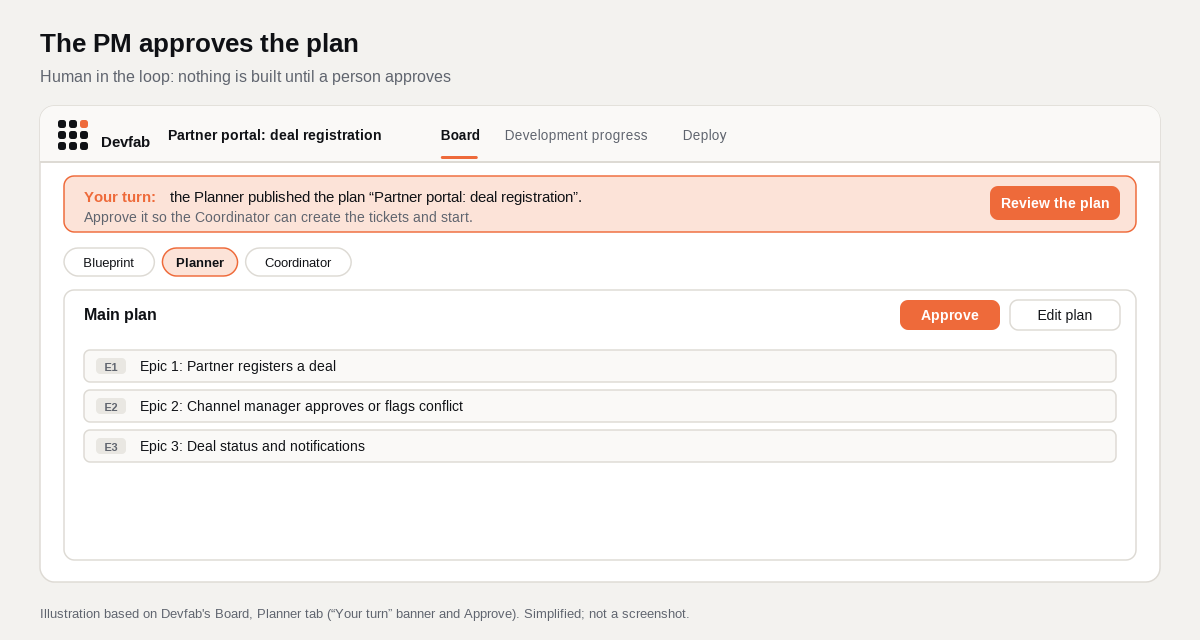
- You approve the plan. The Planner publishes it with a "Your turn" banner, and the Coordinator creates tickets only after a person approves. Human in the loop is the default; Auto mode asks only when needed.
- ChainFlow maps which functions and APIs call each other and what is deployed, so a change to deal approval shows its links to commissions and notifications.
- The QA agent runs UI and flow tests (screens, buttons and user journeys clicked end to end) plus logic tests.
- Shipping: code in your own GitHub account or organization; Deploy ships to your own server. Docs include blueprints, sequence flows and user manuals.
- Cost: predictable cost; cost is logged after each run, per task and per project. You can choose the model for each agent or keep Devfab's default.
Coding agents automate the developer. Devfab automates the development lifecycle.
Best for: PMs who own the outcome of a whole app and need research, an approved plan, QA proof and a deploy their IT team controls. Limits: Devfab is in Beta, with a smaller community and fewer integrations than mature platforms. It is not an editor for hands-on coding, it needs a GitHub account, and for a throwaway demo it is more process than you need.
How to choose
Start from where your idea is today and where it has to end up.
| Your situation | Start with | Why |
|---|---|---|
| Idea only; need users to click something | Lovable or v0 | Hosted app or UI fast, little setup |
| Internal tool on company data | Replit | Connectors, plan approval, runtime choices |
| Existing product, backlog of issues | Tempo | Agents work from PRDs and issues into PRs |
| Need a store-ready mobile app | Emergent | Expo EAS submission |
| Gemini feature to test | Google AI Studio | Free start, AI features built in |
| Whole app with sign-off, QA and your own server | Devfab | Research, approved plan, QA agent, deploy |
Two rules help whatever you choose. First, get the code into a GitHub repo your company controls early. Second, decide who approves the plan and who checks the tests before the first prompt, not after the demo. See how to review a plan written by an AI agent.
FAQ
What is the best AI tool for a product manager to build a prototype?
For a clickable web prototype with no setup, Lovable or v0. Lovable hosts a full-stack app with a built-in backend; v0 builds Next.js UI and deploys to Vercel. For a prototype that uses Gemini features such as image or voice, Google AI Studio has a free starting point.
Can product managers ship production software with AI tools?
They can ship small apps and internal tools, especially with tools that host the app for them. For software customers rely on, a PM still needs engineers or a process that adds review, testing and a release path. Tools such as Tempo and Devfab are built around that hand-off.
Do these AI tools replace writing a PRD?
No, but they change what the PRD is for. Tempo reads linked PRDs and specs as context on every agent turn. Lovable and Replit have a plan mode that writes a plan for approval before changing code. Devfab's Planner writes a project plan that a person approves.
Which AI tools let a product manager approve a plan before code is written?
In the docs we checked: Replit's Plan mode, Lovable's Plan mode and Devfab, where a person approves the Planner's plan before the Coordinator creates tickets. Google AI Studio asks for approval before provisioning Firestore or Firebase Auth.
Read next
- What is an AI software factory?
- v0 vs Tempo Labs
- Lovable vs v0
- Best AI tools for writing software requirements
Own the outcome, not just the prototype. Try Beta
Sources (checked November 2026): v0 docs; v0 FAQs; v0 Design Mode; v0 GitHub; v0 pricing; Lovable FAQ; Lovable GitHub integration; Lovable pricing; Replit Agent overview; Replit App Testing; Replit: Publish your app; Replit Teams; Replit pricing; Replit pricing and plans (docs); Tempo; Tempo docs; Tempo agents; Tempo: Migrating from web to desktop; Tempo billing docs; Emergent; Emergent pricing; Emergent FAQs; Emergent deployment; Google AI Studio Build mode; Gemini API pricing; Firebase Studio migration.
Frequently asked questions
What is the best AI tool for a product manager to build a prototype?
For a clickable web prototype with no setup, Lovable or v0. Lovable hosts a full-stack app with a built-in backend; v0 builds Next.js UI and deploys to Vercel. For a prototype that uses Gemini features such as image or voice, Google AI Studio has a free starting point.
Can product managers ship production software with AI tools?
They can ship small apps and internal tools, especially with tools that host the app for them. For software customers rely on, a PM still needs engineers or a process that adds review, testing and a release path. Tools such as Tempo and Devfab are built around that hand-off.
Do these AI tools replace writing a PRD?
No, but they change what the PRD is for. Tempo reads linked PRDs and specs as context on every agent turn. Lovable and Replit have a plan mode that writes a plan for approval before changing code. Devfab's Planner writes a project plan that a person approves.
Which AI tools let a product manager approve a plan before code is written?
In the docs we checked: Replit's Plan mode, Lovable's Plan mode and Devfab, where a person approves the Planner's plan before the Coordinator creates tickets. Google AI Studio asks for approval before provisioning Firestore or Firebase Auth.