Short answer: For product requirement documents, try ChatPRD or Notion AI. If your work lives in Jira and Confluence, use Atlassian Rovo; in Azure DevOps, Copilot4DevOps. For regulated requirement quality, Jama Connect Advisor. For specs that coding agents follow, Kiro or GitHub Spec Kit. For requirements that become an approved plan and a built app, Devfab.
You write the requirements, and every gap comes back as rework. A missing rule or a vague "should be fast" turns into client disputes. AI tools now draft from rough notes, spot gaps and make unclear lines testable. Each of these tools does a different job, though. Some write documents for people, and some live in your ticket system. Others write specs for coding agents to follow.
In this guide, you'll learn:
- How we picked and compared
- Eight tools in one table
- What each tool does well and where it falls short
- How to choose
Match the tool to the job using the sections below.
How we picked and compared
We compared tools from vendor documentation, official product pages and published guides, checked in November 2026. We did not run hands-on tests for this article. For each tool we looked at:
- Input. What it can start from: a prompt, meeting notes, existing docs, tickets, code.
- Output. A PRD, user stories, acceptance criteria, work items, or a spec with tasks.
- Quality checks. Whether it reviews requirements for gaps, ambiguity or testability.
- Where the result goes. A doc tool, a ticket system, a repository, or straight into a build.
- Approval. Where a person signs off before work starts.
We describe pricing models where vendors publish them, and leave them out where they don't. Devfab is our product; we include it and list its limits.
Quick comparison table
| Tool | Best for | Main output | Quality checks | Where it lives | Main limit |
|---|---|---|---|---|---|
| ChatPRD | Product managers drafting PRDs | PRDs, user stories, tech specs | AI coaching, gap analysis, edge cases | Web app; exports to Notion, Confluence, Linear, Google Docs | Document only; no build |
| Atlassian Rovo | Teams on Jira and Confluence | PRD drafts, reviews, Jira work items | PRD review via agent | Jira, Confluence | Needs Atlassian Cloud |
| Notion AI | Teams that write specs in Notion | Drafts, summaries, action items | Editing and rewriting | Notion | General writing help, not a requirements method |
| Copilot4DevOps | Teams on Azure DevOps | User stories, analysis, diagrams | INVEST, MoSCoW and other scoring | Azure DevOps | Azure DevOps only |
| Jama Connect Advisor | Regulated, safety-critical work | Scored requirement statements | INCOSE and EARS rules | Jama Connect | Part of a heavy enterprise platform |
| Kiro | Developers working spec-first | requirements.md, design.md, tasks.md | EARS acceptance criteria | IDE and repo | Developer tool |
| GitHub Spec Kit | Teams using any coding agent | Spec, plan, tasks | Constitution of project rules | CLI and repo | Templates and commands; you run the agent |
| Devfab | Turning requirements into an approved plan and a built app | Research, plan, tickets, app | Research step; person approves the plan | Devfab workspace and your GitHub | New, in Beta |
The tools, one by one
ChatPRD
ChatPRD turns rough ideas, meeting notes or a single prompt into PRDs, user stories, tech specs and launch briefs. It has more than 50 templates and can import your own from Markdown, Word or PDF. It gives real-time coaching on each document, plus a senior-level review, gap analysis and edge-case detection, with before-and-after diffs. It pulls context from Notion, Linear, GitHub, Google Drive, SharePoint and others, and exports to Google Docs, Notion, Confluence, Linear, Markdown or Word. It is free to start, with paid plans and a trial.
Best for: product managers and founders who want a better first draft and a tough reviewer.
Limits: its job ends at the document. Its feature page does not list a Jira export, and building the app is a separate step.
Atlassian Rovo
Rovo is Atlassian's AI across Jira and Confluence. Its Product Requirements Expert agent finds information across Confluence, Jira and connected sources, reads web pages, searches Jira and writes Confluence pages or comments. Its example prompts show it drafting a PRD, reviewing one and suggesting user stories. Atlassian also documents creating Jira work items with Rovo, turning ideas into structured work items; Atlassian notes that feature is rolling out gradually.
Best for: teams whose requirements already live in Confluence and whose work lives in Jira.
Limits: it needs Atlassian Cloud, and its value depends on how much of your context is already there.
Notion AI
Notion AI drafts any kind of document, including feature specs, and lets you refine, expand, simplify or change the tone of the text. Notion's guide for product teams shows it summarizing research into key themes and finding action items in a project scope or meeting note, then adding them to a to-do list.
Best for: teams that already write specs and keep research in Notion.
Limits: it is a general writing assistant. It doesn't bring a requirements method or a testability check of its own, so the structure is up to you.
Copilot4DevOps
Copilot4DevOps, from Modern Requirements, works inside Azure DevOps. It turns business goals into user stories, extracts requirements from raw input, scores and prioritizes work items with frameworks such as INVEST, SWOT and MoSCoW, builds diagrams from work items, and generates pseudocode or test scripts. Modern Requirements offers a free trial and plans for different team sizes.
Best for: teams that manage requirements and backlogs in Azure DevOps.
Limits: it is tied to Azure DevOps. Teams on Jira or GitHub Issues need a different tool.
Jama Connect Advisor
Jama Connect Advisor uses natural language processing to score requirement statements against INCOSE rules and the EARS pattern. It gives guided suggestions as you write each statement, analyzes many statements in a batch and produces reports to track quality over time. It is part of Jama Connect, which lists industries such as aerospace and defense, automotive, medical technology and government.
Best for: teams in regulated or safety-related work where each requirement must be clear, testable and traceable.
Limits: it improves the wording of requirements you write; it doesn't draft a product for you. It sits inside Jama Connect, which is more than a small team needs.
Kiro
Kiro turns a feature idea into three linked files. requirements.md holds user stories and acceptance criteria in EARS notation, in the form "WHEN [condition] THE SYSTEM SHALL [behavior]". design.md documents architecture, components and sequence diagrams. tasks.md holds the implementation plan as trackable tasks. Kiro's docs describe decision points between phases and a spec you can refine as work goes on.
Best for: developers who want requirements, design and tasks in the repo, right next to the code.
Limits: it is a developer tool. A non-technical client won't write or review specs in an IDE.
GitHub Spec Kit
GitHub Spec Kit is an open-source toolkit for spec-driven development. Its /specify command captures the "what" and "why" for the product requirements, without tech choices. /plan covers the "how": frameworks, data and infrastructure. /tasks breaks the spec and plan into chunks an AI agent can build. A constitution.md file holds the project's non-negotiable rules. Microsoft's write-up says it is "cross-agent by default."
Best for: teams that want one spec format across whichever coding agents they use.
Limits: it gives you templates and commands, not a product. You still run the coding agent, the reviews and the testing.
Devfab, with honest limits
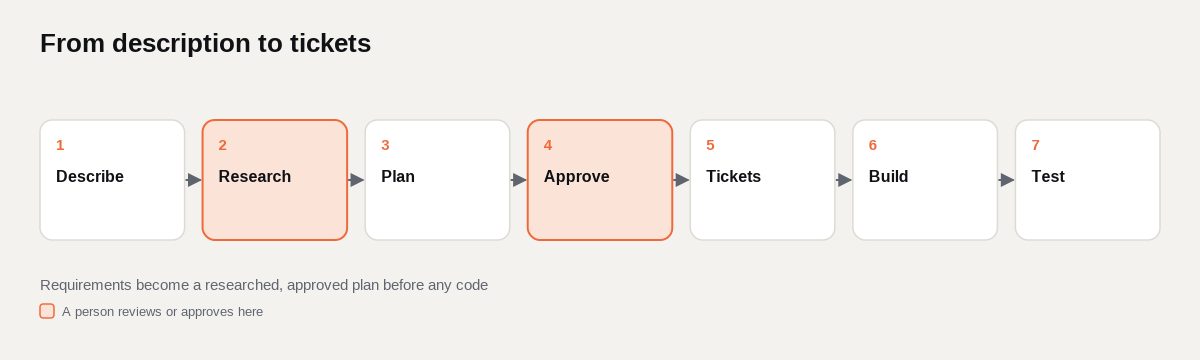
Devfab is a Software Factory: a team of AI agents that runs the development lifecycle. Coding agents automate the developer. Devfab automates the development lifecycle. In Devfab, requirements are not the end product. They are the start of a process that ends in a tested app.
You start at "What should we build?" and describe the app in plain words. You can attach a spec, doc or screenshots. Then two things happen before any code:
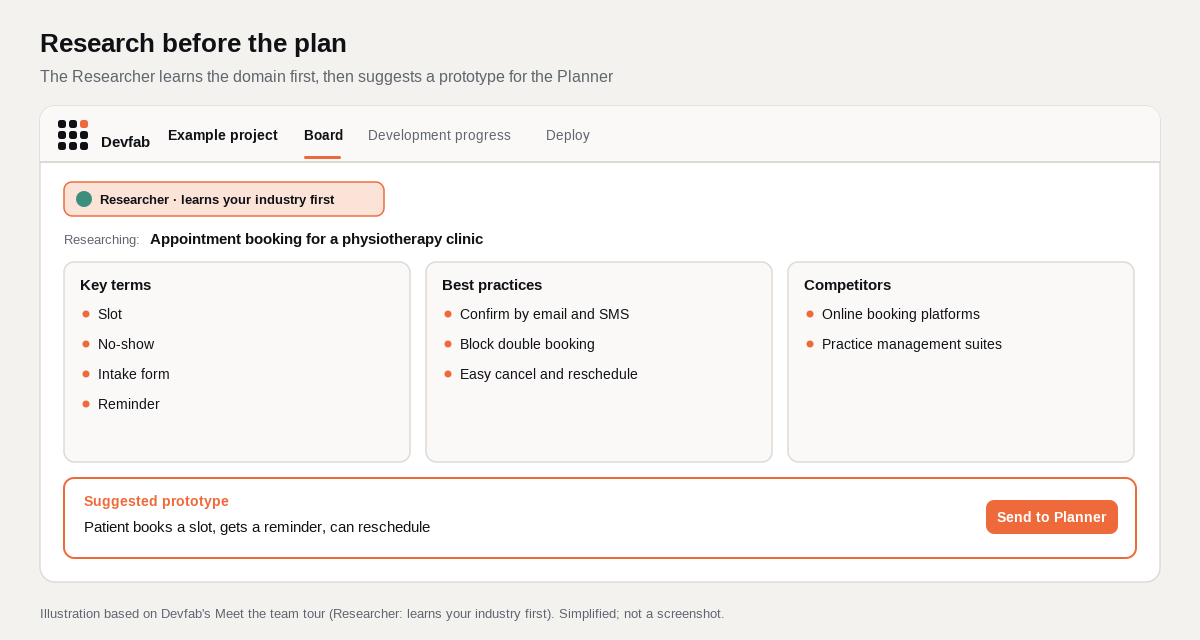
- The research step. Before any plan, Devfab's research step maps the domain: key terms, best practices for that kind of app and competitors, then suggests a prototype. The Researcher agent learns your industry first, so the plan doesn't miss what every app of that type needs.
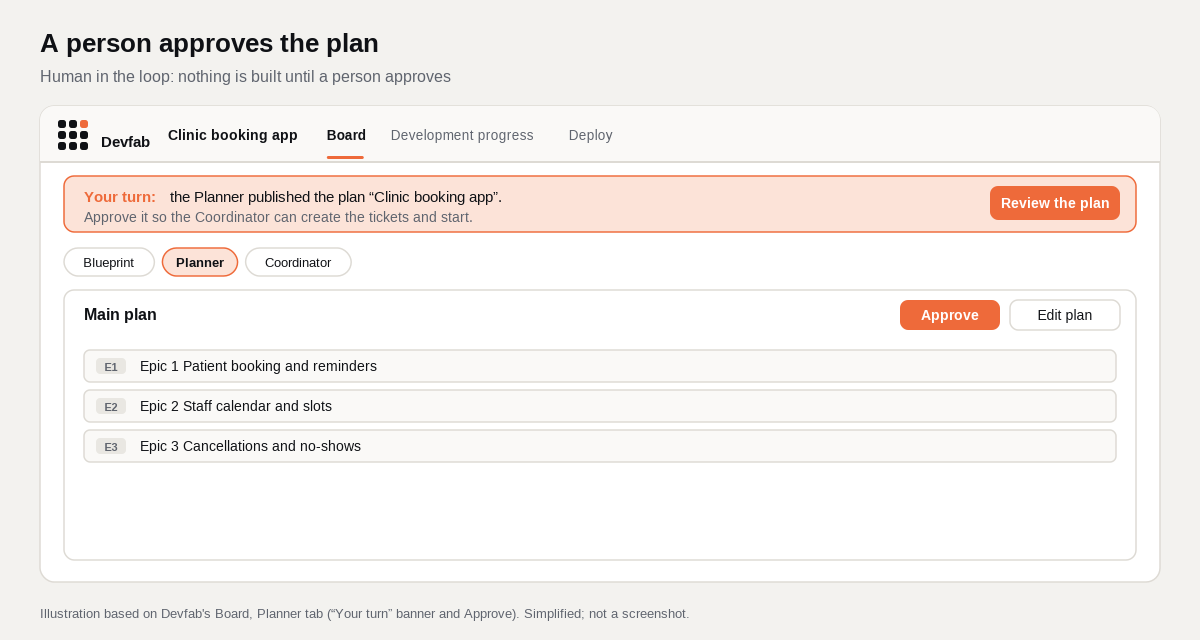
- The plan. The Planner writes the plan. A person approves the plan before the Coordinator splits it into tickets for the developer agents.
Because the plan feeds the build, the requirements get tested. The QA agent runs UI and flow tests (screens, buttons and user journeys clicked end to end) plus logic tests against what was planned. On an existing app, ChainFlow maps which functions and APIs call each other, so new requirements are checked against the code they will touch. The code lives in your own GitHub account (or your organization's), and cost is logged after each run, per task and per project.
Best for: agencies and teams who want a client's description to become a researched, approved plan and then a working app, in one place.
Limits: Devfab is new and in Beta, with a smaller community and fewer integrations than the tools above, so teams with a mature requirements process in other tools may use it alongside them rather than instead of them. It isn't a document editor for long PRDs, and it isn't an editor for hands-on coding. It needs a GitHub account.
How to choose
Ask where your requirements need to end up.
- A document for people. ChatPRD for structured PRDs with tough review; Notion AI if your team already writes in Notion.
- Tickets in your current tracker. Atlassian Rovo for Jira and Confluence; Copilot4DevOps for Azure DevOps.
- Audit-ready requirement statements. Jama Connect Advisor.
- A spec a coding agent will follow. Kiro if you want it built into the IDE; GitHub Spec Kit if you want a format that works across agents.
- A researched plan that becomes a tested app. Devfab.
Whatever you pick, a few habits make AI-written requirements better:
- Give it real input. Interview notes, support tickets and screenshots beat a one-line prompt.
- Ask for edge cases. Empty states, errors, permissions, cancellations.
- Make each line testable. If you can't say how you'd check it, rewrite it.
- Have one person approve. AI drafts. A person who owns the outcome signs off.
FAQ
Can AI write software requirements for me?
AI can write a strong first draft from rough notes, meeting transcripts or a short prompt, and it can point out gaps and unclear wording. A person who knows the users and the business still has to check, correct and approve the requirements.
What is EARS notation?
EARS (Easy Approach to Requirements Syntax) is a pattern for writing clear, testable requirements, such as WHEN a condition happens THE SYSTEM SHALL do something. Kiro writes acceptance criteria this way, and Jama Connect Advisor scores requirements against EARS and INCOSE rules.
What is the difference between a PRD and a spec for a coding agent?
A PRD explains what to build and why, for people. A spec for a coding agent adds the how: design, data, and a task list the agent can follow. Spec-driven tools such as Kiro and GitHub Spec Kit keep both in the repository.
How does Devfab handle requirements?
You describe the app in plain words and can attach a spec, doc or screenshots. Devfab's research step maps the domain first, then the Planner writes a plan that a person approves before tickets are created and agents start building.
Read next
- What is an AI software factory?
- How to review a plan written by an AI agent
- AI software factory vs AI coding tools
- Devfab vs Kiro
- Devfab vs Claude Code
- Spec-driven development vs vibe coding: which ships better software?
- Kiro alternatives for teams that ship to production (2026)
Describe your app and get a researched plan to approve. Try Beta
Sources (checked November 2026): ChatPRD: AI documentation; Atlassian: Rovo Product Requirements Expert; Atlassian Support: Create work items with Rovo; Notion: How product teams use Notion AI; Modern Requirements: Copilot4DevOps; Jama Software: Jama Connect Advisor; Kiro docs: Specs concepts; Microsoft for Developers: Spec-driven development with Spec Kit.
Frequently asked questions
Can AI write software requirements for me?
AI can write a strong first draft from rough notes, meeting transcripts or a short prompt, and it can point out gaps and unclear wording. A person who knows the users and the business still has to check, correct and approve the requirements.
What is EARS notation?
EARS (Easy Approach to Requirements Syntax) is a pattern for writing clear, testable requirements, such as WHEN a condition happens THE SYSTEM SHALL do something. Kiro writes acceptance criteria this way, and Jama Connect Advisor scores requirements against EARS and INCOSE rules.
What is the difference between a PRD and a spec for a coding agent?
A PRD explains what to build and why, for people. A spec for a coding agent adds the how: design, data, and a task list the agent can follow. Spec-driven tools such as Kiro and GitHub Spec Kit keep both in the repository.
How does Devfab handle requirements?
You describe the app in plain words and can attach a spec, doc or screenshots. Devfab's research step maps the domain first, then the Planner writes a plan that a person approves before tickets are created and agents start building.