Short answer: For instant setup, GitHub Copilot Free. For a free open-source agent inside VS Code or JetBrains, Cline or Kilo Code. For the terminal, OpenCode or goose. For a fast editor with optional AI, Zed. Open-source agents are free, but hosted models still cost money unless you run them locally.
You're a student, a freelancer or a developer paying for tools out of your own pocket. You want an AI assistant that costs nothing, and you don't want it to vanish next month.
That second part matters more than it did last year. Several free tools shut down in 2026, and some free tiers quietly shrank. This list sticks to tools that are active on November 20, 2026, and says exactly what "free" covers.
In this guide, you'll learn:
Start with what's gone, so you don't install it.
Free tools that are gone or going
- Roo Code was shut down and its GitHub repo archived on May 15, 2026 (Roo Code repo).
- Continue was acquired by Cursor and discontinued; its homepage reads "Continue has joined Cursor" (Continue).
- Gemini CLI stopped serving free Gemini Code Assist individuals on June 18, 2026, as Google moves them to Antigravity CLI (Google Developers Blog).
- Amazon Q Developer blocked new Free Tier accounts from May 15, 2026, and reaches end of support on April 30, 2027 (AWS blog).
- Google Jules winds down on December 31, 2026 (Jules changelog).
How we picked and compared
We included tools that are active as of November 20, 2026 and that a developer can use at no license cost: a permanent free tier, or free open-source software. We read official pricing pages, docs, repos and dated reviews, and we did not run hands-on tests. For each tool we checked:
- What free includes, and what it leaves out.
- Where it runs: editor, terminal or desktop app.
- Model choice, including local models.
- License, if open source.
- Status risk: acquisitions, slow releases or shutdown notices.
Quick comparison table
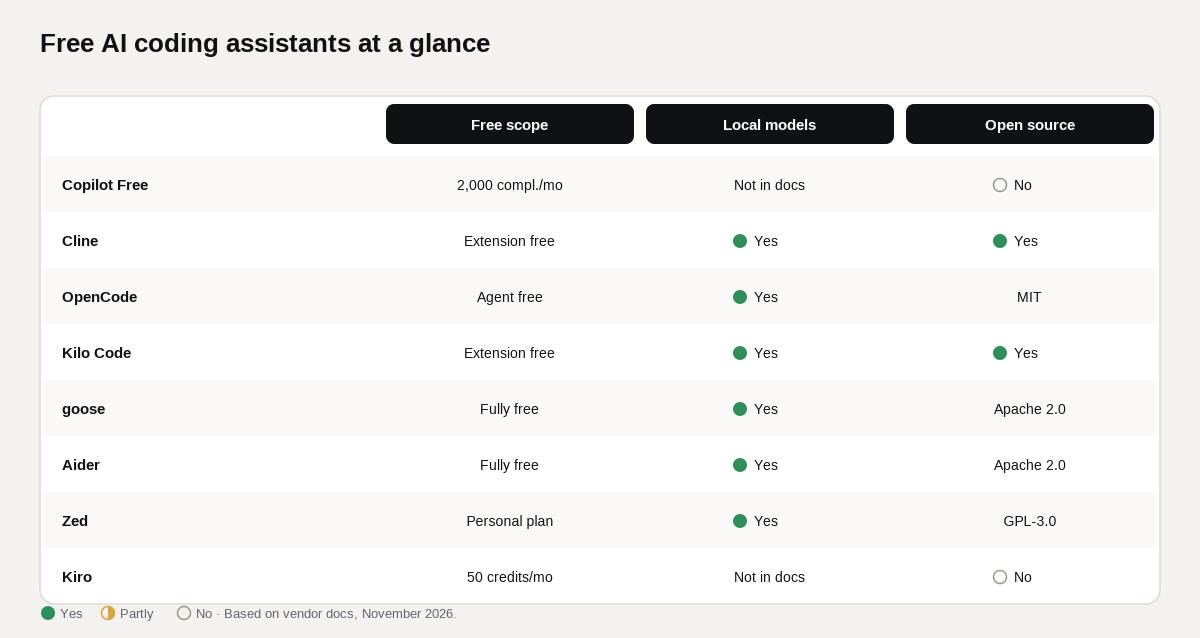
| Tool | Free option (Nov 2026) | Where it runs | Model choice | Open source | Watch out for |
|---|---|---|---|---|---|
| GitHub Copilot Free | 2,000 completions a month, limited chat and agent | IDEs, GitHub, CLI | Set by plan | No | No coding agent or PR review on Free |
| Cline | Free extension; pay inference or BYOK | VS Code, JetBrains, CLI, desktop | BYOK, local, ClinePass | Yes | Staff departures in Jan 2026 |
| OpenCode | Free agent; free models, BYOK or subscriptions | Terminal, desktop, mobile | 200+ providers | MIT | High RAM use reported |
| Kilo Code | Free extension; usage at provider rates | VS Code, JetBrains, CLI | 500+ models, local | Yes | Now owned by Anaconda |
| goose | Free; pay your provider or run local | Desktop app, CLI | 15+ providers, local | Apache 2.0 | No default sandbox |
| Aider | Free; pay your provider | Terminal, browser | Many providers, local | Apache 2.0 | Slow release pace |
| Zed | Personal plan free (BYOK, no hosted AI) | Desktop editor | BYOK, local, ACP agents | GPL-3.0 | No SSO yet |
| Kiro | 50 credits a month, limited models | IDE, CLI, web | Limited on Free | No | Small free allowance |
| Devfab | Not a free tool; Beta | Devfab workspace + your GitHub | Choose per agent | Not stated | Not an editor |
The free assistants, one by one
GitHub Copilot Free
Best for: developers who want AI suggestions in their editor today, with no keys or setup.
Copilot Free gives 2,000 completions a month plus limited chat and agent use (Copilot plans). Completions and next edit suggestions don't use AI credits; chat and agent work do (same source). In the IDE, agent mode picks which files to change and asks for approval on changes and terminal commands (GitHub docs). Copilot runs in IDEs, on GitHub.com, in GitHub Mobile and in the Copilot CLI (same source). The upgrade path is clear: Pro is USD 10 per user per month, as of November 2026 (Copilot plans).
Limits: the cloud coding agent and PR code review are not on Free (Copilot plans). Since October 28, 2026, the new "Copilot in the cloud" experience is for paid plans; Free users stay on the older Copilot Chat (GitHub docs).
Cline
Best for: developers who want an open-source agent in VS Code or JetBrains that asks before each action.
Cline reads and writes files, runs commands and uses a browser, with each action approved by you (Cline docs). The extension, CLI and desktop app are described as fully open source (Cline blog). It runs in VS Code, JetBrains, the terminal and a desktop app, and in Zed and Neovim via ACP (Cline docs). The free extension charges only for inference: usage billing, your own key, or a local runtime (Cline pricing). Cline says the VS Code extension is installed by over 11 million developers (vendor claim) (Cline blog).
Limits: in January 2026 OpenAI hired at least seven Cline employees, which was reported as a continuity challenge (Texxr). A 2026 harness migration deprecated "some less-used features" (Cline blog).
OpenCode
Best for: terminal users who want maximum model choice in an MIT-licensed agent.
OpenCode runs as a terminal UI, a desktop app and a mobile app, with an SDK for scripts and CI (OpenCode). It connects to 200+ providers, including local models, and can use existing ChatGPT Plus/Pro or GitHub Copilot subscriptions (same source). It's MIT-licensed, and the repo now lives at anomalyco/opencode (GitHub). The agent is free; OpenCode Go, a subscription for curated open-weight models, starts at USD 10 per month, as of November 2026 (OpenCode).
Limits: a June 2026 review reports 1GB+ RAM use by the TUI, releases that sometimes break features, permissive default permissions and immature enterprise compliance (Ry Walker).
Kilo Code
Best for: VS Code and JetBrains users who want hundreds of models at provider rates.
Kilo Code is an open-source, model-agnostic agent for VS Code, JetBrains and the terminal (Kilo docs). Anaconda acquired Kilo, announced July 15, 2026, and says Kilo "remains available today with no changes to existing products, plans, or support for current users" (Anaconda). Its VS Code extension was rebuilt on the open-source OpenCode server in April 2026 (Kilo blog). Kilo Gateway routes 500+ models from 60+ providers, or you bring your own key or run local models through Ollama or LM Studio (Kilo pricing). The extension is free; inference is billed at provider rates with a 5% fee on credit purchases (same source).
Limits: a June 2026 review flags 1,300+ open GitHub issues and a broad product range (Ry Walker). Anaconda plans to bring Kilo into the Anaconda Platform, so watch the roadmap (Anaconda).
goose
Best for: developers who want a free general-purpose agent, governed by a foundation, not a vendor.
goose moved from Block to the Agentic AI Foundation at the Linux Foundation; the repo is now aaif-goose/goose (goose blog, April 7, 2026). It's Apache 2.0, built in Rust, and runs as a desktop app, a CLI and an embeddable API (goose README). It works with 15+ model providers, including Ollama for local models, and connects to 70+ extensions via MCP (same source). Recipes save workflows as YAML you can share or run in CI (goose docs). There's no vendor pricing; you pay your model provider or run locally (same source).
Limits: a September 2026 review notes no default sandbox per run, no built-in model, community-only support and no IDE-embedded assistant (PromptQuorum).
Aider
Best for: solo developers who want full control of every edit and a clean git trail.
Aider is an open-source pair programmer that edits files in your local git repo from the terminal (GitHub). It's Apache-2.0 with 49.8k GitHub stars (same source). It works with OpenAI, Anthropic, Gemini, DeepSeek, Bedrock, OpenRouter, Ollama, LM Studio and any OpenAI-compatible API (Aider docs). A watch mode responds to AI comments you add in your editor (same source). You pay only your model provider (CodeMySpec).
Limits: the latest PyPI release is still 0.86.2 from February 12, 2026, and one review calls the project effectively "dormant" (PyPI; CodeMySpec). It supports Python 3.10 to 3.12 only, has no native MCP support and no team features (same sources).
Zed
Best for: developers who want a fast native editor where AI is optional and models are your choice.
Zed calls itself "The world's fastest IDE. Open source. AI optional." (Zed). It's GPL-3.0-or-later, with Apache-2.0 parts where marked (GitHub). The free Personal plan supports your own keys or outside agents, but no Zed-hosted AI (Zed pricing). Model options include BYOK from Anthropic, OpenAI, Google, Bedrock, GitHub Copilot and OpenRouter, plus local models via Ollama or LM Studio (same source). Zed 1.0 shipped April 29, 2026 (Zed blog).
Limits: "SSO, SAML, and SCIM are planned but not currently available" (Zed pricing). There's no web version (GitHub).
Kiro
Best for: developers who want to try spec-driven development before paying.
Kiro's perpetual free tier includes 50 credits a month with limited models (Kiro pricing). Its specs generate requirements.md with acceptance criteria, design.md and tasks.md, and each phase finishes before the next (Kiro docs). Agent hooks run commands or prompts on events such as file save (Kiro hooks). It supports MCP, AGENTS.md, Skills and Open VSX extensions (Kiro). AWS points Amazon Q Developer users to Kiro (AWS blog).
Limits: a spec task typically costs more credits than a simple prompt, so spec work uses the free allowance faster than chat (Kiro pricing). The free tier is not available for Kiro Enterprise or AWS GovCloud (same source).
Devfab, with honest limits
Best for: teams that have outgrown "free assistant in the editor" and need whole projects planned, tested and deployed.
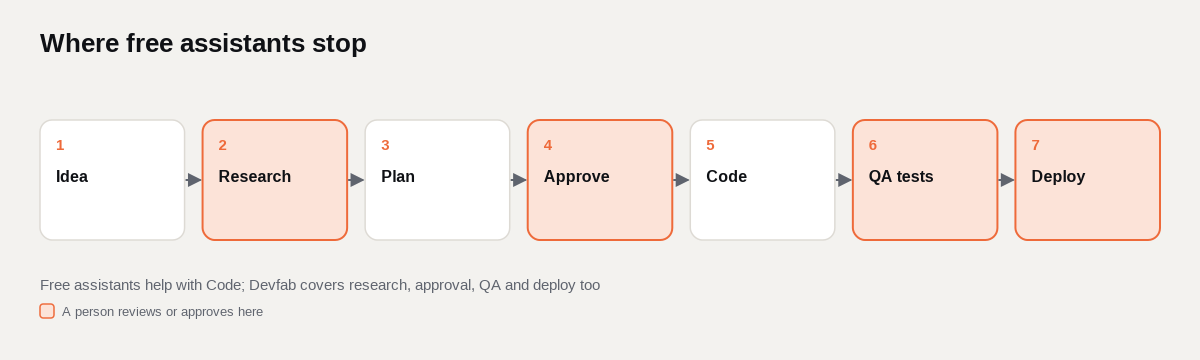
Devfab doesn't belong on a free list on price. It's here because many readers search for a free assistant when the real problem is bigger: an app that must be planned, reviewed and shipped. Coding agents automate the developer. Devfab automates the development lifecycle.
Before any plan, Devfab's Researcher maps the domain: key terms, best practices and competitors, then suggests a prototype. The Planner writes the plan and a person approves it. ChainFlow maps which functions and APIs call each other, so dev agents see the impact of a change; changing checkout, for example, can affect payments, inventory, order confirmation and notifications. The QA agent runs UI and flow tests (screens, buttons and user journeys clicked end to end) plus logic tests. Code lives in your own GitHub account, and you can choose the model for each agent or keep Devfab's default.
Limits: Devfab is not free and is in Beta. It has a smaller community and fewer integrations than mature tools, it is not an editor for hands-on coding, and it needs a GitHub account. Cost is predictable: it is logged after each run, per task and per project.
Other free options worth a look
A few paid products also have free entry points. Cursor has a free tier with limited agent and chat requests, but cloud agents need Premium or higher (Cursor pricing; Cursor docs). Devin Desktop, formerly Windsurf, has a Free plan, and paid plans have no free trial (Devin pricing; Devin docs). JetBrains gives every account a free "Junie Lite" model, with BYOK at provider rates and no markup (Junie). ChatGPT Free and Go include limited Codex desktop-app access (OpenAI docs).
How to choose
- Want it working now with no keys? GitHub Copilot Free.
- Want an agent in VS Code or JetBrains? Cline if you want each action approved; Kilo Code if you want the widest model list.
- Live in the terminal? OpenCode for model choice, goose for foundation governance, Aider for a minimal git-first flow.
- Want truly zero cost? Pick any tool above that supports Ollama or LM Studio and run a local model.
- Want a better editor first? Zed, with AI switched on only when you want it.
- Want structure before code? Kiro's specs, within its small free allowance.
- Shipping client or company projects? A free assistant helps one developer. For plans, tests and deploys across a team, look at a software factory such as Devfab.
FAQ
What is the best free AI coding assistant in 2026?
For zero setup in VS Code or JetBrains, GitHub Copilot Free. For an open-source agent in your editor with any model, Cline or Kilo Code. For a free terminal agent, OpenCode or goose. Remember that open-source agents are free, but the model you connect usually is not, unless you run a local model.
Is there a completely free AI coding assistant?
Yes, if you run a local model. goose, Aider, OpenCode, Kilo Code and Zed can all use models on your own machine through Ollama or LM Studio, so you pay nothing per request. You trade away some quality and speed compared with hosted frontier models.
Which free AI coding tools shut down in 2026?
Roo Code was shut down and its repo archived on May 15, 2026. Continue was acquired by Cursor and discontinued. GitHub Spark closed to new users in August. Google Jules ends on December 31, 2026, and Gemini CLI stopped serving free Code Assist individuals on June 18, 2026.
Does GitHub Copilot Free include the coding agent?
No. As of November 2026, Copilot Free includes 2,000 completions a month with limited chat and agent use, but the cloud coding agent and pull request code review are paid-plan features. Free users also stay on the older Copilot Chat experience.
Is Devfab free?
Devfab is not a free coding assistant. It is an AI software factory in Beta that plans, builds, tests and deploys whole projects. Cost is logged after each run, per task and per project, so you can see what each piece of work used.
Read next
- What is an AI software factory?
- Best open-source AI coding agents
- Open-source vs commercial AI coding agents
- Devfab vs Cline
- Devfab vs GitHub Copilot
Free assistant not enough for a whole project? Try Beta
Sources (checked November 2026): GitHub Copilot plans; GitHub docs: Copilot plans; GitHub docs: Copilot features; GitHub docs: Copilot coding agent; Cline pricing; Cline docs; Cline blog: harness upgrade; Cline blog: Cline Desktop; Texxr: OpenAI hires Cline employees; OpenCode; OpenCode on GitHub; Ry Walker: OpenCode (Jun 2026); Kilo pricing; Kilo docs: plans; Kilo blog: new Kilo for VS Code; Anaconda acquires Kilo Code (Jul 15, 2026); Ry Walker: Kilo (Jun 2026); goose moves to AAIF; goose README; goose docs; PromptQuorum: goose review (Sep 2026); Aider on GitHub; Aider docs; aider-chat on PyPI; CodeMySpec: Aider in 2026; Zed; Zed pricing; Zed on GitHub; Zed 1.0; Kiro; Kiro pricing; Kiro docs: specs; Kiro docs: hooks; Roo Code repo; Continue; Google Developers Blog: Gemini CLI to Antigravity CLI; AWS: Amazon Q Developer end of support; Jules changelog; GitHub changelog: GitHub Spark deprecation; Cursor pricing; Cursor docs: cloud agents; Devin pricing; Devin docs: usage; JetBrains Junie; OpenAI: Codex pricing.
Frequently asked questions
What is the best free AI coding assistant in 2026?
For zero setup in VS Code or JetBrains, GitHub Copilot Free. For an open-source agent in your editor with any model, Cline or Kilo Code. For a free terminal agent, OpenCode or goose. Remember that open-source agents are free, but the model you connect usually is not, unless you run a local model.
Is there a completely free AI coding assistant?
Yes, if you run a local model. goose, Aider, OpenCode, Kilo Code and Zed can all use models on your own machine through Ollama or LM Studio, so you pay nothing per request. You trade away some quality and speed compared with hosted frontier models.
Which free AI coding tools shut down in 2026?
Roo Code was shut down and its repo archived on May 15, 2026. Continue was acquired by Cursor and discontinued. GitHub Spark closed to new users in August. Google Jules ends on December 31, 2026, and Gemini CLI stopped serving free Code Assist individuals on June 18, 2026.
Does GitHub Copilot Free include the coding agent?
No. As of November 2026, Copilot Free includes 2,000 completions a month with limited chat and agent use, but the cloud coding agent and pull request code review are paid-plan features. Free users also stay on the older Copilot Chat experience.
Is Devfab free?
Devfab is not a free coding assistant. It is an AI software factory in Beta that plans, builds, tests and deploys whole projects. Cost is logged after each run, per task and per project, so you can see what each piece of work used.