Short answer: Pick Retool for governed admin tools on existing data, Power Apps if you live in Microsoft 365, and ToolJet, Appsmith or Budibase for open-source self-hosting. Pick Superblocks to keep everything in your cloud and Softr for ops teams without engineers. Pick Devfab when the "tool" is really a custom app you want to own.
Your ops team runs on spreadsheets and email. Every request for a small tool lands on an engineer who has no time. Internal tool builders promise to fix that, and in 2026 every one of them added AI. That makes lists like this harder to trust: the screenshots look the same. What differs is where the app lives, who can build it and how the bill grows. This guide compares eight options using vendor pages checked on November 20, 2026.
In this guide, you'll learn:
- How we picked and compared
- Quick comparison
- The internal tool builders
- Where a dedicated builder beats Devfab
- How to choose
Skim the table, then read the two or three tools that match your team.
How we picked and compared
We included tools built for internal apps on company data: admin panels, approval flows, request portals and dashboards. Each one had to be active in November 2026, with a public pricing page.
For each tool we read the official pricing page, product pages and release notes, plus dated third-party reviews where the vendor was silent. Several reviews come from Jet Admin and Superblocks, which sell competing products; we label them. We did not run hands-on tests, so this page compares documented features, not speed or output quality. Prices appear only where the official page showed them, as of November 2026.
We compared seven things: how apps get built (visual, AI or code), where they run, open source and self-hosting, governance (SSO, roles, audit logs), Git and code access, the pricing model, and the main documented limit.
Quick comparison
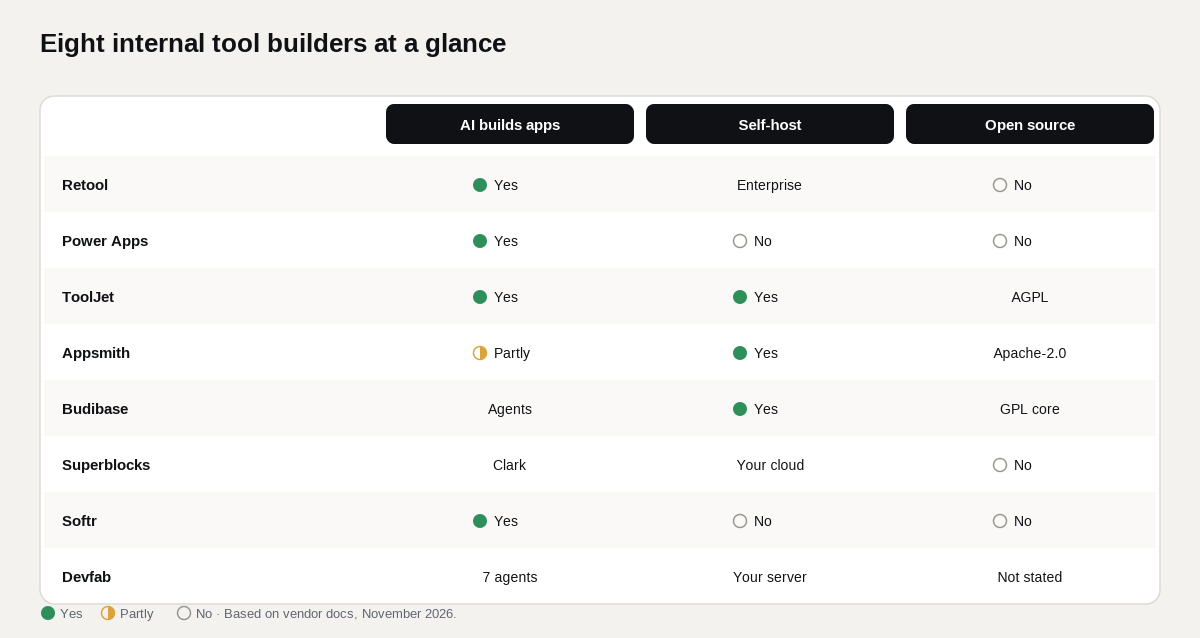
| Tool | Best for | AI building | Self-host | Open source | Pricing (as of Nov 2026) |
|---|---|---|---|---|---|
| Retool | Governed admin tools on existing data | Prompt-first React builder | VPC, on-prem, air-gapped (Enterprise) | No | Free up to 5 users; Team USD 10 per builder and USD 5 per internal user per month (annual) |
| Microsoft Power Apps | Microsoft 365 and Dataverse shops | Natural language apps, Plans workspace | No (Microsoft cloud) | No | Premium USD 20 per user per month, paid yearly |
| ToolJet | Coding-agent builds landing in a governed runtime | AI Builder; MCP for outside agents | Yes, whole platform | AGPL-3.0 Community | Free; Basic USD 23 per builder per month (annual) |
| Appsmith | Many CRUD screens, low budget | Ask AI for queries and JavaScript | Yes (Docker, Kubernetes, AMI) | Apache-2.0 | Free; Business USD 15 per user per month |
| Budibase | Regulated orgs with agent approvals | Agents with approval policies | Yes, incl. air-gapped | GPL v3 core | Community USD 0; Cloud from USD 299 per month |
| Superblocks | Everything inside your own cloud | Clark agent | Cloud-Prem in AWS, GCP or Azure | No | Usage-based; no prices on the page |
| Softr | Ops teams with no engineers | AI builds data, roles and frontend | No | No | Free start; prices did not load on the page |
| Devfab | Custom apps you own as code | Seven agents from research to deploy | Deploys to your own server | Not stated | Cost logged per task and per project (Beta) |
The internal tool builders
1. Retool
Best for: teams building many internal apps on top of existing databases and APIs, with permissions enforced at the data source.
- New builder. Retool's React-based AI app builder went GA on June 17, 2026. It is "optimized for prompt-first workflows," and apps are "written in React on the frontend and TypeScript on the backend," with a Code tab to inspect and edit (Retool blog).
- Governance for outside apps. Apps imported from Lovable, Replit, Cursor, Claude Code and others inherit central authentication, role-based access and data policies (Retool newsroom).
- Hosting. Retool Cloud, your VPC, or fully on-prem; self-hosted and air-gapped are Enterprise (Retool pricing).
- Pricing. Free up to 5 users; Team USD 10 per builder and USD 5 per internal user per month; Business USD 50 per builder and USD 15 per internal user per month, billed annually; Enterprise custom (Retool pricing).
- Plan gates. Git source control and custom SSO are Enterprise; audit logs start at Business (same source).
Limits: bring-your-own AI key became Enterprise-only in October 2026, and forum users complained that managed credits ran out (Retool Forum). A competitor's review says some classic features are missing from the new builder (Jet Admin, Sep 2026).
2. Microsoft Power Apps
Best for: organizations standardized on Microsoft 365, Dataverse and Entra.
- AI building. Users "describe what they need in natural language and generate rich, custom app experiences" (Power Apps).
- Planning. The Plans workspace uses AI agents as requirements analyst, data modeler and solution architect before generating assets (The New Stack).
- Outside coding tools. The app-builder skill lets AI code tools build model-driven apps, "creating nothing until the user approves the build plan" (Power Platform blog, Sep 2026).
- Governance. IT can centralize policies for environments, data loss prevention, access and auditing (Power Apps).
- Pricing. Developer Plan free; Premium USD 20 per user per month, paid yearly; Dataverse capacity add-on USD 40 per GB per month (Power Apps pricing).
Limits: premium, on-premises and custom connectors need a standalone license beyond Microsoft 365 rights, and several AI building pieces are still in preview (Licensing FAQ).
3. ToolJet
Best for: teams that want to keep their own coding agent but land the result in a governed, permissioned runtime.
- Coding agents. The "new ToolJet" (September 2, 2026) lets Claude Code, Codex, Cursor and others build apps through ToolJet MCP, with a Governance MCP for permissions (ToolJet blog).
- AI Builder. It "can create complete business applications" across 100+ integrations, and every app stays editable in the visual builder (same source).
- Hosting. ToolJet Cloud, VPC or self-hosted on Docker, Kubernetes, AWS, Azure, GCP or on-prem (ToolJet vs Superblocks).
- Governance. SSO with SCIM, fine-grained RBAC on queries, components and pages; SOC 2 Type II and ISO 27001 listed (ToolJet blog, Jan 2026).
- Pricing. Free (1 builder, 10 end users); Basic USD 23 per builder per month; Pro USD 79 per month for 5 builders; Team USD 199 per builder per month, billed annually (ToolJet pricing). Building over MCP uses no ToolJet AI credits.
Limits: workflows and AI agents are listed as self-hosted only, and self-hosting adds DevOps cost; a competitor notes AI-built apps may need input validation review (Jet Admin, Jul 2026).
4. Appsmith
Best for: budget-conscious teams building many CRUD screens and admin panels on existing databases.
- Open source. Apache-2.0, about 41.0k GitHub stars; self-host with Docker, Kubernetes or an AWS AMI (GitHub).
- Data. Built for "admin panels, internal tools, and dashboards" across "25+ databases and any API" (same source).
- AI. Ask AI helps with JavaScript and queries; version 2.3 (August 2026) brought it to Community Edition (Appsmith 2.3 notes).
- SSO. Google and GitHub OAuth on Free and Business; SAML and OIDC on Enterprise (Appsmith pricing).
- Pricing. Community free (self-managed); Free cloud plan up to 5 users; Business USD 15 per user per month; Enterprise USD 2,500 per month for 100 users. Developers who build don't cost extra (same source).
Limits: the Appsmith AI datasource was removed on September 30, 2026, and the separate Appsmith Agents product is marked Legacy (Appsmith Agents). A competitor's review cites G2 users calling it "slow or buggy at times" (Superblocks, Sep 2026).
5. Budibase
Best for: regulated organizations that need agents with human approval rules, self-hosted.
- Budibase 4.0. Launched November 10, 2026, with agents that have their own instructions, tools, escalation logic and permissions, plus Approval Policies that decide when a human must step in (Budibase 4.0).
- Chat approvals. Approvals and file submissions to agents work in Slack and Teams (same source).
- Hosting. Budibase Cloud or self-host on private cloud, on-premise or air-gapped (Budibase).
- Open source. GPL v3 core, with paid features under a Business Source License; about 28.3k GitHub stars (GitHub).
- Pricing. Community (self-managed) USD 0; Cloud from USD 299 per month; Enterprise custom; extra creators USD 50 per user per month on annual billing (Budibase pricing).
Limits: Cloud action allowances are hard monthly limits that halt work when exceeded, and per-end-user charges raise cost for large audiences, per a competitor's review (Jet Admin, Sep 2026).
6. Superblocks
Best for: enterprises whose security team wants building, running and AI inference inside their own cloud account.
- Deployment. Fully managed cloud, Hybrid, or Cloud-Prem inside your AWS, GCP or Azure account (Superblocks blog).
- Clark agent. Chat to generate an app, refine visually, then extend in React (Clark docs).
- Security review. Version 3.0 (August 3, 2026) added security agents, deterministic scanners on each change, SBOM and CVE scanning per app (Superblocks 3.0).
- Git. Works with GitHub, GitLab, Bitbucket and Azure DevOps (Superblocks blog).
- Pricing model. Usage-based "Governed Agent Units" plus a charge per published app per month; no per-seat fees on the enterprise license (Billing docs). The pricing page showed no plan prices.
Limits: no free tier, and VPC deployment, SSO, audit logs and source control are Enterprise-only, per a competitor's review (Jet Admin, Sep 2026).
7. Softr
Best for: operations teams that need client portals and internal apps without engineers.
- Relaunch. The "new Softr" (November 9, 2026) builds the database, roles and permissions, workflows and a custom frontend from a description: "We vibe code your frontend. We don't vibe code your backend" (Softr blog).
- Data. Softr Databases plus Airtable, Google Sheets, Notion and REST APIs on every plan; HubSpot, Salesforce and SQL on higher tiers (Softr).
- Permissions. User groups control pages and buttons, with record-level restrictions and preview-as-user (same source).
- MCP. Claude, ChatGPT, Cursor and Codex can build and manage apps through Softr MCP, on every plan (Softr MCP).
- Pricing model. Workspace plans (Free, Basic, Pro, Business, Enterprise) with set builders and app users, monthly workflow limits and AI credits (Softr docs). Prices did not load on the pricing page.
Limits: app users are capped per plan, records and workflow actions are metered, and there is no native app store publishing, per a competitor's review (Jet Admin, Sep 2026).
8. Devfab
Best for: teams whose "internal tool" is really a custom app, with complex rules, outside users or a need to run anywhere without a platform license.
Devfab is not a visual builder. It is an AI software factory. Coding agents automate the developer. Devfab automates the development lifecycle.
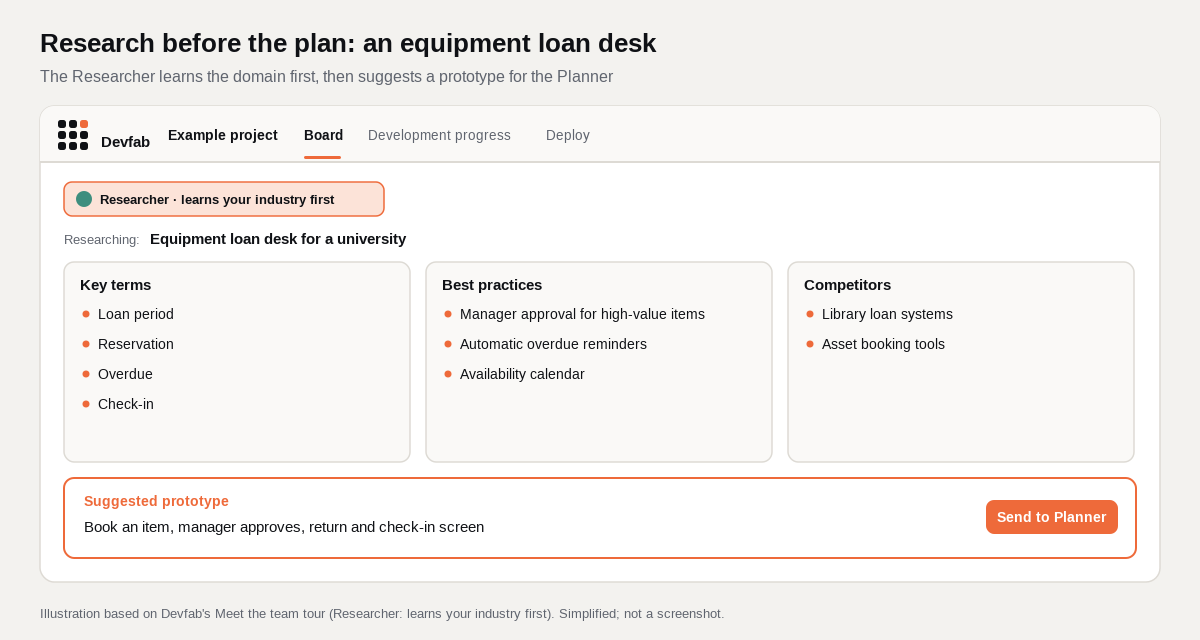
Take an equipment loan desk for a university: staff book cameras and laptops, a manager approves, and overdue items trigger reminders. Devfab's Researcher maps loan terms, approval rules and how similar booking tools work, then suggests a prototype. The Planner writes the plan, and a person approves it. The Coordinator splits it into tickets for dev agents. ChainFlow maps which functions and APIs call each other, so a change to loan periods shows its effect on reminders, fines and availability. The QA agent clicks through booking, approval and return journeys and runs logic tests, such as no double booking. Deploy ships to your own server. Code lives in your own GitHub account, with blueprints and user manuals alongside.
Pricing: predictable cost; cost is logged after each run, per task and per project.
Limits: Devfab is in Beta, with a smaller community and fewer integrations than mature platforms. It is not an editor for hands-on coding, and it needs a GitHub account. The platform-wide governance layers above, such as data-source permissions, DLP policies and agent approval policies, are not part of what Devfab offers; your app's roles and rules go into the plan instead.
Where a dedicated builder beats Devfab
- Business users will build and change apps themselves. Power Apps, Softr and Retool are made for that; Devfab is not an editor.
- You need dozens of small CRUD screens fast on databases you already have. Appsmith or Retool fit that pattern.
- Governance must be central across every app: Retool's data-source permissions, Power Apps DLP, Superblocks' security agents.
- You must run fully air-gapped on an open-source core: Budibase, ToolJet or Appsmith.
- Your developers already use a coding agent and just need a governed runtime: ToolJet's MCP or Retool's import.
How to choose
Answer three questions in order.
- Who will build? Business users point to Power Apps or Softr. Developers point to Retool, Appsmith or ToolJet. If nobody in-house has time to build at all, look at Devfab.
- Where must it run? Microsoft cloud: Power Apps. Your own cloud account: Superblocks. Your own servers or air-gapped: Budibase, ToolJet, Appsmith. Anywhere, as plain code: Devfab.
- How will the bill grow? Per builder (ToolJet), per builder plus internal user (Retool), per user (Appsmith, Power Apps), per published app plus usage (Superblocks), or per task and project (Devfab).
If the answers keep pointing to "custom," read internal tool builder vs custom app. For head-to-heads, see Power Apps vs Retool and Retool vs ToolJet.
FAQ
What is the best internal tool builder in 2026?
There is no single winner. Retool fits teams building many admin tools on existing data with enterprise governance. Power Apps fits Microsoft 365 shops. ToolJet, Appsmith and Budibase fit teams that want open source and self-hosting. Superblocks fits enterprises that need everything in their own cloud. Softr fits ops teams without engineers.
Which internal tool builder is open source?
Appsmith is Apache-2.0. ToolJet's Community Edition is AGPL-3.0. Budibase's core is GPL v3, with some paid features under a Business Source License. All three can be self-hosted, which matters for regulated teams.
Can AI build internal tools now?
Yes. Retool's React builder works prompt-first, ToolJet's AI Builder creates full apps, Superblocks has the Clark agent, Power Apps generates apps from natural language, and the new Softr builds the database, permissions and frontend from a description. Most still run the result on their own platform.
When should I build a custom app instead of using an internal tool builder?
Build custom when the app has complex logic, many outside users, or must run anywhere without a platform license. An AI software factory like Devfab delivers that as plain code in your own GitHub account, with a plan a person approves, UI and flow tests and deployment to your own server.
Read next
Need a custom internal app you own as code? Try Beta
Sources (checked November 2026): Retool pricing; Retool: React AI app builder; Retool newsroom: governance for vibe-coded apps; Retool Forum: BYOK gating thread; Jet Admin: Retool review (competitor, Sep 2026); Power Apps; Power Apps pricing; Power Platform licensing FAQ; Power Platform: September 2026 update; The New Stack: Power Apps Plans; ToolJet pricing; Meet the new ToolJet (Sep 2, 2026); ToolJet at the start of 2026; ToolJet vs Superblocks (ToolJet page); Jet Admin: ToolJet vs Retool (competitor, Jul 2026); Appsmith on GitHub; Appsmith pricing; Appsmith Agents (Legacy); Appsmith 2.3 release notes; Superblocks: Appsmith review (competitor, Sep 2026); Budibase; Budibase pricing; Budibase 4.0 (Nov 10, 2026); Budibase on GitHub; Jet Admin: Budibase review (competitor, Sep 2026); Superblocks pricing; Superblocks 3.0 (Aug 3, 2026); Superblocks: AI-native enterprise tooling stack; Superblocks Clark docs; Superblocks billing docs; Jet Admin: Superblocks review (competitor, Sep 2026); Softr; Softr pricing; Softr: Beyond building blocks (Nov 9, 2026); Softr MCP; Softr docs: pricing and plans; Jet Admin: Softr review (competitor, Sep 2026).
Frequently asked questions
What is the best internal tool builder in 2026?
There is no single winner. Retool fits teams building many admin tools on existing data with enterprise governance. Power Apps fits Microsoft 365 shops. ToolJet, Appsmith and Budibase fit teams that want open source and self-hosting. Superblocks fits enterprises that need everything in their own cloud. Softr fits ops teams without engineers.
Which internal tool builder is open source?
Appsmith is Apache-2.0. ToolJet's Community Edition is AGPL-3.0. Budibase's core is GPL v3, with some paid features under a Business Source License. All three can be self-hosted, which matters for regulated teams.
Can AI build internal tools now?
Yes. Retool's React builder works prompt-first, ToolJet's AI Builder creates full apps, Superblocks has the Clark agent, Power Apps generates apps from natural language, and the new Softr builds the database, permissions and frontend from a description. Most still run the result on their own platform.
When should I build a custom app instead of using an internal tool builder?
Build custom when the app has complex logic, many outside users, or must run anywhere without a platform license. An AI software factory like Devfab delivers that as plain code in your own GitHub account, with a plan a person approves, UI and flow tests and deployment to your own server.