Short answer: Buy when the tool does a standard job, such as payroll, ticketing or CRM, that a vendor already maintains. Build when the workflow is specific to how you operate and will keep changing. In 2026 there are two middle paths: build on an internal-tool platform, or have AI agents deliver custom code you own.
You run operations, and your team lives in spreadsheets that nobody wants to own. One person says, "Just buy something." Another says, "We could build that ourselves with AI." Both sound reasonable. The wrong choice costs more than money: it locks a workflow into a tool that doesn't fit, or a tool nobody maintains. This guide gives you a plain way to decide.
In this guide, you'll learn:
Use it as a checklist for your next tool request.
Definitions
Internal tool. Software your own staff use to run the business: admin panels, approval flows, dashboards, inventory screens, field apps. Customers rarely see them, but they shape how fast work moves.
Buy. You pay for a finished product, usually SaaS, and configure it. The vendor writes, hosts, secures and updates it. You get speed and support. You accept the vendor's roadmap, data model and pricing changes.
Build on a platform. You buy an internal-tool or low-code platform and build your app on top of it. IBM describes low-code as "a rapid application development (RAD) approach that enables automated code generation through visual building blocks" (IBM). Retool, Power Apps and Appsmith are common choices. Retool's newer builder is "optimized for prompt-first workflows" and writes React on the front end and TypeScript on the back end (Retool blog). Apps still run under the platform's hosting, permissions and plan limits.
Build custom code. Your team, a contractor, or AI agents write an ordinary application that lives in your own repository and runs on your own servers. You own every line, and you own every bug.
Three writers frame the trade-off well:
- Will Larson (Apr 5, 2020) treats buying a vendor like taking on debt. The serious risks are the vendor failing, changing pricing in ways that don't fit your usage, a major breach, or dropping the product. He weighs risk first, then value against cost (lethain.com).
- Retool's guide (Mads Clark, Jun 5, 2025) asks whether the tool is core to your business, how specific the need is, and what the total cost is, including salaries, hosting, maintenance and the cost of waiting. It also suggests "buy-then-build": buy first, learn the limits, build later (Retool blog).
- QA Wolf (Michael Price, Jun 4, 2026) argues that "AI made building cheap to start — not cheap to own" and sums up its advice as "Build narrow, buy broad." QA Wolf sells a QA platform, so the post leans toward buying (QA Wolf blog).
Side by side
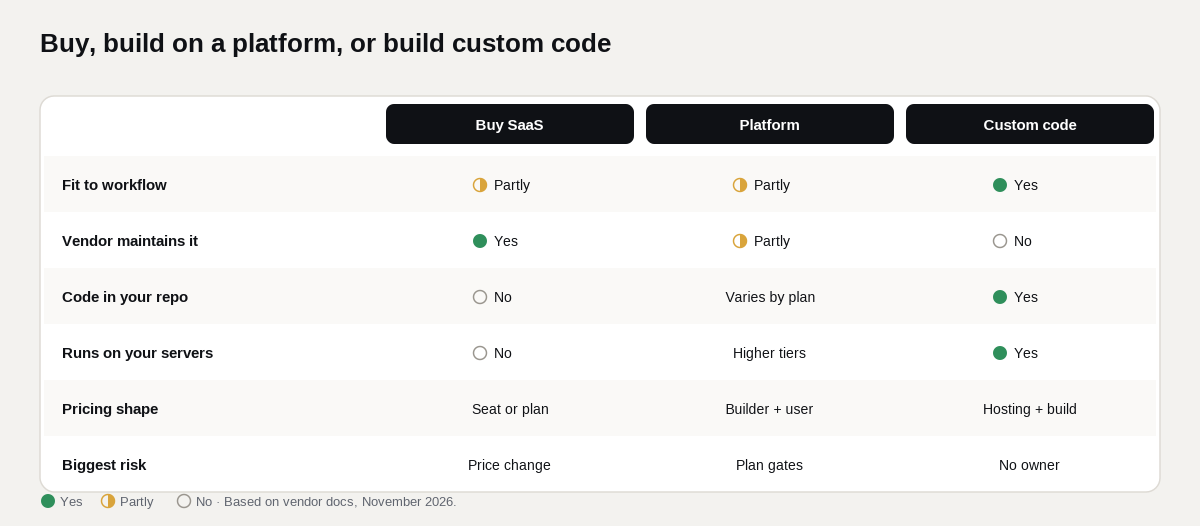
| Aspect | Buy SaaS | Build on a platform | Build custom code |
|---|---|---|---|
| First version | Configure, import data | Drag, drop or prompt inside the platform | Write or generate the app |
| Fit to your workflow | As far as the product allows | Good, within platform limits | Exact, if you specify it well |
| Who maintains it | The vendor | You build; vendor runs the platform | You (or whoever you hire) |
| Pricing shape | Per seat or per plan | Per builder and per user, often plus AI credits | Hosting plus people or agent cost |
| Example price, Nov 2026 | Varies by product | Retool Team USD 10 per builder and USD 5 per internal user per month (annual); Power Apps Premium USD 20 per user per month (annual); Appsmith Business USD 15 per user per month | No license; you pay to build and run |
| Code ownership | None | Varies; Retool Git source control is Enterprise-only | Full, in your repo |
| Where it runs | Vendor cloud | Vendor cloud, or self-host on higher tiers | Your servers or cloud |
| Biggest risk | Vendor changes price, roadmap or exits | Plan gates and platform lock-in | Nobody owns upkeep; tool quietly dies |
Prices as of November 2026 from Retool pricing, Power Apps pricing and Appsmith pricing.
Larson's "pricing change" risk is not theoretical. In October 2026, Retool made bring-your-own AI keys an Enterprise-only feature, and users on its forum said their managed AI credits ran out; staff acknowledged poor communication (Retool Forum). Platforms also change shape: Softr relaunched as "the new Softr" on November 9, 2026, with AI now building whole apps on its backend (Softr blog). Neither is a reason to avoid platforms. Both are reasons to read the plan page twice.
When to choose buy
- The job is standard. Payroll, help desk, CRM, expense reports and e-signature are solved problems. A vendor has already met the edge cases you haven't thought of.
- Compliance is the product. If auditors expect a certified system, buying shifts much of that work to the vendor.
- The tool is not core to how you compete. Retool's guide quotes Greenly's co-founder: "It's about what your focus is. What's your core expertise?"
- You need it this quarter and nobody will own a build. An unowned build turns into a tool nobody fixes.
- You want to learn before you commit. Buy first, find the limits, and only then decide whether a custom build is worth it.
When to choose build
- The workflow is how you win. A warehouse that picks orders in its own bin layout, or a city office with its own permit rules, gains little from a generic product that forces a different process.
- You keep paying for customization. If every renewal comes with workarounds, plugins and consultants, a narrow custom tool can cost less over time.
- The data must stay with you. Custom code can run on your own servers, inside your network, with your own access rules.
- Seat pricing scales badly for you. A tool used by many occasional staff, such as drivers or field technicians, can be expensive on per-user plans.
- You want to leave the door open. Code in your own repository can move to any host or any team later. Platform apps move only as far as the platform allows.
Build on a platform when you want most of these benefits but don't have developers to own a codebase, and you accept the platform's runtime and plan gates.
Where an AI software factory fits
AI tools changed one part of the math: the first version is cheaper. They did not change the rest. A built tool still needs a spec, tests, a deploy routine, permissions and someone who fixes it when it breaks. That is where most internal builds stall.
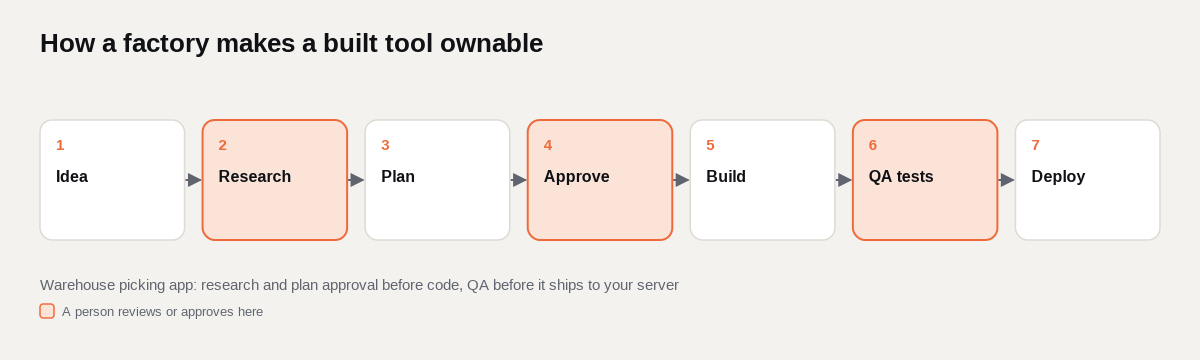
Coding agents automate the developer. Devfab automates the development lifecycle. Devfab is an AI software factory, so it covers the steps that make a built tool ownable, not just the code:
- Research before the plan. The Researcher maps your domain first: key terms, best practices for that kind of app, and competing products. Then it suggests a prototype, so you see the tool before you commit.
- A person approves the plan. The Planner publishes a plan, you approve it, and the Coordinator turns it into tickets for dev agents.
- Changes that don't break neighbors. ChainFlow maps which functions and APIs call each other and what is deployed. When you change the picking screen later, dev agents see what else it touches, such as stock counts, shipping labels and notifications.
- Tests that click through the app. The QA agent runs UI and flow tests, with screens, buttons and user journeys clicked end to end, plus logic tests.
- Ownership and predictable cost. Code lives in your own GitHub account or your organization's, and Deploy ships to your own server. Cost is logged after each run, per task and per project.
Honest limits: Devfab is in Beta, it has a smaller community and fewer integrations than mature platforms, it is not an editor for hands-on coding, and it needs a GitHub account. If your tool is a standard job, buy it. If you want a governed drag-and-drop platform for business users, Retool or Power Apps may suit you better; see Power Apps vs Retool and the best internal tool builders.
A five-question checklist
- Does a product already do this job well for companies like yours? If yes, buy.
- Is the workflow a reason customers pick you? If yes, lean toward build.
- Who will own the tool once it ships, by name? If nobody, buy or use a platform.
- What happens if the vendor raises prices or drops a feature? Write it down.
- Can you see a working prototype before you commit to either path?
FAQ
Is it cheaper to build or buy internal tools?
Buying is usually cheaper for standard jobs, because the vendor carries maintenance. Building can be cheaper when a workflow is specific to you and would need heavy customization in a bought tool. Compare the full cost: setup, licenses or hosting, maintenance, and the cost of changing course later.
Has AI changed the build vs buy decision?
It lowered the cost of the first version, not the cost of owning a tool. Someone still has to test changes, fix bugs, handle access and keep the tool running. A QA Wolf post from June 2026 sums it up as building being cheap to start but not cheap to own.
Where do Retool and Power Apps fit, build or buy?
In between. You buy the platform and build the app on it. You get hosting, permissions and governance from the vendor, and you accept its runtime, pricing and feature gates. Retool, for example, keeps Git source control and bring-your-own AI keys on its Enterprise plan.
What is a good first internal tool to build instead of buy?
A narrow workflow that no product covers well and that your team runs every day: a warehouse picking screen tied to your own bins, a permit tracker with your city's rules, or a quote tool with your own pricing logic. Keep standard jobs like payroll on bought software.
Read next
- What is an AI software factory?
- Internal tool builder vs custom app
- Low-code vs AI software factory
- Retool alternatives
Want to see the tool before you decide to build it? Try Beta
Sources (checked November 2026): Will Larson: Build versus buy (Apr 5, 2020); Retool: Build vs buy, a guide for internal tools (Jun 5, 2025); QA Wolf: The graveyard of AI-built internal tools keeps growing (Jun 4, 2026); IBM: Low-code vs no-code; Retool: React AI app builder launch; Retool pricing; Retool Forum: changes to AI resources (Oct 2026); Power Apps pricing; Appsmith pricing; Softr: Beyond building blocks (Nov 2026).
Frequently asked questions
Is it cheaper to build or buy internal tools?
Buying is usually cheaper for standard jobs, because the vendor carries maintenance. Building can be cheaper when a workflow is specific to you and would need heavy customization in a bought tool. Compare the full cost: setup, licenses or hosting, maintenance, and the cost of changing course later.
Has AI changed the build vs buy decision?
It lowered the cost of the first version, not the cost of owning a tool. Someone still has to test changes, fix bugs, handle access and keep the tool running. A QA Wolf post from June 2026 sums it up as building being cheap to start but not cheap to own.
Where do Retool and Power Apps fit, build or buy?
In between. You buy the platform and build the app on it. You get hosting, permissions and governance from the vendor, and you accept its runtime, pricing and feature gates. Retool, for example, keeps Git source control and bring-your-own AI keys on its Enterprise plan.
What is a good first internal tool to build instead of buy?
A narrow workflow that no product covers well and that your team runs every day: a warehouse picking screen tied to your own bins, a permit tracker with your city's rules, or a quote tool with your own pricing logic. Keep standard jobs like payroll on bought software.