Short answer: The main Retool alternatives are Appsmith, ToolJet and Budibase (open-source internal-tool builders you can self-host), Superblocks (an enterprise AI builder for internal apps), Lovable (an AI app builder for full web apps) and Devfab (an AI software factory that plans, builds, tests and deploys a custom app you own outright).
Your team runs its internal tools on Retool, and the seat bill keeps climbing. Now someone wants a tool your clients can use too.
Some people say switch to open source and self-host. Others say no builder beats Retool on company data. This page weighs both sides, using vendor docs and 2026 reviews.
In this comparison:
- What Retool does well
- Six alternatives in one feature table
- Where Retool is still the better choice
- Where Devfab fits
- How to choose for your team
Here's how each one compares.
What Retool does well
Retool is the best-known builder for internal tools: admin panels, dashboards, approval apps and back-office screens on top of your own databases and APIs. It now has an AI app builder (AppGen) that creates a working app from a plain-language description, connected to live data, which you can then refine with prompts, the visual editor or code. Apps inherit the organization's SSO, role-based access and audit logging. Retool also has Workflows and Agents, and Enterprise customers can run it in their own VPC, self-hosted or air-gapped.
On June 17, 2026, Retool announced that its new React-based AI app builder is generally available; it writes React on the frontend and TypeScript on the backend.
For a team of engineers who need many small internal tools on real company data, Retool is still very hard to beat.
Why teams look for alternatives
- Seat-based pricing. Retool charges per builder and per internal user, with external users metered on higher plans. Reviews from 2026 point out that the bill grows step by step as more people build or use apps.
- Self-hosting needs Enterprise. Free, Team and Business run on Retool Cloud. Teams that must keep data on their own servers have to move to an Enterprise contract, which slows security reviews.
- Separate meters for AI. AI app building and AI actions use a monthly credit pool, and agents are billed by runtime. That's clear, but it's one more meter to track.
- Developer-only maintenance. Tools lean on JavaScript and SQL where the visual layer stops. When the engineer who built a tool leaves, others struggle to change it.
- Some apps outgrow "internal". When a tool becomes a customer portal, or needs its own design, workflows and tests, teams start to want a normal codebase instead of a platform app.
How we compared
We compared tools on what each is built for, using vendor pages, documentation and independent reviews as of November 2026. We did not run hands-on tests for this page. We describe pricing models (seats, credits, usage) rather than prices, because they change often. Several reviews we read are published by competitors of Retool, so we checked key facts on official pages.
Shortlist with a feature table
| Tool | Type | Self-host | Code and Git | AI building | Pricing model |
|---|---|---|---|---|---|
| Retool (baseline) | Internal-tool builder | Enterprise only | Platform apps, plus custom code | AppGen, Agents, Workflows | Per builder and per user, plus AI credits and agent runtime |
| Appsmith | Open-source internal-tool builder | Yes, any edition | Git sync with branches and PRs | Copilots for widgets and logic | Free self-hosted; paid cloud and enterprise |
| Budibase | Open-source apps, automations, agents | Yes, incl. air-gapped | Platform apps | AI agents with approvals | Free self-hosted; paid plans |
| ToolJet | Open-source internal-tool builder | Yes (Community Edition) | GitSync on Enterprise | AI app generation on Enterprise | Free self-hosted; paid cloud and enterprise |
| Superblocks | Enterprise AI builder | Hybrid or cloud-prem | You own generated code; Git on Enterprise | Clark AI agent | Plans with agent units; Enterprise custom |
| Lovable | AI app builder | Export and host anywhere | Two-way Git sync | Prompt to full app | Credits |
| Devfab | AI software factory | Deploy to your own server | Normal codebase in your GitHub | Research, plan, build, QA, deploy | Cost logged per task and per project |
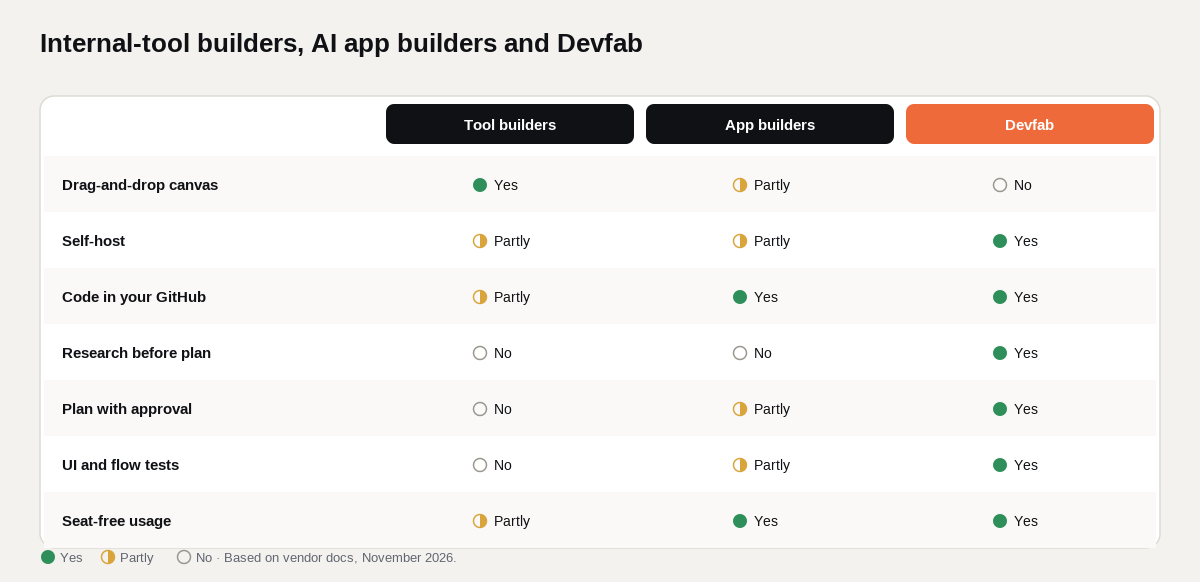
Appsmith
Appsmith is an open-source low-code platform for internal apps, with a community edition under Apache 2.0. You can self-host any edition, including air-gapped. Apps sync to a Git repository with dev, staging and production branches, pull-request review and your own CI/CD. Copilots generate widgets and workflow logic from prompts, which you can then edit in code. Enterprise adds SSO, role-based access, SCIM and audit logs.
Best for engineering teams that like Retool's model but want open source, self-hosting and Git-based release flow. Limits: you run the infrastructure yourself when self-hosting; it's still a builder for internal screens, not a product codebase.
Budibase
Budibase is open source and builds apps, automations and AI agents around your existing systems, with requests and approvals so people stay in control. It runs on Budibase Cloud or self-hosted on private cloud, on-premise or air-gapped infrastructure, with roles, SSO, SCIM and audit history. Reviews say it's quick at generating CRUD screens from a data source.
Best for operations teams that need forms, approvals and simple workflows on top of existing data, especially in regulated settings. Limits: reviewers note UI polish is limited for complex apps.
ToolJet
ToolJet's open-source Community Edition (AGPL-3.0) gives you a visual builder with 60+ components, a built-in database, multi-page apps, 80+ data sources and JavaScript or Python in apps. It self-hosts on Docker, Kubernetes and the major clouds. The Enterprise edition, ToolJet AI, adds app generation from prompts, an AI query builder, an agent builder, role-based access, multiple environments and GitSync with CI/CD.
Best for teams that want the widest set of self-hosting options and a path to AI building later. Limits: the AI features and Git sync sit in the Enterprise edition.
Superblocks
Superblocks calls itself an enterprise AI platform for internal apps. Builders use Clark, an AI coding agent that works from your data schemas, API docs and existing app patterns, and only uses data each builder is allowed to see. It offers cloud, hybrid (production data stays in your VPC) and cloud-prem deployment. Builders own the generated code; source-control integrations, SSO, audit logs and VPC deployment are Enterprise features.
Best for large companies that want AI-built internal apps under strict governance. Limits: the most useful controls are on the Enterprise plan, and it targets bigger organizations.
Lovable
Lovable is an AI app builder rather than an internal-tool builder. You describe the app and it generates a full web app. New projects use a TanStack Start stack; Git sync works on all plans with GitHub, GitLab or Bitbucket, and you can host the frontend and backend outside Lovable. Pricing is credit-based.
Best for teams who want a polished, customer-facing web app quickly and are happy to steer it by prompt. Limits: once you host outside Lovable, monitoring and uptime are on you; planning and test discipline depend on the person prompting. We compare it with similar builders in Base44 alternatives.
Devfab
Devfab is an AI software factory. It doesn't give you a canvas; it builds a normal application with agents. You describe the internal tool or connect an existing repo, a Researcher maps the domain, a Planner writes the plan, a person approves it, and developer agents, a QA agent and a Deploy agent take it to your own server. See Where Devfab fits.
Where Retool is still the better choice
- Many small internal tools, built by engineers, on live company data. Retool's components, data connectors and AppGen make this quick, and the product is mature.
- Governance from day one. Every Retool app inherits SSO, role-based access and audit logging at the platform level.
- You don't want to own a codebase. With Retool there's no repository to maintain, no server to patch and no dependencies to update. With Devfab, you own the code and the server, which is also more responsibility.
- Agents tied to internal data. Retool's Agents and Workflows run next to the apps and data they use.
- Maturity. Retool has a large community, many integrations and enterprise support. Devfab is new and in Beta.
Where Devfab fits
Internal-tool builders give your team a faster way to make screens on top of data. Devfab gives you a team of agents that runs the whole software lifecycle. Coding agents automate the developer. Devfab automates the development lifecycle.
Devfab is a good fit when an "internal tool" is really an application: an approval system with rules, a client portal, a field-service app, or something you'd hand to an agency.
- Research before the plan. Devfab's research step maps the domain first: key terms, best practices for that kind of app, and competitors, then suggests a prototype. For a purchase-approval tool, that means approval limits, audit trail and roles are on the table before anyone writes a ticket.
- ChainFlow. Devfab's code-intelligence layer maps which functions and APIs call each other and what is deployed, so developer agents see the impact of a change and don't break connected features. On an existing repo, leave the change box empty and Devfab maps the code first and suggests three small first tickets.
- QA agent. It runs UI and flow tests (screens, buttons and user journeys clicked end to end) plus logic tests, and with "QA agent · review before Done" switched on, work isn't marked Done until it's reviewed.
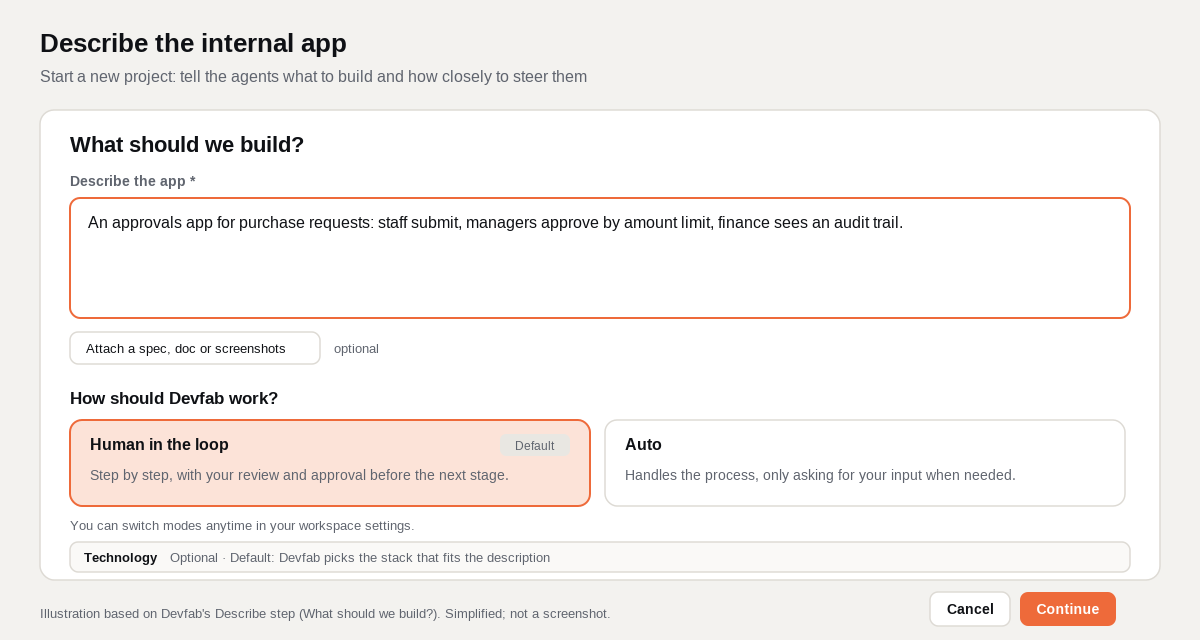
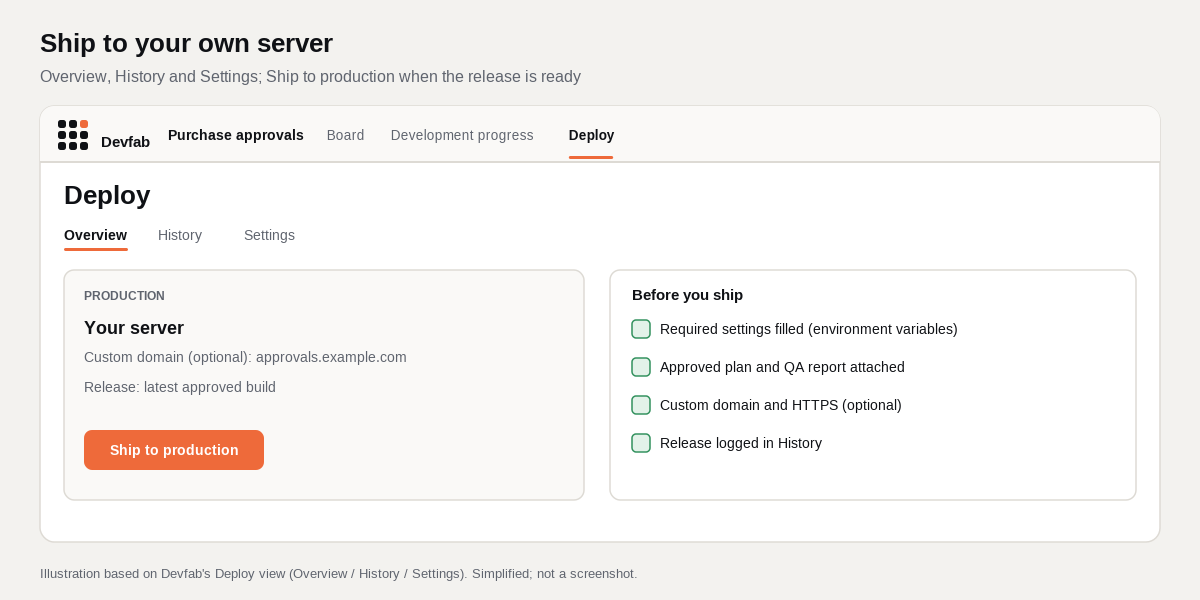
A person approves the plan by default (Human in the loop); you can switch to Auto in workspace settings. You can choose the model for each agent or keep Devfab's default. The code lives in your own GitHub account (or your organization's), and you deploy to your own server, with an optional custom domain. There's no platform license tied to how many people use the app. Cost is predictable and visible: it's logged after each run, per task and per project.
Devfab's honest limits:
- It's new and in Beta, with a smaller community than Retool or the open-source builders.
- It has far fewer ready-made data connectors than Retool, Appsmith or ToolJet.
- There is no drag-and-drop canvas. If you want to move widgets around yourself, use a low-code builder.
- It isn't an editor for hands-on coding; developers use their own editor on the repo.
- It needs a GitHub account, and you are responsible for the server you deploy to.
How to choose
- Engineers building many internal screens on company data? Stay with Retool, or try Appsmith if you want open source.
- Must self-host without an Enterprise contract? Appsmith, ToolJet or Budibase.
- Approvals and simple workflows for operations staff? Budibase.
- Large company, AI-built apps under strict governance? Superblocks or Retool Enterprise.
- A polished web app from prompts? Lovable.
- A custom app that you own, planned and tested by agents, on your own server? Devfab. Read What is an AI software factory? to see how that works.
FAQ
What is the best open-source alternative to Retool?
Appsmith (Apache 2.0) and ToolJet (AGPL-3.0) are the closest open-source matches: visual builders for internal tools that you can self-host. Budibase is also open source and is strongest for forms, approvals and CRUD apps on existing data.
Can I self-host Retool?
Yes, but only on the Enterprise plan. Free, Team and Business run on Retool Cloud. Appsmith, Budibase and ToolJet can be self-hosted on their free editions.
When should I build a custom app instead of using Retool?
When the tool will be used by customers or many staff, needs its own design and logic, or must run on your own server without a platform license. Then a custom codebase in your own GitHub, built and tested by a tool like Devfab, can make more sense than another internal-tool builder.
Is Devfab a low-code tool like Retool?
No. Devfab doesn't give you a drag-and-drop canvas. Its agents research, plan, write, test and deploy a normal codebase that lives in your own GitHub account and runs on your own server.
Read next
- What is an AI software factory?
- AI software factory vs AI coding tools
- How to document an internal app so non-technical staff can use it
- Build: HR leave request system
- Retool vs Appsmith
- Internal tool builder vs custom app: which fits your team?
Need an internal app you own, not another platform seat? Try the Devfab Beta
Sources (checked November 2026): Retool pricing; Retool AI app generation; Jet Admin: Retool alternatives 2026; Vybe: Best Retool alternatives 2026; Appsmith; Budibase; ToolJet on GitHub; Superblocks pricing; Lovable docs: Deploying and hosting outside Lovable; Retool: Retool launches a full-stack React AI app builder.
Frequently asked questions
What is the best open-source alternative to Retool?
Appsmith (Apache 2.0) and ToolJet (AGPL-3.0) are the closest open-source matches: visual builders for internal tools that you can self-host. Budibase is also open source and is strongest for forms, approvals and CRUD apps on existing data.
Can I self-host Retool?
Yes, but only on the Enterprise plan. Free, Team and Business run on Retool Cloud. Appsmith, Budibase and ToolJet can be self-hosted on their free editions.
When should I build a custom app instead of using Retool?
When the tool will be used by customers or many staff, needs its own design and logic, or must run on your own server without a platform license. Then a custom codebase in your own GitHub, built and tested by a tool like Devfab, can make more sense than another internal-tool builder.
Is Devfab a low-code tool like Retool?
No. Devfab doesn't give you a drag-and-drop canvas. Its agents research, plan, write, test and deploy a normal codebase that lives in your own GitHub account and runs on your own server.