Short answer: Retool wins when you want a free start, a large set of internal-tool features such as Workflows, and pricing per builder and per user that stays low for small teams. Superblocks wins when IT must govern many builders under one policy, with security agents on every change, no per-seat fees and the whole stack deployable inside your own cloud.
Your teams are already building internal apps with AI, some in Lovable, some in Claude, some in spreadsheets. IT wants one governed place for them. Retool and Superblocks both now pitch exactly that, and both import apps from other AI tools. Their pricing models are opposites, though, so the cheaper one depends on your headcount. This page referees the choice with sources.
In this comparison:
- Retool and Superblocks at a glance
- Feature comparison
- Cost model by team size
- Where Retool wins and where Superblocks wins
- Where Devfab fits
The sections below lay it out in order.
Retool and Superblocks at a glance
Status changes in 2026. Retool announced its React-based AI app builder as generally available on June 17, 2026, along with governance for apps built in other AI tools (Retool blog). A September 2026 review by Jet Admin, a competitor, still calls the new builder a public beta on Cloud (Jet Admin). In October 2026 Retool made bring-your-own-key Enterprise-only (Retool Forum). Superblocks shipped 2.0 on April 15, 2026, with Clark agent memory and VPC deployment, and 3.0 on August 3, 2026, with an AWS partnership, security agents and a Smart Router (Superblocks 3.0). Its Clark docs page still says Clark is in private beta, which conflicts with those announcements (Clark docs).
Retool is a platform for internal apps, workflows and agents on top of company data. Its builder is "optimized for prompt-first workflows" and writes React on the frontend and TypeScript on the backend, with a Code tab to edit the result (Retool blog). Apps inherit central authentication, role-based access and data access policies attached to data sources (Retool newsroom).
Superblocks is an enterprise platform where business and engineering teams build internal apps with an AI agent called Clark under central IT governance (Superblocks 2.0). You chat to generate an app, refine it in a visual editor and extend it by editing the underlying React (Clark docs).
Feature comparison
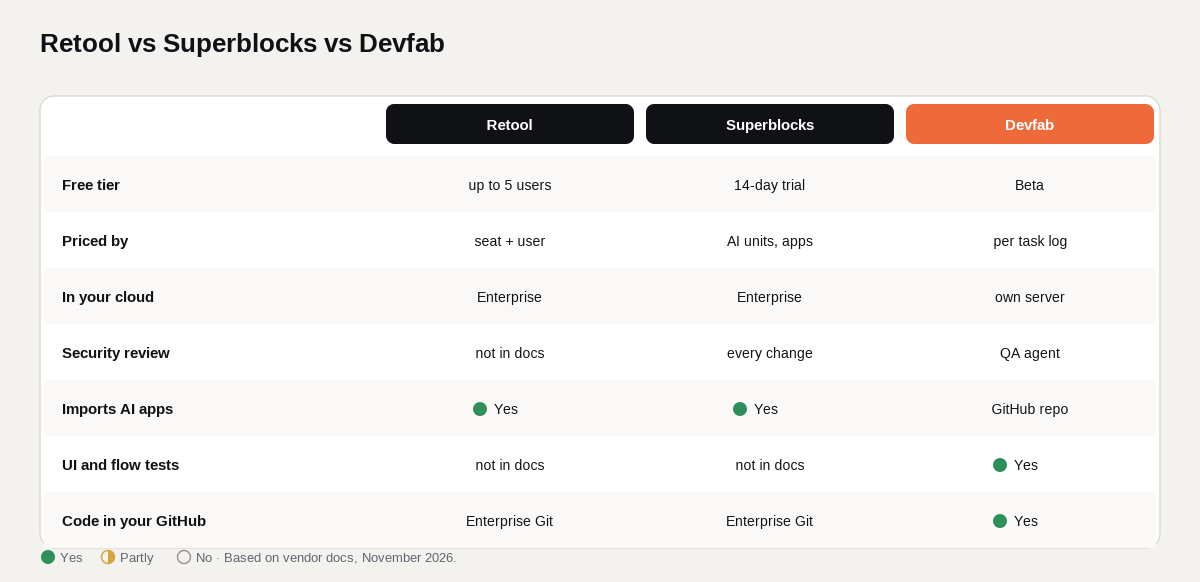
| Aspect | Retool | Superblocks | Source |
|---|---|---|---|
| Where it runs | Retool Cloud, your VPC or on-prem; MCP server and CLI | Superblocks Cloud, Hybrid, or Cloud-Prem in your AWS, GCP or Azure | Retool blog; Superblocks |
| AI building | Prompt the whole app or one component; accepts screenshots, PDFs, designs, spreadsheets | Clark chat, then visual editor, then React code; memory of code policies and design systems | Retool blog; Superblocks 2.0 |
| Review and security | Agent asks before running functions that change data | Security agents and scanners review each change; SBOM and CVE scanning per app | Jet Admin; Superblocks 3.0 |
| Importing AI-built apps | React, HTML, JS with Node.js or Supabase; zip up to 50 MB; app builder or MCP | Claude, ChatGPT, Lovable, Replit, or a zipped React, Next.js or Vue project | Retool docs; Superblocks docs |
| Environments and Git | Free: production only; Team: staging and production; Git on Enterprise | Staging and production on Teams; Git (GitHub, GitLab, Bitbucket, Azure DevOps) on Enterprise | Retool pricing; Superblocks pricing |
| Team and admin | Audit logs from Business; SSO, SCIM and granular roles on Enterprise | RBAC on Teams; SSO, audit logs, secrets management on Enterprise | Retool pricing; Superblocks pricing |
| Model choice | Retool-managed Anthropic and OpenAI models; BYOK on Enterprise | Bedrock, Vertex AI, Azure AI, Snowflake Cortex, Databricks; Smart Router | Retool docs; Superblocks 3.0 |
| Compliance | Self-hosted and air-gapped on Enterprise | SOC 2, GDPR, HIPAA-eligible deployments | Retool pricing; Superblocks |
| Pricing model | Per builder and per internal user; pooled AI credits; agents and workflow runs metered | Flat Teams fee for up to 15 builders; Governed Agent Units; per published app; no seat fees on Enterprise | Retool pricing; Superblocks billing |
Cost model by team size
| Team size | Retool | Superblocks | Devfab |
|---|---|---|---|
| 1 person | Free for up to 5 users, 250 AI credits, production only | No free tier; 14-day trial; Teams USD 100 a month billed annually (USD 125 monthly) | Cost logged per task and per project (Beta) |
| 5 people | Team: USD 10 per builder and USD 5 per internal user; five builders cost USD 50 a month | Teams covers up to 15 builders and unlimited end users; 100 GAUs and one hosted app included, extra apps USD 10 each | Cost logged per task and per project (Beta) |
| 25 people | Team or Business (USD 50 per builder, USD 15 per user, audit logs); 5 builders plus 20 users on Team cost USD 150 a month | Teams if 15 builders or fewer; Enterprise (custom) for VPC, SSO and audit logs; GAU packs from USD 100 per 100 | Cost logged per task and per project (Beta) |
Prices per month as of November 2026 from Retool pricing, Superblocks pricing and Superblocks self-serve plan. Retool Team and Business prices require annual billing. Team totals are our arithmetic. Devfab is in Beta and offers predictable cost: cost is logged after each run, per task and per project.
Where Retool wins
- You want to start free. The Free plan covers up to 5 users with no time limit; Superblocks offers a 14-day trial.
- Few builders, few users. Per-seat pricing stays low for a small team.
- You need background automation. Workflows run on schedules and webhooks, with versioned releases, run history and error handlers (Jet Admin).
- Input comes in many forms. Prompt with screenshots, PDFs, design files or spreadsheets.
- Permissions live on the data. Data-source permissions apply no matter where an app was built.
Where Superblocks wins
- Many builders, one budget. Teams covers up to 15 builders at a flat fee, and Enterprise has no per-seat fees.
- Every change gets a security review. Security agents, deterministic scanners, SBOM and CVE scanning run per app.
- Inference must stay in your account. 3.0 deploys in your VPC with Bedrock inference.
- You need HIPAA-eligible deployments. Superblocks lists SOC 2, GDPR and HIPAA-eligible options.
- You want model choice on your cloud. Approved models from Bedrock, Vertex AI, Azure AI, Snowflake and Databricks.
Switching from one to the other
From Retool to Superblocks. The Superblocks import docs we checked do not mention Retool. Apps from Retool's new builder are React, and the Code tab shows the source. If you can get that project out as a zip, remove node_modules and build folders and use Import, then Other; Clark rewrites it and asks you to connect integrations (Superblocks docs). Set up databases and APIs in Superblocks first. Classic Retool apps will likely need a rebuild.
From Superblocks to Retool. Source control is an Enterprise feature on Superblocks, so plan how you get the React code out. Then zip it under 50 MB and use Create, App, then Import React code. Retool checks the architecture first and won't import an incompatible app; its agent maps data sources and falls back to mock data where a match is missing (Retool docs).
Where Devfab fits
Retool and Superblocks both host and govern internal apps on their platforms. In the docs we checked, neither researches the domain before planning or runs a separate QA step with UI and flow tests across user journeys before release.
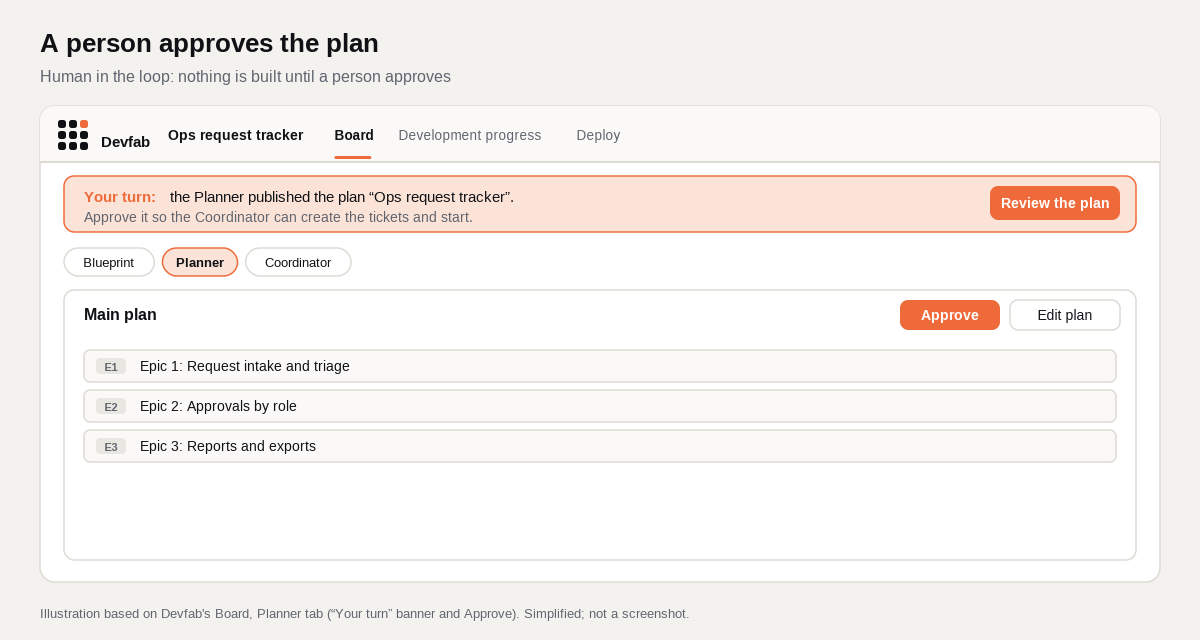
App builders automate the first version. Devfab automates the development lifecycle. The Researcher maps terms, best practices and competitors; a person approves the plan; dev agents work with ChainFlow; the QA agent runs UI, flow and logic tests; and Deploy ships the app to your own server, with the code in your own GitHub account rather than on a platform.
Honest limits: Devfab is new and in Beta, with fewer integrations and data connectors than either platform. It has no visual editor, and it needs a GitHub account. See Devfab vs Superblocks and Retool alternatives.
FAQ
Which is cheaper for a small team?
It depends on how many people use the apps. As of November 2026, Retool Team costs USD 10 per builder and USD 5 per internal user a month on annual billing, and Retool has a free plan for up to 5 users. Superblocks Teams is USD 100 a month billed annually (USD 125 monthly) for up to 15 builders and unlimited end users, with 100 AI units and one hosted app; extra apps are USD 10 each a month.
Can I run Retool or Superblocks inside my own cloud?
Yes, on enterprise plans. Retool lists self-hosted and air-gapped deployment under Enterprise. Superblocks offers Hybrid and Cloud-Prem deployment inside your AWS, GCP or Azure account on Enterprise, and version 3.0 added in-VPC deployment with Bedrock inference.
Can I move a Lovable or Replit prototype into either one?
Yes. Retool imports React, HTML and JavaScript frontends with Node.js or Supabase backends from a zip of up to 50 MB, and lists Lovable, Replit and Claude as sources. Superblocks imports from Claude, ChatGPT, Lovable, Replit and other zipped React, Next.js or Vue projects, and Clark rewrites them to run on Superblocks.
Can I bring my own AI key?
On Retool, bring-your-own-key is Enterprise-only; Retool enforced this in October 2026, which drew complaints on its forum. Superblocks uses approved models from AWS Bedrock, Google Vertex AI, Azure AI, Snowflake Cortex and Databricks, and routes sub-tasks with a Smart Router.
Read next
Want an internal app you own, tested and deployed to your server? Try Beta
Sources (checked November 13, 2026): Retool blog: React AI app builder (Jun 17, 2026); Retool newsroom: Governance for vibe-coded apps; Retool pricing; Retool docs: AI providers and models; Retool docs: Import external React apps; Retool Forum: BYOK gating thread (Oct 2, 2026); Jet Admin: Retool review (competitor, Sep 26, 2026); Superblocks pricing; Superblocks 2.0 (Apr 15, 2026); Superblocks 3.0 (Aug 3, 2026); Superblocks: The AI-native enterprise tooling stack (Mar 17, 2026); Superblocks docs: Clark AI; Superblocks docs: Billing overview; Superblocks docs: Self-serve plan; Superblocks docs: Import from other sources.
Frequently asked questions
Which is cheaper for a small team?
It depends on how many people use the apps. As of November 2026, Retool Team costs USD 10 per builder and USD 5 per internal user a month on annual billing, and Retool has a free plan for up to 5 users. Superblocks Teams is USD 100 a month billed annually (USD 125 monthly) for up to 15 builders and unlimited end users, with 100 AI units and one hosted app; extra apps are USD 10 each a month.
Can I run Retool or Superblocks inside my own cloud?
Yes, on enterprise plans. Retool lists self-hosted and air-gapped deployment under Enterprise. Superblocks offers Hybrid and Cloud-Prem deployment inside your AWS, GCP or Azure account on Enterprise, and version 3.0 added in-VPC deployment with Bedrock inference.
Can I move a Lovable or Replit prototype into either one?
Yes. Retool imports React, HTML and JavaScript frontends with Node.js or Supabase backends from a zip of up to 50 MB, and lists Lovable, Replit and Claude as sources. Superblocks imports from Claude, ChatGPT, Lovable, Replit and other zipped React, Next.js or Vue projects, and Clark rewrites them to run on Superblocks.
Can I bring my own AI key?
On Retool, bring-your-own-key is Enterprise-only; Retool enforced this in October 2026, which drew complaints on its forum. Superblocks uses approved models from AWS Bedrock, Google Vertex AI, Azure AI, Snowflake Cortex and Databricks, and routes sub-tasks with a Smart Router.