Short answer: Cline wins when developers work in VS Code or JetBrains and want to approve every edit and command, with an Enterprise tier behind it. OpenCode wins when developers live in the terminal, want to start agents from a desktop or phone, and want 200+ model providers or to reuse a ChatGPT or Copilot subscription.
You've decided on open source for your coding agent. Good. Now the real fork in the road: does the agent live inside your editor, or does your editor become optional?
Cline fans like the side panel and a stop at every step. OpenCode fans like a fast terminal UI and agents they can check from a phone. Both tools are free and both are active. We compare them on facts from their own pages, checked in November 2026.
In this comparison:
- Cline and OpenCode at a glance
- Feature comparison
- Where Cline wins
- Where OpenCode wins
- Where Devfab fits
Pick the section that matches your question.
Cline and OpenCode at a glance
OpenCode is an MIT-licensed coding agent from Anomaly, the team behind SST. Its GitHub repo moved from sst/opencode to anomalyco/opencode (GitHub; rywalker.com, Jun 2026). It runs as a terminal UI, a desktop app for macOS, Windows and Linux (marked beta), a mobile app and an SDK for scripts and CI (opencode.ai). It has two built-in agents: "build" with full access and "plan," which is read-only and asks before bash commands (GitHub). The repo shows 225.7k stars, and OpenCode claims 22M+ monthly developers (vendor claim) (GitHub; opencode.ai). Kilo Code's VS Code extension is now built on the OpenCode server (Kilo blog).
Cline is an open-source agent from Cline Bot Inc. for VS Code, JetBrains, the CLI, desktop and Kanban, where every action requires your approval (Cline docs). It shipped CLI 2.0, Kanban, an SDK rebuild, ClinePass, a new harness and a desktop beta in 2026 (Cline blog archive). In January 2026, OpenAI hired at least seven Cline staff and said it was not an acquisition (TEXXR).
Feature comparison
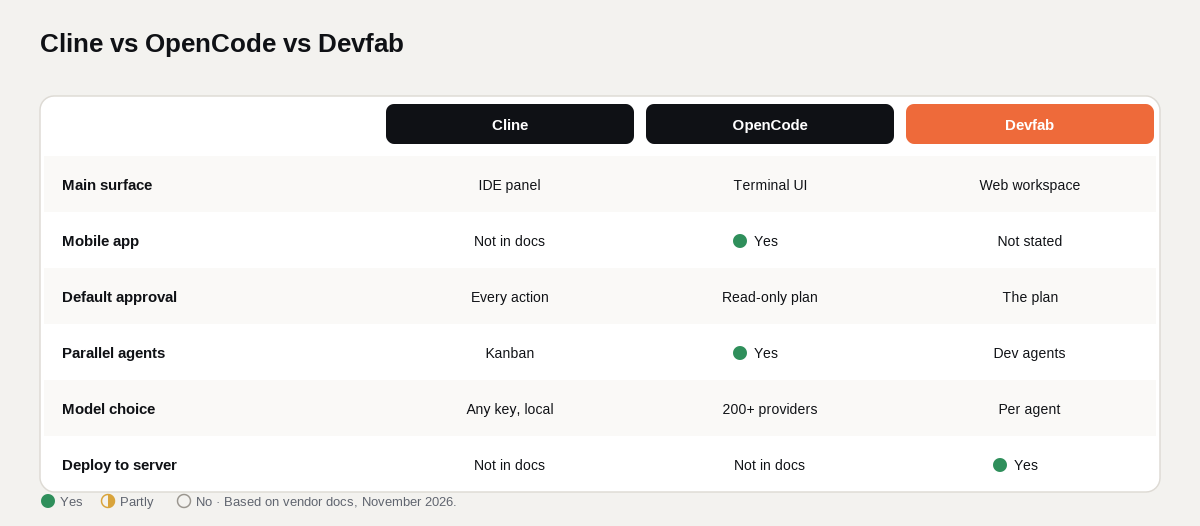
| Aspect | Cline | OpenCode | Source |
|---|---|---|---|
| Where it runs | VS Code, JetBrains, CLI (incl. headless CI), desktop, SDK, Kanban | Terminal UI, desktop (beta), mobile, SDK | Cline docs; opencode.ai |
| Planning | Plan mode (no edits), Act mode, /deep-planning, Checkpoints | "plan" agent: read-only, asks before bash | Plan & Act; GitHub |
| Agent autonomy | Approves every action; Kanban runs agents in parallel | Several agents in parallel on one project; permissions; undo/redo | Cline docs; opencode.ai |
| Extensibility | Not covered in the pages we checked | MCP, plugins, custom agents, skills, custom commands | opencode.ai |
| Deploy and hosting | Not covered in the docs we checked | Not covered in the docs we checked | — |
| License | Described as fully open source | MIT | Cline Desktop post; GitHub |
| Team and admin | Enterprise: SSO, RBAC, SLA, central billing, auth logs | Zen workspaces: member invites, model enablement, per-member budgets | Cline pricing; Zen docs |
| Model choice | Cline billing, ClinePass, or your own key incl. local | 200+ providers via Models.dev, local models, ChatGPT or Copilot subscriptions | Cline docs; opencode.ai |
| Pricing model | Free; pay inference; Enterprise custom | Free; OpenCode Go subscription; Zen prepaid credits | Cline pricing; opencode.ai |
Cost model by team size
| Team size | Cline | OpenCode |
|---|---|---|
| 1 person | Free; pay inference via Cline billing, ClinePass or your own key | Free agent; free models, your own key, or OpenCode Go from USD 10 per month |
| 5 people | Same per developer; no seat fee in the docs we checked | Zen workspace with invites and per-member budgets; pay-as-you-go credits |
| 25 people | Enterprise, custom pricing | Same; the review rates enterprise compliance features as immature |
As of November 2026. OpenCode Go price from opencode.ai; Zen bills prepaid credits with a per-purchase processing fee (Zen docs). Cline shows no plan prices on its pricing page.
Where Cline wins
- Your team works in VS Code or JetBrains and wants the agent there, not in a separate window.
- You want a stop before every action. Cline's default asks each time (Cline docs); a review calls OpenCode's default permissions permissive (rywalker.com).
- You need SSO, RBAC and an SLA from the vendor (Cline pricing).
- You want a gentle start. The same review describes a steeper learning curve for OpenCode.
- You want a task board for many agents: Kanban runs them in parallel.
Where OpenCode wins
- You live in the terminal and want a fast TUI with undo and redo.
- You want to check agents from your phone. OpenCode has mobile clients (opencode.ai).
- You already pay for ChatGPT or Copilot and want to reuse that subscription.
- You want the widest model menu: 200+ providers through Models.dev, plus local models.
- You want an MIT license and a very large contributor base, 1,000+ contributors by OpenCode's count.
Know OpenCode's weak spots too: the review reports 1GB+ RAM use by the TUI and frequent releases that sometimes break features (rywalker.com).
Switching from one to the other
Both work in your local repo, so there is no code export. To OpenCode: install the TUI or desktop app, connect a provider (your key, a subscription, or Zen), and start with the read-only plan agent until you set permissions you trust (GitHub). To Cline: install the extension in VS Code or JetBrains, choose a model route, and use Plan mode before Act (Plan & Act). Rules and custom agents don't carry over automatically between the two in the docs we checked.
Where Devfab fits
Both agents help a developer finish a change. In the docs we checked, neither does domain research before a plan, sends the plan to a person for approval as a project gate, or deploys the result.
Coding agents automate the developer. Devfab automates the development lifecycle. For a field-service app, Devfab's Researcher maps work-order terms, best practices and competing products before the Planner writes anything. A person approves the plan. The Coordinator splits it into tickets for dev agents, and the QA agent runs UI and flow tests, clicking screens and journeys end to end, plus logic tests.
Devfab is in Beta, with a smaller community and fewer integrations, and it is not a terminal or editor tool. See Devfab vs OpenCode and Devfab vs Cline.
FAQ
Are Cline and OpenCode both free?
Yes, both agents are free and open source, and you pay for the models you use. OpenCode adds an optional OpenCode Go subscription from USD 10 per month and pay-as-you-go Zen credits, as of November 2026. Cline adds usage billing, ClinePass and a custom-priced Enterprise tier.
Can OpenCode run inside VS Code like Cline?
OpenCode's own clients are a terminal UI, a desktop app, a mobile app and an SDK. Editors such as Zed can host it through the Agent Client Protocol, and Kilo Code's VS Code extension is built on the OpenCode server. Cline ships as a VS Code extension and a JetBrains plugin directly.
Can I reuse my ChatGPT or Copilot subscription?
OpenCode says it can use existing ChatGPT Plus or Pro and GitHub Copilot subscriptions, as well as 200+ providers and local models. Cline supports its own billing, ClinePass, or your own key for cloud providers and local runtimes.
Which one is safer by default?
Cline asks for your approval on every action. OpenCode's plan agent is read-only and asks before shell commands, while its build agent has full access; a dated review calls OpenCode's default permissions permissive. Teams that want a stop at every step will find Cline's default closer.
Read next
- What is an AI software factory?
- OpenCode alternatives for teams that ship to production (2026)
- Best open-source AI coding agents (2026)
Your agent writes the code. Devfab runs the project around it. Try Beta
Sources (checked November 2026): Cline docs overview; Cline Plan & Act; Cline pricing; Cline blog archive; Cline Desktop announcement; OpenAI hires seven employees from Cline (TEXXR, Jan 29, 2026); OpenCode homepage; anomalyco/opencode on GitHub; OpenCode Zen docs; OpenCode research note (rywalker.com, Jun 2026); The New Kilo Code for VS Code (Kilo blog, Apr 2, 2026); Zed is 1.0 (Zed blog).
Frequently asked questions
Are Cline and OpenCode both free?
Yes, both agents are free and open source, and you pay for the models you use. OpenCode adds an optional OpenCode Go subscription from USD 10 per month and pay-as-you-go Zen credits, as of November 2026. Cline adds usage billing, ClinePass and a custom-priced Enterprise tier.
Can OpenCode run inside VS Code like Cline?
OpenCode's own clients are a terminal UI, a desktop app, a mobile app and an SDK. Editors such as Zed can host it through the Agent Client Protocol, and Kilo Code's VS Code extension is built on the OpenCode server. Cline ships as a VS Code extension and a JetBrains plugin directly.
Can I reuse my ChatGPT or Copilot subscription?
OpenCode says it can use existing ChatGPT Plus or Pro and GitHub Copilot subscriptions, as well as 200+ providers and local models. Cline supports its own billing, ClinePass, or your own key for cloud providers and local runtimes.
Which one is safer by default?
Cline asks for your approval on every action. OpenCode's plan agent is read-only and asks before shell commands, while its build agent has full access; a dated review calls OpenCode's default permissions permissive. Teams that want a stop at every step will find Cline's default closer.