Short answer: GitHub Copilot wins when your code already lives on GitHub and you want review, fixes and the coding agent in one seat you probably already pay for. CodeRabbit wins when you need a dedicated reviewer across GitHub, GitLab, Azure DevOps or Bitbucket that replies in threads, learns your team's preferences and can test the running app.
You run a university IT team. Students book study rooms through a library booking system your developers maintain. Copilot writes a growing share of the pull requests. Now finance asks the obvious question: why pay for a second AI tool just to review the first one's work?
One side says a reviewer from the same vendor as the author is good enough, and cheaper. The other says review deserves its own specialist. This page referees, using GitHub and CodeRabbit docs checked in November 2026.
In this comparison:
- CodeRabbit and GitHub Copilot at a glance
- Feature comparison
- Cost model by team size
- Where CodeRabbit wins
- Where GitHub Copilot wins
Start with what each one actually leaves on a pull request.
CodeRabbit and GitHub Copilot at a glance
CodeRabbit is a reviewer first. It raised a USD 143M Series C on August 12, 2026 and now calls its category "Agentic Change Management" (CodeRabbit newsroom). It reviews pull requests on GitHub, GitLab, Azure DevOps and Bitbucket, in the IDE, in a pre-commit CLI, and through a Slack and Discord agent (CodeRabbit docs). Review features include PR summaries, chat, learnings, autofix, pre-merge checks and security review. Advanced adds blast-radius and architecture impact analysis (CodeRabbit pricing).
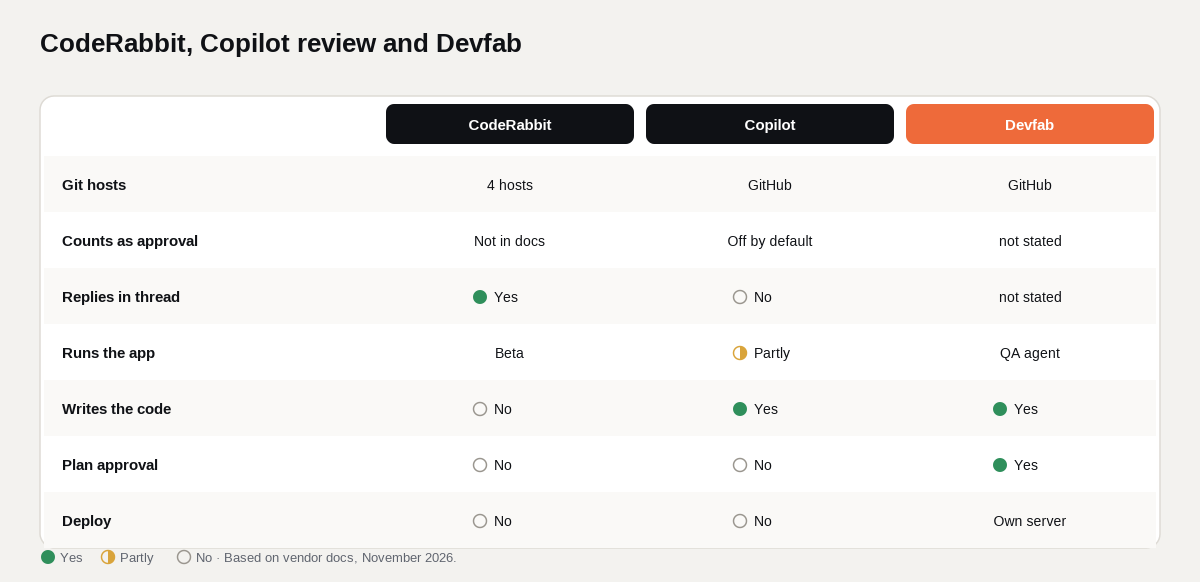
Copilot is an assistant that also reviews. It runs in IDEs, on GitHub.com, in the CLI and a desktop app, and has a cloud agent that takes assigned work and opens pull requests (GitHub Docs: features). Code review is one feature on paid plans (Copilot plans). The details matter. By default, "Copilot leaves a 'Comment' review, not an 'Approve' review or a 'Request changes' review," so its reviews "do not count toward required approvals." Approvals can be switched on, in public preview, and are dismissed when new commits arrive (GitHub Docs: use code review).
Two more points from the same docs page. Copilot won't reply to human comments on its reviews. And it "may repeat the same comments again" after you resolve them. A dedicated reviewer that holds a conversation is CodeRabbit's main pitch against that.
Feature comparison
| Aspect | CodeRabbit | GitHub Copilot code review | Source |
|---|---|---|---|
| Git hosts | GitHub, GitLab, Azure DevOps, Bitbucket | GitHub (cloud agent "only works with repositories hosted on GitHub") | CodeRabbit docs; GitHub Docs: cloud agent |
| Review type | Review comments, summaries, pre-merge checks | Comment review by default; Approve optional (preview) | GitHub Docs: use code review |
| Conversation | Chat in the PR; learns from feedback | Does not reply to human comments on its reviews | Same as above; CodeRabbit pricing |
| Team rules | Learnings and pre-merge checks | .github/copilot-instructions.md, path instructions, AGENTS.md; also reads CLAUDE.md, GEMINI.md, REVIEW.md | Same as above |
| Fixing issues | Autofix | Fix with Copilot hands off to the cloud agent | Same as above |
| Review depth | Blast-radius analysis on Advanced | Lite or Balanced effort; severity labels High, Medium, Low | Same as above |
| Testing | Verify (beta) runs the app in a sandbox; unit test generation on Team | Playwright MCP enabled by default during review | Verify docs; GitHub Docs: use code review |
| Writes the code too | No | Yes: completions, agent mode, cloud agent | GitHub Docs: features |
| Admin | SSO, roles, audit logs, self-hosting on Enterprise | Policies and usage data on Business; audit logs on Enterprise | CodeRabbit pricing; GitHub Docs: features |
Cost model by team size
| Team size | CodeRabbit | GitHub Copilot | Devfab |
|---|---|---|---|
| 1 person | Free IDE reviews; Essentials USD 24 per user per month | Pro USD 10 per user per month (Free has no PR code review) | Cost logged per task and per project (Beta) |
| 5 people | Essentials USD 24 or Team USD 48 per user per month | Business USD 19 per granted seat per month, pooled credits | Cost logged per task and per project (Beta) |
| 25 people | Team USD 48 or Advanced USD 72 per user per month; Enterprise custom | Business USD 19 or Enterprise USD 39 per granted seat per month | Cost logged per task and per project (Beta) |
Prices as of November 2026 from CodeRabbit pricing, Copilot plans and GitHub Docs: plans. CodeRabbit caps PR reviews per developer under fair use and bills extra on consumption. Copilot chat and agent work draw on AI credits (1 credit = USD 0.01), with overage at the same rate. GitHub's docs say organization members without a Copilot license can get reviews when an admin enables it. Devfab is in Beta and offers predictable cost: cost is logged after each run, per task and per project.
Where CodeRabbit wins
- Not only GitHub. GitLab, Azure DevOps and Bitbucket teams get the same reviewer.
- A reviewer that talks back. Chat in the pull request and learnings from feedback, where Copilot doesn't reply to human comments on its reviews.
- An independent second opinion. A separate vendor reviewing code a Copilot agent wrote.
- Behavior checks. Verify runs the app and reports bugs with screenshots and recordings. It is free during beta, for web apps and services on CodeRabbit Cloud (Verify docs).
- Security scans for vulnerabilities, leaked secrets and vulnerable dependencies.
Where GitHub Copilot wins
- Lower cost if you already have seats. Review comes with paid Copilot plans you may already buy.
- One loop from review to fix. Fix with Copilot hands an issue to the cloud agent, which opens a pull request or commits to the same one.
- Instruction files you already have. Copilot review reads
AGENTS.mdandCLAUDE.mdas well as its own instructions. - GitHub-native governance. Enterprise AI Controls and the agent control plane went GA on February 26, 2026, with audit-log fields that mark agent actions (GitHub Changelog).
- It writes code too. Completions, agent mode and a cloud agent, not only review.
Switching from one to the other
From Copilot review to CodeRabbit. Install the CodeRabbit app on your Git host and start the trial. Turn off automatic Copilot reviews on the same repos for the trial period, or the two bots will comment on the same lines. Copy your review guidance from .github/copilot-instructions.md into CodeRabbit's settings.
From CodeRabbit to Copilot review. Make sure the people opening pull requests are on a paid Copilot plan, or ask an admin to enable review for unlicensed members. Write your team's rules into .github/copilot-instructions.md. Turn on automatic reviews if you want every pull request covered, since manual requests are the default.
Where Devfab fits
Both tools look at pull requests after someone, or some agent, has written them. Neither, in the docs we checked, researches the domain, asks a person to approve a project plan, or deploys the finished app to your server.
Coding agents automate the developer. Devfab automates the development lifecycle. For the room booking system, Devfab's Researcher would map terms like holds, no-shows and quiet zones before the Planner writes a plan. A person approves it. ChainFlow maps which functions and APIs call each other, so a change to booking limits shows its effect on reminders, check-in and the usage report. The QA agent runs UI, flow and logic tests on the result.
If your developers write code and need review, CodeRabbit or Copilot is the right tool. Devfab is in Beta, has a smaller community and fewer integrations, is not an editor, and needs a GitHub account. See Devfab vs CodeRabbit and Devfab vs GitHub Copilot.
FAQ
Does GitHub Copilot code review count as an approval?
Not by default. GitHub's docs say Copilot leaves a Comment review, not an Approve or Request changes review, so it does not count toward required approvals. Admins can turn on Approve reviews, a public preview setting, and an approval is dismissed if new commits are pushed.
Do I need CodeRabbit if I already pay for Copilot?
Not always. If your code is on GitHub and you want review where you already work, Copilot review is the simpler start. CodeRabbit adds more when you use GitLab, Azure DevOps or Bitbucket, want a reviewer that replies in threads and learns from feedback, or want Verify to test the running app.
How much does each cost for code review?
As of November 2026, CodeRabbit is USD 24, 48 or 72 per user per month for Essentials, Team and Advanced, with Enterprise custom. Copilot Pro is USD 10 per user per month and Business USD 19 per granted seat per month, with chat and agent work drawing on AI credits. Copilot's Free plan does not include PR code review.
Can Copilot fix the issues its review finds?
Yes, with the cloud agent turned on. GitHub's docs describe a Fix with Copilot button that opens a draft comment for instructions, then hands the work to Copilot cloud agent as a new pull request or a commit to the same one.
Read next
- AI software factory vs AI coding tools
- CodeRabbit vs Qodo
- Qodo vs GitHub Copilot
- CodeRabbit alternatives
Want review to be one stage of a planned build? Try Beta
Sources (checked November 2026): CodeRabbit pricing; CodeRabbit docs; CodeRabbit Verify docs; CodeRabbit Series C (Aug 12, 2026); GitHub Copilot plans; GitHub Docs: Plans for GitHub Copilot; GitHub Docs: Copilot features; GitHub Docs: Using Copilot code review; GitHub Docs: About Copilot cloud agent; GitHub Changelog: Enterprise AI Controls GA (Feb 26, 2026).
Frequently asked questions
Does GitHub Copilot code review count as an approval?
Not by default. GitHub's docs say Copilot leaves a Comment review, not an Approve or Request changes review, so it does not count toward required approvals. Admins can turn on Approve reviews, a public preview setting, and an approval is dismissed if new commits are pushed.
Do I need CodeRabbit if I already pay for Copilot?
Not always. If your code is on GitHub and you want review where you already work, Copilot review is the simpler start. CodeRabbit adds more when you use GitLab, Azure DevOps or Bitbucket, want a reviewer that replies in threads and learns from feedback, or want Verify to test the running app.
How much does each cost for code review?
As of November 2026, CodeRabbit is USD 24, 48 or 72 per user per month for Essentials, Team and Advanced, with Enterprise custom. Copilot Pro is USD 10 per user per month and Business USD 19 per granted seat per month, with chat and agent work drawing on AI credits. Copilot's Free plan does not include PR code review.
Can Copilot fix the issues its review finds?
Yes, with the cloud agent turned on. GitHub's docs describe a Fix with Copilot button that opens a draft comment for instructions, then hands the work to Copilot cloud agent as a new pull request or a commit to the same one.