Short answer: Continue was acquired by Cursor in June 2026 and the product was discontinued. For the closest swap, an open-source assistant in VS Code or JetBrains where you pick the model, choose Cline or Kilo Code. For a managed, mainstream option, choose GitHub Copilot. If your real gap is planning, testing and deployment, look at Devfab.
You picked Continue because you kept control: your models, your config, your data. Then the product went away. The vendor turned billing off, and the data export window closed on July 15, 2026. The code is still public, but nobody ships fixes for you anymore. That leaves a team with a working habit and no vendor behind it.
In this guide, you'll learn:
- Why teams leave Continue
- Quick comparison
- The alternatives
- Where Continue is still the better choice
- How to choose
Pick the section that matches how your team used Continue.
Why teams leave Continue
First, the status change. Around June 16, 2026, Continue's homepage announced that "Continue was acquired by Cursor". The New Stack reported on June 22 that the product has been discontinued, recurring billing is disabled, and users had until July 15, 2026 to export their data before deletion. Terms were not disclosed, and The New Stack describes the deal as a likely acqui-hire, with co-founder Nate Sesti joining Cursor. Cursor itself is now a wholly owned subsidiary of SpaceX; its August 14, 2026 post says the acquisition closed.
What that means for users:
- No vendor, no updates. The final 2.0.0 release removed telemetry and tidied the code as a handoff to the community. There is no hosted service behind it.
- Hosted features are gone. In February 2026 Continue described Mission Control, which ran cloud agents in parallel and "AI Checks" on every pull request as GitHub status checks. Those needed the hosted service.
- JetBrains users were already on thin ice. In the same February post, the JetBrains plugin became community-maintained and the team recommended its CLI for JetBrains users.
- A fork is the only continuity path. A June 2026 write-up on DEV notes that "the only continuity path the vendor is offering is a fork" of the Apache-2.0 code.
- Many teams are affected. The project had about 34,300 GitHub stars and 4,800 forks at the time of the acquisition.
How we compared
We compared tools from vendor documentation, pricing pages and dated reviews, checked on November 13, 2026. We did not run hands-on tests for this page. We describe pricing models (free tiers, seats, credits, usage) rather than list prices, because they change often.
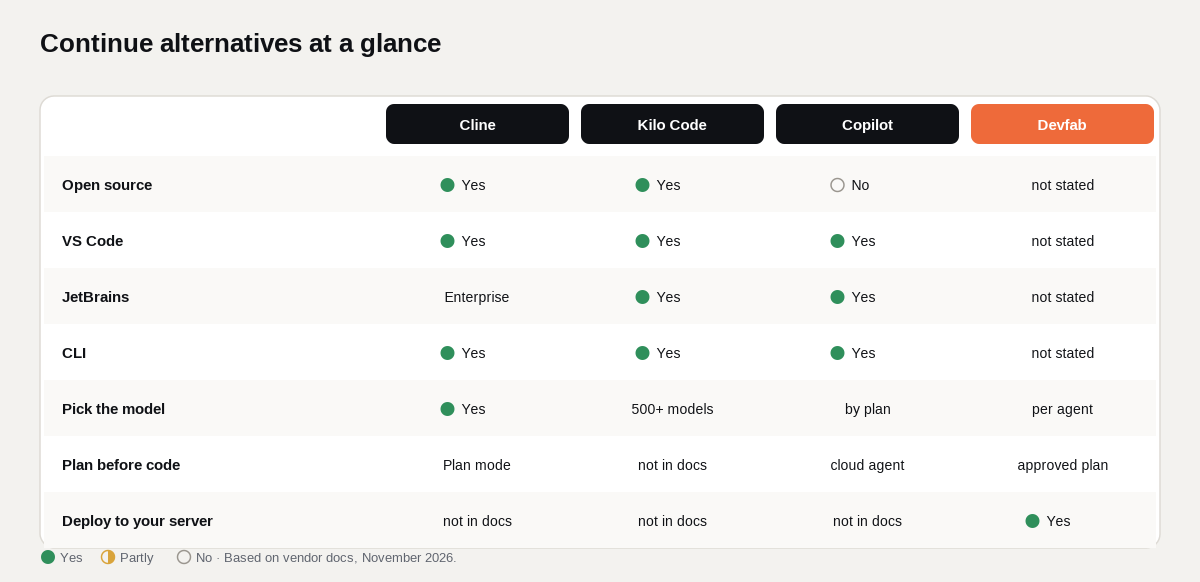
Quick comparison
| Tool | Where it runs | Open source | Model choice | Team controls | Pricing model |
|---|---|---|---|---|---|
| Cline | VS Code, JetBrains, CLI, desktop app | Yes | Your own keys, local runtimes, Cline billing | Enterprise: SSO, RBAC, audit logs | Free extension, pay for inference; Enterprise custom |
| Kilo Code | VS Code, JetBrains, CLI, cloud agents | Yes | 500+ models, your own keys, Ollama, LM Studio | Teams and Enterprise: SSO, audit logs, model limits | Free extension, inference at provider rates; Teams per user |
| GitHub Copilot | Many IDEs, GitHub.com, CLI, desktop app | Commercial | Models from several vendors, by plan | Business and Enterprise: policies, usage data, audit logs | Free tier; AI credits; per-seat business plans |
| Cursor | Cursor editor, CLI, cloud agents | Commercial | Many vendors' models | SSO on Teams; SCIM and audit logs on Enterprise | Free tier; usage pools; per-seat Teams |
| JetBrains Junie | JetBrains IDEs, CLI, GitHub and GitLab CI | Not stated in docs we checked | Your own keys, local runtimes | Organization plans | Free start; JetBrains AI credits |
| OpenCode | Terminal, desktop, mobile, SDK | Yes (MIT) | 200+ providers, local models | Zen workspaces with member budgets | Free agent; your own keys or subscriptions |
| Devfab | Web workspace on your GitHub repo | Commercial | Choose a model per agent or keep the default | Roles, workspace permissions, delivery report | Beta; cost logged per task and per project |
The alternatives
1. Cline
Verdict: The closest open-source replacement for an in-editor assistant that runs on your own models. Best for: Developers who want to approve every step inside VS Code or JetBrains. Trade-off: Every action needs your approval, which is safe but hands-on. Cline's pricing page lists JetBrains among Enterprise features. Pricing: The extension is free and you pay only for inference, through Cline's usage billing or your own key. ClinePass is a flat subscription for open-weight models. Enterprise is custom. Check Cline's pricing page.
- Runs as a VS Code extension, JetBrains plugin, CLI (interactive or headless for CI), desktop app and Kanban, a web board for running many agents in parallel.
- Plan mode reads and discusses without editing; Act mode carries out the plan. You can use a different model in each mode, and Checkpoints let you roll back.
- Bring your own key for cloud providers or local runtimes. Cline describes its extension, CLI and desktop app as fully open source.
2. Kilo Code
Verdict: The open-source pick for teams that want the widest model choice plus admin controls. Best for: Teams that want an open-source agent in VS Code or JetBrains, with SSO and audit logs on paid tiers. Trade-off: A June 2026 review flags a broad product range for a small team and more than 1,300 open GitHub issues. Pricing: Free, open-source extension. Inference is billed at provider rates, with a 5% fee on credit purchases. Teams is per user and Enterprise is custom. Check Kilo's pricing page.
- The VS Code extension was rebuilt on the open-source OpenCode server and became the default on April 2, 2026.
- Agent Manager runs several agent tabs and can isolate agents in git worktrees. A built-in diff reviewer supports line-level comments.
- Kilo Gateway offers 500+ models from 60+ providers, or bring your own key, or run local models through Ollama or LM Studio.
3. GitHub Copilot
Verdict: The safest managed choice when your code, issues and reviews already live on GitHub. Best for: Teams that want completions, chat and agent mode across VS Code, JetBrains and other IDEs, with central policies. Trade-off: Commercial, and model availability depends on plan and surface. The cloud agent only works with repositories hosted on GitHub. Pricing: Free tier with limited chat and agent use. All plans use GitHub AI Credits; Business and Enterprise are per granted seat with pooled credits. Check GitHub's plans page.
- In the IDE, agent mode decides which files to change and asks for approval on changes and terminal commands.
- The cloud agent can research a repository and "create an implementation plan" before it changes code.
- Models from OpenAI, Anthropic, Google, Microsoft, Moonshot AI and xAI are supported, by plan and surface.
4. Cursor
Verdict: The natural landing spot if you are ready to change editors, since Cursor acquired Continue. Best for: Developers who want Plan Mode, cloud agents and Bugbot pull request review in one editor. Trade-off: It is its own editor, so VS Code users switch apps. Ownership changed in 2026, and pricing now bundles Grok products. A 2026 review called its credit pricing "opaque". Pricing: Free tier; individual tiers with a usage pool that refreshes weekly; Teams per seat; Enterprise custom. Check Cursor's pricing page.
- Plan Mode asks clarifying questions, researches the codebase and drafts a plan you can edit before it builds.
- Cloud agents run in isolated VMs with full development environments, each on its own branch. Self-Hosted Machines can run their tool execution on hardware you manage.
- SAML or OIDC SSO is on Teams and Enterprise; SCIM, audit logs and model access restrictions are Enterprise only.
5. JetBrains Junie
Verdict: The best fit for Continue users who worked in IntelliJ, PyCharm or other JetBrains IDEs. Best for: Teams that want an agent using the IDE's own index, build configurations, test runners and debugger. Trade-off: Tied to the JetBrains world. Debug mode works only in IntelliJ IDEA Ultimate, and no deploy or hosting features are described. Pricing: Free to start with a free Junie Lite model. Your own key is billed at provider rates with no markup. Paid JetBrains AI subscriptions include monthly AI credits. Check the Junie page.
- Junie left beta in June 2026. Plan mode writes a structured plan you can edit and approve, saved in
.junie/plansso you can commit it. - Bring your own key for Anthropic, OpenAI and Google, or run local models through Ollama, LM Studio or LiteLLM.
- Junie CLI entered beta in March 2026 and runs in the terminal and in GitHub or GitLab CI.
6. OpenCode
Verdict: The best fit if you used Continue's cn CLI in the terminal or in CI. Best for: Terminal-first developers who want an MIT-licensed, model-agnostic agent. Trade-off: A June 2026 review reports high memory use by the terminal UI, frequent releases that sometimes break features, and immature enterprise compliance features. Pricing: The agent is free. Use free models, your own keys, or existing ChatGPT or GitHub Copilot subscriptions. OpenCode Go is a monthly plan for curated open-weight models; Zen is pay-as-you-go credits.
- Runs as a terminal UI, a desktop app (beta) and mobile clients, with an SDK for scripts and CI.
- Ships a "build" agent with full access and a read-only "plan" agent that asks before running shell commands.
- Works with 200+ model providers through Models.dev, including local models.
- MIT license. Kilo Code's VS Code extension is built on the OpenCode server.
7. Devfab
Verdict: Not a Continue replacement in the editor. The right pick when the missing piece is the delivery process around the code. Best for: Agencies and product teams that need research, an approved plan, QA evidence and deployment to their own server. Trade-off: Devfab is new and in Beta, with a smaller community and fewer integrations. It is not an editor for hands-on coding, and it needs a GitHub account. Pricing: Predictable cost: cost is logged after each run, per task and per project. Devfab is in Beta.
Coding agents automate the developer. Devfab automates the development lifecycle. Devfab is an AI software factory with seven agents: Researcher, Planner, Coordinator, Developers, Blueprint, QA agent and Deploy.
- Research before the plan. The Researcher maps your domain first: key terms, best practices for that kind of app and competitors, then suggests a prototype.
- ChainFlow. Devfab's code-intelligence layer maps which functions and APIs call each other and what is deployed, so a change to checkout doesn't quietly break payments or notifications.
- QA agent. A separate agent runs UI and flow tests (screens, buttons and user journeys clicked end to end) plus logic tests.
- A person approves the plan by default, the code stays in your own GitHub account (or your organization's), and you deploy to your own server. You can choose the model for each agent or keep Devfab's default.
Where Continue is still the better choice
The product is gone, but the code is not. Running your own fork of Continue can still beat switching when:
- You must audit every line of your assistant. The Apache-2.0 code is public, and the final 2.0.0 release removed telemetry.
- You built many custom assistants and context sources around Continue, such as Jira and Confluence context, and have engineers who can maintain a fork.
- Your security team approved Continue for a locked-down setup with your own models, and approving a new vendor would be harder than maintaining the code you already run.
- You need a bridge, not a final answer. A pinned internal build can keep developers working while you test Cline, Kilo Code or Copilot.
The catch: with a fork, you own security fixes, new IDE versions and model API changes.
Where Devfab fits
Mission Control's AI Checks hinted at a need beyond the editor: process around the code. If that is your gap, add Devfab next to your editor tool.
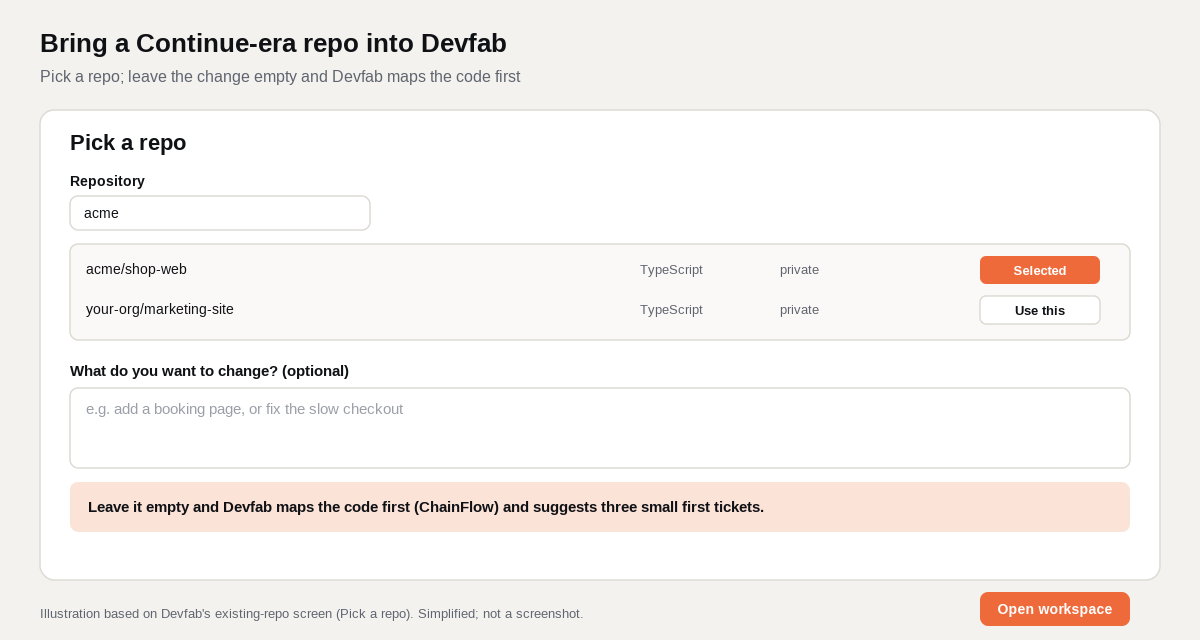
Moving a Continue-era project into Devfab:
- Push your code to GitHub. Continue worked on your local files, so your code is already yours. Make sure it is in your own GitHub account or your organization's.
- Choose "Work on an existing project" in Devfab and pick the repository.
- Leave the change box empty. Devfab maps the code first with ChainFlow and suggests three small first tickets.
- Review and approve the plan. The Coordinator then turns it into tickets for the dev agents.
- Let the QA agent test. It runs UI, flow and logic tests. Turn on "QA agent · review before Done" so tickets reach Done only after review.
Your developers keep Cline, Kilo Code, Copilot or Junie for hands-on work in the same repo.
How to choose
| If you used Continue for... | Pick |
|---|---|
| An open-source assistant in VS Code with your own model | Cline or Kilo Code |
| JetBrains IDEs | JetBrains Junie, or GitHub Copilot |
The cn CLI in the terminal or CI | OpenCode, or the Cline CLI |
| A company-wide rollout with admin policies | GitHub Copilot |
| Following the Continue team to its new home | Cursor |
| Planning, testing and deploying whole projects | Devfab, next to your editor tool |
| A fully audited, locked-down setup | A maintained fork of Continue |
FAQ
Is Continue still available?
Not as a product. Continue was acquired by Cursor around June 16, 2026 and discontinued. Recurring billing was turned off and users could export data until July 15, 2026, after which it was deleted. The Apache-2.0 source code is still public, so teams can fork it and maintain it themselves.
What is the closest alternative to Continue?
For an open-source assistant inside VS Code or JetBrains where you choose the model, Cline and Kilo Code are the closest. Both are open source, support your own API keys and local models, and offer paid team tiers with admin controls.
Can I keep using Continue's code?
Yes. The codebase is Apache-2.0 and the final 2.0.0 release removed telemetry. A fork is the only continuity path, though, so your team takes on security fixes, IDE compatibility and model API changes.
I used Continue in JetBrains. What should I switch to?
JetBrains Junie is built for JetBrains IDEs and uses the IDE's index, test runners and debugger. GitHub Copilot also supports JetBrains IDEs. Continue's own JetBrains plugin had been community-maintained since February 2026.
Does Devfab replace an in-editor assistant like Continue?
No. Devfab is an AI software factory, not an editor. It plans, builds, tests and deploys projects in your own GitHub repo. Most teams keep an editor assistant such as Cline or Copilot for hands-on coding and run projects through Devfab.
Read next
- What is an AI software factory?
- AI software factory vs AI coding tools: which does your team need?
- Devfab vs Cline
- Cline alternatives
- Kilo Code vs Cline
- Cursor alternatives
Keep your editor tool, and give your projects a process. Try Beta
Sources (checked November 13, 2026): Continue homepage; Cursor acquires Continue (The New Stack, Jun 22, 2026); Cursor acquires Continue and gives its users a July 15 export deadline (DEV, Jun 24, 2026); From Extension to Mission Control (Continue blog, Feb 17, 2026); Cursor: Joining SpaceX; Cline docs overview; Cline Plan and Act; Cline pricing; Cline Desktop announcement; OpenAI hires seven employees from Cline (TEXXR); The new Kilo Code for VS Code (Kilo blog); Thank you, Roo (Kilo blog); Kilo pricing; Kilo research note (rywalker.com); GitHub Copilot features; Plans for GitHub Copilot; About Copilot cloud agent; Copilot supported models; Enterprise AI Controls GA (GitHub Changelog); Cursor docs; Cursor Plan Mode; Cursor cloud agents; Cursor enterprise; Cursor pricing; Cursor 3 review (DEV, Apr 2026); Junie product page; Junie out of beta (JetBrains blog); Junie CLI beta (JetBrains blog); Junie agent help; OpenCode; anomalyco/opencode on GitHub; OpenCode Zen docs; OpenCode research note (rywalker.com).
Frequently asked questions
Is Continue still available?
Not as a product. Continue was acquired by Cursor around June 16, 2026 and discontinued. Recurring billing was turned off and users could export data until July 15, 2026, after which it was deleted. The Apache-2.0 source code is still public, so teams can fork it and maintain it themselves.
What is the closest alternative to Continue?
For an open-source assistant inside VS Code or JetBrains where you choose the model, Cline and Kilo Code are the closest. Both are open source, support your own API keys and local models, and offer paid team tiers with admin controls.
Can I keep using Continue's code?
Yes. The codebase is Apache-2.0 and the final 2.0.0 release removed telemetry. A fork is the only continuity path, though, so your team takes on security fixes, IDE compatibility and model API changes.
I used Continue in JetBrains. What should I switch to?
JetBrains Junie is built for JetBrains IDEs and uses the IDE's index, test runners and debugger. GitHub Copilot also supports JetBrains IDEs. Continue's own JetBrains plugin had been community-maintained since February 2026.
Does Devfab replace an in-editor assistant like Continue?
No. Devfab is an AI software factory, not an editor. It plans, builds, tests and deploys projects in your own GitHub repo. Most teams keep an editor assistant such as Cline or Copilot for hands-on coding and run projects through Devfab.