Short answer: OpenCode wins when you want a free, MIT-licensed agent in the terminal, desktop or phone that works with 200+ model providers, local models or the ChatGPT and Copilot plans you already pay for. Cursor wins when your team wants a polished AI editor with parallel cloud agents, Bugbot reviews and enterprise admin controls.
You already pay for one AI subscription too many. A developer on your team says OpenCode does the same job for free. Another says Cursor's editor saves more time than it costs. Both are partly right. This page lays out the facts from each vendor and a dated review, then names a winner for each situation.
In this comparison:
- Cursor and OpenCode at a glance
- Feature comparison
- Cost model by team size
- Where Cursor wins
- Where OpenCode wins
Start with who makes each tool today.
Cursor and OpenCode at a glance
OpenCode is an open-source coding agent from Anomaly, the team behind SST. Its GitHub repo moved from sst/opencode to anomalyco/opencode (GitHub; rywalker.com, Jun 2026). It runs as a terminal UI, a desktop app for macOS, Windows and Linux (marked beta), a mobile app, and an SDK for scripts and CI (OpenCode). It is MIT-licensed with 225.7k GitHub stars (GitHub). Its reach goes beyond its own app: Kilo Code's VS Code extension is now built on the OpenCode server (Kilo blog).
Cursor is an AI code editor plus a coding agent that also runs in a CLI, as cloud agents, on mobile and through SDKs (Cursor docs). Its maker, Anysphere, became part of SpaceX in a deal confirmed on June 16, 2026 (The Next Web); Cursor says the acquisition closed in August (Cursor blog).
The short version: Cursor sells you an editor and a usage pool. OpenCode gives you the agent and lets you bring the model.
Feature comparison
| Aspect | Cursor | OpenCode | Source |
|---|---|---|---|
| Where it runs | Desktop editor, CLI, cloud agents, mobile, SDKs | Terminal UI, desktop app (beta), mobile app, SDK | Cursor docs; OpenCode |
| Planning | Plan Mode asks questions and drafts an editable plan | Built-in read-only "plan" agent that asks before bash commands | Cursor Plan Mode; GitHub |
| Parallel agents | Cloud agents in isolated VMs, each on its own branch | Multiple parallel agents on one project, on your machine | Cursor cloud agents; OpenCode |
| Code review | Bugbot reviews PRs; Autofix pushes fixes | Not covered in the docs we checked | Bugbot |
| Customization | Rules, skills, subagents, hooks, plugins, MCP | MCP servers, plugins, custom agents, skills, commands, permissions | Cursor docs; OpenCode |
| Model choice | Claude, Gemini, GPT, Grok, Composer and others | 200+ providers via Models.dev, local models, ChatGPT or Copilot subscriptions | Cursor docs; OpenCode |
| Team and admin | SSO on Teams; SCIM, audit logs on Enterprise | Zen workspaces: member invites, model enablement, per-member budgets | Cursor Enterprise; OpenCode Zen |
| Open source | No | Yes, MIT | GitHub |
| Deploy your app | Not covered in the docs we checked | Not covered in the docs we checked | — |
| Pricing model | Free tier, monthly tiers with a usage pool, Teams per seat | Agent free; OpenCode Go subscription; Zen pay-as-you-go credits | Cursor pricing; OpenCode |
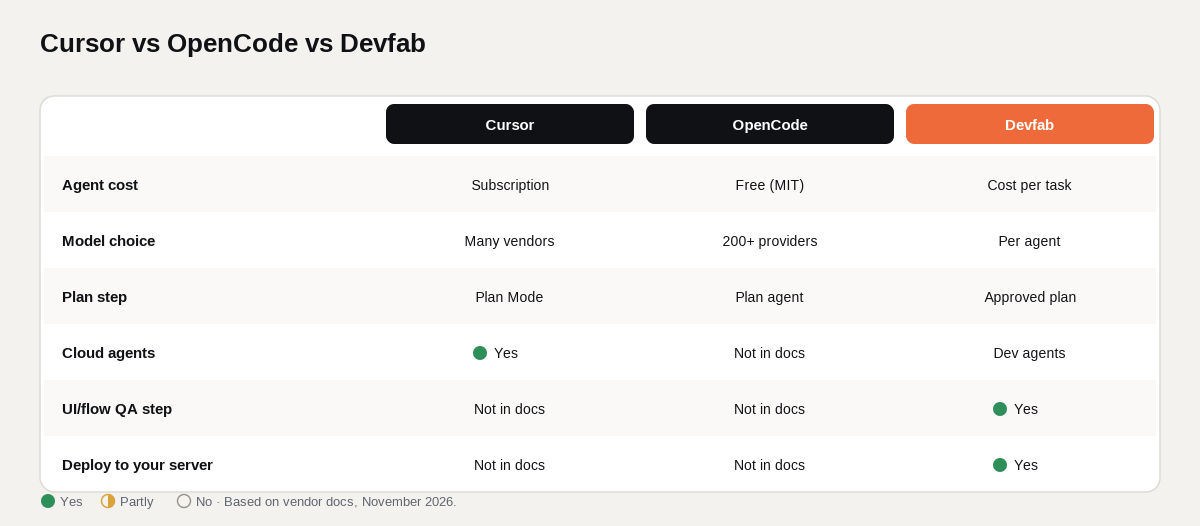
Cost model by team size
| Team size | Cursor | OpenCode | Devfab |
|---|---|---|---|
| 1 person | Free; Plus USD 8 per month (Grok models only); Premium USD 30 per month | Agent free; free models, your own key, an existing subscription, or OpenCode Go from USD 10 per month | Cost logged per task and per project (Beta) |
| 5 people | Teams from USD 30 per user per month | Agent free; Zen workspace with prepaid credits and per-member budgets | Cost logged per task and per project (Beta) |
| 25 people | Teams, or Enterprise (custom) | Same model; no enterprise plan described on the pages we checked | Cost logged per task and per project (Beta) |
Prices as of November 2026 from Cursor pricing and the OpenCode homepage. Zen credits carry a per-purchase processing fee (OpenCode Zen). Devfab is in Beta and offers predictable cost: cost is logged after each run, per task and per project.
Where Cursor wins
- You want a full editor, with tab completion and chat next to the code, not a terminal UI.
- You want cloud agents that run in isolated VMs and keep going off your machine.
- You want PR reviews that fix. Bugbot flags bugs and security issues, and Autofix pushes changes.
- You need enterprise controls today: SSO, SCIM, audit logs and model restrictions.
- You want fewer moving parts. A June 2026 review of OpenCode reported 1GB+ RAM use, frequent releases that sometimes break features and permissive default permissions.
Where OpenCode wins
- You want the agent for free and to pay only for models.
- You already pay for ChatGPT Plus or Pro or GitHub Copilot. OpenCode can use those subscriptions.
- You need local or specific models. It supports 200+ providers, including local ones.
- You want to read and change the source. It is MIT-licensed.
- You live in the terminal, or want the same agent on desktop and phone.
Switching from one to the other
Both work on your own repository, so there is no export step.
From Cursor to OpenCode. Install OpenCode, connect a model provider or subscription, and open the repo. Recreate rules as custom agents or commands, and re-add MCP servers. Review permission settings first, since the June 2026 review flagged permissive defaults (rywalker.com).
From OpenCode to Cursor. Install Cursor, open the repo, and move project instructions into AGENTS.md, which Cursor reads (Cursor rules). Pick a plan with cloud agents (Premium or higher, Teams or Enterprise) if you want unattended work.
Where Devfab fits
Say you run a field-service company and need a dispatch app: jobs, technicians, parts and signed work orders. Cursor or OpenCode can write the code fast. In the docs we checked, neither researches the domain before planning, routes a project plan to a person for approval, runs a separate QA step on technician journeys, or deploys the app.
Coding agents automate the developer. Devfab automates the development lifecycle. Devfab's Researcher maps the field-service domain first and suggests a prototype. A person approves the plan. ChainFlow, Devfab's code-intelligence layer, maps which functions and APIs call each other, so changing the work-order form shows what it touches: parts stock, invoices and customer notices. The QA agent runs UI, flow and logic tests, and Deploy ships to your own server.
Devfab is in Beta, has a smaller community and fewer integrations, and is not an editor or a terminal agent. See Devfab vs OpenCode and Devfab vs Cursor.
FAQ
Is OpenCode really free?
The agent is free and MIT-licensed. You pay for models: use free models, bring your own API key, reuse a ChatGPT Plus or Pro or GitHub Copilot subscription, or buy OpenCode Go, which starts at USD 10 per month as of November 2026, or pay-as-you-go Zen credits.
Does OpenCode have a plan mode like Cursor?
Yes. OpenCode ships a built-in plan agent that is read-only: it denies edits by default and asks before running bash commands. Cursor's Plan Mode asks clarifying questions, researches the codebase and drafts a plan you can edit before building.
Who makes OpenCode?
Anomaly, the team behind SST. The GitHub repository moved from sst/opencode to anomalyco/opencode. Kilo Code's VS Code extension is now built on the OpenCode server.
Is OpenCode ready for enterprise use?
It has workspace features in OpenCode Zen, such as member invites, model enablement and per-member budgets. A June 2026 review still called its enterprise compliance features immature. Cursor offers SSO on Teams and SCIM, audit logs and model restrictions on Enterprise.
Read next
- What is an AI software factory?
- OpenCode alternatives for teams that ship to production
- OpenCode vs Claude Code
Want the whole project run, not just the next prompt? Try Beta
Sources (checked November 2026): OpenCode; anomalyco/opencode on GitHub; OpenCode Zen docs; rywalker.com: OpenCode research note (Jun 2026); Kilo blog: The new Kilo Code for VS Code (Apr 2, 2026); Cursor docs; Cursor pricing; Cursor Plan Mode; Cursor cloud agents; Cursor Bugbot; Cursor Enterprise; Cursor rules; Cursor blog: Joining SpaceX; The Next Web: SpaceX makes its Cursor takeover official.
Frequently asked questions
Is OpenCode really free?
The agent is free and MIT-licensed. You pay for models: use free models, bring your own API key, reuse a ChatGPT Plus or Pro or GitHub Copilot subscription, or buy OpenCode Go, which starts at USD 10 per month as of November 2026, or pay-as-you-go Zen credits.
Does OpenCode have a plan mode like Cursor?
Yes. OpenCode ships a built-in plan agent that is read-only: it denies edits by default and asks before running bash commands. Cursor's Plan Mode asks clarifying questions, researches the codebase and drafts a plan you can edit before building.
Who makes OpenCode?
Anomaly, the team behind SST. The GitHub repository moved from sst/opencode to anomalyco/opencode. Kilo Code's VS Code extension is now built on the OpenCode server.
Is OpenCode ready for enterprise use?
It has workspace features in OpenCode Zen, such as member invites, model enablement and per-member budgets. A June 2026 review still called its enterprise compliance features immature. Cursor offers SSO on Teams and SCIM, audit logs and model restrictions on Enterprise.