Short answer: QA Wolf wins when you already ship an app and want an independent team of agents, or QA Wolf engineers, to write and maintain its end-to-end tests. Devfab wins when you deliver whole client apps and need research, an approved plan, the build, UI and flow tests, and deployment in one line.
You run an agency or an IT team, and the client asks one thing at handover: does it work? Your coding agents say yes. Your test suite is thin.
That is where two very different products end up on the same shortlist. QA Wolf checks software that exists. Devfab makes software, and checking is one step of making it. Comparing them is only useful if you know which problem you have, so this page starts there.
In this comparison:
- What each tool is built for
- Switching triggers
- Cost model by team size
- Where QA Wolf is the better choice
- Where Devfab is the better choice
Read the next section first; it decides most cases.
What each tool is built for
QA Wolf
QA Wolf is active and calls itself an "AI Testing Platform" that combines agents, infrastructure and human experts (QA Wolf). Its pitch is aimed at teams whose coding agents "ship faster than anyone can review". The homepage cites a sample of 20k pull requests in which 1 in 25 had a bug (same source).
Its agents plan coverage, write tests, choose the tests each pull request needs, investigate failures and file bugs to Linear or Jira (QA Wolf pricing). It tests web, iOS, Android and Windows apps, including real iPhone and iPad devices, and runs tests in parallel (QA Wolf). Tests are "open-source Playwright and Appium code you can export anytime" (QA Wolf pricing). An MCP server lets Claude Code, Codex, Cursor or any MCP client call it, and connectors cover GitHub, Slack, Jira and Linear (QA Wolf). For teams without QA staff, QA Wolf engineers can build the suite (Jump Start) or own it (Coverage-as-a-Service).
The fair way to frame it: QA Wolf tests code you already have. It doesn't plan or write your app.
Devfab
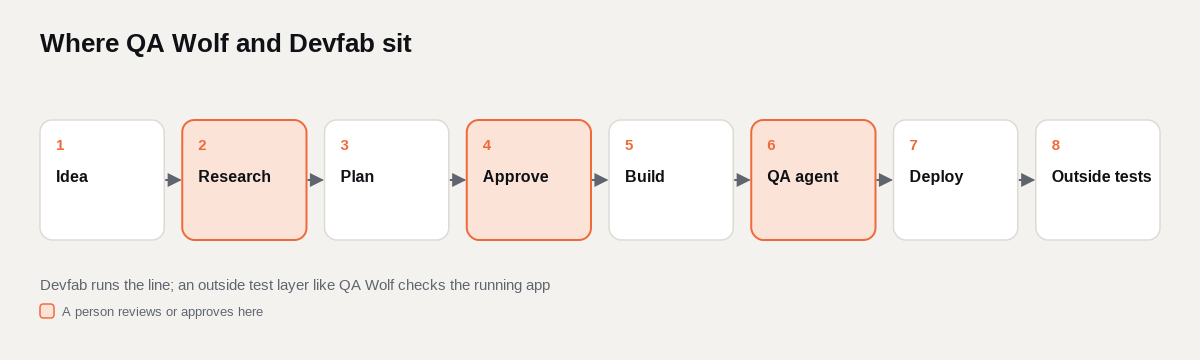
Devfab is an AI software factory in the Autonomous Software Lifecycle category. You start a new project from a description, or connect an existing GitHub repo. Seven agents share the work: Researcher, Planner, Coordinator, Developers, Blueprint, QA agent and Deploy.
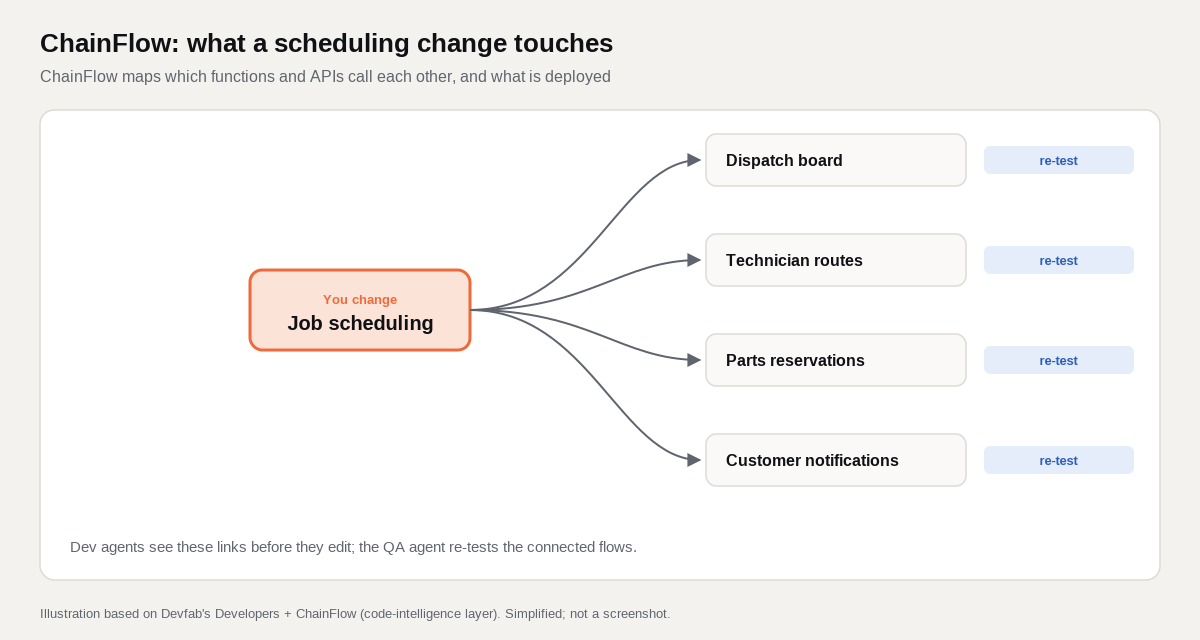
The Researcher runs before the Planner. It maps key terms, best practices and competitors for the domain, then suggests a prototype. A person approves the plan, and the Coordinator splits it into tickets for dev agents. ChainFlow, Devfab's code-intelligence layer, maps which functions and APIs call each other and what is deployed, so a change doesn't break connected features. The QA agent runs UI and flow tests (screens, buttons and user journeys clicked end to end) plus logic tests. Deploy ships to your own server. The QA agent is one step of that line, not a separate product.
Coding agents automate the developer. Devfab automates the development lifecycle.
Switching triggers
| Trigger | QA Wolf | Devfab | Source |
|---|---|---|---|
| You don't have the app yet | Tests an app you already have | Researches, plans, builds, tests and deploys it | QA Wolf |
| Test bill grows with suite size times frequency | Per-run billing; vendor example of about USD 1,083 a month for 50 web tests run daily, as of November 2026 | Cost logged per task and per project | QA Wolf pricing |
| Flaky tests | Retried up to 3 times per run rather than removed | Flake handling not stated; QA agent runs UI, flow and logic tests as a lifecycle step | QA Wolf pricing |
| You want a coverage guarantee | "80%+ automated coverage" only on sales-quoted managed tiers | No coverage guarantee stated | QA Wolf pricing |
| A fix breaks a connected feature | Finds it after the change, when tests run | ChainFlow shows the impact while dev agents work | QA Wolf |
| You need mobile or desktop device testing | Web, iOS, Android, Windows, real devices | Not stated | QA Wolf |
The last row runs the other way on purpose. Not every trigger points to Devfab.
Cost model by team size
| Team size | QA Wolf | Devfab |
|---|---|---|
| 1 person | Free runs to start, then USD 1 per web run and USD 2 per mobile or desktop run | Cost logged per task and per project (Beta) |
| 5 people | Same per-run prices; no per-seat fees | Cost logged per task and per project (Beta) |
| 25 people | Per run, or a sales-quoted Jump Start or Coverage-as-a-Service tier | Cost logged per task and per project (Beta) |
QA Wolf prices as of November 2026 from QA Wolf pricing. AI and up to 3 retries per run are included, and long runs are billed in extra time blocks. Devfab is in Beta and offers predictable cost: cost is logged after each run, per task and per project.
Moving from QA Wolf to Devfab
Most teams don't drop QA Wolf. They add Devfab for the build work and keep tests running. If you do move:
- Get your tests into your GitHub. Export them as Playwright or Appium code, which QA Wolf says you can do anytime. Commit them to the app's repo so the flows you cared about stay documented.
- Connect the repo. In Devfab, choose "Work on an existing project" and pick the repository.
- Leave the change box empty. Devfab maps the code first with ChainFlow and suggests three small first tickets.
- Approve the plan. The Planner publishes it; a person approves it so the Coordinator can create tickets.
- Let the QA agent test. It runs UI, flow and logic tests on the work. Keep the exported tests as a reference list of journeys to cover.
Where QA Wolf is the better choice
- The app already exists and works. You need tests, not a build line. QA Wolf is aimed exactly there.
- You want someone else to own coverage. Coverage-as-a-Service puts writing, running and maintenance on QA Wolf engineers.
- You ship mobile or Windows apps. Real iPhone and iPad devices and Windows are listed.
- You want an outside check on any code. It works with code from any coding agent or team through GitHub and MCP.
- You want tests as portable code. Playwright and Appium export means no test lock-in.
Where Devfab is the better choice
- You deliver whole apps for clients. Take a field-service app for a heating contractor: the Researcher maps work orders, technician skills, parts and service windows before the Planner writes anything, and a person approves the plan.
- Changes keep breaking other features. ChainFlow shows that changing job scheduling touches dispatch, technician routes, parts reservations and customer notifications, so dev agents see it before it ships.
- You want testing inside the build. The QA agent runs UI, flow and logic tests as one step, with "QA agent · review before Done" in the workspace controls.
- You want ownership and a paper trail. Code sits in your own GitHub account, Deploy ships to your own server, and Devfab produces docs such as blueprints and user manuals.
- You report cost per job. Cost is logged after each run, per task and per project.
Devfab's honest limits: it is in Beta, has a smaller community and fewer integrations than mature platforms, is not an editor for hands-on coding, and needs a GitHub account. You can choose the model for each agent or keep Devfab's default.
FAQ
Is Devfab a replacement for QA Wolf?
Not one for one. QA Wolf tests code you already have, often written by coding agents or other teams. Devfab runs the whole lifecycle for an app it builds or changes, and its QA agent is one step in that line. Teams with a large existing product often want an outside test layer like QA Wolf.
Can I use QA Wolf and Devfab together?
Yes. Devfab keeps the code in your GitHub account and deploys to your own server, so QA Wolf can test the running app like any other. QA Wolf connects to GitHub and lists an MCP server for coding agents, so it can act as a second, independent check.
How does QA Wolf charge compared with Devfab?
QA Wolf lists USD 1 per web or Linux Electron test run and USD 2 per mobile or desktop run, with no per-seat fees, as of November 2026. Devfab is in Beta and offers predictable cost: cost is logged after each run, per task and per project.
Does Devfab test mobile and desktop apps like QA Wolf?
QA Wolf lists web, iOS, Android and Windows testing, plus real iPhone and iPad devices. Devfab's QA agent runs UI, flow and logic tests on the apps Devfab builds; mobile and desktop device testing is not stated for Devfab, so pick QA Wolf if that is your need.
Read next
- QA Wolf alternatives
- QA Wolf vs mabl
- Build: field-service work order app
- What is an AI software factory?
Have an app to build, not just to test? Try Beta
Sources (checked November 2026): QA Wolf homepage; QA Wolf pricing.
Frequently asked questions
Is Devfab a replacement for QA Wolf?
Not one for one. QA Wolf tests code you already have, often written by coding agents or other teams. Devfab runs the whole lifecycle for an app it builds or changes, and its QA agent is one step in that line. Teams with a large existing product often want an outside test layer like QA Wolf.
Can I use QA Wolf and Devfab together?
Yes. Devfab keeps the code in your GitHub account and deploys to your own server, so QA Wolf can test the running app like any other. QA Wolf connects to GitHub and lists an MCP server for coding agents, so it can act as a second, independent check.
How does QA Wolf charge compared with Devfab?
QA Wolf lists USD 1 per web or Linux Electron test run and USD 2 per mobile or desktop run, with no per-seat fees, as of November 2026. Devfab is in Beta and offers predictable cost: cost is logged after each run, per task and per project.
Does Devfab test mobile and desktop apps like QA Wolf?
QA Wolf lists web, iOS, Android and Windows testing, plus real iPhone and iPad devices. Devfab's QA agent runs UI, flow and logic tests on the apps Devfab builds; mobile and desktop device testing is not stated for Devfab, so pick QA Wolf if that is your need.